
1. Introducere
This manual provides detailed instructions for the setup, operation, maintenance, and troubleshooting of your ACASIS DS-0202 14-in-1 USB C Docking Station. Please read this manual thoroughly before using the product to ensure optimal performance and longevity.

Image 1.1: The ACASIS DS-0202 14-in-1 USB C Docking Station, showcasing its compact design and multiple connectivity options including USB-C, USB-A, HDMI, DisplayPort, Ethernet, and card readers.
2. Caracteristici cheie
- Conectivitate 14 în 1: Expands a single USB-C/Thunderbolt 3/4 port into 14 ports, including 2 HDMI, 1 DisplayPort, 3 USB-C 3.1 (10Gbps), 2 USB-A 3.1 (10Gbps), 1 USB 2.0, SD/TF card reader, 1Gbps Ethernet, 3.5mm audio, and 100W Power Delivery.
- Suport pentru afișaj triplu: Supports single 4K@60Hz display and triple 4K@30Hz displays (under DP1.4). Windows systems support both MST (Multi-Stream Transport) and SST (Single-Stream Transport) for mirror and extend modes. macOS systems do not support MST.
- Transfer de date de mare viteză: Features 3 USB-C 3.1 and 2 USB-A 3.1 ports, all offering 10Gbps data transfer speeds for rapid file transferuri.
- Putere de livrare 100W: Provides up to 100W Power Delivery through the dedicated USB-C port to charge compatible laptops, tablets, and phones.
- Gigabit-Ethernet: Integrated 1000Mbps Ethernet port ensures stable and fast wired network connectivity.
- Conectivitate audio: Includes a 3.5mm audio and microphone port for headset connection.
- Cititoare de carduri SD/TF: Built-in SD and TF card slots for convenient data access.
3. Aspectul porturilor
Familiarize yourself with the various ports on the ACASIS DS-0202 docking station:

Imaginea 3.1: Detaliată view of the docking station's ports, including RJ45 (Ethernet), DisplayPort, HDMI 1, HDMI 2, USB 2.0, USB-A 3.1, PD 3.0 (Max 100W), 3.5mm Audio, and three USB-C 3.1, two USB-A 3.1, SD/TF 3.0 ports.
- Front/Side Ports:
- 3 x USB-C 3.1 (10Gbps)
- 2 x USB-A 3.1 (10 Gbps)
- 1 x SD Card Reader (SD 3.0)
- 1 x TF Card Reader (TF 3.0)
- Porturi din spate:
- 1 x RJ45 Gigabit Ethernet (1000Mbps)
- 1 x DisplayPort (4K@60Hz)
- 2 x HDMI 2.0 (4K la 60Hz)
- 1 x USB 2.0 (480Mbps)
- 1 x USB-A 3.1 (10 Gbps)
- 1 x USB-C PD 3.0 (Max 100W input)
- 1 x 3.5mm Audio & Mic In
4. Instrucțiuni de configurare
Before connecting the docking station, ensure your laptop's USB-C port supports Power Delivery, DisplayPort Alt Mode, and Data Transfer. Refer to your laptop's specifications or manufacturer for details.

Image 4.1: USB-C port compatibility check. Ensure your laptop's USB-C port supports Thunderbolt 3/4 or USB-C with Power Delivery, DisplayPort Alt Mode, and Data Transfer for full functionality.
- Conectați adaptorul de alimentare (opțional, dar recomandat): If you wish to charge your laptop via the docking station, connect your laptop's USB-C power adapter (up to 100W) to the "PD 100W" USB-C port on the docking station.
- Conectare la laptop: Connect the integrated USB-C cable from the docking station to a compatible USB-C/Thunderbolt 3/4 port on your laptop.
- Conectați afișajele externe:
- For single or dual monitors: Connect your monitors using HDMI cables to the HDMI 1 and HDMI 2 ports, or a DisplayPort cable to the DP port.
- For triple monitors: Connect your monitors to the HDMI 1, HDMI 2, and DP ports.
Note: Ensure your display cables are securely connected.
- Conectați periferice: Connect your USB devices (keyboard, mouse, external drives, etc.) to the available USB-A and USB-C data ports.
- Conectare Ethernet (opțional): For a wired network connection, connect an Ethernet cable from your router/modem to the RJ45 port on the docking station.
- Conectați dispozitivele audio (opțional): Plug your headphones or speakers into the 3.5mm audio jack.
The docking station is plug-and-play and should be automatically recognized by your operating system. You may need to configure display settings manually.
5. Instrucțiuni de utilizare
5.1 Configurarea afișajului (Windows)
Windows operating systems support both Mirror Mode (SST) and Extend Mode (MST) for multiple displays. You can configure these settings via your display settings.

Image 5.1: Triple display setup examples for Windows, illustrating Mirror Mode (A-BBB) and Extend Mode (A-BCD, A-BC, A-BD) with various monitor arrangements and resolutions.
- Mirror Mode (SST): Toate ecranele conectate afișează același conținut ca ecranul laptopului.
- Extend Mode (MST): Each connected display can show different content, extending your desktop across multiple screens.
- Rezoluţie: Supports up to 4K@60Hz for a single display and 4K@30Hz for triple displays (under DP1.4).
To adjust display settings in Windows:
- Right-click on your desktop and select "Display settings".
- Identify and arrange your displays.
- Select the desired display mode (Extend these displays, Duplicate these displays).
- Adjust resolution and orientation as needed.
5.2 Configurarea afișajului (macOS)
macOS systems do not support Multi-Stream Transport (MST). Therefore, when multiple external monitors are connected, they will either mirror each other or extend the laptop display, but cannot extend independently to three unique displays.

Image 5.2: Triple display setup examples for macOS, illustrating Mirror Mode (A-AAA) where all displays show the same content, and Extend Mode (A-BBB) where external displays mirror each other while extending the laptop screen.
- Modul oglindă: Toate ecranele conectate afișează același conținut ca ecranul MacBook-ului tău.
- Modul extindere: The external displays will mirror each other, extending your desktop from the MacBook screen. You cannot have three independent extended displays.
- Rezoluţie: Supports up to 4K@30Hz for triple displays.
To adjust display settings in macOS:
- Go to "System Settings" (or "System Preferences" on older macOS versions).
- Selectați „Afișaje”.
- Arrange your displays and select the desired mode (Mirror Displays or Use as separate display).
5.3 Transfer de date
The docking station features 3 USB-C 3.1 and 2 USB-A 3.1 ports, all capable of 10Gbps data transfer. Connect your high-speed storage devices to these ports for optimal performance.

Image 5.3: The docking station's 10Gbps USB-C and USB-A ports enable ultra-fast data transfer for large files and high-bandwidth peripherals.
5.4 Furnizare de energie
The dedicated USB-C PD port supports up to 100W power input. Connect your laptop's power adapter to this port to charge your laptop while using the docking station.

Image 5.4: The 100W Power Delivery port allows for fast charging of your laptop while connected to the docking station, with an example showing 100W input and 85W output to the laptop.
5.5 Gigabit Ethernet
The RJ45 port provides a stable and fast 1000Mbps (1 Gigabit) Ethernet connection. This is ideal for reliable internet access and large file transferuri printr-o rețea locală.

Image 5.5: The Gigabit Ethernet port provides a fast and stable wired network connection, supporting speeds up to 1000Mbps.
5.6 Cititoare de carduri SD/TF
Insert your SD or TF (Micro SD) cards into the respective slots for quick access to photos and other data. Both slots can be used simultaneously.
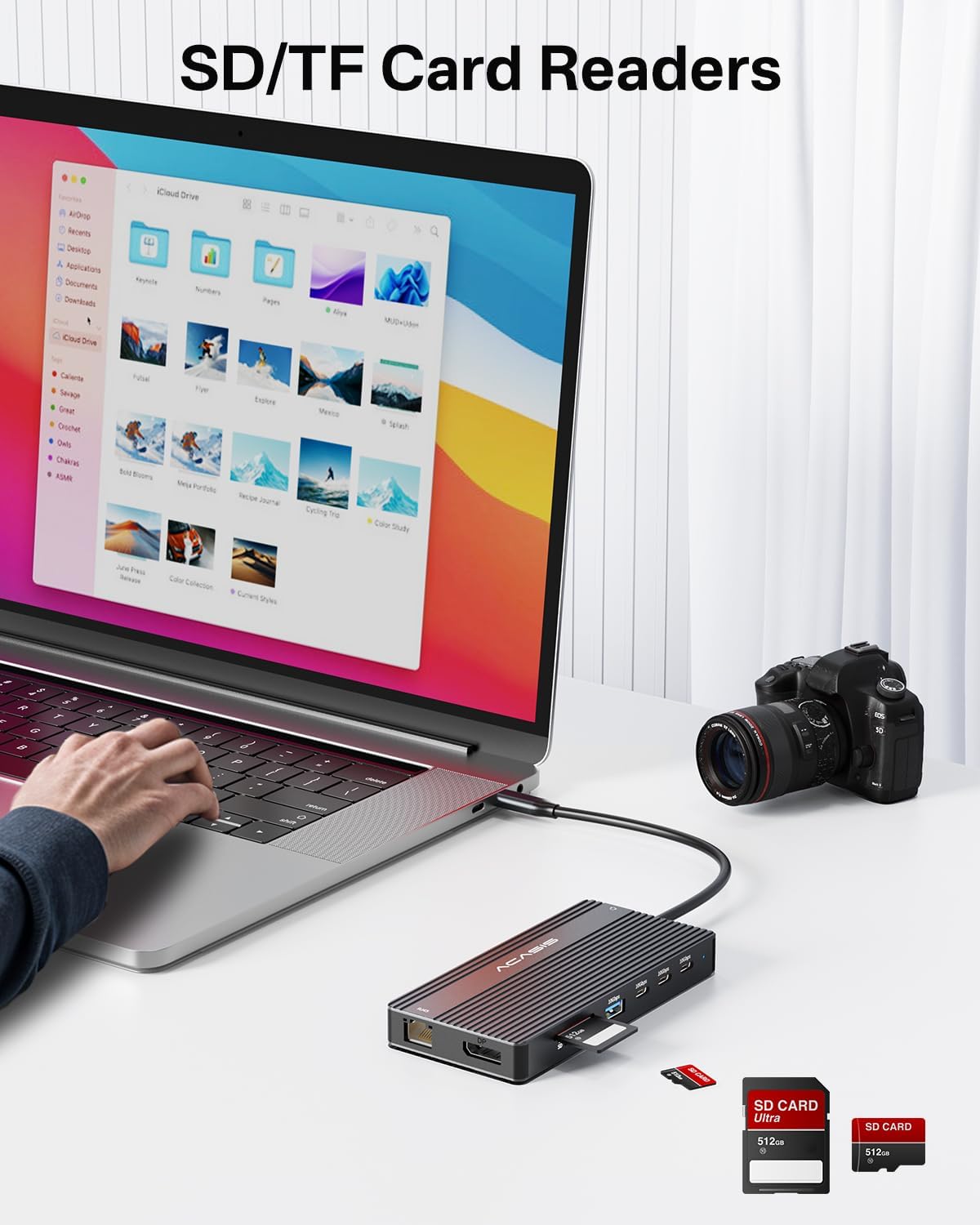
Image 5.6: The integrated SD and TF card readers allow for convenient and fast access to memory card data, useful for photographers and content creators.
6. Întreținere
- curatenie: Use a soft, dry cloth to clean the surface of the docking station. Avoid liquid cleaners or abrasive materials.
- Depozitare: Depozitați stația de andocare într-un loc răcoros și uscat, ferit de lumina directă a soarelui și de temperaturi extreme.
- Manipulare: Evitați să scăpați dispozitivul sau să îl supuneți la impacturi puternice. Nu îndoiți excesiv cablul USB-C integrat.
- Ventilare: Asigurați-vă că stația de andocare are o ventilație adecvată pentru a preveni supraîncălzirea, în special în timpul utilizării prelungite cu mai multe dispozitive conectate.
7. Depanare
| Problemă | Cauza posibila | Soluţie |
|---|---|---|
| No display output / Flickering screen |
|
|
| Laptopul nu se încarcă |
|
|
| USB devices not recognized / Slow data transfer |
|
|
| Ethernet connection unstable or not working |
|
|
8. Specificații
| Caracteristică | Detaliu |
|---|---|
| Numărul de model | DS-0202 |
| Marca | ACASIS |
| Conectivitate | USB-C (Host connection) |
| Ieșire video | 2 x HDMI 2.0 (4K@60Hz), 1 x DisplayPort (4K@60Hz) |
| Porturi de date USB | 3 x USB-C 3.1 (10Gbps), 2 x USB-A 3.1 (10Gbps), 1 x USB 2.0 (480Mbps) |
| Ethernet | 1 x RJ45 Gigabit Ethernet (1000Mbps) |
| Cititor de carduri | SD 3.0, TF 3.0 (simultaneous use) |
| Audio | 1 x 3.5mm Audio & Mic In |
| Livrarea energiei | USB-C PD 3.0, up to 100W input |
| Dispozitive compatibile | Laptops with full-featured USB-C/Thunderbolt 3/4 ports (Dell, HP, Lenovo, ThinkPad, Surface, MacBook, etc.) |
| Sisteme de operare | Windows, macOS, Linux, iPadOS |
| Dimensiunile produsului | 1 x 1 x 1 inci (aproximativ) |
| Greutatea articolului | 5 uncii (aproximativ) |
| Culoare | Negru |
9. Informații despre garanție
ACASIS products typically come with a standard manufacturer's warranty. For specific warranty terms and conditions, please refer to the warranty card included with your product or visit the official ACASIS webPăstrați bonul fiscal ca dovadă a achiziției pentru reclamații în garanție.
Protection plans are also available for purchase separately:
- Plan de protecție pe 3 ani
- Plan de protecție pe 4 ani
- Protecție completă (abonament lunar)
These plans offer extended coverage beyond the standard manufacturer's warranty.
10. Asistență pentru clienți
If you encounter any issues or have questions regarding your ACASIS DS-0202 14-in-1 USB C Docking Station, please contact ACASIS customer support through the following channels:
- Oficial Website: Vizitați ACASIS Store on Amazon pentru informații despre produs și resurse de asistență.
- Asistență prin e-mail: Refer to your product packaging or the ACASIS website pentru cea mai recentă adresă de e-mail de asistență.
- Formular de contact online: Many manufacturers provide a contact form on their website pentru asistență tehnică.
When contacting support, please have your product model number (DS-0202) and purchase details ready.