
1. Introducere
The Audizio Avola is a comprehensive audio system designed to provide a wide range of listening options. It integrates Internet Radio, DAB+, FM radio, a CD player, and Bluetooth connectivity into a single, elegant unit. This manual will guide you through the setup, operation, and maintenance of your Avola system, ensuring you can fully utilize its features for an optimal audio experience.
2. Instrucțiuni de siguranță
- Alimentare electrică: Folosiți doar adaptorul de alimentare furnizat. Asigurați-vă că volumultage se potrivește cu cerințele regiunii dumneavoastră.
- Apă și umiditate: Nu expuneți unitatea la ploaie, umezeală sau lichide. Evitați să așezați obiecte umplute cu lichide, cum ar fi vaze, pe unitate.
- Ventilare: Asigurați o ventilație adecvată în jurul unității. Nu blocați orificiile de ventilație.
- Surse de caldura: Țineți unitatea departe de surse de căldură, cum ar fi calorifere, registre de căldură, sobe sau alte aparate care produc căldură.
- curatenie: Disconnect the unit from the power supply before cleaning. Use a soft, dry cloth. Do not use liquid cleaners or aerosol cleaners.
- Service: Nu încercați să reparați unitatea singur. Apelați la personal de service calificat pentru toate lucrările de service.
- CD player: Do not insert foreign objects into the CD tray. Handle CDs by their edges to avoid scratches.
3. Conținutul pachetului
Verificați dacă toate articolele sunt prezente în ambalaj:
- 1x Audizio Avola Internet Radio
- 1x telecomandă
- 1x adaptor de alimentare
- 1x Manual de utilizare (Ghid de pornire rapidă)

Image: Audizio Avola unit shown with its remote control and power adapter.
4. Produs terminatview
4.1 Panoul frontal

Imagine: față view of the Audizio Avola with the CD tray closed.
The front panel features the main display, control buttons, a CD tray, and input ports.
- Afişa: Color display for navigation and information.
- Butoane de control: MENU, INFO, REC/DEL, PRESET/REPEAT, STANDBY, I/R, Play/Pause, Stop, Skip/Fast Forward/Rewind.
- Tava CD: Pentru introducerea CD-urilor audio.
- TUNE/SELECT Knob: Rotate to navigate menus, press to select.
- Butonul VOLUM: Reglează nivelul de ieșire audio.
- Port USB: Pentru conectarea dispozitivelor de stocare USB.
- Slot pentru card SD: Pentru introducerea cardurilor de memorie SD.
- Intrare AUX: 3.5mm jack for external audio sources.
- Jack pentru căști: Mufă de 3.5 mm pentru ascultare privată.

Image: Close-up of the Audizio Avola front panel showing USB, SD, AUX, and headphone ports.
4.2 Panoul din spate
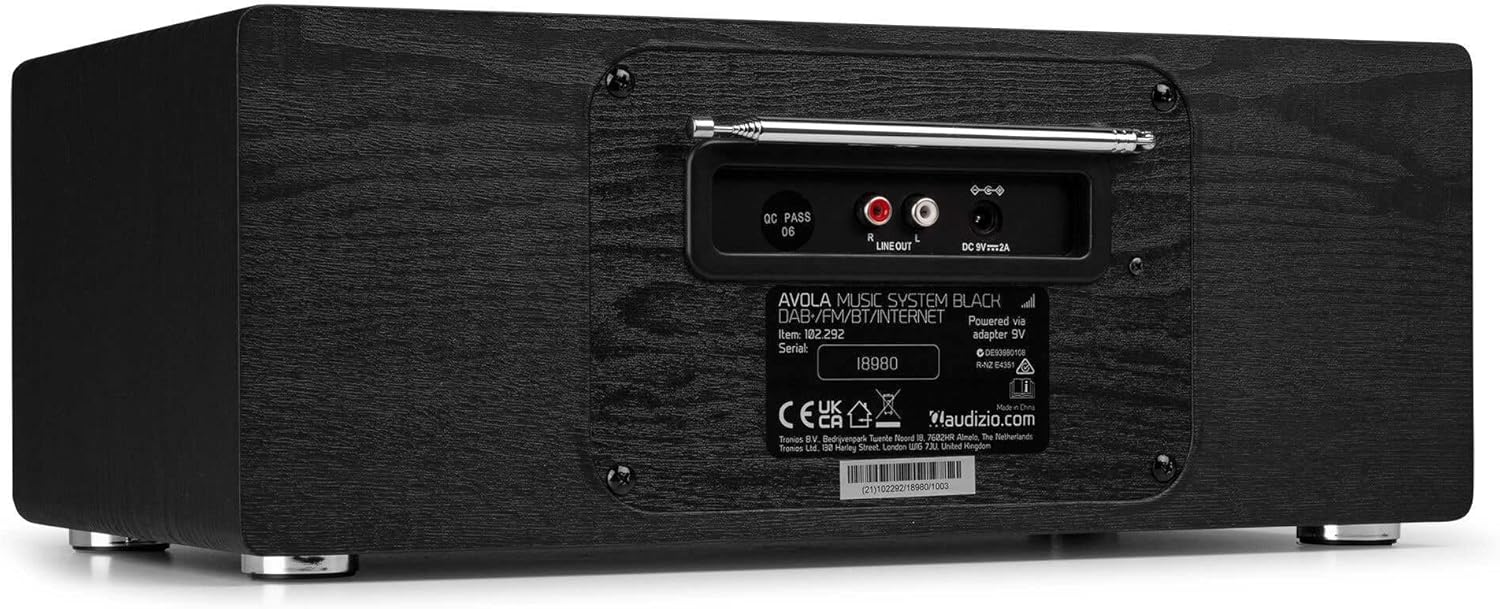
Imagine: Spate view of the Audizio Avola, highlighting the antenna and connection ports.
The rear panel houses essential connections:
- Antena telescopica: For DAB+ and FM radio reception. Extend fully for best signal.
- IEȘIRE LINIE (RCA): Pentru conectarea la dispozitive externe ampliificatoare sau difuzoare.
- DC 9V 2A Power Input: Pentru conectarea adaptorului de alimentare.
5. Configurare
5.1 Conexiune la alimentare
- Connect the power adapter to the DC 9V 2A input on the rear of the Avola unit.
- Conectați adaptorul de alimentare la o priză de perete adecvată.
- The unit will enter standby mode. Press the STANDBY button on the unit or remote control to power on.
5.2 Configurarea antenei
Pentru o recepție optimă a radioului DAB+ și FM, extindeți complet antena telescopică situată pe panoul din spate. Reglați poziția acesteia pentru a obține cea mai bună calitate a semnalului.
5.3 Initial Setup (WLAN Connection)
To access Internet Radio features, the Avola must be connected to a Wi-Fi network.
- Upon first power-on, the unit may prompt you to set up the network connection. If not, press MENU, navigate to 'System Settings' and then 'Network'.
- Select 'Wi-Fi Network' and choose 'Scan' to find available networks.
- Selectați rețeaua Wi-Fi din listă.
- Enter your Wi-Fi password using the TUNE/SELECT knob to navigate characters and press to confirm each character.
- Once connected, the display will show a Wi-Fi icon.
6. Moduri de operare
6.1 Internet Radio
Accesați mii de posturi de radio din întreaga lume prin conexiunea Wi-Fi.
- Press the MENU button and select 'Internet Radio'.
- Puteți răsfoi posturile după locație, gen sau puteți căuta anumite posturi.
- Use the TUNE/SELECT knob to navigate and select.
- To save a station as a preset, press and hold the PRESET/REPEAT button until the preset menu appears, then select a preset number.

Image: The Audizio Avola display showing the Internet Radio interface.
Radio DAB+ 6.2
Digital Audio Broadcasting Plus offers high-quality digital radio.
- Press the MENU button and select 'DAB Radio'.
- The unit will automatically scan for available DAB+ stations.
- Use the TUNE/SELECT knob to browse and select stations.
- Save presets as described for Internet Radio.
6.3 Radio FM
Listen to traditional analog FM radio broadcasts.
- Press the MENU button and select 'FM Radio'.
- Use the TUNE/SELECT knob to manually tune or press and hold to auto-scan for stations.
- Save presets as described for Internet Radio.
6.4 CD Player
Play your favorite audio CDs.
- Press the MENU button and select 'CD Player'.
- Press the 'Open' button next to the CD tray to open it.
- Carefully place an audio CD onto the tray with the label side facing up.
- Press the 'Open' button again to close the tray. The unit will begin playing the CD automatically.
- Use the Play/Pause, Stop, and Skip buttons for playback control.
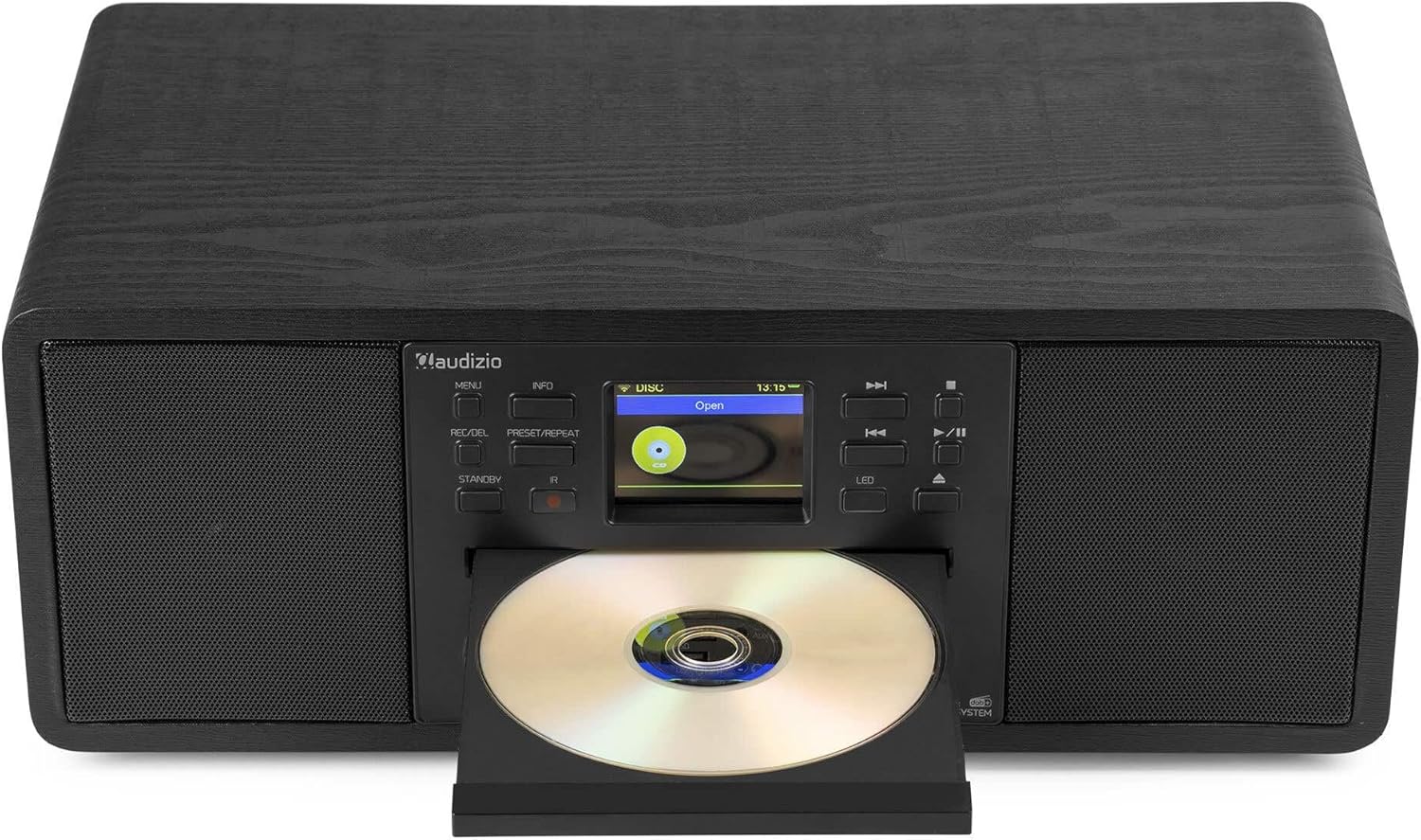
Image: The Audizio Avola with its CD tray open, ready for disc insertion.
6.5 Conectivitate Bluetooth
Redați audio fără fir de pe smartphone, tabletă sau alte dispozitive compatibile Bluetooth.
- Press the MENU button and select 'Bluetooth'.
- The Avola will enter pairing mode and become discoverable.
- On your Bluetooth device, search for 'Audizio Avola' in the Bluetooth settings and select it to pair.
- Once connected, the display will show 'BT Connected'. You can now play audio from your device through the Avola.

Image: The Audizio Avola display indicating a successful Bluetooth connection.
6.6 Redare USB/SD
Redați audio filede pe unități USB sau carduri SD.
- Insert a USB drive into the USB port or an SD card into the SD card slot on the front panel.
- Press the MENU button and select 'USB' or 'SD' (the unit may automatically switch to the correct mode).
- Navigați prin files and folders using the TUNE/SELECT knob.
- Press the TUNE/SELECT knob to play a selected track.
7. Întreținere
- Curățarea unității: Use a soft, dry, lint-free cloth to clean the exterior of the unit. Do not use abrasive cleaners, waxes, or solvents.
- Curățarea lentilei CD-ului: If CD playback becomes erratic, use a commercially available CD lens cleaner disc to clean the laser lens.
- Depozitare: Dacă depozitați unitatea pentru o perioadă lungă de timp, deconectați-o de la sursa de alimentare și depozitați-o într-un loc răcoros și uscat.
8. Depanare
| Problemă | Cauza posibila | Soluţie |
|---|---|---|
| Fără putere | Adaptorul de alimentare nu este conectat sau priza este defectă. | Verificați conexiunile de alimentare. Încercați o altă priză. |
| Nici un sunet | Volum prea mic, sunetul este activat sau sursa este selectată incorect. | Increase volume. Check if mute is active. Ensure correct input source is selected. |
| Radioul de internet nu se conectează | Incorrect Wi-Fi password, weak signal, or network issue. | Re-enter Wi-Fi password. Move unit closer to router. Check router status. |
| DAB+/FM reception poor | Antena nu este extinsă sau semnalul în zonă este slab. | Extindeți complet și reglați antena telescopică. Încercați să repoziționați unitatea. |
| CD-ul nu se redă | CD inserted incorrectly, dirty/scratched CD, or unsupported format. | Ensure CD is inserted label-side up. Clean or replace CD. Verify CD format (supports CD-DA, MP3). |
| Bluetooth nu se asociază | Device not in pairing mode, or Avola not discoverable. | Ensure both devices are in pairing mode. Check Bluetooth settings on your device. |
9. Specificații
| Caracteristică | Caietul de sarcini |
|---|---|
| Numele modelului | Avola |
| Numărul articolului | 102.292 |
| Dimensiuni (Lxlxh) | 45.8 x 25.8 x 19.7 cm |
| Greutate | 4 kg |
| Intrare de putere | 220 Volt (via power adapter) |
| Speaker Output Power (Max) | 60 Watt |
| Mod ieșire audio | Stereo |
| Formate audio acceptate | CD-DA, MP3 |
| Tehnologia de conectivitate | WLAN, Bluetooth, AUX, RCA |
| Dispozitive compatibile | MP3 Player, PC, Smartphone, Tablet |
| Culoare | Negru |
10. Garanție și asistență
Audizio products are designed and manufactured to the highest standards. In the unlikely event of a problem with your product, please contact your retailer for assistance. Keep your proof of purchase for warranty claims. For further support or inquiries, please refer to the official Audizio website-ul sau contactați serviciul pentru clienți.