
1. Introducere
This manual provides essential information for the proper setup, operation, maintenance, and troubleshooting of your Meizu mblu 21 4G LTE smartphone. Please read this manual thoroughly before using your device to ensure optimal performance and longevity.
The Meizu mblu 21 features a 6.79-inch HD display, a 13MP dual camera system, and runs on Android 14. It is designed for efficient performance and reliable connectivity.
2. Configurare
2.1 Conținutul pachetului
Verificați dacă pachetul dvs. conține următoarele articole:
- Meizu mblu 21 Smartphone
- Adaptor de alimentare
- Ghid de pornire rapidă (dacă este inclus)
2.2 Instalarea cartelei SIM și a cardului MicroSD
The Meizu mblu 21 supports Dual Nano SIM cards and a MicroSD card for expandable storage.
- Localizați suportul pentru cartela SIM pe lateralul dispozitivului.
- Insert the SIM ejector tool (not included, use a thin pin if necessary) into the small hole on the SIM tray to eject it.
- Place your Nano SIM card(s) and/or MicroSD card into the designated slots on the tray, ensuring proper orientation.
- Reintroduceți cu grijă suportul cartelei SIM în telefon până când se fixează în poziție cu un clic.
2.3 Pornirea inițială și configurarea rețelei
- Press and hold the power button until the Meizu logo appears.
- Urmați instrucțiunile de pe ecran pentru a finaliza configurarea inițială, inclusiv selectarea limbii, conexiunea Wi-Fi și configurarea contului Google.
- For cellular connectivity, ensure your SIM card is active. This device is an international version and in the USA market, it operates exclusively on T-Mobile's 4G LTE network. Outside the USA, it is compatible with various carriers worldwide.
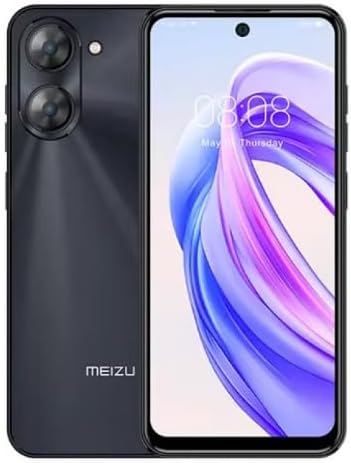
Imaginea 2.3.1: Fata si spate view of the Meizu mblu 21 smartphone. The front displays the screen with a punch-hole camera, while the rear shows the dual camera module and the Meizu branding.
3. Instrucțiuni de utilizare
3.1 Navigație de bază (Android 14)
Your Meizu mblu 21 runs on Android 14, offering an intuitive user experience. Use gestures or on-screen navigation buttons to move between apps, access settings, and manage notifications.
3.2 Utilizarea camerei
The device features a 13MP Smart Camera on the rear and an 8MP front camera. Open the Camera app to capture photos and videos. Utilize various modes and settings for optimal results.
3.3 Caracteristici de securitate
Unlock your device using the side-mounted fingerprint sensor for instant access or the 8MP front camera for Smart Face Unlock.
3.4 Conectivitate
- Wifi: Supports Dual-Band Wi-Fi (2.4GHz and 5GHz) for stable internet access.
- Bluetooth: Bluetooth 5.0 for connecting to wireless accessories.
- VoLTE: Enjoy clearer voice calls with VoLTE HD Calls.

Imaginea 3.4.1: Visual representation of key connectivity and operating system features, including Android 14, Dual-Band Wi-Fi, Bluetooth 5.0, and VoLTE HD Calls.
4. Întreținere
4.1 Îngrijire generală
- Păstrați dispozitivul uscat și departe de temperaturi extreme.
- Curățați ecranul și carcasa cu o lavetă moale, fără scame. Evitați substanțele chimice dure.
- Protect the screen with a screen protector and the body with a protective case to prevent scratches and damage.
4.2 Managementul bateriei
The 4900mAh battery is designed for all-day performance. To prolong battery life:
- Evitați descărcarea completă frecventă a bateriei.
- Folosiți adaptorul de alimentare furnizat pentru încărcare.
- Optimize background app usage and screen brightness in settings.

Imaginea 4.2.1: Un intern view of the Meizu mblu 21 smartphone highlighting the 4900mAh battery, emphasizing its capacity for extended use.
5. Depanare
5.1 Probleme comune și soluții
- Dispozitivul nu pornește: Asigurați-vă că bateria este încărcată. Conectați adaptorul de alimentare și încercați din nou.
- Probleme de conectivitate la rețea: Check if your SIM card is properly inserted and active. Verify network settings and ensure you are within T-Mobile's coverage area in the USA.
- Performanță lentă: Close unnecessary background applications. Clear cache and temporary files. Restart the device.
- Bateria se descarcă rapid: Reduce screen brightness, disable unused features like Bluetooth or GPS, and check for power-intensive apps.
If problems persist, consider performing a factory reset (back up your data first) or contacting customer support.
6. Specificații
| Numărul de model | M416L |
| Sistem de operare | Android 14 |
| Afişa | 6.79 Inches HD, 2340 x 1080 Resolution, 90Hz Adaptive Refresh Rate |
| Procesor | Octa Core 1.6GHz ARM Mali-G57 |
| Memorie | 64 GB Internal Storage, 4 GB RAM |
| Baterie | 4900mAh (4.9E+3 Milliamp Hours) Lithium Polymer |
| Camera spate | 13MP Smart Camera, 5P Precision Lens |
| Cameră frontală | 8MP |
| Tehnologia celulară | 4G LTE FDD: 2,3,4,5,7,8,12,17,26,28,66; 3G WCDMA: 2/4/5/8; 2G Quad Band |
| Tip SIM | Dual Nano SIM + MicroSD |
| Wifi | Bandă dublă (2.4 GHz și 5 GHz) |
| Bluetooth | 5.0 |
| Jack audio | USB tip C |
| Greutatea articolului | 14 uncii |
| ID FCC | 2ANQ6-M416L |

Imaginea 6.1: The Meizu mblu 21 smartphone presented in its Titan Black color variant, showcasindesignul său.
7. Garanție și asistență
For warranty information, please refer to the warranty card included with your product or consult the retailer where the device was purchased. Meizu provides support for its products. For further assistance, please visit the official Meizu website-ul sau contactați serviciul pentru clienți.


