
1. Introducere
This manual provides essential information for the safe and efficient operation of your Meizu mblu 21 smartphone. Please read it thoroughly before using the device.
The Meizu mblu 21 features a Prism Edge Design with a radiant gradient and a large immersive 6.79-inch HD display. It is equipped with a 13MP main camera and an 8MP front camera, powered by Android 14. The device includes a 4900mAh battery for extended use and supports 4G LTE connectivity, Dual-Band Wi-Fi, and Bluetooth 5.0.
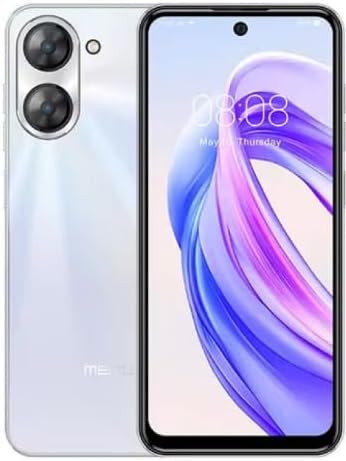
Figura 1.1: Față și spate view of the Meizu mblu 21 smartphone in White Diamond color.
2. Ce se află în cutie
Verificați dacă toate articolele sunt prezente în colet:
- Meizu mblu 21 Smartphone
- Adaptor de alimentare
- Cablu USB
- Instrumentul Ejector SIM
- Ghid de pornire rapidă

Figure 2.1: Meizu mblu 21 smartphone alongside its power adapter.
3. Configurare
3.1. Introducerea cartelelor SIM și a cardului MicroSD
The Meizu mblu 21 supports Dual Nano SIM cards and a MicroSD card for expandable storage. Locate the SIM tray on the side of the device.
- Power off the device before inserting or removing SIM/MicroSD cards.
- Folosește instrumentul de ejectare a cartelei SIM furnizat pentru a deschide tava cartelei SIM.
- Carefully place the Nano SIM cards and/or MicroSD card into the designated slots on the tray, ensuring correct orientation.
- Împingeți ușor tava înapoi în dispozitiv până când este aliniată.
3.2. Pornirea inițială și expertul de configurare
- Press and hold the Power button until the Meizu logo appears.
- Follow the on-screen instructions to complete the initial setup, including selecting your language, connecting to a Wi-Fi network, and setting up your Google account.
4. Operarea dispozitivului
4.1. Afișaj și navigare
The 6.79-inch HD display features a 90Hz adaptive refresh rate for smooth visuals. Navigate the interface using touch gestures: tap, swipe, pinch-to-zoom.
4.2. Funcțiile camerei
The device is equipped with a 13MP main camera and an 8MP front camera. Open the Camera application to capture photos and videos.
- Cameră inteligentă de 13MP: Ideal for capturing everyday moments with sharpness and true-to-life colors.
- Cameră frontală de 8MP: Designed for clear selfies and video calls.
4.3. Caracteristici de securitate
- Side Unlock: A fast and secure fingerprint sensor integrated into the side power button for instant access.
- Smart Face Unlock: Use the front camera to unlock your device quickly and conveniently.
4.4. Conectivitate
Your mblu 21 supports various connectivity options:
- 4G LTE: For mobile data connectivity. In the USA, this device is compatible with T-Mobile. Outside the USA, it works with any carrier worldwide.
- Wi-Fi dublă bandă: Supports both 2.4GHz and 5GHz bands for seamless internet access.
- Bluetooth 5.0: For connecting wireless accessories with improved energy efficiency.
- VoLTE HD Calls: Enjoy sharper, clearer voice calls over LTE networks.

Figure 4.1: Key technology features of the Meizu mblu 21, including Android 14, Dual-Band Wi-Fi, Bluetooth 5.0, and VoLTE.
5. Întreținere
5.1. Îngrijirea bateriei
The mblu 21 is equipped with a 4900mAh battery. To maximize battery lifespan:
- Evitați temperaturile extreme.
- Use only the provided power adapter or certified compatible chargers.
- Evitați descărcarea completă frecventă a bateriei.

Figura 5.1: Intern view of the Meizu mblu 21, showcasing the 4900mAh battery and internal components.
5.2. Curățarea dispozitivului
Folosește o lavetă moale, fără scame, pentru a curăța ecranul și carcasa telefonului. Evită utilizarea substanțelor chimice dure sau a materialelor abrazive.
5.3. Actualizări software
Regularly check for and install software updates to ensure optimal performance and security. Updates can be found in the device's settings menu.
6. Depanare
If you encounter issues with your Meizu mblu 21, try the following solutions:
- Dispozitivul nu răspunde: Apăsați și țineți apăsat butonul de pornire timp de aproximativ 10-15 secunde pentru a forța o repornire.
- Probleme de conectivitate la rețea:
- Asigurați-vă că este introdusă corect cartela SIM.
- Activează și dezactivează Modul Avion.
- Check network settings (APN, preferred network type).
- Se descarcă rapid bateria:
- Închideți aplicațiile neutilizate care rulează în fundal.
- Reduceți luminozitatea ecranului.
- Disable unnecessary features like GPS or Bluetooth when not in use.
- Probleme de performanță:
- Clear cache and data of problematic apps.
- Eliberați spațiu de stocare.
- Consider a factory reset (Note: This will erase all data on your device. Back up important data first.).
7. Specificații
| Caracteristică | Detaliu |
|---|---|
| Numele modelului | mblu 21 |
| Numărul de model | M416L |
| Sistem de operare | Android 14 |
| Dimensiunea ecranului | 6.79 inchi |
| Capacitate de stocare a memoriei | 64 GB |
| Dimensiunea memoriei RAM instalate | 4 GB |
| Capacitatea bateriei | 4900 Miliamp Ore |
| Camera principală | 13 MP |
| Cameră frontală | 8 MP |
| Wireless Carrier (USA) | T-Mobile |
| Tehnologia celulară | 4G LTE |
| Tehnologii de conectivitate | 4G, Dual-Band Wi-Fi, Bluetooth 5.0 |
| Greutatea articolului | 14 uncii |
| Dimensiuni pachet | 7 x 4 x 2 inci |
| Culoare | White Diamond |
8. Garanție și asistență
Your Meizu mblu 21 smartphone comes with a manufacturer's warranty. Please refer to the warranty card included in your product packaging for specific terms and conditions.
For technical support, service, or further inquiries, please contact Meizu customer support through their official channels. Contact information can typically be found on the manufacturer's website-ul sau în documentația produsului.