
1. Introducere
Mulțumesc pentru achizițieasing the Sharp KI-TX75-W Humidifying Air Purifier. This appliance is designed to improve your indoor air quality through advanced air purification and humidification technologies. It features Plasmacluster NEXT for high-density ion emission, AI AUTO mode for intelligent operation, Coanda flow for efficient dust collection, an AI monitor for real-time air quality feedback, and COCORO AIR for smart control via a smartphone app.
This manual provides essential information for the safe and efficient use, maintenance, and troubleshooting of your air purifier. Please read it thoroughly before use and keep it for future reference.
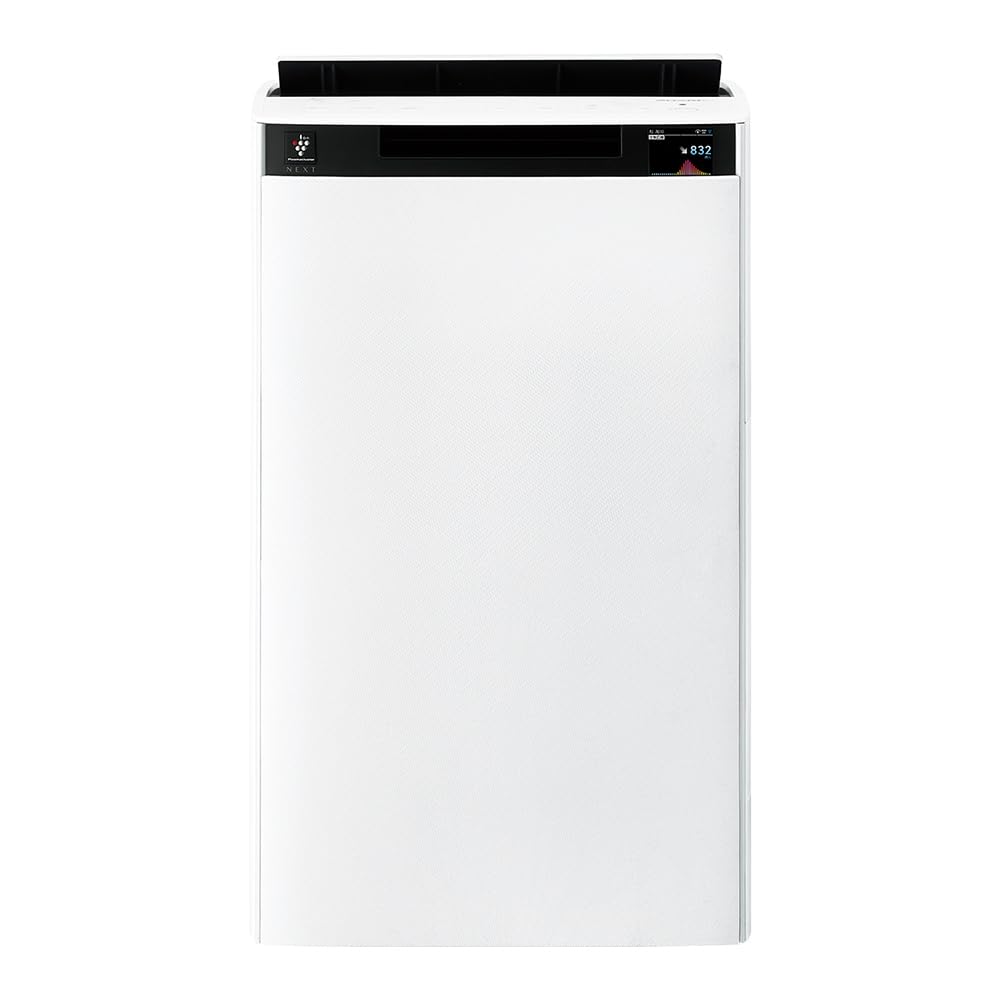
Faţă view of the Sharp KI-TX75-W Humidifying Air Purifier.
2. Informații de siguranță
Pentru a asigura o funcționare în siguranță și a preveni deteriorarea, vă rugăm să respectați următoarele măsuri de siguranță:
- Folosiți întotdeauna aparatul cu volumul corecttage, așa cum este specificat pe eticheta cu valori nominale.
- Nu blocați orificiile de admisie sau de evacuare a aerului.
- Keep the appliance away from water and moisture. Do not operate with wet hands.
- Deconectați cablul de alimentare înainte de curățare sau de efectuarea oricărei operațiuni de întreținere.
- Nu permiteți copiilor să opereze aparatul fără supraveghere.
- Dacă cablul de alimentare este deteriorat, acesta trebuie înlocuit de producător, de agentul său de service sau de persoane calificate similar pentru a evita un pericol.
- Nu introduceți obiecte străine în nicio deschidere.
- Așezați unitatea pe o suprafață stabilă, plană.
3. Configurare
3.1 Despachetarea și plasarea
- Scoateți cu grijă purificatorul de aer din ambalaj.
- Choose a location with adequate space around the unit for optimal airflow. Avoid placing it directly against walls or furniture.
- Ensure the unit is placed on a flat, stable surface. The built-in casters with stoppers allow for easy movement and secure positioning.

The unit features casters with stoppers for convenient movement and secure placement.
3.2 Instalarea filtrului
The unit comes with pre-installed filters. Verify they are correctly seated before first use.
- Open the back panel of the air purifier.
- Ensure the HEPA filter, deodorizing filter, and pre-filter are securely in place.
- Închideți panoul din spate.

The air purifier utilizes a three-layer filter system: pre-filter, deodorizing filter, and HEPA filter.
3.3 Umplere rezervor de apă
For humidification, fill the water tank with clean tap water.
- Scoateți rezervorul de apă din lateralul unității.
- Open the water tank cap and fill it with fresh tap water.
- Închideți bine capacul și introduceți la loc rezervorul de apă în unitate.

Remove the water tank from the side of the unit to fill it with water.
3.4 Pornirea inițială și conectarea la rețea
- Conectați cablul de alimentare la o priză de perete.
- Apăsați butonul de alimentare de pe panoul de control.
- To utilize smart features, download the COCORO AIR app on your smartphone and follow the in-app instructions to connect the air purifier to your wireless LAN network.
4. Instrucțiuni de utilizare
4.1 Panoul de control pesteview

The control panel allows selection of various modes and settings.
4.2 Moduri de operare
- AI AUTO Mode: This intelligent mode automatically adjusts operation based on detected air quality, aiming for a cleanroom Class 8 level environment. It optimizes airflow to effectively collect pollen, dust, and fine particles.
- Mod purificare a aerului: Operates solely as an air purifier, removing airborne particles and odors.
- Mod de umidificare: Adds moisture to the air while purifying. The unit can deliver up to 900 mL/h of humidification.
- Plasmacluster NEXT: This technology generates high-density Plasmacluster ions (50,000 ions/cm³) to suppress airborne and adhering viruses, allergens, and odors.

AI AUTO mode significantly reduces airborne particles to maintain a clean environment.
4.3 AI Monitor
The AI Monitor visualizes the number of particles in the room and provides feedback on air quality. It displays real-time particle counts and indicates when the air is clean or needs purification.

The AI Monitor provides a visual representation of airborne particle levels.
The AI Monitor also provides notifications for humidification status, maintenance timing, and estimated electricity costs.

Notifications include humidification status, maintenance alerts, and electricity usage.
4.4 COCORO AIR App
Connect your air purifier to the COCORO AIR app via Wi-Fi for enhanced control and monitoring. The app allows you to:
- Monitor air quality and operating status remotely.
- Customize operation schedules and settings.
- Receive notifications for filter replacement and maintenance.
- Access special operating modes, such as pet-specific modes.

The COCORO AIR app provides remote control and monitoring capabilities.
5. Întreținere
Întreținerea regulată asigură performanțe optime și prelungește durata de viață a purificatorului de aer.
5.1 Curățarea și înlocuirea filtrului
- Prefiltru: Clean regularly (e.g., once a month) by vacuuming or washing with water.
- HEPA Filter & Deodorizing Filter: These filters are not washable. Replace them according to the recommended schedule (typically every 1-2 years, depending on usage and environment). The COCORO AIR app will notify you when replacement is due.
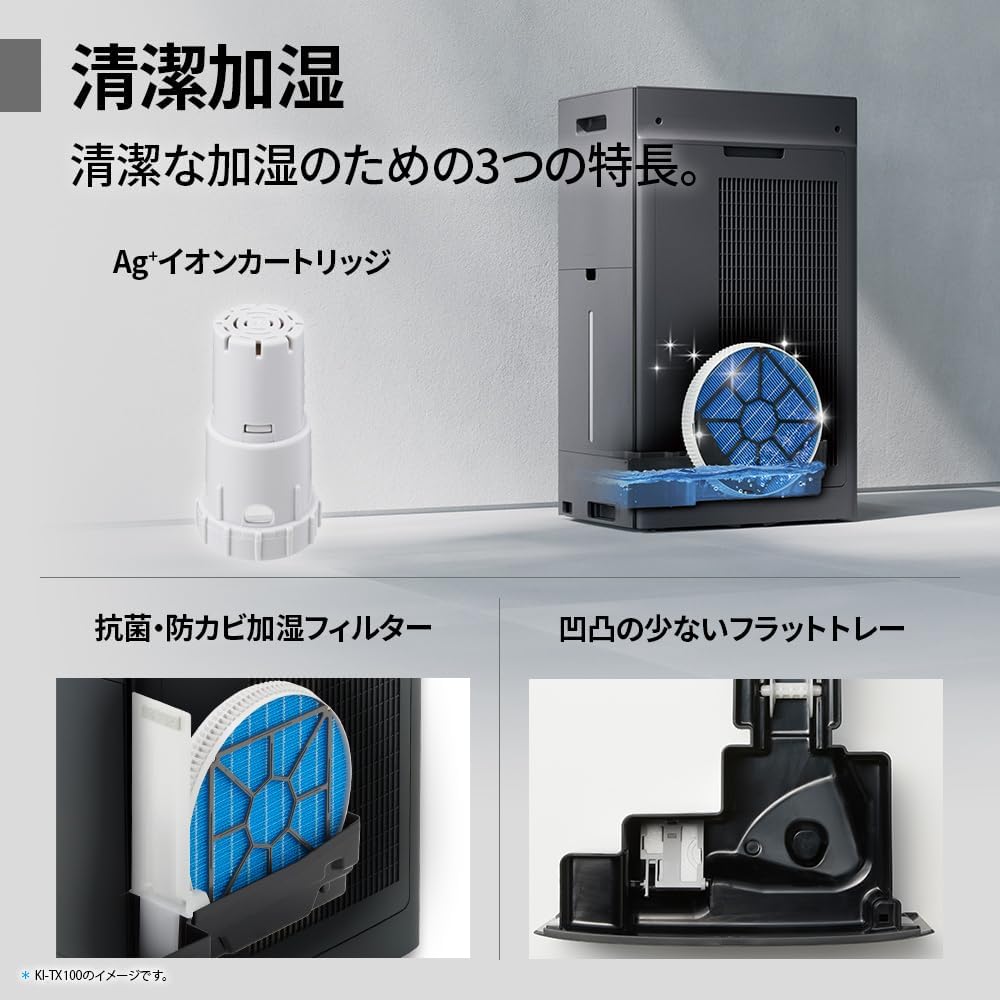
Regularly clean the pre-filter to maintain air purification efficiency.
5.2 Humidifying Filter Maintenance
The humidifying filter can be automatically cleaned using the unit's internal cleaning function. This helps prevent scale buildup.
- Remove the water tank and humidifying filter assembly.
- Add a small spoon of citric acid (commercially available) to the water tank and fill with water.
- Press the internal humidification cleaning button on the unit.
- After the cleaning cycle, rinse the tank and filter thoroughly.

The humidifying filter can be automatically cleaned using citric acid and water.
5.3 Ag+ Ion Cartridge Replacement
The Ag+ ion cartridge helps keep the water in the tank clean. Replace it approximately once a year.

Replace the Ag+ ion cartridge annually for optimal water tank hygiene.
6. Depanare
Dacă întâmpinați probleme cu purificatorul de aer, consultați următoarele probleme și soluții frecvente:
| Problemă | Cauza posibila | Soluţie |
|---|---|---|
| Unitatea nu pornește. | Cablul de alimentare nu este conectat corect. Nu există curent de la priză. | Verificați conexiunea cablului de alimentare. Testați priza cu un alt dispozitiv. |
| Flux de aer slab sau purificare deficitară. | Filters are dirty or clogged. Air intake/outlet blocked. | Clean or replace filters. Ensure vents are clear. |
| Fără umidificare sau umiditate scăzută la ieșire. | Water tank is empty. Humidifying filter is dirty. | Refill water tank. Clean the humidifying filter. |
| Zgomot neobișnuit în timpul funcționării. | Unit not on a level surface. Foreign object in fan. | Ensure unit is stable. Check for obstructions (unplug first). |
| AI Monitor shows high particle count despite operation. | Filters need cleaning/replacement. Room size exceeds recommended area. | Perform filter maintenance. Consider unit placement or additional units for larger spaces. |
Dacă problema persistă după ce încercați aceste soluții, vă rugăm să contactați serviciul de asistență pentru clienți.
7. Specificații
| Caracteristică | Caietul de sarcini |
|---|---|
| Numărul de model | KI-TX75-W |
| Marca | Ascuțit |
| Dimensiuni (L x A x H) | 39.5 cm x 26.5 cm x 65 cm |
| Greutate | 12 kg |
| Sursa de alimentare | Electric cu fir |
| Nivel de zgomot | 20-52 dB |
| Recommended Room Size (Plasmacluster) | Up to 18 tatami (~29.7 m²) |
| Recommended Room Size (Air Purification) | Up to 34 tatami (~56.1 m²) |
| Capacitate maximă de umidificare | 900 ml/h |
| Air Purification Time (8 tatami) | 9 minute |
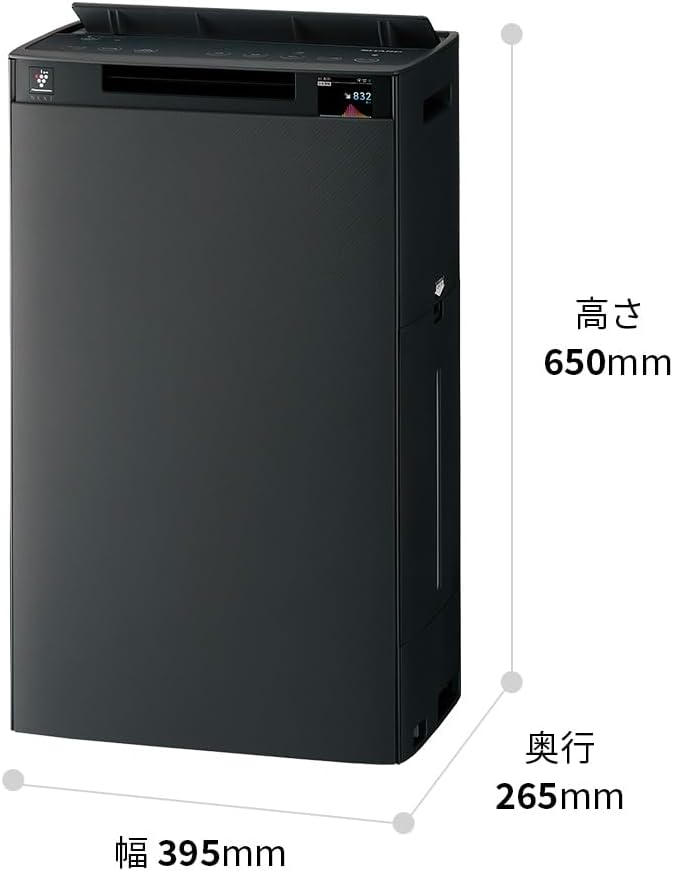
Detailed dimensions of the Sharp KI-TX75-W.
8. Garanție și asistență
8.1 Garanția producătorului
This Sharp KI-TX75-W Humidifying Air Purifier comes with a Garanție de 1 an de la producător de la data achiziției. Această garanție acoperă defectele de materiale și de fabricație în condiții normale de utilizare. Vă rugăm să păstrați dovada achiziției pentru reclamațiile în garanție.
Garanția nu acoperă daunele cauzate de utilizarea necorespunzătoare, accidente, modificări neautorizate sau nerespectarea instrucțiunilor din acest manual.
8.2 Asistență pentru clienți
For technical assistance, warranty service, or inquiries about replacement parts, please contact Sharp customer support.
You can find additional support resources and FAQs on the official Sharp website: