1. Introducere
The AI HY-Y16 Language Translation Earbuds are designed to facilitate seamless cross-language communication and enhance daily productivity through advanced AI features. These earbuds offer real-time translation, AI voice dialogue, and integration with a multi-functional AI application, making them suitable for travel, business meetings, and personal use.
This manual provides detailed instructions on setting up, operating, and maintaining your AI HY-Y16 earbuds to ensure optimal performance and user experience.
2. Conținutul pachetului
- AI HY-Y16 Earbuds (2 units)
- Charging Case (1 unit)
- USB Data Cable (1 unit)
- Manual de utilizare (1 unitate)

Image: Contents of the AI HY-Y16 Earbuds package, including the earbuds, charging case, and data cable.
3. Produs terminatview
The AI HY-Y16 earbuds are designed for comfort and functionality, integrating advanced AI capabilities for communication and productivity.
Componente cheie:
- Căști: Equipped with microphones for voice input and speakers for audio output.
- Carcasa de incarcare: Stores and charges the earbuds, often featuring a digital display for battery status.
- Cablu de date USB: Used for charging the case.

Image: The AI HY-Y16 earbuds resting in their charging case, highlighting their compact design and integration with modern technology.

Image: The AI HY-Y16 earbuds in their charging case, emphasizing their multi-functional capabilities for recording, writing, translating, listening, and speaking.
4. Configurare
4.1 Încărcarea căștilor și a carcasei
- Place the earbuds into the charging case. Ensure they are correctly seated to make contact with the charging pins.
- Connect the USB data cable to the charging port on the case and plug the other end into a USB power adapter (not included) or a computer's USB port.
- The charging indicator on the case will illuminate or display battery percentage, indicating that charging is in progress.
- Allow approximately 1-2 hours for a full charge of the earbuds and charging case.
4.2 Asociere Bluetooth
- Asigurați-vă că căștile sunt încărcate.
- Open the charging case. The earbuds will automatically enter pairing mode, and an indicator light on the earbuds may flash.
- Pe smartphone-ul sau dispozitivul compatibil Bluetooth, accesați setările Bluetooth.
- Caută available devices. Select "HY-Y16" or a similar name from the list.
- Once connected, a voice prompt will confirm successful pairing, and the indicator light on the earbuds will stop flashing.
4.3 AI App Installation
To utilize the full range of translation and AI features, download the dedicated AI application on your smartphone.
- Scan the QR code provided in the physical manual or on the product packaging to download the app.
- Alternatively, search for "AI HY-Y16" or "AI Translator Earbuds" in your device's app store (Google Play Store for Android, Apple App Store for iOS).
- Install the application and follow the on-screen instructions to set up your profile and connect the earbuds within the app.
5. Instrucțiuni de utilizare
5.1 Real-Time Language Translation
The earbuds support 144 languages and accents for high-precision, real-time translation.
- Open the AI application on your paired smartphone.
- Select the desired translation mode (e.g., Conversation Mode, Interpreter Mode).
- Choose the source and target languages within the app.
- Speak into the earbud's microphone. The app will process your speech and provide the translation through the earbud and/or display it on the screen.

Image: A smartphone screen displaying real-time language translation, demonstrating efficient communication facilitated by the earbuds.

Image: A user engaged in cross-language communication, utilizing the earbud for real-time translation displayed on a connected smartphone.
5.2 AI Voice Dialogue
Engage in real-time voice conversations with the AI system for information retrieval or assistance.
- Navigate to the "AI Voice Intelligent Dialogue" section within the AI app.
- Speak your query or statement. The system will recognize your voice, understand your intent, and provide an accurate, natural voice response.
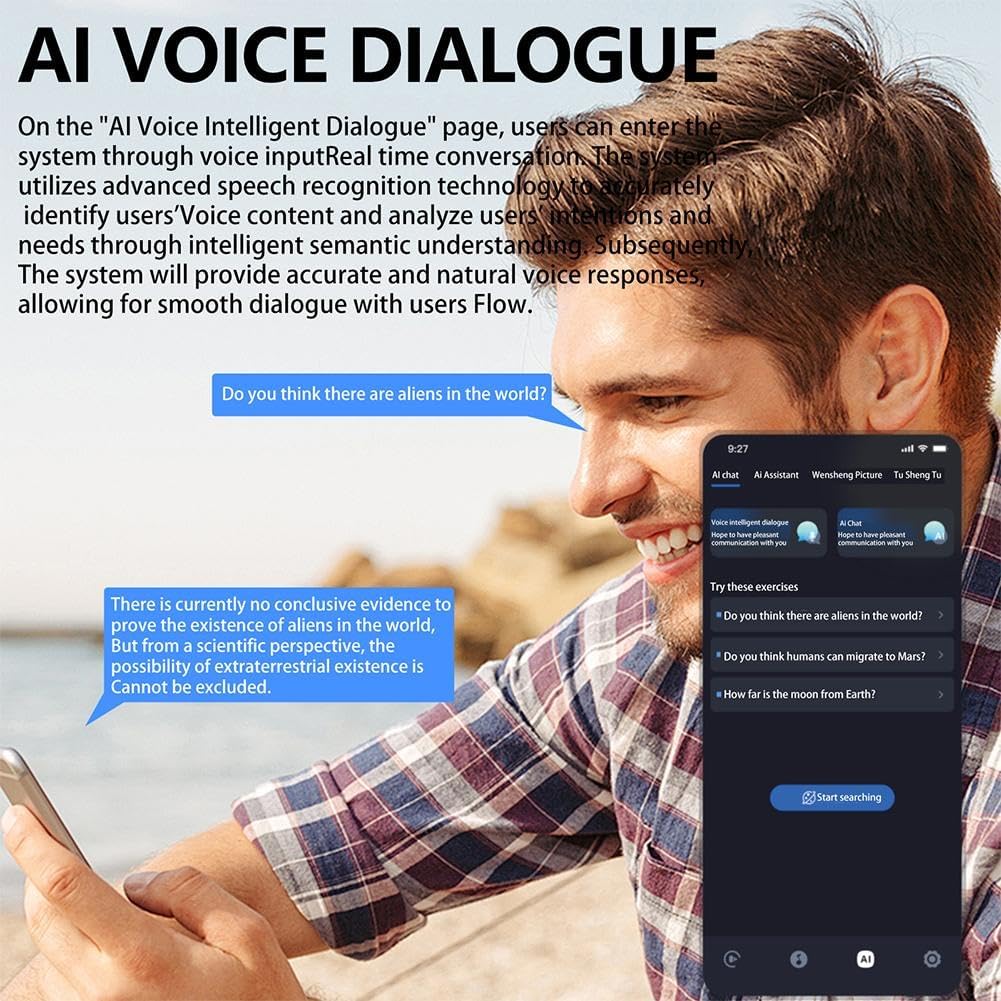
Image: A user interacting with the AI Voice Dialogue feature on their smartphone, demonstrating the system's ability to understand and respond to spoken queries.
5.3 Multi-Function AI App Features
The AI app includes over 200 applications across various scenarios like creation, office, study, and law.
- Recording & Writing: Utilize the app for voice recording and transcription, or for generating text content like copywriting.
- Picture Generation: Input keywords to generate images based on AI algorithms.
- Simple Music Generation: Explore basic music creation functionalities within the app.
- Chat cu inteligență artificială: Engage in conversational AI for various tasks and information.

Image: A smartphone screen displaying the AI image generation interface, where users can input keywords to create visual content.
5.4 Redarea muzicii și apelurile
The earbuds also function as standard Bluetooth headphones for audio and calls.
- Redare muzică: Once paired, play music from your device. Use the touch controls on the earbuds (if available, refer to specific product documentation for exact controls) to play/pause, skip tracks, or adjust volume.
- Efectuarea/Primirea apelurilor: When a call comes in, answer by tapping the earbud (if supported) or through your phone. Speak normally, and your voice will be picked up by the earbud's microphone.

Image: A man wearing an AI HY-Y16 earbud, demonstrating its use for wireless audio and communication.

Image: A woman wearing an AI HY-Y16 earbud, showcasing the product's design and fit for everyday use.
6. Întreținere
- curatenie: Regularly wipe the earbuds and charging case with a soft, dry, lint-free cloth. Do not use abrasive cleaners or immerse in water.
- Depozitare: Când nu le utilizați, depozitați căștile în carcasa lor de încărcare pentru a le proteja și a le menține încărcate. Depozitați într-un loc răcoros și uscat, ferit de lumina directă a soarelui și de temperaturi extreme.
- Îngrijirea bateriei: Pentru a prelungi durata de viață a bateriei, evitați descărcarea completă frecventă a căștilor și a carcasei de încărcare. Încărcați-le regulat, chiar dacă nu le utilizați constant.
7. Depanare
| Problemă | Soluție posibilă |
|---|---|
| Căștile nu se împerechează. |
|
| Niciun sunet din căști. |
|
| Traducerea nu funcționează sau este inexactă. |
|
| Carcasa de încărcare nu se încarcă. |
|
8. Specificații
| Caracteristică | Detaliu |
|---|---|
| Model | HY-Y16 |
| Versiune Bluetooth | 5.4 |
| Capacitatea bateriei căștilor | 40mAh per earbud (x2) |
| Capacitatea compartimentului de încărcare | 200mAh |
| Limbi acceptate | 144 (via AI App) |
| Funcții | Real-time Translation, AI Voice Dialogue, Music Playback, Call Function, AI App Features (Recording, Writing, Picture Generation, Music Generation) |
9. Garanție și asistență
This product comes with a standard manufacturer's warranty against defects in materials and workmanship. The specific duration and terms of the warranty may vary by region and retailer. Please retain your proof of purchase for warranty claims.
For technical support, troubleshooting assistance, or warranty inquiries, please contact the retailer or manufacturer's customer service. Contact information can typically be found on the product packaging or the retailer's website-ul.
Note: Unauthorized disassembly or modification of the product may void the warranty.