
Introducere
Thank you for choosing the SWOFY D26 MP3 Player. This device combines a high-capacity music player with the versatility of an Android 13.0 system, featuring Bluetooth and Wi-Fi connectivity, a 4.7-inch HD touchscreen, and support for various streaming applications. This manual will guide you through the setup, operation, maintenance, and troubleshooting of your new device to ensure an optimal user experience.
Ce este în cutie
Vă rugăm să verificați cu atenție conținutul pachetului. Dacă lipsesc sau sunt deteriorate articolele, contactați serviciul de asistență pentru clienți.
- SWOFY D26 MP3 Player (x1)
- Cablu de încărcare USB-C (x1)
- 64GB SD Card (x1)
- Wired Headphones (x1)
- Carcasă de protecție (x1)
- Manual de utilizare (x1)

Image: All components included in the SWOFY D26 MP3 Player package.
Dispozitiv terminatview
The SWOFY D26 features a sleek design with a responsive touchscreen and essential physical controls.

Imagine: față view of the SWOFY D26 MP3 Player.
Caracteristici cheie:
- Ecran tactil HD de 4.7 inci: Pentru navigare intuitivă și media viewing.
- Buton de alimentare: Situat pe lateral, pentru pornirea/oprirea dispozitivului și blocarea ecranului.
- Butoane de volum: Reglați ieșirea audio.
- Port USB-C: Pentru încărcare și transfer de date.
- Mufă pentru căști de 3.5 mm: Pentru ieșire audio cu fir.
- Slot pentru card MicroSD: Pentru extinderea memoriei.
- Difuzor integrat: Pentru redarea audio fără căști.
Înființat
1. Încărcarea dispozitivului
Before first use, fully charge the MP3 player. Connect the provided USB-C cable to the device's USB-C port and the other end to a compatible USB power adapter (not included) or a computer's USB port. The charging indicator will show the charging status.
2. Pornire/Oprire
- Pentru a porni: Țineți apăsat butonul de alimentare până când ecranul se aprinde.
- Pentru a opri: Apăsați și mențineți apăsat butonul de pornire/oprire, apoi selectați „Oprire” din opțiunile de pe ecran.
- To Lock/Unlock Screen: Apăsați scurt butonul de pornire.
3. Configurare inițială
La prima pornire, urmați instrucțiunile de pe ecran pentru a:
- Selectați limba preferată.
- Conectați-vă la o rețea Wi-Fi pentru acces la internet și descărcarea de aplicații.
- Setați data și ora.
4. Introducerea cardului SD
The device comes with 32GB of internal ROM and includes a 64GB SD card, providing a total of 96GB storage. It supports expansion up to 1TB via a microSD card.
- Localizați slotul pentru cardul microSD pe lateralul dispozitivului.
- Introduceți ușor cardul microSD în slot cu contactele aurii în jos, până când se fixează în poziție cu un clic.
- Pentru a scoate cardul, împingeți ușor până când acesta iese.
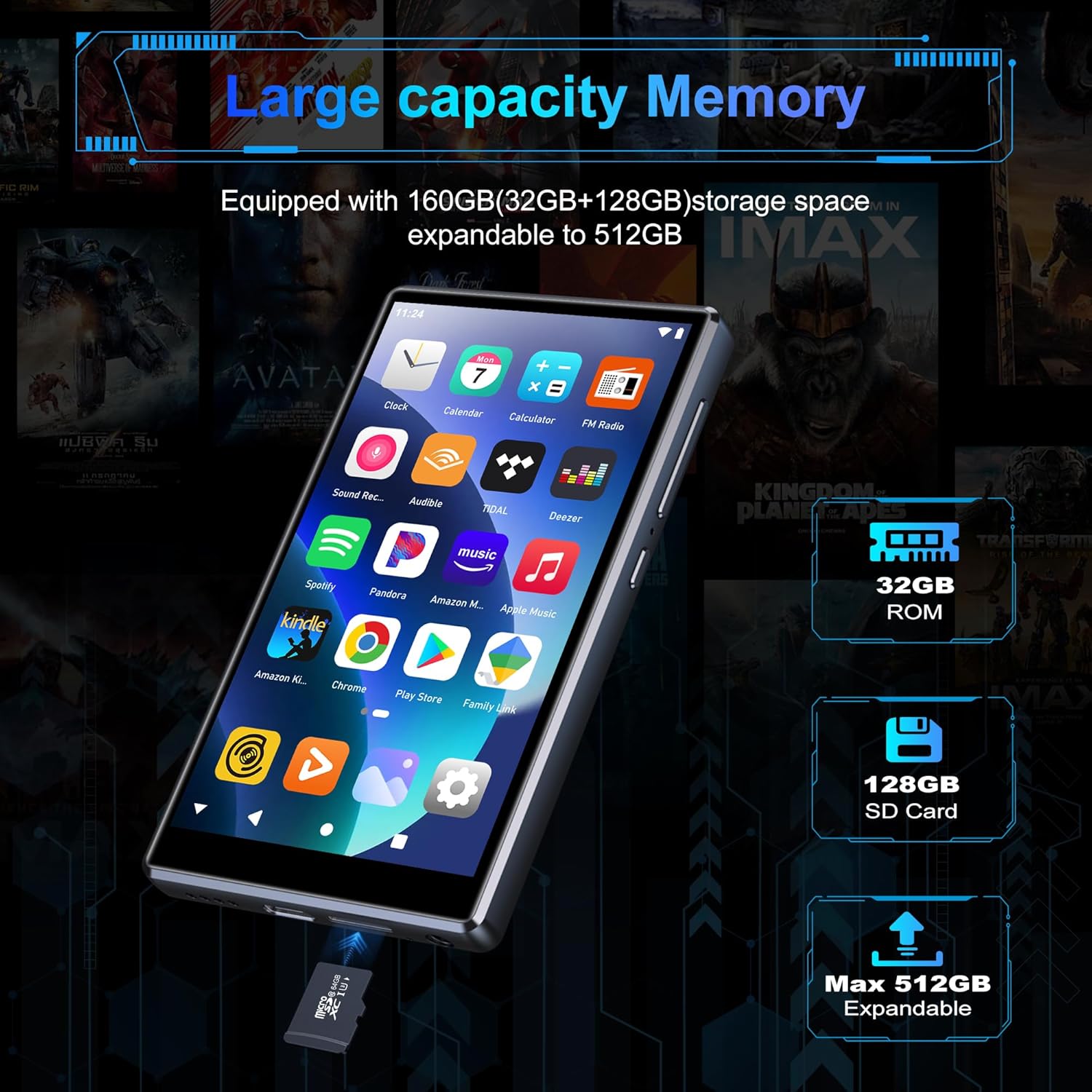
Image: Inserting an SD card for memory expansion.
Instrucțiuni de operare
1. Navigare de bază
The SWOFY D26 operates like a standard Android device. Use touch gestures (tap, swipe, pinch) to navigate menus, open apps, and control media playback.
2. Conectarea la Wi-Fi
- Du-te la Setări > Rețea și internet > Wifi.
- Comutare Wi-Fi On.
- Selectați rețeaua dorită din listă și introduceți parola dacă vi se solicită.
- The device supports dual-band Wi-Fi (2.4GHz and 5GHz) for stable connections.
3. Asociere Bluetooth
Connect your SWOFY D26 to Bluetooth headphones, speakers, or car stereo systems.
- Du-te la Setări > Dispozitive conectate > Bluetooth.
- Comutați Bluetooth On.
- Asigurați-vă că accesoriul Bluetooth este în modul de asociere.
- Select the accessory from the list of available devices to pair.

Image: Bluetooth connectivity for audio playback.
4. Redarea muzicii
The device supports various audio formats including MP3, OGG, FLAC, AAC, WAV, WMA, and APE. You can play music stored locally or stream from pre-installed apps.
- Local Files: Use the pre-installed music player app to browse and play audio files stored on the device or SD card.
- Aplicații de streaming: Access Spotify, Amazon Music, Deezer, Pandora, HIBY, and other streaming services via their respective apps.

Image: Enjoying music with the SWOFY D26 MP3 Player.
5. Redare video
The 4.7-inch HD screen supports 720p and 1280p video playback. Supported formats include AVI, MKV, RMVB, MP4, MPG, MOV, DAT, and TS.
- Use the pre-installed video player app to watch videos stored on the device or SD card.
- Download video streaming apps from the Play Store for online content.
6. Managementul aplicației
The device comes with several popular apps pre-installed. You can download more apps via Wi-Fi from the Google Play Store or uninstall unnecessary ones.

Image: Pre-installed applications on the SWOFY D26.
- Instalați aplicații: Open the Google Play Store app, search for your desired app, and tap "Install."
- Dezinstalați aplicațiile: Du-te la Setări > Aplicații, select the app, and tap "Uninstall."
7. Control parental
Utilize the parental control features to manage app access and screen time for children.
- Access parental control settings through the device's Setări meniu.
- You can restrict app installations, remove pre-installed apps, set a reset lock, and control internet and music player usage duration.
8. Radio FM
The device includes a built-in FM radio. Connect wired headphones (acting as an antenna) to use this feature.
- Conectați căștile cu fir.
- Open the FM Radio app.
- Scanați posturile disponibile.
Întreţinere
1. Curatenie
To clean the device, use a soft, dry, lint-free cloth. Avoid using harsh chemicals, cleaning solvents, or abrasive materials, as these can damage the screen or finish.
2. Îngrijirea bateriei
The SWOFY D26 is equipped with a 2500mAh lithium battery. To maximize battery life:
- Evitați descărcarea completă frecventă a bateriei.
- Nu expuneți dispozitivul la temperaturi extreme (căldură sau frig).
- Unplug the charger once the device is fully charged.
- Expected battery life: Up to 60 hours music playback, 10 hours video playback, 240 hours standby.

Image: Battery capacity and estimated usage times.
3. Actualizări software
Periodically check for software updates to ensure optimal performance and access to new features. Connect to Wi-Fi and go to Setări > Sistem > Actualizare de sistem.
Depanare
Dacă întâmpinați probleme cu playerul MP3 SWOFY D26, consultați următoarele soluții comune:
| Problemă | Soluţie |
|---|---|
| Dispozitivul nu pornește. | Ensure the device is charged. Connect to a charger for at least 30 minutes. If unresponsive, perform a hard reset by holding the power button for 10-15 seconds. |
| Probleme cu conexiunea Wi-Fi. | Check if Wi-Fi is enabled in settings. Ensure the password is correct. Restart the device and your Wi-Fi router. Try connecting to a different Wi-Fi network. |
| Eroare de asociere Bluetooth. | Ensure Bluetooth is enabled on both devices and the accessory is in pairing mode. Move devices closer. Restart both devices. |
| Aplicațiile se blochează sau se blochează. | Ștergeți memoria cache și datele aplicației din Setări > Aplicații. Uninstall and reinstall the app. Ensure sufficient storage space is available. |
| Calitate audio slabă. | Check headphone connection or Bluetooth connection. Test with different headphones or speakers. Ensure audio fileFișierele nu sunt corupte. Ajustați setările egalizatorului, dacă sunt disponibile. |
Specificații
| Caracteristică | Detaliu |
|---|---|
| Numele modelului | D26 |
| Sistem de operare | Android 13.0 |
| Procesor | procesor cu 8 nuclee |
| RAM | 4 GB |
| Stocare internă (ROM) | 32 GB |
| Included SD Card | 64 GB |
| Max. Expandable Storage | Până la 1 TB (prin card microSD) |
| Dimensiunea ecranului | 4.7 inci |
| Rezoluția ecranului | 720 * 1280 (HD Touchscreen) |
| Conectivitate | Dual-band Wi-Fi (2.4GHz & 5GHz), Bluetooth |
| Capacitatea bateriei | 2500 mAh |
| Durata de viață a bateriei (muzică) | Până la 60 ore |
| Durata de viață a bateriei (video) | Până la 10 ore |
| Formate audio acceptate | MP3, OGG, FLAC, AAC, WAV, WMA, APE |
| Formate video acceptate | AVI, MKV, RMVB, MP4, MPG, MOV, DAT, TS |
| Caracteristici speciale | Built-in Speaker, FM Radio, Parental Controls |
| Culoare | Negru |
| Dimensiuni (L x l x H) | 11.9 x 6.7 x 1 cm |
| Greutate | 150 grame |

Image: Internal processor and RAM details.
Garanție și suport
The SWOFY D26 MP3 Player comes with a standard manufacturer's warranty. For specific warranty terms and conditions, please refer to the warranty card included in your package or contact SWOFY customer support.
For technical support, troubleshooting assistance, or any product-related inquiries, please visit the official SWOFY website or contact their customer service department. Contact information can typically be found on the product packaging or the SWOFY brand store page.
SWOFY Brand Store: Visit SWOFY Store on Amazon