
1. Configurare
1.1. Conținutul pachetului
Asigurați-vă că toate componentele sunt prezente în pachet:
- AUSDOM 108-Key Wireless Keyboard
- AUSDOM Wireless Mouse
- USB Receiver (stored in the mouse)
- Cablu de încărcare USB-C
- Manual de utilizare
1.2. Connecting the Combo
- Localizați receptorul USB: The 2.4GHz USB receiver is conveniently stored in a compartment on the underside of the wireless mouse. Gently slide open the battery cover to access it.
- Introduceți receptorul: Plug the USB receiver into an available USB port on your computer (PC, laptop, or tablet). The system will automatically detect and install the necessary drivers.
- Pornirea dispozitivelor: Ensure both the keyboard and mouse are switched to the 'ON' position. The power switch for the keyboard is located on its top edge, and for the mouse, it is on the underside.

1.3. Charging the Combo
Both the keyboard and mouse are equipped with built-in rechargeable Lithium Polymer batteries. Use the provided USB-C cable to charge them.
- Connect the USB-C end of the cable to the charging port on the keyboard (located on the top edge) or the mouse (located on the front).
- Connect the USB-A end of the cable to a powered USB port on your computer or a USB wall adapter.
- A full charge takes approximately 2 hours and provides up to 300 hours of standby time.

2. Instrucțiuni de utilizare
2.1. Caracteristici ale tastaturii
The AUSDOM KAM200X keyboard features a full-size 108-key layout, including a dedicated numeric keypad and various function keys for enhanced productivity.
- Mechanical-Feel Keys: Experience tactile feedback similar to mechanical keyboards, combined with quiet scissor-switch mechanisms and a short 3.8mm key travel for comfortable and precise typing.
- Multimedia and Shortcut Keys: Utilize dedicated media controls (volume, play/pause) and app-switching shortcuts for streamlined workflow. Refer to the user manual for a complete list of function key combinations.
- OS Switching: Easily switch between Windows and macOS layouts using specific function key combinations (e.g., Fn + P for Windows, Fn + O for Mac).


2.2. Caracteristici ale mouse-ului
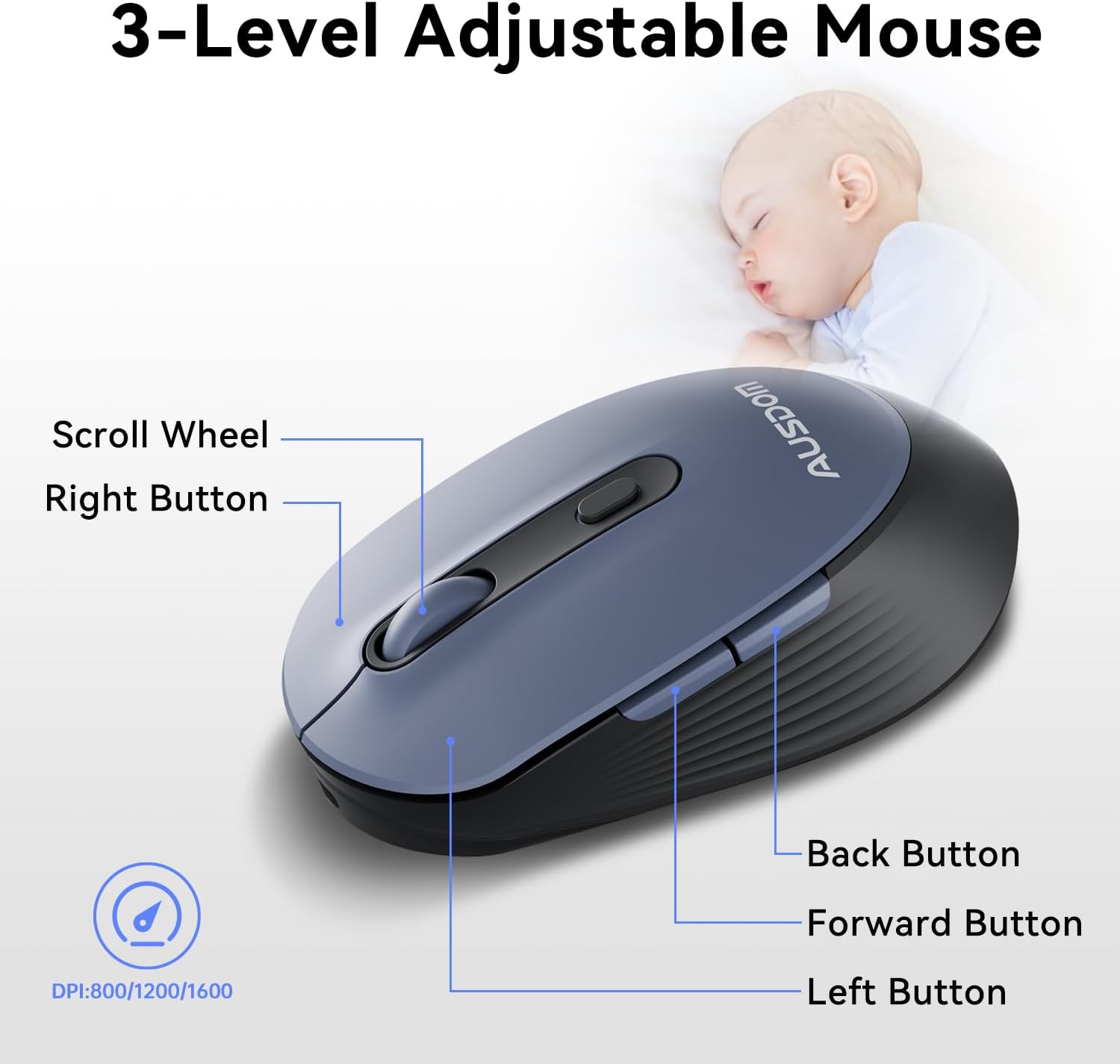
The ergonomic wireless mouse is designed for comfortable use and precise control.
- DPI reglabil: Cycle through 3 DPI levels (800, 1200, 1600) using the dedicated DPI button to adjust cursor sensitivity for different tasks.
- Butoane Înainte/Înapoi: Folosește butoanele laterale pentru navigare rapidă în web browsere și aplicații.
- Clicuri silențioase: The mouse features silent click buttons to minimize noise in quiet environments.
2.3. Compatibilitate largă
The AUSDOM wireless combo is compatible with a broad range of operating systems and devices, ensuring seamless integration into your existing setup.
- Sisteme de operare: Compatible with Windows XP/ME/Vista/7/8/10/11 and macOS.
- Dispozitive: Works instantly with desktops, laptops, and other computers without requiring additional software or drivers.

3. Întreținere
3.1. Curatenie
To ensure the longevity and optimal performance of your AUSDOM combo, regular cleaning is recommended.
- Use a soft, dry, lint-free cloth to wipe down the surfaces of the keyboard and mouse.
- Pentru murdăria persistentă, dreaptă ușorampen the cloth with water or a mild cleaning solution, ensuring no liquid enters the device openings.
- Evitați utilizarea substanțelor chimice dure, a agenților de curățare abrazivi sau a solvenților.
3.2. Depozitare
When not in use for extended periods, store the keyboard and mouse in a cool, dry place away from direct sunlight and extreme temperatures. The USB receiver can be stored inside the mouse to prevent loss.
4. Depanare
4.1. Probleme de conectare
- Verificați receptorul: Ensure the USB receiver is firmly plugged into a working USB port on your computer.
- Pornire: Verify that both the keyboard and mouse are switched to the 'ON' position.
- Nivel baterie: Confirm that both devices have sufficient battery charge. Recharge if necessary.
- Încercați un port diferit: Conectați receptorul USB la un alt port USB al computerului.
4.2. Lag or Unresponsiveness
- Reduce interferența: Mutați tastatura și mouse-ul mai aproape de receptorul USB. Evitați plasarea de obiecte metalice mari între dispozitive și receptor.
- Check for Other Devices: Other 2.4GHz wireless devices might cause interference. Try to minimize their use or move them further away.
- REÎNCĂRCĂ: Asigurați-vă că ambele dispozitive sunt complet încărcate.
4.3. Keyboard Specific Issues
- Tastele nu răspund: Gently clean around the affected keys to remove any debris.
- Ieșire cheie incorectă: Check your computer's operating system settings to ensure the correct keyboard layout is selected.
4.4. Mouse Specific Issues
- Erratic Cursor: Clean the optical sensor on the underside of the mouse. Ensure you are using the mouse on a suitable, non-reflective surface.
- Ajustarea DPI: Press the DPI button on the top of the mouse to cycle through the 800/1200/1600 DPI settings.
5. Specificațiile produsului
| Caracteristică | Caietul de sarcini |
|---|---|
| Marca | AUSDOM |
| Numărul de model | KAM200X |
| Dimensiunile produsului | 17.44 x 5.31 x 0.79 inci |
| Greutatea articolului | 1.8 lire sterline |
| baterii | Sunt necesare 2 baterii cu litiu polimer (incluse) |
| Tehnologia de conectivitate | Wireless de 2.4 GHz |
| Caracteristici speciale | Lightweight, Rechargeable, Scissor Switch, Wireless |
| Dispozitive compatibile | Laptop, computer personal, tabletă |
6. Informații despre garanție
For detailed warranty information regarding your AUSDOM KAM200X Wireless Keyboard and Mouse Combo, please refer to the official documentation included in your product packaging or visit the manufacturer's official webTermenii și condițiile de garanție pot varia în funcție de regiune și de produs.
7. Asistență pentru clienți
If you encounter any issues or have questions about your AUSDOM KAM200X Wireless Keyboard and Mouse Combo, please contact AUSDOM customer support through their official channels. You can often find support contact information, FAQs, and additional resources on the AUSDOM Store Page sau oficialul lor website-ul.


