
1. Introducere
Thank you for choosing the MESTEK TH11 Digital Temperature and Humidity Meter. This device is designed for precise measurement of ambient temperature, relative humidity, wet bulb temperature, and dew point temperature. Its portable and user-friendly design makes it suitable for a wide range of applications, from home environments to industrial and agricultural settings. Please read this manual thoroughly before use to ensure proper operation and to maximize the lifespan of your instrument.

Image 1.1: The MESTEK TH11 meter highlighting its multi-functional capabilities including ambient temperature, humidity, wet bulb, and dew point measurements.
2. Informații de siguranță
- Nu încercați să dezasamblați sau să modificați instrumentul.
- Țineți dispozitivul departe de apă și medii cu umiditate ridicată pentru a preveni deteriorarea.
- Evitați expunerea dispozitivului la temperaturi extreme sau la lumina directă a soarelui pentru perioade prelungite.
- Înlocuiți bateriile imediat ce apare indicatorul de baterie descărcată pentru a asigura citiri precise.
- Aruncați bateriile uzate conform reglementărilor locale.
- Curățați dispozitivul cu o lavetă moale și uscată. Nu utilizați substanțe de curățare abrazive sau solvenți.
3. Produs terminatview
3.1. Conținutul pachetului
La deschiderea coletului, vă rugăm să verificați dacă toate articolele sunt prezente și în stare bună:
- 1 x MESTEK TH11 Digital Temperature and Humidity Meter
- 3 x baterii AAA
- 1 x geantă de pânză
- 1 x șurubelniță
- 1 x Manual de utilizare

Image 3.1: The complete packing list for the MESTEK TH11, showing all included accessories.
3.2. Componentele dispozitivului
Familiarize yourself with the main parts of your MESTEK TH11 meter:
- Senzor sonda: Located at the top, this high-precision Swiss SHT30 sensor measures temperature and humidity.
- Ecran de afișare: A backlit LCD for clear reading of measurement values.
- Taste funcționale: Buttons for power, mode selection, unit switching, and data hold.
- Compartiment baterie: Located at the rear for AAA battery installation.

Image 3.2: Labeled diagram of the MESTEK TH11, indicating the probe sensor, display screen, and function keys, along with its dimensions.
3.3. Caracteristici de afișare
The backlit LCD provides clear readings and important indicators:
- Afișaj dublu: Shows both temperature and humidity simultaneously.
- Iluminare de fundal: Îmbunătățește vizibilitatea în condiții de lumină slabă.
- Indicație baterie descărcată: An icon will appear when batteries need replacement.
- Reținere date (HOLD): Îngheață măsurătoarea curentă pe afișaj.
- MAX / MIN: Displays maximum or minimum recorded values.
- WB/DP: Indicates Wet Bulb or Dew Point temperature mode.
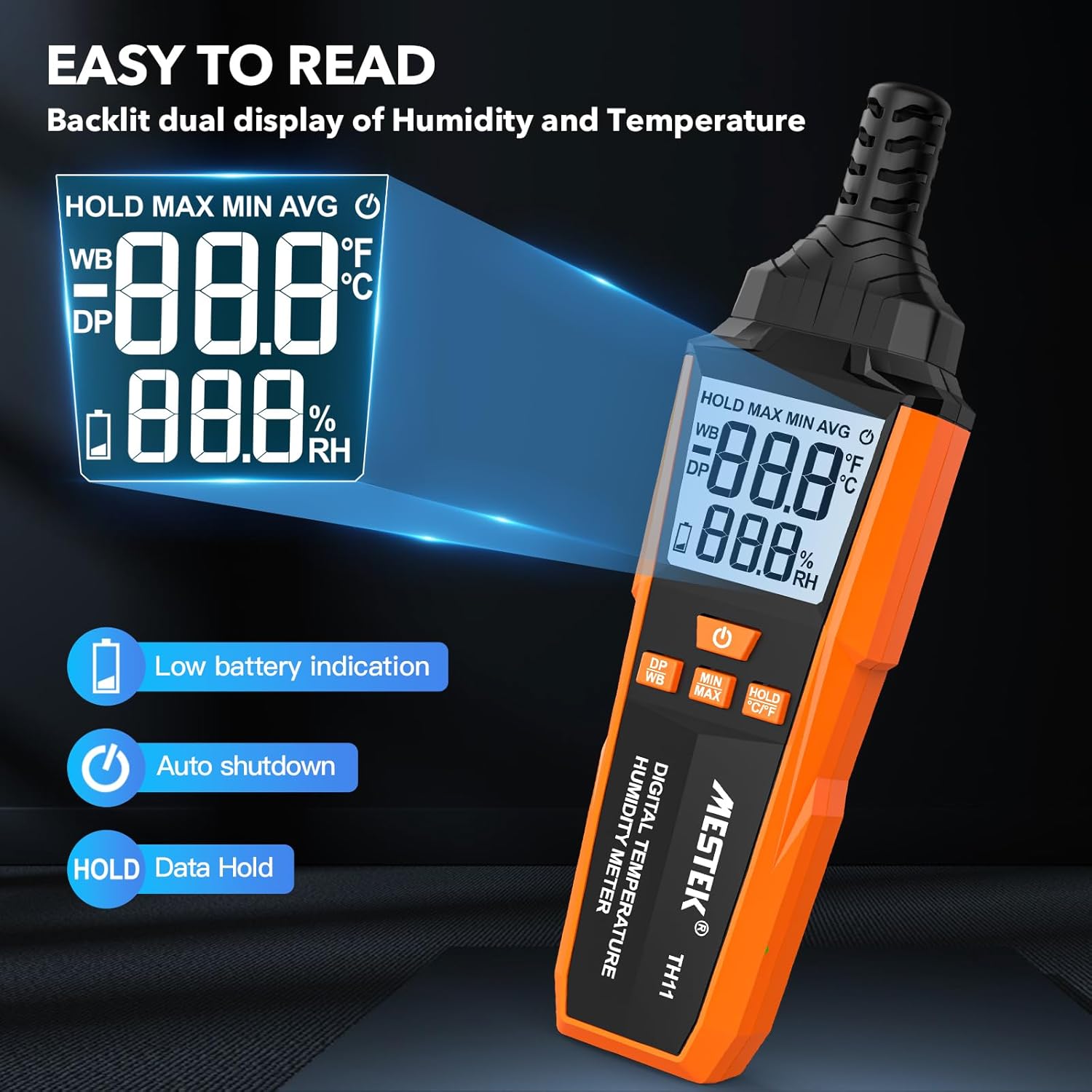
Image 3.3: The MESTEK TH11's backlit display, illustrating its clarity and indicators for low battery and data hold.
4. Configurare
4.1. Instalarea bateriei
The MESTEK TH11 requires 3 AAA batteries for operation. Follow these steps to install them:
- Localizați capacul compartimentului bateriei pe spatele dispozitivului.
- Use the provided screwdriver to loosen the screw on the battery compartment cover.
- Scoateți capacul.
- Introduceți 3 baterii AAA, asigurându-vă că polaritatea este corectă (+/-), așa cum este indicată în interiorul compartimentului.
- Puneți la loc capacul compartimentului bateriei și strângeți șurubul.
5. Instrucțiuni de utilizare
5.1. Pornire/Oprire
- Pentru a porni dispozitivul, apăsați tasta Buton de pornire ().
- Pentru a opri dispozitivul, țineți apăsat butonul Buton de pornire for approximately 2 seconds. The device also features an automatic shutdown function after 30 minutes of inactivity to conserve battery life.

Image 5.1: The automatic shutdown feature of the MESTEK TH11, activating after 30 minutes of inactivity.
5.2. Comutare unități (°C/°F)
- Pentru a comuta între Celsius (°C) și Fahrenheit (°F), apăsați și mențineți apăsat butonul HOLD °C/°F button timp de aproximativ 2 secunde.
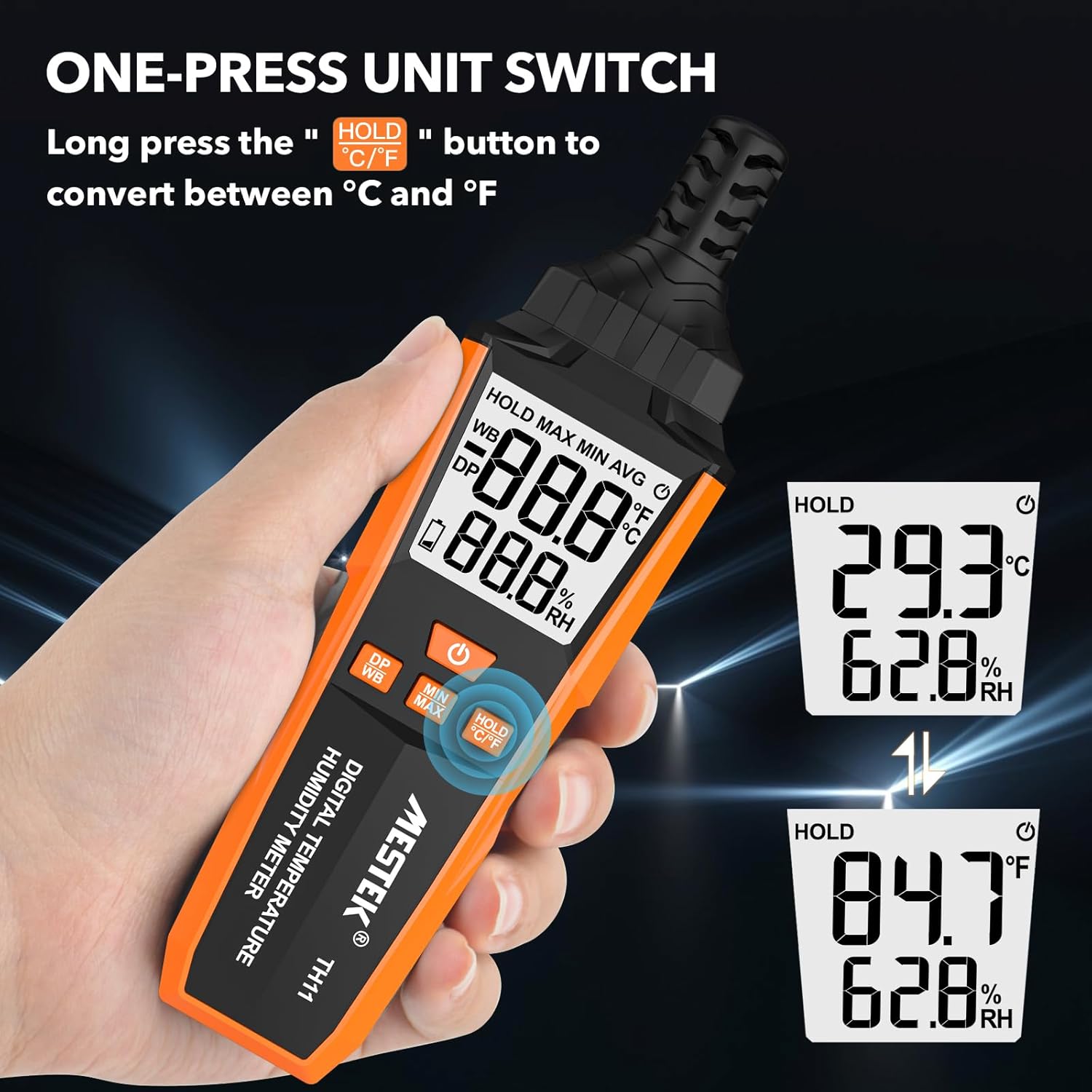
Image 5.2: The MESTEK TH11 showing how to switch between Celsius and Fahrenheit temperature units.
5.3. Funcția de memorare a datelor
- To freeze the current measurement on the display, short press the HOLD °C/°F button. The "HOLD" icon will appear on the screen.
- Press the button again to exit the data hold mode.

Image 5.3: The MESTEK TH11 display indicating the active HOLD function.
5.4. Minimum/Maximum Value Measurement
- La view the maximum recorded temperature and humidity, short press the Butonul MIN/MAX. The "MAX" icon will appear.
- Apăsați tasta Butonul MIN/MAX din nou la view the minimum recorded values. The "MIN" icon will appear.
- Press the button a third time to return to real-time measurement.

Image 5.4: The MESTEK TH11 displaying the maximum and minimum recorded temperature and humidity values.
5.5. Wet Bulb / Dew Point Mode
- To switch between Wet Bulb (WB) and Dew Point (DP) temperature display, short press the DP/WB button. The corresponding icon will be shown on the display.
6. Aplicații
The MESTEK TH11 Digital Temperature and Humidity Meter is versatile and can be used in various environments:
- Acasă: Monitor indoor climate in bedrooms, children's rooms, and living areas for comfort and health.
- Birou: Ensure optimal working conditions by monitoring office temperature and humidity.
- Agricultură: Ideal for gardens, greenhouses, and agricultural crops to maintain suitable growing conditions.
- Industrie: Useful in warehouses, cellars, and facilities with air conditioning systems for environmental control.
- Specialized Environments: Suitable for maternity wards and areas requiring precise climate control.

Imaginea 6.1: Examples of the MESTEK TH11's diverse applications in home, plant, storage, and warehouse settings.
6.1. Ambient Temperature and Relative Humidity Reference Values
For optimal conditions in various environments, consider the following reference values:
| Mediu | Temperatură | Umiditate relativă (RH) |
|---|---|---|
| Human Body Comfort | 15-25°C | 45%-75% RH |
| Room Environment | 40%-70% RH | |
| Library/Art Gallery/Museum | 40%-60% RH | |
| Electronic Equipment/Communication Room | 45%-60% RH | |
| Agricultural/Cotton/Wool Textiles Storage | 40%-60% RH | |
| Dairy Products Storage | 50%-60% RH | |
| Fruit Storage | 60%-70% RH | |
| Best Convalescent Environment | 30%-50% RH |
Table 6.1: Reference values for ambient temperature and relative humidity in various settings.
7. Specificații
| Parametru | Valoare |
|---|---|
| Numărul de model | TH11 |
| Marca | MESTEK |
| Greutate | 210 g |
| Dimensiuni (L x l x H) | 18.8 x 5.4 x 3.4 cm |
| Culoare | Portocale |
| Stil | Modern |
| Sursa de alimentare | Alimentat cu baterie |
| Tip baterie | Baterii alcaline 3 x AAA |
| Precizia măsurării (temperatură) | ±0.1°C |
| Stil de afișare | Digital |
| Tip de montare | Handheld / Freestanding |
| Caracteristici speciale | High Accuracy, Backlit Display, Data Hold, Min/Max, Auto Shutdown, Low Battery Indicator |
| Intervalul de umiditate | 0-99% RH |
| Interval de temperatură | -20°C ~ 60°C (-4°F ~ 140°F) |
| Interval de temperatură punct de rouă | -50°C ~ 60°C (-58°F ~ 140°F) |
| Gama de temperatură a becului umed | -20°C ~ 60°C (-4°F ~ 140°F) |
| Tip senzor | Swiss SHT30 High-Precision Sensor |
| SampLing Rate | Aproximativ 1 secundă |
8. Întreținere
- curatenie: Wipe the device with a soft, dry cloth. Do not use liquid cleaners or immerse the device in water.
- Depozitare: Când nu îl utilizați pentru perioade lungi de timp, scoateți bateriile pentru a preveni scurgerile. Depozitați dispozitivul într-un loc răcoros și uscat, ferit de lumina directă a soarelui și de temperaturi extreme.
- Îngrijirea senzorului: The probe sensor is delicate. Avoid touching it directly or exposing it to dust and debris.
9. Depanare
- Dispozitivul nu pornește:
Check if the batteries are installed correctly with the right polarity. Ensure the batteries are not depleted; replace them if necessary. - Citiri inexacte:
Ensure the device has been in the environment for at least 15 minutes to stabilize. Check for any obstructions around the sensor. Replace old batteries. - Afișajul este slab sau pâlpâie:
Acest lucru indică de obicei un nivel scăzut al bateriei. Înlocuiți bateriile. - Butoanele nu răspund:
Try powering off and on the device. If the issue persists, replace the batteries.
10. Garanție și asistență
The MESTEK TH11 Digital Temperature and Humidity Meter comes with a 24 luni garantie from the date of purchase, covering manufacturing defects. Additionally, MESTEK provides suport tehnic pe viață pentru acest produs.
If you encounter any issues, have questions, or require assistance, please do not hesitate to contact our customer support team. We are committed to providing satisfactory solutions.
For support, please refer to the contact information provided on the MESTEK official website-ul sau platforma dvs. de cumpărare.