
Introducere
This manual provides detailed instructions for the installation, operation, and maintenance of your Defender AI Powered Sentinel 4K Wired Security Camera System. This system offers advanced surveillance features including 360° PTZ cameras, AI tracking, smart human detection, blue-red light deterrence, and color night vision.
Ce este inclus
Verificați dacă toate componentele sunt prezente în pachet:
- 1x 8-Channel PoE NVR with 1TB HDD
- 4x 4K UHD SMART AI PTZ Cameras
- 1x NVR Power Supply
- 1x NVR USB Mouse
- 4x Ethernet Cables (60 ft)
- 1x Ethernet Cable (6.5 ft)
- 1x HDMI Cable (6 ft)
- 4x Mounting Hardware sets
- 4x Waterproof Caps
- 4x Drill Templates
- 1x Window Warning Sticker
- 1x Ghid de pornire rapidă
- 1x Warranty Insert
- Asistență gratuită pe viață

Image: All components included in the Defender AI Powered Sentinel 4K Wired Security Camera System, including the NVR, four PTZ cameras, cables, and accessories.
Configurare și instalare
Follow these steps for a successful installation of your security system.
- Planificați amplasarea camerei: Identify optimal locations for your 4K UHD PTZ cameras to ensure maximum coverage and minimize blind spots. Consider areas prone to activity and entry points. The cameras offer 360° pan and 90° tilt for comprehensive surveillance.
- Montarea camerelor: Use the provided drill templates and mounting hardware to securely attach each camera. Ensure the camera is positioned to capture the desired area. The cameras are IP65 weather-rated for outdoor use.
- Connect Cameras to NVR (Power over Ethernet - PoE): Connect each camera to the NVR using the provided Ethernet cables. PoE technology simplifies installation by providing both power and data through a single cable.
- Connect NVR to Display: Use the HDMI cable to connect the NVR to a monitor or TV for local viewing and initial setup.
- Pornire: Connect the NVR power supply and power on the system.
- Configurație inițială: Follow the on-screen instructions to set up the NVR, including network settings, date/time, and user accounts.
- Configurare aplicație mobilă: Download the Defender Empower app (available on iOS/Android). Register your NVR and cameras to enable remote viewing, two-way audio, and receive mobile alerts.
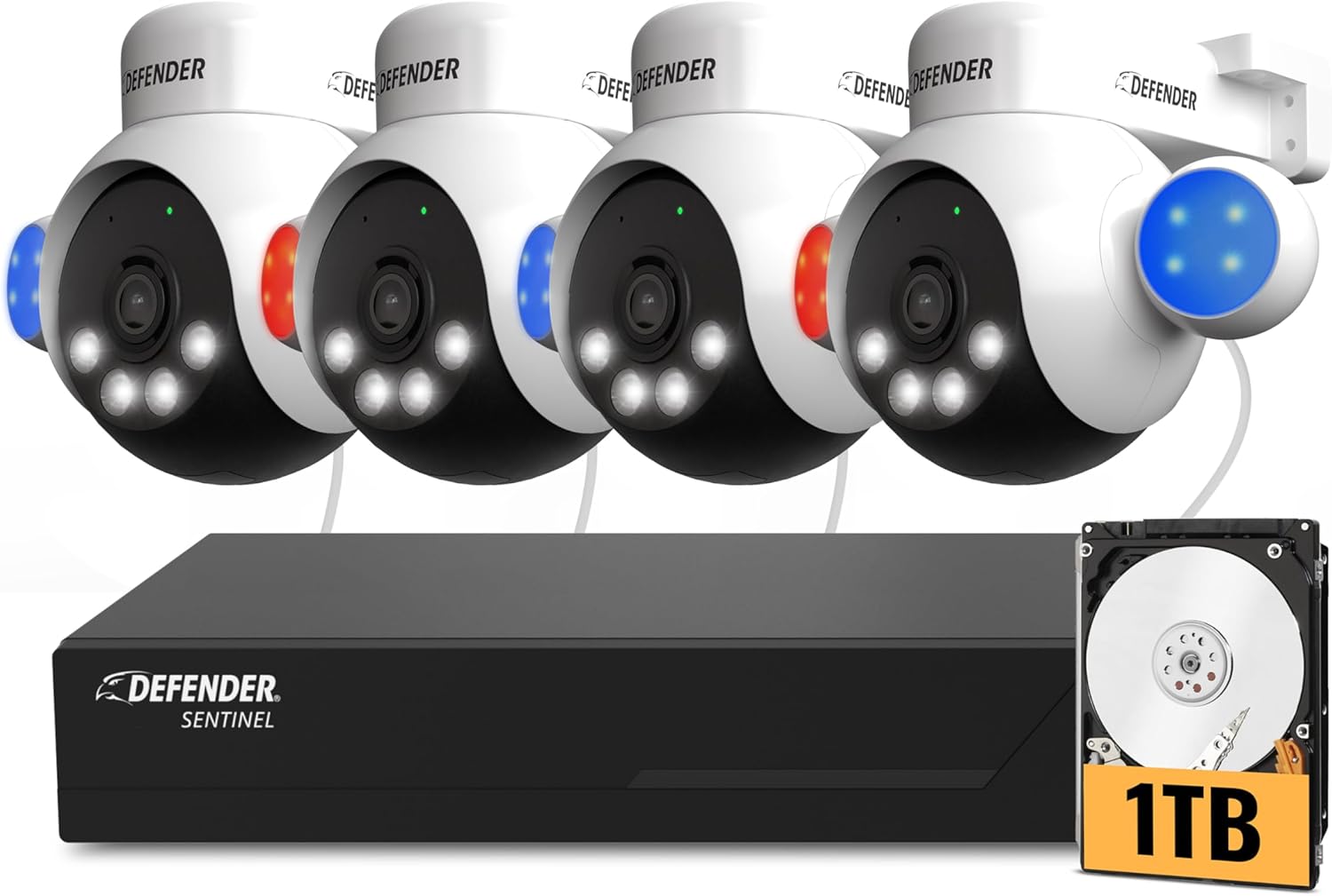
Image: A Defender PTZ camera mounted under an eave, demonstrating its outdoor installation capability.

Image: Close-up of an Ethernet cable, representing the Power over Ethernet (PoE) connection for the cameras.

Image: A mobile phone screen showing the Defender Empower app, used for live viewing and system control.
Instrucțiuni de operare
AI Auto-Tracking and PTZ Control
Your cameras feature 360° pan and 90° tilt capabilities. Through the Defender Empower app or NVR interface, you can manually control the camera's direction. The AI auto-tracking function automatically follows detected movement, ensuring continuous surveillance of subjects.

Image: A visual representation of the AI auto-tracking feature, showing the camera following a person's movement.
Video: Un produs oficial încheiatview demonstrating the AI Powered 4K Wired Security Camera System's features, including PTZ and AI tracking.
Smart AI Human Detection
The system utilizes AI to differentiate human movement from other objects, reducing false alarms. When human movement is detected, you will receive real-time alerts on your mobile device.

Image: A person receiving a package, with the AI human detection highlighting the individual and showing two-way audio communication.
Audio bidirecțional
Engage in real-time conversations through the camera using the two-way audio feature via the mobile app. This allows you to communicate with visitors or deter intruders.
Blue-Red Flashing Light and Siren Deterrence
For active deterrence, the cameras are equipped with high-intensity blue-red flashing lights, an LED spotlight, and a built-in siren. These can be activated manually via the app or configured to trigger automatically upon detection of suspicious activity.

Image: Multiple Defender cameras with blue and red flashing lights activated, demonstrating the deterrence feature.
4K ClearVu and Color Night Vision
The system records in stunning 4K UHD resolution, providing clear and detailed footage. Advanced spotlight illumination enables vibrant true color night vision up to 100 feet, ensuring visibility even in complete darkness.

Image: A side-by-side comparison showing the superior clarity of 4K Ultra HD footage versus 1080p.

Image: A split image demonstrating the camera's color night vision, showing a clear, vivid view în condiții de lumină slabă.
Înregistrare și stocare
The 1TB NVR provides local storage for continuous recording. The system supports motion detection recording to optimize storage space. No monthly fees are required for local recording.
Întreţinere
- Curățare regulată: Curățați periodic obiectivele camerei cu o lavetă moale,amp cloth to ensure optimal image clarity.
- Actualizări firmware: Check the Defender Empower app or Defender website for available firmware updates to ensure your system has the latest features and security enhancements.
- Verificarea cablului: Inspect all Ethernet cables for any signs of wear or damage, especially for outdoor installations.
- NVR Placement: Ensure the NVR is placed in a well-ventilated area, away from direct sunlight and excessive heat, to prevent overheating.
Depanare
| Problemă | Cauza posibila | Soluţie |
|---|---|---|
| Niciun flux video de la cameră | Loose cable connection, no power, camera malfunction. | Check Ethernet cable connections at both the camera and NVR. Ensure NVR is powered on. Restart the NVR. |
| Calitate slabă a imaginii | Dirty lens, low light conditions, network issues. | Clean the camera lens. Ensure adequate lighting or verify color night vision is active. Check network connection stability. |
| No mobile alerts | App notification settings, network connectivity, incorrect detection settings. | Verify notification settings in the Defender Empower app and on your phone. Ensure NVR has internet access. Check AI human detection settings. |
| Controlul PTZ nu răspunde | Network delay, camera unresponsive. | Check network connection. Restart the camera or NVR. |
Specificații
- Marca: Apărător
- Număr de model: NS8B4PTZ-1T
- Tehnologie de conectivitate: Wired (Power over Ethernet - PoE)
- Rezoluția capturii video: 4K(3840×2160)
- Caracteristici speciale: 360° PTZ, AI-Powered, Color Night Vision, PoE, Audio/Video Streaming, Mobile Alerts
- Număr de canale: 8 (NVR-ul suportă până la 8 camere)
- Capacitate de stocare a memoriei: 1 TB (HDD included)
- Sursa de alimentare: Alimentare prin Ethernet
- Compatibilitate cu sistemul de operare: iOS/Android (for mobile app)
- Format semnal: Digital
- Vedere de noapte: Yes (IR and Color Night Vision)
- Gama Night Vision: 100 picioare
- Frecvența cadrelor: 20 FPS
- Mod de înregistrare: Detectarea mișcării
- Tehnologia senzorilor optici: Senzor CMOS 1/2.7 ”
- Total porturi USB: 2
- Interfață hardware: Ethernet
- Tip de lentile: Zoom/Varifocal
- Intrare video: RJ45
- Viewunghi: 360 de grade (capacitate PTZ)
- Evaluare meteo: IP65
- Greutatea articolului: 11.8 Pounds (System total)
Garanție și suport
The Defender AI Powered Sentinel 4K Wired Security Camera System comes with a 3-year warranty, providing peace of mind for your investment. Defender also offers free lifetime support for this product. For technical assistance, warranty claims, or further inquiries, please visit the official Defender website-ul sau contactați serviciul de asistență pentru clienți.