
Introducere
This manual provides essential information for the safe and efficient use of your NOHON 10000mAh Magnetic Wireless Power Bank, Model NX-YSP04. Please read this manual thoroughly before using the product and retain it for future reference.
The NOHON Magnetic Wireless Power Bank offers a convenient and portable charging solution with its 10000mAh capacity, magnetic wireless charging, and fast wired charging capabilities. Its compact design makes it ideal for travel and daily use.
Conținutul pachetului
Verificați dacă toate articolele sunt prezente în colet:
- 1 x NOHON 10000mAh Magnetic Wireless Power Bank
- Cablu de încărcare 1 x USB-C
- 1 x Manual de utilizare
Produs terminatview
Familiarizează-te cu componentele power bank-ului tău.
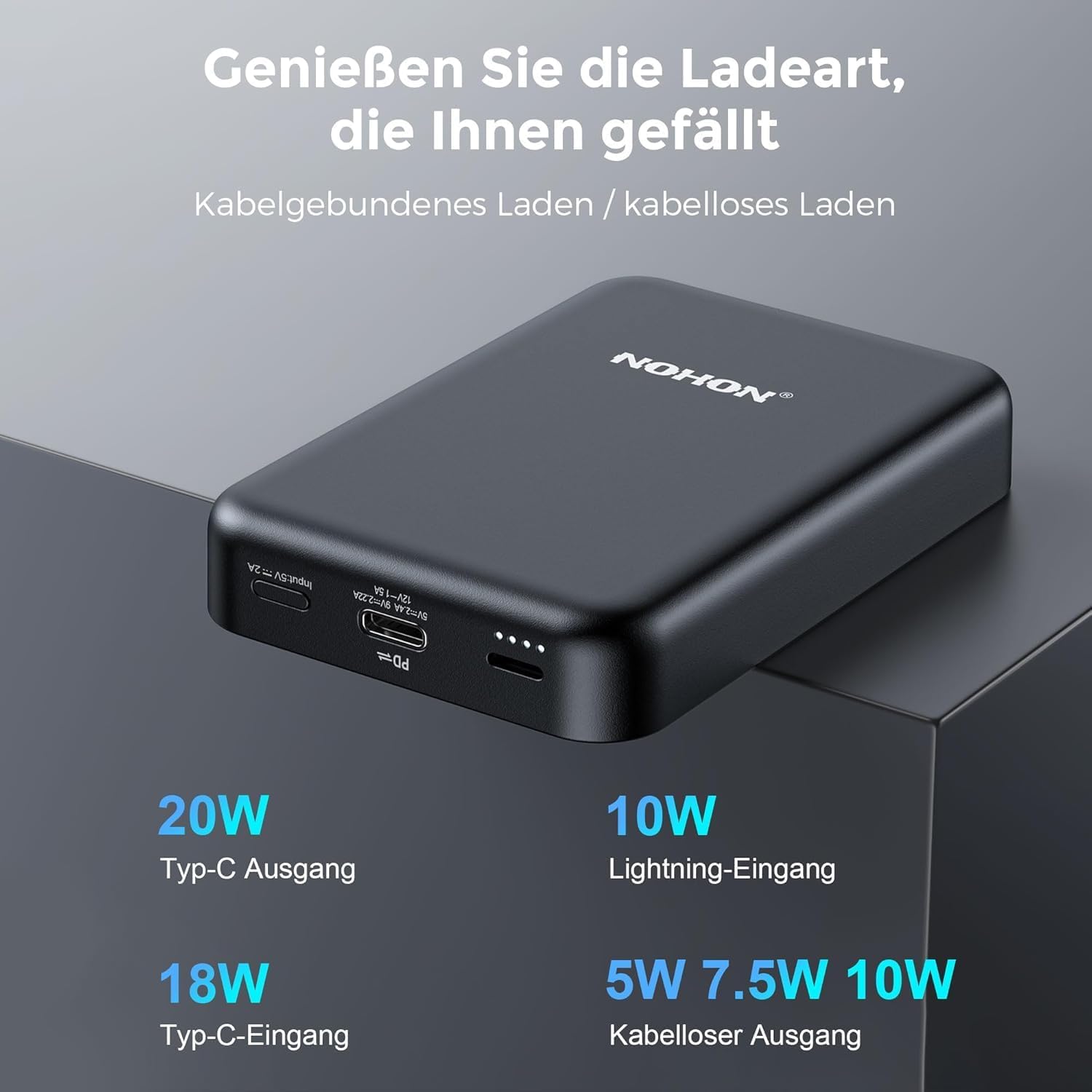
Image: NOHON Magnetic Wireless Power Bank showing its Type-C In/Out port, Lightning Input, and LED indicators.
- Placă de încărcare wireless magnetică: For wireless charging compatible devices.
- USB-C Port (In/Out): Supports 20W PD fast charging for both input and output.
- Lightning Input Port: For charging the power bank using a Lightning cable (10W).
- Indicatoare LED: Afișează nivelul bateriei și starea de încărcare.
- Buton de alimentare: To activate/deactivate the power bank and check battery level.
Înființat
Încărcarea inițială a bateriei externe
Before first use, fully charge your NOHON Power Bank.
- Conectați cablul USB-C furnizat la portul USB-C de pe bateria externă.
- Conectați celălalt capăt al cablului USB-C la un adaptor USB de perete compatibil (nu este inclus).
- Indicatorii LED se vor aprinde pentru a arăta progresul încărcării. Toate LED-urile vor fi aprinse constant când bateria este complet încărcată.
- Alternatively, you can use a Lightning cable (not included) to charge the power bank via its Lightning input port.

Imagine: Prim-plan view of the USB-C and Lightning input ports on the power bank.
Instrucțiuni de operare
Verificarea nivelului bateriei
Press the power button once to check the remaining battery level via the LED indicators.
Încărcare fără fir
The power bank features magnetic wireless charging for compatible devices (e.g., iPhone 12/13/14 series).
- Ensure your device supports magnetic wireless charging. For other devices, a MagSafe-compatible case may be required.
- Align your device with the magnetic charging pad on the power bank. The magnets will securely attach the device.
- Wireless charging will begin automatically. The power bank supports 5W/7.5W/10W wireless output.

Image: An iPhone is shown magnetically attached to the NOHON power bank, indicating active wireless charging.

Image: A hand demonstrates the strong magnetic attachment of the power bank to a smartphone, ensuring stable charging.

Image: Illustration differentiating between MagSafe-compatible cases (green check) and non-MagSafe cases (red cross) for optimal magnetic charging.
Încărcare prin cablu
Use the USB-C port for wired charging of your devices.
- Conectați un capăt al unui cablu USB-C la portul USB-C de pe bateria externă.
- Conectați celălalt capăt al cablului la portul de încărcare al dispozitivului.
- The power bank will automatically begin charging your device with up to 20W PD fast charging.
Încărcarea mai multor dispozitive simultan
The NOHON Power Bank supports charging two devices at the same time: one wirelessly and one via the USB-C port.

Image: The power bank is shown charging an iPhone wirelessly while simultaneously being recharged via a USB-C cable from a wall adapter.
Întreţinere
- Păstrați acumulatorul extern uscat și ferit de umezeală.
- Nu expuneți la temperaturi extreme (cald sau rece).
- Curățați suprafața cu o cârpă moale și uscată. Evitați substanțele chimice dure sau materialele abrazive.
- Depozitați într-un loc răcoros și uscat atunci când nu este utilizat pentru perioade lungi de timp.
- Evitați să scăpați sau să supună powerbank-ului la impacturi puternice.
Depanare
- Bateria externă nu se încarcă:
- Asigurați-vă că cablul de încărcare este conectat în siguranță atât la acumulatorul extern, cât și la sursa de alimentare.
- Încearcă un alt cablu de încărcare sau un adaptor de perete.
- Verificați dacă sursa de alimentare este activă.
- Dispozitivul nu se încarcă wireless:
- Ensure your device is wirelessly charging compatible and properly aligned with the power bank's magnetic pad.
- Remove any thick cases or metal objects between the device and the power bank.
- Asigurați-vă că bateria externă are suficientă încărcare.
- Press the power button on the power bank to activate wireless charging if it doesn't start automatically.
- Dispozitivul nu se încarcă prin cablu:
- Asigurați-vă că cablul este conectat în siguranță atât la acumulatorul extern, cât și la dispozitiv.
- Try a different cable or device to rule out cable or device issues.
- Asigurați-vă că bateria externă are suficientă încărcare.
Specificații
| Numărul de model | NX-YSP04 |
| Capacitatea bateriei | 10000mAh |
| Intrare/ieșire USB-C | 20W PD (Power Delivery) |
| Intrare fulger | 10W |
| Ieșire fără fir | 5W / 7.5W / 10W |
| Tip baterie | Litiu-polimer |
| Dimensiuni (L x l x H) | 9.6 x 6.4 x 1.8 cm |
| Greutate | 250 g |
| Dispozitive compatibile | Smartphones (e.g., iPhone 12/13/14 series), Tablets, Wireless Earbuds |

Image: Visual representation of the power bank's broad compatibility with iOS devices (iPhone 12/13/14 series) and other smartphones (requiring a MagSafe case).
Informații de siguranță
Pentru a asigura o funcționare în siguranță și a preveni deteriorarea, vă rugăm să respectați următoarele măsuri de siguranță:
- Nu dezasamblați, modificați și reparați singur dispozitivul.
- Do not expose to fire, water, or extreme temperatures.
- Evitați căderea sau impactul puternic.
- A nu se lăsa la îndemâna copiilor.
- Nu utilizați dacă bateria externă este deteriorată sau umflată.
- Aruncați produsul în mod responsabil, conform reglementărilor locale.
- The product features Multi-Protect safety technology to prevent overcharge, over-discharge, over-current, and short-circuit.
Garanție și suport
NOHON is committed to product quality and customer satisfaction. If you encounter any issues or have questions regarding your NOHON Magnetic Wireless Power Bank, please contact our customer support.
Please refer to the contact information provided on the product packaging or the official NOHON website-ul pentru detalii de asistență.
The product includes a standard manufacturer's warranty. Please retain your proof of purchase for warranty claims.