
1. Introducere
Thank you for choosing the Aioneus 10000mAh Portable Charger. This power bank is designed for convenience and efficiency, featuring built-in USB-C and Lightning cables, 22.5W fast charging capabilities, and a clear digital display to keep you powered on the go. Please read this manual carefully to ensure proper use and maintenance of your device.
2. Produs terminatview
The Aioneus portable charger is a compact and powerful device equipped with multiple charging options. It includes two integrated cables (Lightning and USB-C) for direct connection to your devices, along with additional USB-A output ports and a USB-C input/output port for versatile charging needs. The digital display provides real-time battery status.
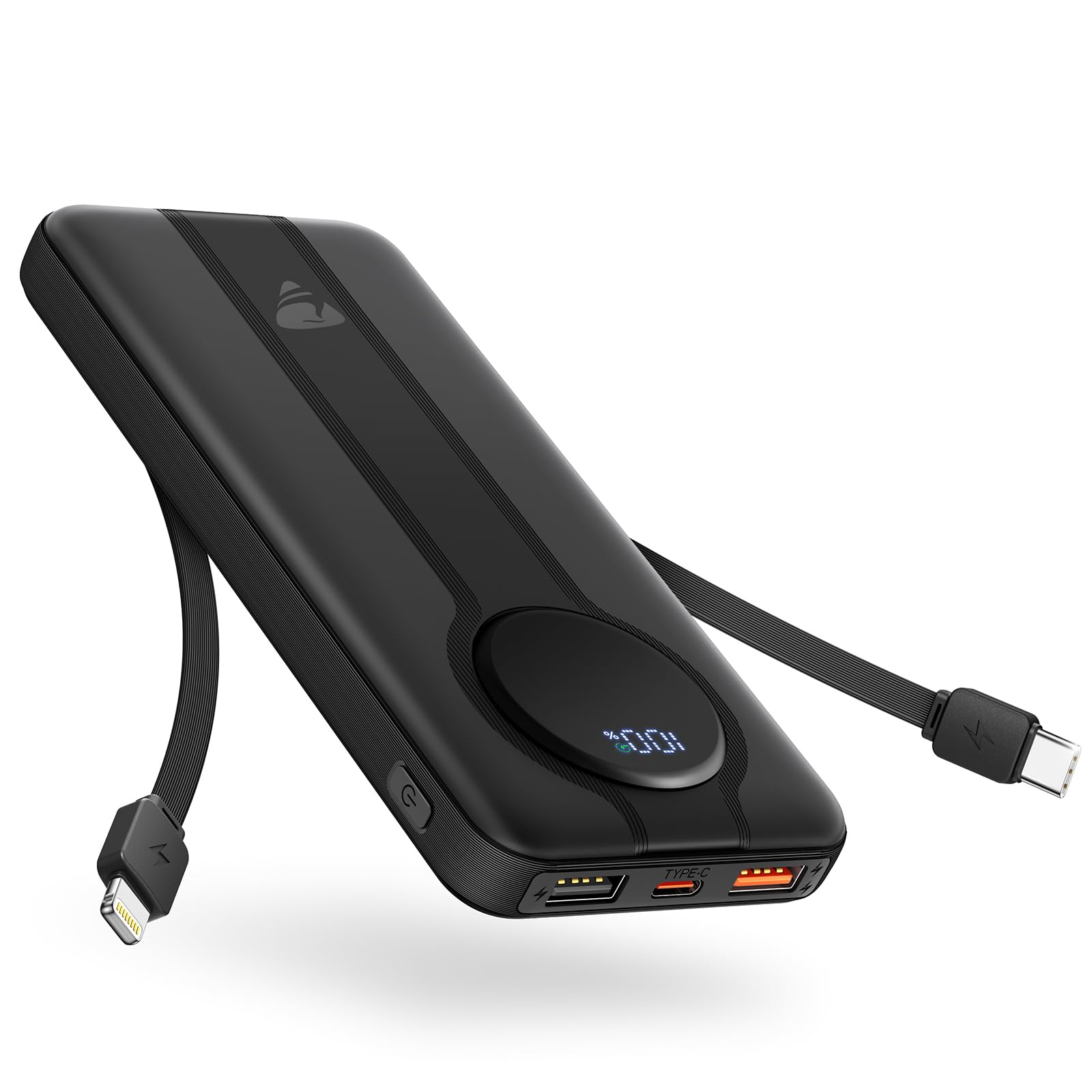
Image: Aioneus 10000mAh Portable Charger, showcasing designul său compact și afișajul digital.
3. Configurare și utilizare inițială
3.1 Unboxing și inspecție
Upon receiving your Aioneus Portable Charger, please inspect the package contents. You should find:
- 1 x Aioneus 10000mAh Power Bank with 2 Built-in Cords
- 1 x Manual de utilizare (acest document)
- 1 x extra USB-A to USB-C cable (1ft)
3.2 Încărcarea inițială a bateriei externe
Before first use, it is recommended to fully charge the power bank. Connect the included USB-A to USB-C cable to a compatible USB wall adapter (not included) and plug the USB-C end into the power bank's USB-C input port. The digital display will show the charging progress, indicating 100% when fully charged. Full charging typically takes 3-4 hours with an 18W USB-C input.

Image: The power bank being recharged using its USB-C input port, showing the digital display.
4. Instrucțiuni de utilizare
4.1 Încărcarea dispozitivelor dvs
The Aioneus Portable Charger offers multiple ways to charge your electronic devices:
- Utilizarea cablurilor încorporate: Pull out the integrated Lightning cable for Apple devices (iPhone 14/13/12/11/XR/XS/8/7/6) or the integrated USB-C cable for compatible devices (iPhone 16/15, Samsung Galaxy S24/S23). Connect the appropriate cable directly to your device.
- Using USB-A Ports: For other devices, use your own USB-A charging cable and connect it to one of the two USB-A output ports on the power bank.
- Utilizarea portului USB-C: The USB-C port also functions as an output, supporting 20W PD fast charging for compatible devices.
The power bank will automatically begin charging your device once connected. The digital display will show the remaining battery percentage of the power bank. When your device is fully charged, the power bank will automatically power off to prevent overcharging.

Image: The power bank demonstrating its capability to charge multiple devices using its built-in cables and additional ports.

Image: A user charging their phone with the Aioneus power bank in a work setting, highlighting its portability.
4.2 Verificarea nivelului bateriei
Press the power button on the side of the power bank to activate the digital display, which will show the current battery percentage ramas.
5. Caracteristici cheie
- Cabluri integrate: Equipped with built-in Lightning and USB-C cables, eliminating the need to carry extra charging cords.
- 22.5W încărcare rapidă: Supports advanced PD & QC fast charging technologies. The built-in USB-C cable provides 22.5W output, Lightning cable provides 10.5W output, and the USB-C port offers 20W output. One USB-A port supports QC 22.5W output.
- Capacitate mare de 10000mAh: Provides sufficient power to charge most smartphones multiple times. For example, it can charge an iPhone 16 Pro approximately 2.8 times, a Samsung Galaxy S24 approximately 2.1 times, and a Google Pixel 9 approximately 2.2 times.
- Afișaj digital inteligent: A clear LED screen accurately shows the remaining power percentage și starea de încărcare.
- Oprire automată: Features intelligent circuitry that automatically powers off when a device is fully charged, preventing overcharge, overdischarge, and overload, thereby extending battery life and ensuring safety.
- Compatibilitate largă: Universally compatible with 99% of phones and tablets on the market, including various models of iPhone, Samsung Galaxy, iPad, Google Pixel, LG, PS5, Moto, and more.

Image: Visual representation of the 22.5W Max fast charging feature.

Image: Demonstrates charging an iPhone 16 Pro to 65% in 30 minutes with 22.5W PD rapid recharge.

Image: Illustrates the wide range of adapted devices compatible with the power bank, including phones, tablets, and other gadgets.

Imagine: O imagine internă view of the power bank, emphasizing its 10000mAh large capacity and durable components.

Image: A person holding the power bank, illustrating its slim design and portability, being 25% lighter than competitors.

Image: The power bank being used for outdoor charging, emphasizing its utility for travel and outdoor activities.
6. Întreținere
- Păstrați acumulatorul extern uscat și ferit de umezeală.
- Evitați expunerea dispozitivului la temperaturi extreme (căldură sau frig).
- Do not drop, crush, or disassemble the power bank.
- Curățați dispozitivul cu o cârpă moale și uscată. Evitați utilizarea substanțelor chimice dure sau a materialelor abrazive.
- If storing for an extended period, charge the power bank to about 50-75% every 3 months to maintain battery health.
7. Depanare
7.1 Dispozitivul nu se încarcă
- Asigurați-vă că bateria externă are suficientă încărcare. Verificați afișajul digital.
- Verificați dacă cablul de încărcare este conectat corect atât la acumulatorul extern, cât și la dispozitiv.
- Try using a different cable or port on the power bank to rule out a faulty connection.
- Confirmă că dispozitivul tău este compatibil cu specificațiile de ieșire ale bateriei externe.
7.2 Încărcare lentă
- Asigurați-vă că utilizați un cablu compatibil cu încărcarea rapidă și că dispozitivul acceptă încărcarea rapidă.
- Some devices may charge slower if multiple devices are connected simultaneously.
- Check if the power bank itself is fully charged, as lower battery levels can affect output speed.
7.3 Afișajul digital nu funcționează
- Apăsați butonul de pornire pentru a activa afișajul.
- If the display remains off, the power bank might be completely depleted. Try recharging it.
8. Specificații
| Caracteristică | Detaliu |
|---|---|
| Numărul de model | RE-G176-1 |
| Capacitatea bateriei | 10000mAh (37Wh) |
| Intrare de tip C | 5V-3A, 9V-2A (18W Max) |
| Ieșire de tip C | 5V-3A, 9V-2.22A, 12V-1.67A (20W max.) |
| Ieșire USB-A 1 | 5V-2A (10W max) |
| Ieșire USB-A 2 | 5V-3A, 9V-2.5A, 12V-1.87A (22.5W Max QC) |
| Ieșire cablu fulger | 5V-2.1A (10.5W max) |
| Ieșire prin cablu USB-C | 5V-3A, 9V-2.5A, 12V-1.87A (22.5W Max PD) |
| Dimensiunile produsului | 5.8 x 2.7 x 0.45 inci |
| Greutatea articolului | 10.5 uncii |
| Caracteristici speciale | Built-in Cables, Digital Display, Fast Charging, Over Charging Protection |
9. Videoclip oficial al produsului
Video: O analiză cuprinzătoareview and demonstration of the Aioneus 10000mAh Portable Charger, highlighting its built-in cables, digital display, and multiple charging ports.
10. Garanție și asistență
Aioneus provides 18 months of after-sale service and technical support for this product. If you encounter any issues or have questions, please refer to the contact information provided with your purchase or visit the official Aioneus website pentru asistență.