
1. Introducere
Mulțumesc pentru achizițieasing the Audizio Genua DAB Radio. This manual provides essential information for the safe and efficient operation of your device. Please read it thoroughly before use and retain it for future reference. The Audizio Genua is a versatile DAB+/FM stereo radio featuring Bluetooth connectivity, USB playback, and an alarm function, designed for both home and portable use.
2. Informații de siguranță
- Sursa de alimentare: Only use the provided power adapter. Ensure the voltage se potrivește cu cerințele regiunii dumneavoastră.
- Apă și umiditate: Nu expuneți unitatea la ploaie, umezeală sau lichide care picură/stropi. Nu așezați obiecte umplute cu lichide, cum ar fi vaze, pe aparat.
- Ventilare: Asigurați o ventilație adecvată. Nu blocați orificiile de ventilație.
- Căldură: Țineți unitatea departe de surse de căldură, cum ar fi calorifere, registre de căldură, sobe sau alte aparate (inclusiv ampliificatori) care produc căldură.
- curatenie: Curățați numai cu o cârpă uscată.
- Service: Nu încercați să reparați singur acest produs. Consultați toate lucrările de service către personalul calificat de service.
- Antenă: Do not bend or force the antenna.
3. Conținutul pachetului
Vă rugăm să verificați dacă toate articolele sunt prezente și în stare bună la despachetare:
- Audizio Genua DAB Radio
- Telecomanda
- Adaptor de alimentare
- Quick Start Guide (language not guaranteed)
4. Produs terminatview
4.1 Comenzile și afișajul panoului frontal

Figura 4.1: Față view of the Audizio Genua DAB Radio.
The front panel features a clear color TFT display, two speaker grilles, and an array of control buttons and a central rotary knob. The display shows station information, track details, time, and menu options. Buttons include Menu, Preset, Scan, Dimmer, Alarm, and playback controls (Play/Pause, Skip). The central knob is used for volume adjustment, tuning, and selection.
4.2 Conexiuni la panoul din spate
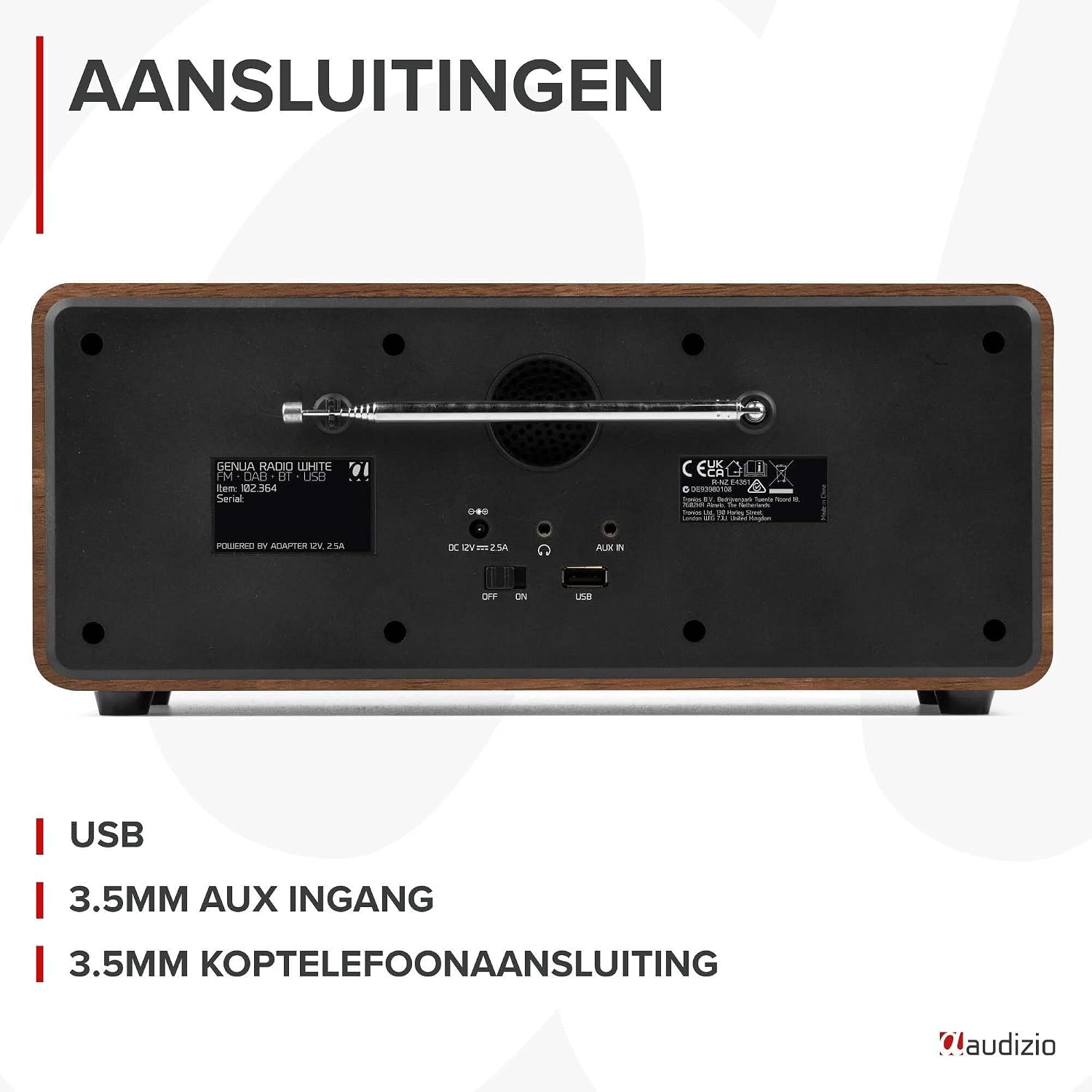
Figura 4.2: Spate view of the Audizio Genua DAB Radio with connections.
The rear panel includes the telescopic antenna for radio reception, a USB port for media playback, a 3.5mm AUX input for external audio devices, a 3.5mm headphone output, a DC 12V power input, and a main power ON/OFF switch.
4.3 Telecomandă

Figure 4.3: Remote control for the Audizio Genua DAB Radio.
The included remote control provides full functionality, allowing you to power on/off, adjust volume, change modes, navigate menus, set alarms, and control playback from a distance.
5. Configurare
5.1 Conexiune la alimentare
- Connect the power adapter to the DC 12V input on the rear of the radio.
- Conectați adaptorul de alimentare la o priză de perete adecvată.
- Flip the main power switch on the rear panel to the 'ON' position.
5.2 Reglarea antenei
Extindeți complet antena telescopică pentru o recepție optimă a radioului DAB+ și FM. Reglați-i poziția pentru o calitate optimă a semnalului.
5.3 Initial Setup and Auto Scan
- Upon first power-on, the radio may prompt you to perform an auto-scan for DAB+ stations. Select 'Yes' or press the 'Scan' button.
- Radioul va scana posturile DAB+ disponibile și le va memora. Acest proces poate dura câteva minute.
- După finalizarea scanării, radioul se va regla pe primul post disponibil.
6. Instrucțiuni de utilizare
6.1 Selectarea modului
Press the 'Mode' button on the remote control or the 'Menu' button on the unit to cycle through available modes: DAB+, FM, Bluetooth, USB, and AUX In.
6.2 Operarea radioului DAB+
- Selectați modul DAB+.
- If no stations are found or you wish to rescan, press the 'Scan' button to perform a full scan.
- Use the 'Tune/Select' knob or the navigation buttons on the remote to browse through the list of available stations.
- Press the 'OK' button (on remote) or push the 'Tune/Select' knob to select a station.
- Stocarea presetărilor: To store a favorite station, press and hold the 'Preset' button until the preset menu appears. Use the knob/navigation to select a preset number (1-30) and press 'OK' to confirm.
- Reamintirea presetărilor: Briefly press the 'Preset' button, then use the knob/navigation to select the desired preset and press 'OK'.
6.3 Funcționarea radioului FM
- Selectați modul FM.
- Auto scanare: Press the 'Scan' button to automatically scan for and store available FM stations.
- Reglare manuală: Use the 'Tune/Select' knob to manually tune to a specific frequency.
- Stocarea presetărilor: Similar to DAB+ mode, press and hold 'Preset', select a number, and confirm.
- Reamintirea presetărilor: Briefly press 'Preset', select the desired preset, and confirm.
6.4 Conectivitate Bluetooth
- Select Bluetooth mode. The display will show "Pairing" or "Waiting for connection".
- Pe smartphone sau pe alt dispozitiv compatibil Bluetooth, activați Bluetooth și căutați dispozitivele disponibile.
- Select "Audizio Genua" from the list of devices.
- Once paired, the radio will confirm the connection, and you can start playing audio from your device.
6.5 Redare USB
- Introduceți o unitate flash USB care conține MP3 fileîn portul USB de pe panoul din spate.
- Select USB mode. The radio will automatically detect the USB drive and begin playing the first compatible audio file.
- Use the playback control buttons (Play/Pause, Skip Forward/Backward) on the unit or remote to manage your music.
6.6 Intrare AUX
- Connect an external audio device (e.g., MP3 player, smartphone) to the 3.5mm AUX IN port on the rear panel using an audio cable (not included).
- Selectați modul AUX.
- Controlează redarea și volumul de pe dispozitivul extern.
6.7 Alarmă și temporizator de oprire
- Setarea alarmei: Press the 'Alarm' button on the unit or remote. Follow the on-screen prompts to set Alarm 1 and Alarm 2, including time, source (DAB/FM/Buzzer), and volume.
- Funcție de amânare: When the alarm sounds, press any button (except Power) to activate snooze. The alarm will sound again after a set interval.
- Temporizator de somn: Press the 'Sleep' button on the remote to set a sleep timer (e.g., 15, 30, 60 minutes). The radio will automatically turn off after the selected time.
6.8 Dimmer de afișare
Press the 'Dimmer' button on the unit or remote to adjust the brightness of the display. This is useful for different lighting conditions or for use in a bedroom.
7. Întreținere
- curatenie: Folosiți o lavetă moale și uscată pentru a curăța exteriorul radioului. Nu utilizați produse de curățare abrazive, ceruri sau solvenți.
- Antenă: Manevrați antena telescopică cu grijă pentru a preveni deteriorarea.
- Depozitare: If storing the radio for an extended period, disconnect it from the power supply.
8. Depanare
| Problemă | Cauza posibila | Soluţie |
|---|---|---|
| Fără putere | Power adapter not connected; Main power switch off | Ensure power adapter is securely connected and plugged in; Turn main power switch to 'ON' |
| Recepție radio slabă (DAB+/FM) | Antenă neextinsă; Zonă cu semnal slab; Interferență | Fully extend and adjust the telescopic antenna; Try repositioning the radio; Move away from other electronic devices |
| Bluetooth nu se asociază | Radio not in Bluetooth mode; Device not discoverable; Already paired with another device | Select Bluetooth mode on the radio; Ensure Bluetooth is enabled on your device and it's in pairing mode; Disconnect from other Bluetooth devices |
| Redarea USB nu funcționează | Unitatea USB nu a fost introdusă corect; Incompatibilă file format; USB drive corrupted | Asigurați-vă că unitatea USB este introdusă complet; Verificați dacă files are in MP3 format; Try a different USB drive |
| Nici un sunet | Volum prea mic; Silențios activat; Sursă incorectă selectată | Increase volume; Check if mute is active; Ensure correct input source (DAB/FM/BT/USB/AUX) is selected |
9. Specificații

Figure 9.1: Audizio Genua DAB Radio dimensions.
- Marca: Audizio
- Număr de model: Genua
- Culoare: Alb
- Caracteristica speciala: Bluetooth Connectivity, DAB+ Radio
- Tehnologie de conectivitate: Aux, Bluetooth, USB
- Dimensiuni produs (L x l x H): 13.5 x 31 x 13.3 cm
- Tehnologia tunerului: DAB+
- Stil: Modern
- Sursa de alimentare: Electric cu fir
- Benzile radio acceptate: FM, DAB+
- Dispozitive compatibile: Smartphone, Tablet, Laptop, MP3 Player, Headphones, Speaker
- Voltage: 220 volți
- Max Speaker Output Power: 50 wați
- Numar de baterii: 1 Non-standard battery (Type of battery required)
- Tip ecran: TFT
- Greutatea articolului: 2.25 kilograme
10. Garanție și asistență
This product is covered by a standard manufacturer's warranty. For detailed warranty terms and conditions, please refer to the documentation provided at the time of purchase or contact your retailer. For technical support or service inquiries, please contact the Audizio customer support team through their official website-ul sau punctul dvs. de vânzare.


