
1. Introducere
The BOYA BY-V10 is a compact and lightweight wireless lavalier microphone system designed for use with USB-C compatible devices, including Android smartphones, iPhone 15/16, iPads, and laptops. It offers high-quality audio recording with features like one-click noise cancellation and stable wireless transmission, making it suitable for various content creation scenarios.

Image: The BOYA BY-V10 USB-C Wireless Lavalier Microphone system, showing the transmitter and receiver.
Video: Un pesteview of the BOYA BY-V10 Wireless Microphone, highlighting its ease of use for recording.
2. Ce se află în cutie
Verificați dacă toate componentele sunt prezente în pachet:
- 1 x transmițător (TX)
- 1 x Receiver (RXU) with USB-C connector
- 1 x cablu de încărcare USB-A la USB-C
- 1 x Parbriz din spumă
- 1 x Geantă de transport
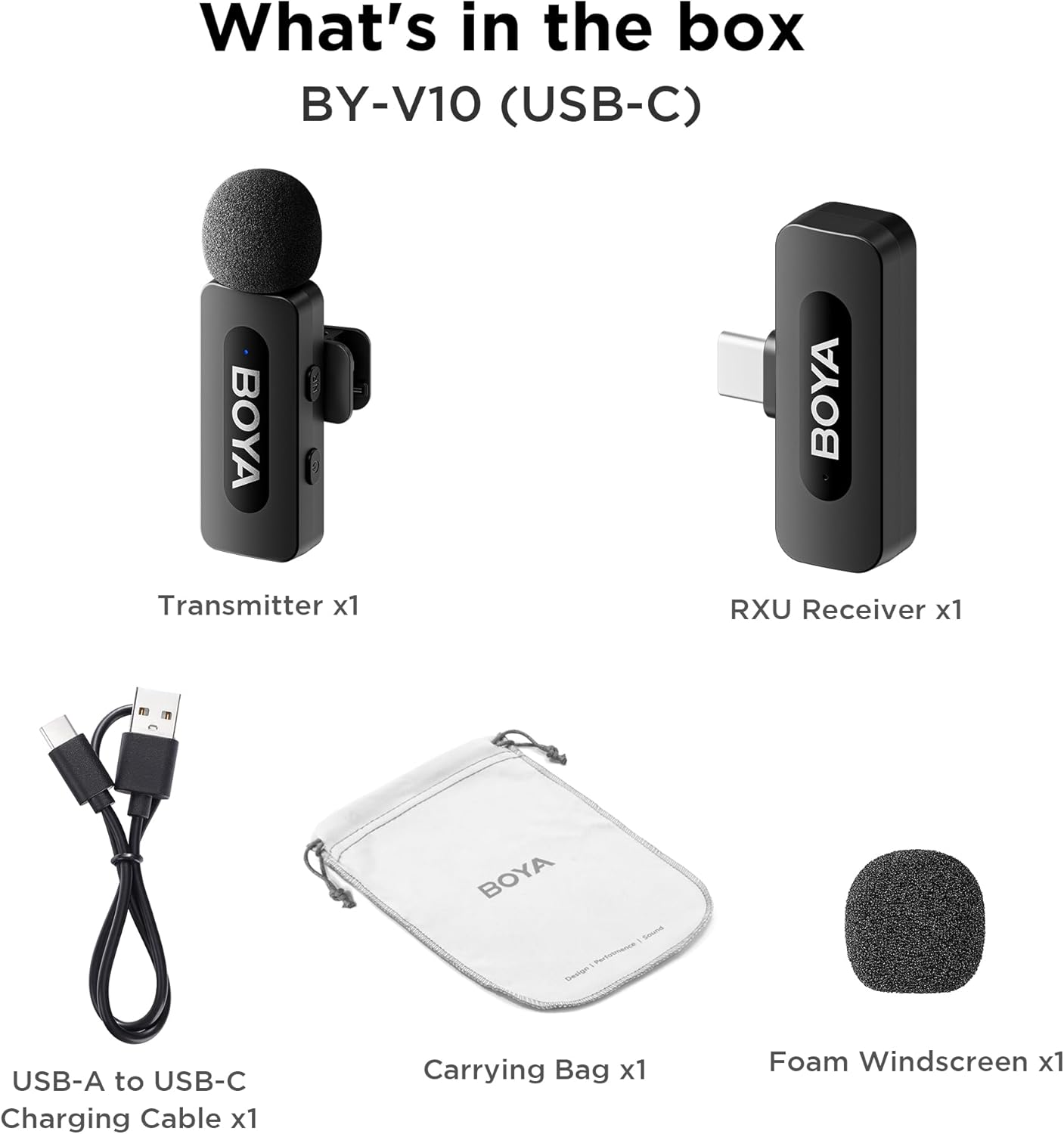
Image: The complete packing list for the BY-V10, showing all included accessories.
Video: An unboxing video demonstrating the contents of the BOYA BY-V Wireless Lavalier Microphone package.
3. Ghid de instalare
3.1 Încărcare inițială
Before first use, ensure the transmitter is fully charged using the provided USB-A to USB-C charging cable. The receiver does not require charging as it draws power directly from your connected device.

Image: Battery life and charging details for the BY-V10 transmitter.
3.2 Conectarea la dispozitivul dvs.
- Press and hold the power button on the Transmitter (TX) for 2 seconds to turn it on. The indicator light will blink.
- Plug the Receiver (RXU) directly into the USB-C port of your smartphone, iPad, or laptop.
- The Transmitter and Receiver will automatically pair within 10 seconds. The indicator light on both units will turn solid blue once successfully paired.
- Notă pentru utilizatorii de Android: Enable the "OTG" function in your device's settings before connecting the USB Type-C microphone.

Image: Visual instructions for the plug-and-play setup process.
3.3 Compatibilitatea dispozitivului
The BY-V10 is compatible with devices featuring a USB-C port, including:
- Smartphone-uri Android
- Modele iPhone 15/16
- iPads with USB-C
- Laptops with USB-C
Please ensure your device supports external USB-C audio input.

Image: Visual representation of compatible devices for the BY-V10 microphone.
4. Instrucțiuni de utilizare
4.1 Purtarea microfonului
The transmitter features a 360° rotatable clip for easy attachment to your clothing. For optimal sound capture, clip the microphone approximately 6-8 inches from your mouth.

Image: The compact size and clip-on design of the BY-V10 transmitter.
4.2 Anulare a zgomotului cu un singur clic
To activate or deactivate the noise reduction mode, press the 'NR' button on the side of the transmitter. The indicator light will change to static green when noise reduction is enabled, and blink blue slowly when muted.

Image: Visual comparison of audio with and without noise cancellation enabled.

Image: Detailed explanation of the noise cancellation button and indicator lights.
4.3 Funcția Mute
To mute the microphone, briefly press the power button on the transmitter. The indicator light will blink blue slowly. Press again to unmute.
4.4 Interval de transmisie
The BY-V10 offers a stable audio signal transmission range of up to 100 meters (328 feet) in open environments without obstacles or interference.

Image: Demonstration of the microphone's long-distance transmission capability.

Image: Further illustration of the extended transmission range.
4.5 Încărcarea în timpul înregistrării
The receiver allows you to charge your phone or connected device while recording, ensuring uninterrupted long sessions for streaming or course recording.

Image: The receiver connected to a smartphone, illustrating the ability to charge the phone during recording.

Image: Another visual of the 'Support Using While Charging' feature.
5. Întreținere
To ensure the longevity and optimal performance of your BOYA BY-V10 microphone, follow these maintenance guidelines:
- curatenie: Use a soft, dry cloth to clean the microphone and receiver. Avoid using liquids or abrasive cleaners.
- Depozitare: Store the microphone system in its carrying bag when not in use to protect it from dust, moisture, and physical damage.
- Îngrijirea bateriei: Fully charge the transmitter before long periods of storage to maintain battery health.
- Manipulați cu grijă: Avoid dropping the devices or exposing them to extreme temperatures.
6. Depanare
If you encounter problems when using the unit, please refer to the following checklist. If the problem cannot be solved, please contact the seller for after-sales service.
- Unitatea nu se conectează: Asigurați-vă că asociați emițătorul/emițătoarele cu un singur receptor. Dacă sunt asociate cu mai multe receptoare, nu se poate specifica care receptor va fi asociat cu emițătorul/emițătoarele.
- Nu se aude sunet de la unitate sau nu se aude sunet când este conectat la un dispozitiv extern:
- Asigurați-vă că conectorul receptorului este bine conectat la dispozitiv.
- Asigurați-vă că transmițătoarele nu sunt dezactivate. Dacă indicatorul său clipește lent în albastru, utilizatorii trebuie să apese o dată butonul de pornire pentru a activa sunetul (transmițătorilor).
- Raza de funcționare a unității este limitată, iar sunetul este frecvent intermitent: Asigurați-vă că nu există interferențe între emițător(e) și receptor. Dacă sunetul intermitent apare în continuare frecvent, vă rugăm să ne contactați pentru service post-vânzare.
- Unitatea se oprește automat: Atunci când nu sunt împerecheate, transmițătoarele se vor opri automat după 10 minute.
- Unitatea nu pornește: Asigurați-vă că unitatea are suficientă baterie pentru a fi pornită. Încercați să conectați un cablu de încărcare pentru a activa circuitul.
- Carcasa de încărcare nu reușește să încarce unitatea:
- Asigurați-vă că bateria carcasei de încărcare nu este descărcată. Încercați să încărcați carcasa.
- Ștergeți contactele de încărcare ale unității și pinii de încărcare ai carcasei de încărcare cu o lavetă curată și asigurați-vă că nu sunt acoperite de praf.
- Încercați să împingeți în jos unitatea plasată în carcasa de încărcare până când contactele de încărcare sunt complet conectate. După aceea, dacă unitatea tot nu se încarcă, este posibil ca forța magnetică să se fi deteriorat. Vă rugăm să ne contactați pentru servicii post-vânzare.

Image: A troubleshooting guide with solutions for common operational problems.
7. Specificații
| Caracteristică | Detaliu |
|---|---|
| Marca | BIAȚI |
| Numele modelului | BY-V10(USB-C) |
| Factor de formă a microfonului | Lavalier |
| Tehnologia de conectivitate | USB |
| Tip conector | USB tip C |
| Model polar | Omnidirecțional |
| Sensibilitate Audio | 42 de decibeli |
| Raportul semnal-zgomot | 80 dB |
| Greutatea articolului | 1.76 uncii (0.05 kilograme) |
| Dimensiunile produsului | 3.27 x 4.45 x 1.38 inci |
| Sursa de alimentare | Alimentat cu baterie (transmițător) |
| Durata de viață a bateriei (transmițător) | Până la 9 ore |
| Timp de încărcare (transmițător) | Aproximativ. 2 ore |
| Caracteristica specială | Mute Function, One-Click Noise Cancellation |
| Dispozitive compatibile | Laptop, Smartphone (USB-C) |
8. Garanție și asistență
For warranty information, technical support, or any inquiries regarding your BOYA BY-V10 microphone, please refer to the official BOYA website or contact the seller directly through your purchase platform. Keep your proof of purchase for warranty claims.