
1. Produs terminatview
The AUTOOL GOGO8-US Digital Manometer is a precision instrument designed for measuring gas pressure and differential pressure. It features a dual-port design for synchronous detection, a backlit LCD display, and supports 12 different pressure units. This device is suitable for applications such as HVAC duct pressure monitoring, filter blockage diagnosis, cleanroom micro-pressure control, and gas appliance maintenance.

Figure 1: AUTOOL GOGO8-US Digital Manometer with accessories.
Caracteristici cheie:
- Interval de măsurare: ±20.68 kPa / ±2.999 psi.
- Precizie: ±0.3% FSO (Full Scale Output).
- Timp de răspuns: 0.5 secunde.
- Unit Support: 12 selectable units including PSI, inHg, inH₂O, ftH₂O, kPa, mbar, Bar, kgcm², ozin², mmHg, cmH₂O, Pa.
- Dual-Port Detection: Real-time display of pressure difference (P1-P2).
- Funcții de date: Data storage (100 groups), Data Hold, Max/Min value recording.
- Afişa: Large backlit LCD for clear readings in various lighting conditions.
- Gestionare a energiei: Automatic shutdown after 15 minutes of inactivity, low battery warning.
- Calibrare: One-button zero calibration.
2. Ce se află în cutie
La despachetare, vă rugăm să verificați dacă toate articolele enumerate mai jos sunt prezente și în stare bună:
- AUTOOL GOGO8-US Digital Manometer
- Flexible Tubes (2 pieces)
- Adaptor metalic
- Manual de utilizare

Figure 2: Package contents of the Digital Manometer.
3. Configurare
3.1 Instalarea bateriei
- Localizați compartimentul bateriei pe spatele manometrului.
- Deschideți capacul bateriei.
- Introduceți o baterie de 9V, asigurându-vă că polaritatea este corectă.
- Închideți bine capacul bateriei.
3.2 Connecting Tubes and Adapters
- Identify the two tube connectors on the top of the manometer: Tube Connector (-) and Tube Connector (+).
- Connect the flexible tubes to the desired ports based on your measurement requirements (e.g., for differential pressure, connect one tube to each port).
- If needed, attach the metal adapter to one of the flexible tubes for specific connection points.

Figure 3: Manometer components and dimensions.
4. Instrucțiuni de utilizare
4.1 Pornire/Oprire
- Apăsați tasta ON/OFF button (red power icon) to turn the device on.
- Țineți apăsat butonul ON/OFF butonul pentru a opri dispozitivul.
4.2 Calibrare la zero
Before each measurement, especially for differential pressure, it is recommended to perform a zero calibration to ensure accuracy.
- Ensure both pressure ports are open to atmospheric pressure or disconnected from any pressure source.
- Apăsați lung pe ȚINE button to clear any zero drift and calibrate the device to zero.
4.3 Selectarea unității
The manometer supports 12 different pressure units.
- Apăsați tasta UNITATE button to cycle through the available pressure units (PSI, inHg, inH₂O, ftH₂O, kPa, mbar, Bar, kgcm², ozin², mmHg, cmH₂O, Pa).
4.4 Differential Pressure Measurement (P1-P2)
The device automatically displays the pressure difference between the two ports (P1-P2).
- Connect the higher pressure source to the (+) port and the lower pressure source to the (-) port for positive readings, or vice-versa.
- The display will show the real-time pressure difference.

Figure 4: Dual-port for positive and negative pressure measurement.
4.5 Reținerea datelor
- Apăsați tasta ȚINE button briefly to freeze the current reading on the display.
- Apăsați tasta ȚINE button again to release the data hold function.
4.6 Max/Min Value Recording
To capture the maximum and minimum pressure values during a measurement period:
- Apăsați lung pe MAX button to activate Max/Min recording mode. The display will show 'MAX' or 'MIN'.
- Apăsați scurt pe MAX button to toggle between MAX and MIN values.
- Apăsați lung pe MAX button again to exit Max/Min recording mode.
4.7 Afișaj cu iluminare de fundal
- Apăsați tasta ° C / ° F button briefly to turn the backlight on or off.

Figure 5: LCD Backlight Display for enhanced visibility.
4.8 Stocarea datelor
The device can store up to 100 groups of readings.
- Apăsați scurt pe ° C / ° F key to save the current reading.
- Utilizați DIF şi MAX keys to scroll through stored data.
5. Întreținere
5.1 Curățare
- Ștergeți dispozitivul cu o lavetă moale și uscată. Nu utilizați substanțe de curățare abrazive sau solvenți.
- Ensure the pressure ports are free from dust and debris.
5.2 Înlocuirea bateriei
When the low battery indicator appears on the display, replace the 9V battery promptly to ensure accurate operation.
- Urmați pașii de instalare a bateriei din Secțiunea 3.1.

Figure 6: Low Battery Reminder and Auto Shutdown feature.
5.3 Depozitare
- Store the manometer in a cool, dry place, away from direct sunlight and extreme temperatures.
- Scoateți bateria dacă dispozitivul nu va fi utilizat pentru o perioadă lungă de timp, pentru a preveni scurgerile.
6. Depanare
| Problemă | Cauza posibila | Soluţie |
|---|---|---|
| Dispozitivul nu pornește | Baterie descărcată sau instalată incorect | Verificați polaritatea bateriei sau înlocuiți-o cu o baterie nouă de 9V. |
| Inaccurate readings / Zero drift | Environmental factors or sensor drift | Perform one-button zero calibration by long pressing the HOLD button. Ensure ports are open to atmosphere during calibration. |
| Display shows "Err0" | Exceeds positive pressure range | The measured pressure is above the maximum positive range. Reduce pressure or use a device with a higher range. |
| Display shows "Err1" | Exceeds negative pressure range | The measured pressure is below the minimum negative range. Reduce vacuum or use a device with a wider negative range. |
| Lumina de fundal nu funcționează | Backlight off or low battery | Press the °C/°F button to toggle backlight. Check battery level and replace if low. |
| Auto-shutdown occurs too quickly | Normal operation (15 minutes inactivity) | This is a power-saving feature. The device will shut down after 15 minutes of no operation. |
7. Specificații
| Parametru | Valoare |
|---|---|
| Domeniul de măsurare | ±20.68 kPa / ±2.999 PSI |
| Unități de măsură | 12 (PSI, inHg, inH₂O, ftH₂O, kPa, mbar, Bar, kgcm², ozin², mmHg, cmH₂O, Pa) |
| Precizie | ±0.3% FSO (25°C) |
| Repetabilitate | ±0.2% (Max±0.5%FSO) |
| Linearity / Hysteresis | ±0.29% FSO (25°C) |
| Rata de măsurare | 0.5 secunde |
| Stocarea datelor | 100 de grupuri |
| Presiune maximă | 20 KPa |
| Temperatura de lucru | 0°C până la 50°C (32°F până la 122°F) |
| Temperatura de depozitare | -10°C până la 60°C (14°F până la 140°F) |
| Alimentare electrică | baterie de 9V |
| Automatic Shut-down Time | 15 minute |
| Dimensiuni | 164 x 70 x 32 mm (6.5 x 2.8 x 1.3 inchi) |
| Greutate | 200 g (0.44 lbs) |
| Material | Acrilonitril Butadien Stiren (ABS) |
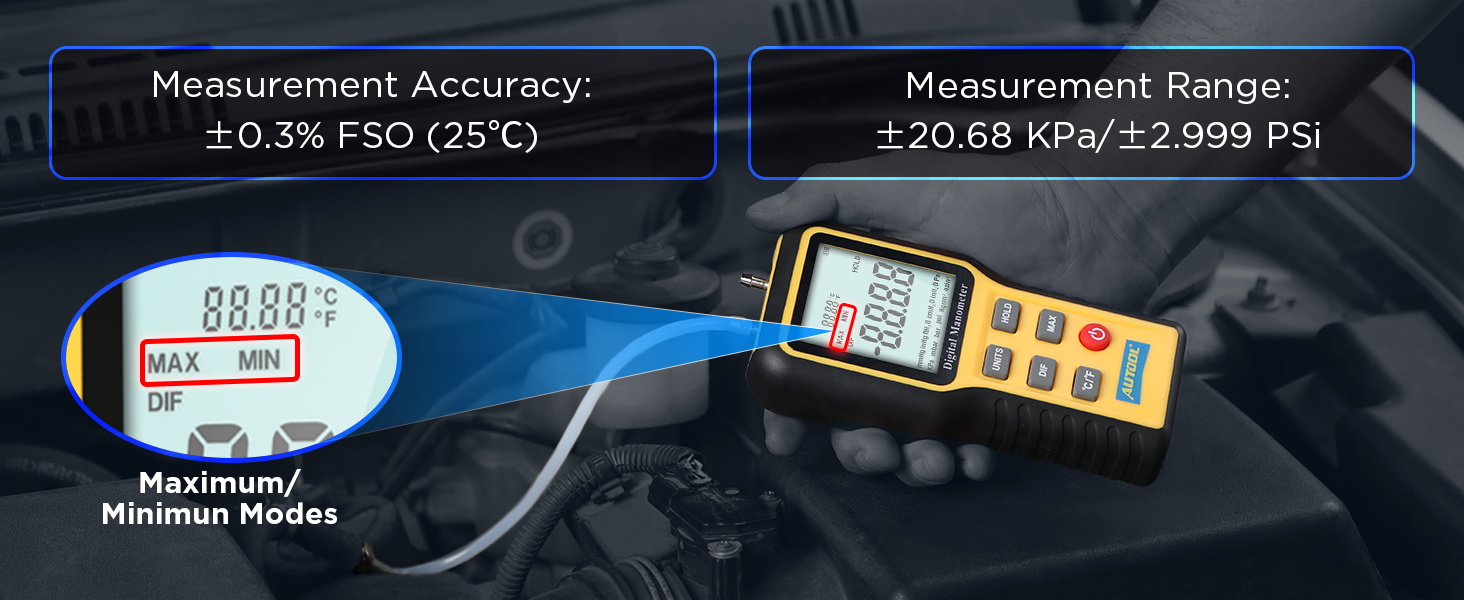
Figura 7: Specificații detaliate ale produsului.
8. Garanție și asistență
8.1 Informații despre garanție
The AUTOOL GOGO8-US Digital Manometer comes with a Trei ani garanție against manufacturing defects. If the manometer exhibits any defects within this period, AUTOOL will provide a replacement or a suitable solution to ensure customer satisfaction without delay.
8.2 Suport tehnic
AUTOOL provides suport tehnic pe viață for this product. For any technical assistance, operational queries, or warranty claims, please contact AUTOOL customer service. We are committed to responding to your inquiries within 24 hours.