
Introducere
This manual provides essential information for the installation, operation, and maintenance of the LiftMaster K001D8395 Logic Control Board Kit with Current Sense, L5. This logic board is designed for use with LiftMaster 1PH or 3PH Logic 5.0 Commercial Door Operators. It incorporates electronic sensing limit switch (SLS) technology for improved performance and reliability.
Produs terminatview

Figura 1: LiftMaster K001D8395 Logic Control Board. This image displays the complete circuit board with various connectors, chips, and control elements, including the main terminal block on the right side and the LiftMaster branding.
The K001D8395 Logic Control Board is a genuine LiftMaster replacement part. It features current sense technology, which is particularly required for all 3PH operator models manufactured after April 2016. This board replaces older physical Sensing Limit Switches with an electronic version, enhancing the door's closing performance and preventing unintended stops above the activation height.
Caracteristicile cheie includ:
- Compatibility with all LiftMaster 1PH or 3PH Logic 5.0 Commercial Door Operators.
- Integrated current sense technology.
- Electronic Sensing Limit Switch (SLS) functionality.
- Also known by part numbers: K001D8395, K001D8075-1, K77-37986.
Configurare și instalare
Siguranța pe primul loc: Before beginning any installation or service, ensure that power to the commercial door operator is completely disconnected at the circuit breaker or fuse box. Failure to do so can result in serious injury or death.
- Deconectați alimentarea: Turn off all electrical power to the garage door operator.
- Cutie de control al accesului: Open the control box cover to access the existing logic board.
- Conexiuni document: Carefully note or photograph all existing wiring connections to the old logic board. This will aid in proper re-connection.
- Îndepărtați placa veche: Disconnect all wires and mounting hardware from the old logic board. Gently remove the old board from the control box.
- Instalați placa nouă: Position the new K001D8395 logic board in the control box and secure it with the appropriate mounting hardware.
- Reconectați cablajul: Refer to your documented connections and the operator's wiring diagram to correctly reconnect all wires to the new logic board's terminals. Pay close attention to power, motor, and accessory connections.
- Verificați conexiunile: Double-check all wiring for proper placement and secure connections.
- Închideți cutia de control: Securely close the control box cover.
- Restabiliți puterea: Reconnect electrical power to the commercial door operator.
- Testare inițială: Perform initial tests as per your operator's specific instructions to ensure the board is functioning correctly and the door operates safely.
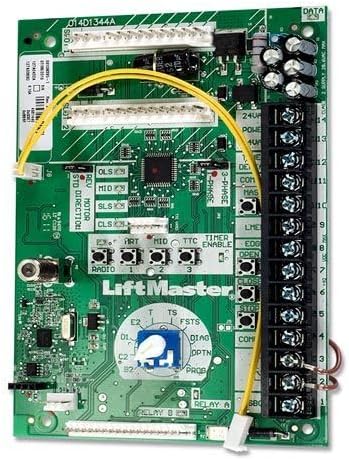
Figura 2: Close-up of the LiftMaster K001D8395 Logic Control Board showing the terminal block on the right side for wiring connections, along with various buttons and indicators for configuration and diagnostics.
Refer to the specific wiring diagram provided with your LiftMaster Logic 5.0 Commercial Door Operator for detailed connection instructions.
Instrucțiuni de operare
The K001D8395 logic board integrates advanced electronic controls for your commercial door operator. Once installed and configured, the operator will function according to its programmed settings.
- Electronic Sensing Limit Switch (SLS): This board features an electronic SLS, which replaces older mechanical limit switches. This system provides precise control over the door's closing cycle, ensuring it stops accurately at the intended closed position without unintended interruptions.
- Current Sense Technology: The integrated current sense technology monitors the motor's current draw, providing enhanced safety and operational feedback. This helps in detecting obstructions and ensuring smooth operation.
- Operare standard: Operate the commercial door using the designated open, close, and stop buttons or remote controls as per your operator's standard functionality.
- Configurare: Any specific operational parameters, such as travel limits or safety features, should be configured through the operator's control panel or programming interface, following the instructions in your main operator manual.
Întreţinere
Regular maintenance helps ensure the longevity and reliable operation of your LiftMaster K001D8395 Logic Control Board and the associated commercial door operator.
- Inspecție vizuală: Periodically inspect the logic board for any signs of damage, loose connections, or debris. Ensure the control box remains clean and dry.
- Integritatea conexiunii: Check all wiring connections to the board to ensure they are secure and free from corrosion.
- Protecția mediului: Ensure the control box is properly sealed to protect the logic board from moisture, dust, and extreme temperatures.
For detailed maintenance procedures for your commercial door operator, refer to its specific instruction manual.
Depanare
If you experience issues with your commercial door operator after installing the K001D8395 logic board, consider the following common troubleshooting steps:
- Fără putere:
- Verify that the circuit breaker supplying power to the operator is ON.
- Check all power connections to the logic board for secure contact.
- Ușa nu răspunde:
- Ensure all safety sensors are properly aligned and free from obstructions.
- Check control wiring connections to the logic board.
- Confirm that the operator is not in a lockout mode or fault condition (refer to operator's diagnostic codes).
- Operație neregulată:
- Inspect for loose wiring or damaged components on the board.
- Ensure proper grounding of the operator system.
For complex issues or if troubleshooting steps do not resolve the problem, it is recommended to contact a qualified LiftMaster service technician or the seller for assistance.
Specificații
| Numărul de model | K001D8395 |
| Alternate Part Numbers | K001D8075-1, K77-37986 |
| Compatibilitate | LiftMaster 1PH or 3PH Logic 5.0 Commercial Door Operators |
| Caracteristică | Current Sense Technology, Electronic Sensing Limit Switch (SLS) |
| Necesar pentru | 3PH operator models manufactured after April 2016 |
| Componente incluse | Placa de control |
| Greutatea articolului | 1 kilogram |
| Dimensiunile produsului | 6 x 4 x 1 inci |
| Producător | Liftmaster |
Informații despre garanție
Specific warranty terms for the LiftMaster K001D8395 Logic Control Board are provided by the manufacturer, LiftMaster. Please refer to the documentation included with your original commercial door operator or contact LiftMaster customer support directly for detailed warranty coverage and claim procedures. Warranty information may also be available from the authorized seller from whom the product was purchased.
Suport și Contact
For technical assistance, installation questions, or troubleshooting support regarding your LiftMaster K001D8395 Logic Control Board, please utilize the following resources:
- Asistență clienți LiftMaster: Vizitați site-ul oficial LiftMaster website pentru resurse de asistență, întrebări frecvente și informații de contact. www.liftmaster.com/support
- Authorized Dealers/Installers: Contact your local authorized LiftMaster dealer or professional installer for on-site service and expert advice.
- Asistență pentru vânzători: For purchase-related inquiries, contact the seller from whom you acquired this product.