
BVTVRemote-01
Manual de utilizare pentru telecomanda universală TV
Model: BVTVRemote-01
1. Introducere
This manual provides comprehensive instructions for the setup, operation, maintenance, and troubleshooting of your new Universal TV Remote Control. Designed for ease of use, this remote is compatible with a wide range of major TV brands, offering a convenient replacement for your original remote.
Vă rugăm să citiți cu atenție acest manual înainte de a utiliza telecomanda pentru a asigura performanțe optime și o lungă durată de viață.

Figure 1: Universal TV Remote Control

Figure 2: Compatible with Major TV Brands
2. Instrucțiuni de configurare
Before first use, insert two AAA batteries into the remote control. Ensure correct polarity (+/-) as indicated inside the battery compartment.
2.1. Brand Setting (Recommended Method)
This method is recommended for major TV brands that have a dedicated button on the remote control (e.g., Samsung, LG, Sony, TCL, Vizio, Hisense, Sanyo, Insignia, Philips, Panasonic, Sharp, Toshiba, Hitachi, JVC, Vestel, Seiki, RCA, Magnavox, Westinghouse, Haier).
- Identify the button on the remote control corresponding to your TV brand.
- Press and hold the corresponding brand button for approximately 3 seconds.
- The LED indicator on the remote will flash three times, indicating that the setting is complete.

Figure 3: Brand Setting Method
Sfat util: Under the Initial Setting Mode, this remote can directly control many TV brands, including LG, SAMSUNG, PHILIPS, SONY, PANASONIC, SHARP and other TV brands listed on the remote control.
2.2. Code Setting Method
Use this method for TV brands that do not have a dedicated brand button on the remote, or if the Brand Setting method does not work.
- Țineți apăsat butonul Mut butonul și Putere butonul simultan pentru câteva secunde.
- Release both buttons when the LED indicator light illuminates.
- Refer to the provided code list in the physical manual (not included here) and enter the 3 or 4-digit code for your TV brand using the number buttons.
- If the code is correct, the LED will turn off, indicating successful setup. If the code is incorrect, the LED will remain lit, and you will need to re-enter the code.

Figure 4: Code Setting Method
Nota: The new chip provides stronger power-off memory. Once set up, the TV brand memory will be maintained permanently, even after power off.
3. Instrucțiuni de utilizare
Once set up, your universal remote control functions similarly to your original TV remote. Below are some common button functions:

Figure 5: Other Button Functions
- Buton de alimentare: Pornește sau oprește televizorul.
- Buton de intrare: Cycles through video input sources (HDMI, AV, etc.).
- Buton CC (subtitrare): Activează sau dezactivează subtitrările.
- Buton inteligent: Accesses the Smart TV hub or home screen.
- Buton NETFLIX: Acces direct la aplicația Netflix.
- Buton 3D: Activează sau dezactivează modul 3D (dacă este compatibil cu televizorul).
- Tastatură de navigare (Sus, Jos, Stânga, Dreapta, OK): Folosit pentru navigarea și selecția meniurilor.
- Buton de meniu: Deschide meniul principal al televizorului.
- Apps Button: Accesses the TV's application list.
- Vol +/- Buttons: Reglează nivelul volumului.
- Ch +/- Buttons: Schimbă canalul.
- Buton mut: Dezactivează sau activează sunetul televizorului.
- Butoane numerice (0-9): Intrare directă pe canal.
- Buton de ieșire: Ieșire din meniul sau aplicația curentă.
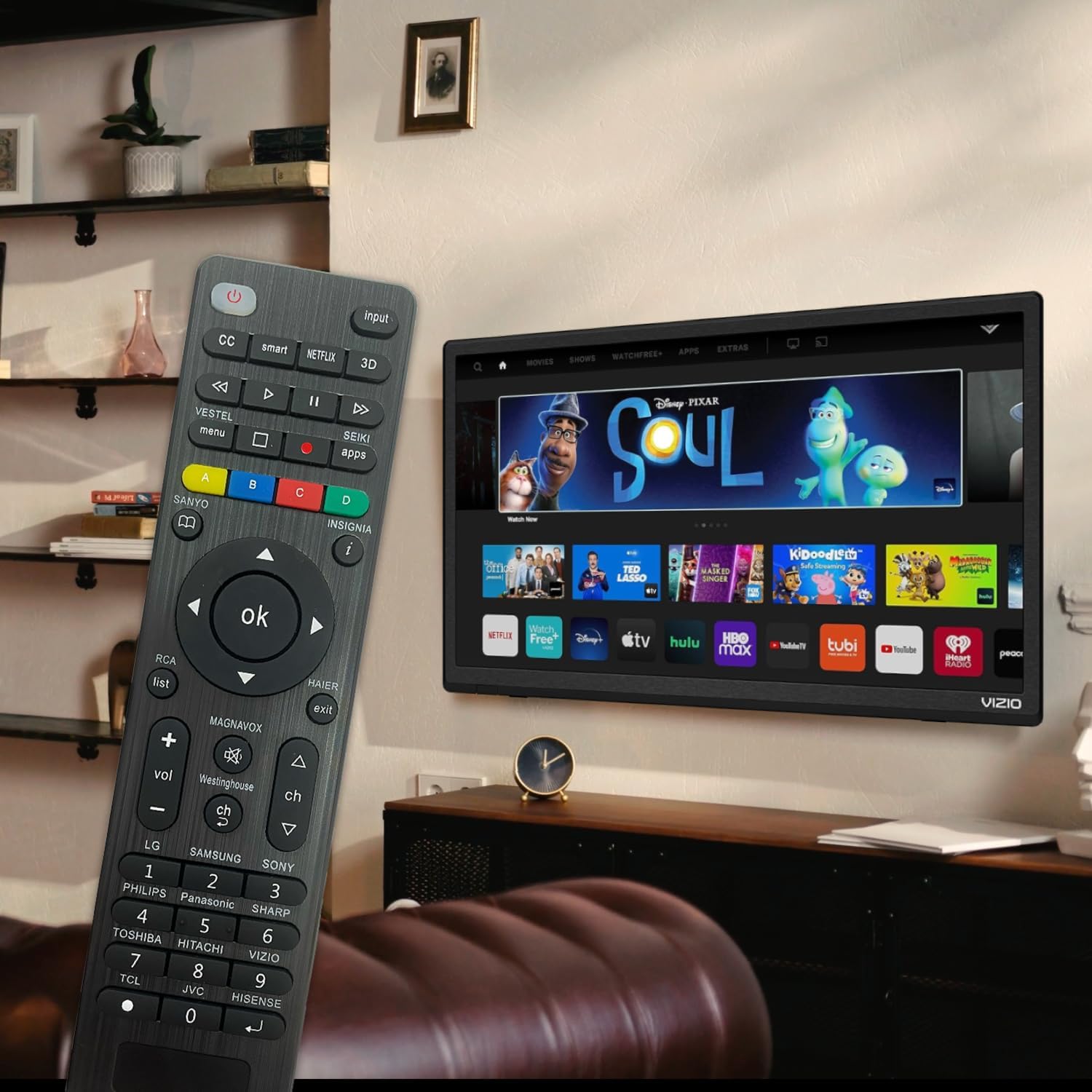
Figure 6: Remote in use with a Smart TV
4. Întreținere
- curatenie: Folosiți o lavetă moale și uscată pentru a curăța telecomanda. Nu utilizați agenți de curățare lichizi sau materiale abrazive, deoarece acestea pot deteriora suprafața sau componentele interne.
- Înlocuire baterie: Replace batteries when the remote's response becomes sluggish or the LED indicator does not light up. Always replace both batteries at the same time with new AAA batteries. Do not mix old and new batteries or different types of batteries.
- Depozitare: Dacă telecomanda nu va fi utilizată pentru o perioadă lungă de timp, scoateți bateriile pentru a preveni scurgerile și eventualele deteriorări. Depozitați telecomanda într-un loc răcoros și uscat, ferit de lumina directă a soarelui și de temperaturi extreme.
- Durabilitate: The remote features upgraded material with a metal dome added to the control buttons for enhanced flexibility and extended life. Avoid dropping the remote or exposing it to excessive force.
5. Depanare
| Problemă | Cauza posibila | Soluţie |
|---|---|---|
| Telecomanda nu funcționează. | Batteries are dead or inserted incorrectly. Remote is not paired with the TV. Obstruction between remote and TV. | Check and replace batteries, ensuring correct polarity. Re-attempt Brand Setting or Code Setting. Ensure clear line of sight to TV's IR receiver. |
| Unele butoane nu funcționează. | Incorrect code or partial pairing. TV does not support certain functions. | Try a different code from the manual's code list. Verify if your TV model supports the specific function. |
| Remote is slow to respond. | Baterie descărcată. Interferență. | Replace batteries. Ensure no strong light sources or other IR devices are interfering. |
| LED indicator keeps lighting up during code setting. | Cod introdus greșit. | Re-enter the correct 3 or 4-digit code from the manual's code list. |
| Cannot find my TV brand button. | Brand not listed on dedicated buttons. | Use the Code Setting Method (Section 2.2) with the provided code list. |
If issues persist, please refer to the original product packaging for customer support contact information or visit the manufacturer's website-ul.
6. Specificații
- Număr de model: BVTVRemote-01
- Dimensiuni produs: 1.38 x 0.6 x 6.5 inci
- Greutatea articolului: 2.39 uncii
- Bateriile necesare: 2 x AAA (nu sunt incluse)
- Culoare: Negru
- Caracteristica speciala: Programmable, Power-off Memory
- Numărul maxim de dispozitive acceptate: 3 (typically for TV, DVD/Blu-ray Player, though primarily designed for TV)
- Dispozitive compatibile: Television, DVD/Blu-ray Player (Universal compatibility with major TV brands)
- Producător: BoostVision
- Țara de origine: China
7. Garanție și asistență
For warranty information, please refer to the documentation included with your purchase or contact the seller directly. This product is typically covered by a standard manufacturer's warranty against defects in materials and workmanship.
For technical support or further assistance, please contact BoostVision customer service through their official website or the contact details provided on the product packaging.
Vânzător: BoostVision TV Remote
Pagina de produs Amazon: https://www.amazon.com/dp/B0DHCZB2DT
Ask a question about this manual
Ask about setup, troubleshooting, compatibility, parts, safety, or missing instructions. Manuals+ will review the question and use this page’s manual context to help answer it.