
Introducere
Thank you for choosing the MARK ADLER Xeno 7.6 Electric Dual Motor Desk Frame. This manual provides detailed instructions for the assembly, operation, maintenance, and troubleshooting of your new height-adjustable desk frame. Please read this manual carefully before installation and use to ensure proper function and safety.
Informații de siguranță
Pentru a preveni vătămările corporale sau deteriorarea produsului, vă rugăm să respectați următoarele instrucțiuni de siguranță:
- Nu depășiți capacitatea maximă de încărcare de 80 kg (176 lbs).
- Ensure all cables are properly routed and secured to avoid entanglement during height adjustments.
- Țineți copiii și animalele de companie departe de birou în timpul funcționării.
- Use the anti-collision system with caution to prevent damage or injury.
- Do not place hands or other body parts near moving parts of the frame.
- Only use the desk frame indoors in a dry environment.
- If any unusual sounds or movements occur, immediately stop operation and consult the troubleshooting section or contact support.
Configurare și asamblare
The MARK ADLER Xeno 7.6 desk frame requires assembly. It is recommended that two people assemble the desk frame for ease and safety.
Conținutul pachetului
Before starting assembly, verify that all components are present. The package includes the electric dual motor desk frame, control panel, and necessary mounting hardware. A desktop is not included and must be purchased separately.
Etapele de asamblare
- Despachetați componente: Scoateți cu grijă toate piesele din ambalaj și așezați-le pe o suprafață curată și moale pentru a preveni zgârieturile.
- Assemble Legs and Crossbars: Attach the lifting columns to the feet and then connect the crossbars. Ensure all screws are tightened securely.
- Install Motors and Control Box: Mount the dual motors and the control box according to the diagrams. Connect all motor and power cables to the control box.
- Atașați panoul de control: Secure the control panel to the desired location on the desk frame, typically on the front edge.
- Montare desktop: Place your chosen desktop (120-150 cm width recommended) onto the assembled frame. Secure the desktop to the frame using appropriate screws. The frame supports both left and right-hand L-shaped configurations.
- Organizare de cabluri: Route all cables neatly using cable ties or clips to prevent them from interfering with the desk's movement.
- Atașați accesorii: Install the included headphone hook and bag holder as desired.

Image: MARK ADLER Xeno 7.6 Desk Frame layout showing dimensions and components. The frame is adjustable from 72 cm to 118 cm in height, and accommodates desktops from 105 cm to 150 cm in width on the main section, and 108 cm on the return section, with a depth of 58 cm.
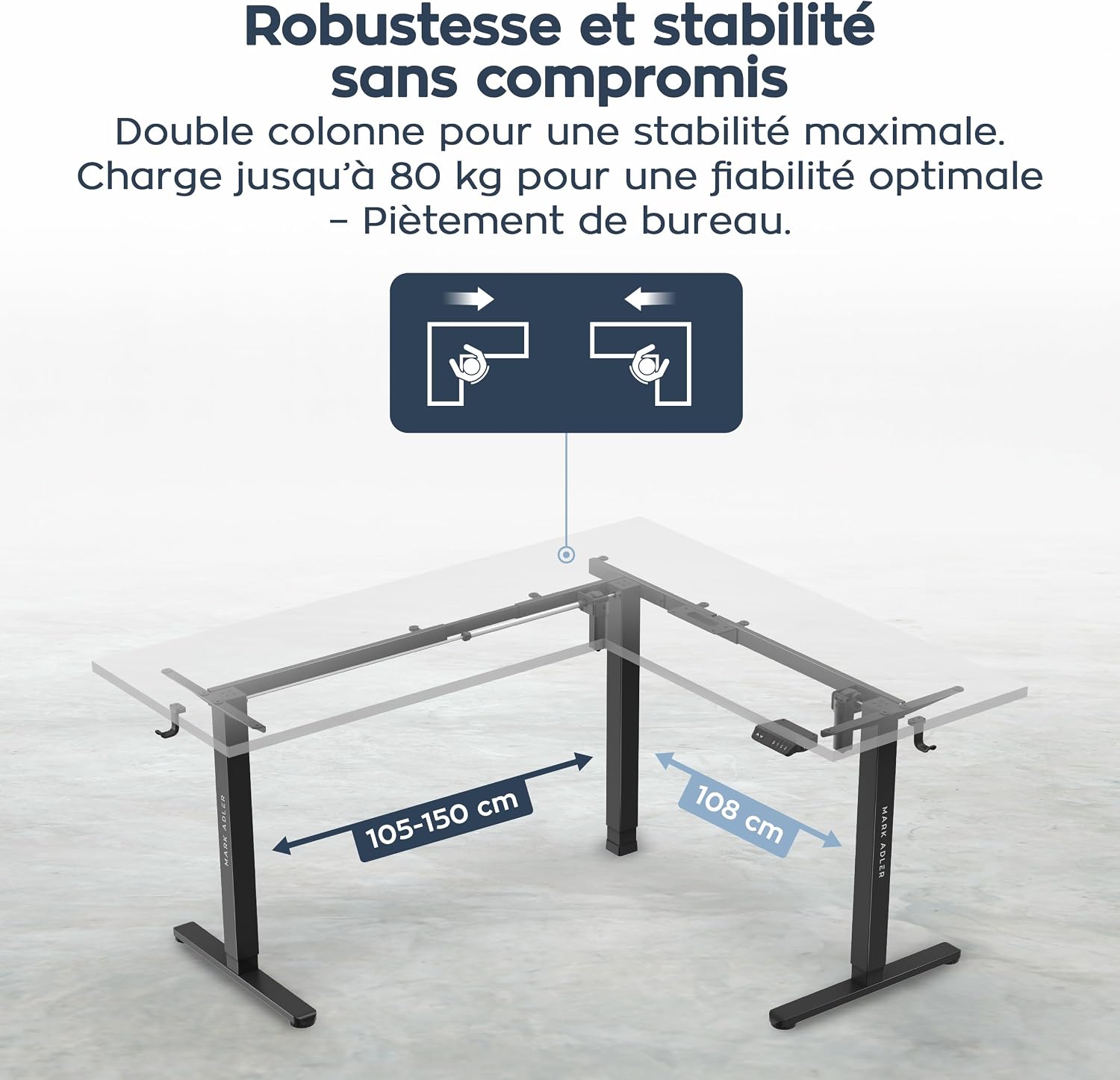
Image: Diagram illustrating the robust and stable construction of the MARK ADLER Xeno 7.6 desk frame, highlighting its dual column design and adjustable width for different desktop sizes.
Instrucțiuni de operare
The MARK ADLER Xeno 7.6 desk frame features an intuitive control panel for easy height adjustment and memory functions.
Funcțiile panoului de control

Image: Close-up of the MARK ADLER Xeno 7.6 control panel, showing the up/down arrows, memory buttons (1, 2, 3), and integrated USB and USB-C charging ports.
- Reglarea înălțimii: Utilizați ▲ (Sus) şi ▼ (Jos) arrow buttons to manually adjust the desk height. The height range is from 72 cm to 118 cm.
- Presetari de memorie: The control panel has three programmable memory positions (1, 2, 3).
- To save a height: Adjust the desk to your desired height. Press the "S" button, then press one of the number buttons (1, 2, sau 3) within 3 seconds. The display will show "S-" followed by the number to confirm.
- To recall a saved height: Simply press the corresponding number button (1, 2, sau 3Biroul se va muta automat în poziția salvată.
- Porturi de încărcare USB: The integrated USB and USB-C ports allow you to conveniently charge your devices directly from the desk.

Image: Graphic illustrating the height adjustment range of the MARK ADLER Xeno 7.6 desk frame, from 72 cm to 118 cm, emphasizing the smooth transition between sitting and standing positions.
Întreţinere
Regular maintenance ensures the longevity and optimal performance of your MARK ADLER Xeno 7.6 desk frame.
- curatenie: Ștergeți cadrul biroului cu o lavetă moale șiamp Evitați produsele de curățare abrazive sau solvenții care ar putea deteriora finisajul.
- Verificare cablu: Periodically inspect all cables for wear or damage. Ensure they are securely connected and not pinched.
- Strângerea șuruburilor: Occasionally check and tighten any loose screws, especially after initial assembly and a few weeks of use.
- Lubrifiere: The lifting columns are generally maintenance-free. Do not apply lubricants unless specifically instructed by the manufacturer.
Depanare
If you encounter issues with your desk frame, refer to the following common problems and solutions.
| Problemă | Cauza posibila | Soluţie |
|---|---|---|
| Biroul nu se mișcă. | Power cable disconnected, control box error, overload. | Check power connection. Unplug and replug the power cord. Reduce load if exceeding 80 kg. Perform a reset (see below). |
| Uneven movement or noise. | Loose connections, uneven load, obstruction. | Check all screws and connections. Ensure weight is evenly distributed. Remove any obstructions. |
| Funcția de memorie nu funcționează. | Memory not properly set, power interruption. | Re-program the memory positions. Perform a reset. |
| Cod de eroare afișat. | Eroare specifică de sistem. | Refer to the specific error code in the full manual (if available) or contact customer support. Often, a reset can resolve temporary errors. |
Procedura de resetare
If the desk is not functioning correctly, a reset may resolve the issue.
- Deconectați cablul de alimentare de la priza de perete.
- Așteptați cel puțin 30 secunde.
- Conectați cablul de alimentare înapoi la priza de perete.
- Țineți apăsat butonul ▼ (Jos) button until the desk reaches its lowest position and slightly retracts, then stops. This indicates a successful reset.
Specificații
| Caracteristică | Detaliu |
|---|---|
| Marca | MARK ADLER |
| Numărul de model | Xeno 7.6 |
| Design birou | Computer Desk (L-shaped frame) |
| Culoare | Negru |
| Material | Metal (cadru) |
| Interval de reglare a înălțimii | 72 cm - 118 cm (28.3 inci - 46.5 inci) |
| Recommended Desktop Width | 120 cm - 150 cm (main section) |
| Adâncime | 58 cm (22.8 inchi) |
| Capacitate maximă de încărcare | 80 kg (176 lbs) |
| Motoare | Sistem cu motor dublu |
| Poziții de memorie | 3 pozitii programabile |
| Caracteristici speciale | Electric height adjustment, Ergonomic, Memory function, USB & USB-C ports, Headphone hook, Bag holder |
| Asamblare necesară | Da (se recomandă 2 persoane) |
| Țara de origine | China |
garanție
The MARK ADLER Xeno 7.6 Electric Dual Motor Desk Frame comes with a Garanție limitată. Please refer to the warranty card included with your product or contact MARK ADLER customer support for specific terms and conditions. This warranty typically covers manufacturing defects and malfunctions under normal use.
Sprijin
For further assistance, technical support, or warranty claims, please contact MARK ADLER customer service.
- Suport online: Visit the official MARK ADLER website pentru întrebări frecvente, resurse suplimentare și formulare de contact.
- E-mail: Consultați ambalajul produsului sau instrucțiunile oficiale website pentru adresa de e-mail a serviciului de asistență pentru clienți.
- Telefon: Consultați ambalajul produsului sau instrucțiunile oficiale website cu numere de telefon pentru asistență clienți.
When contacting support, please have your product model number (Xeno 7.6) and purchase information readily available.