
Introducere
This manual provides instructions for the ZPSHYD Handheld Vacuum, Model JJ-107. This versatile 3-in-1 device functions as a vacuum cleaner, an air duster, and an inflator/vacuum sealer. Please read this manual thoroughly before operating the device to ensure safe and efficient use.
Instrucțiuni de siguranță
- Citiți toate instrucțiunile înainte de a utiliza aparatul.
- Do not immerse the device, charging cable, or plug in water or other liquids.
- Nu aspirați lichide inflamabile sau combustibile, cenușă fierbinte sau obiecte ascuțite.
- Nu lăsați dispozitivul la îndemâna copiilor.
- Use only the charging cable provided by the manufacturer.
- Do not operate the device if the charging cable or plug is damaged.
- Ensure the HEPA filter is properly installed before each use to prevent damage to the motor.
- Avoid blocking the air inlet or outlet during operation.
- Depozitați dispozitivul într-un loc uscat atunci când nu îl utilizați.
Produs terminatview
Familiarize yourself with the components of your ZPSHYD Handheld Vacuum.
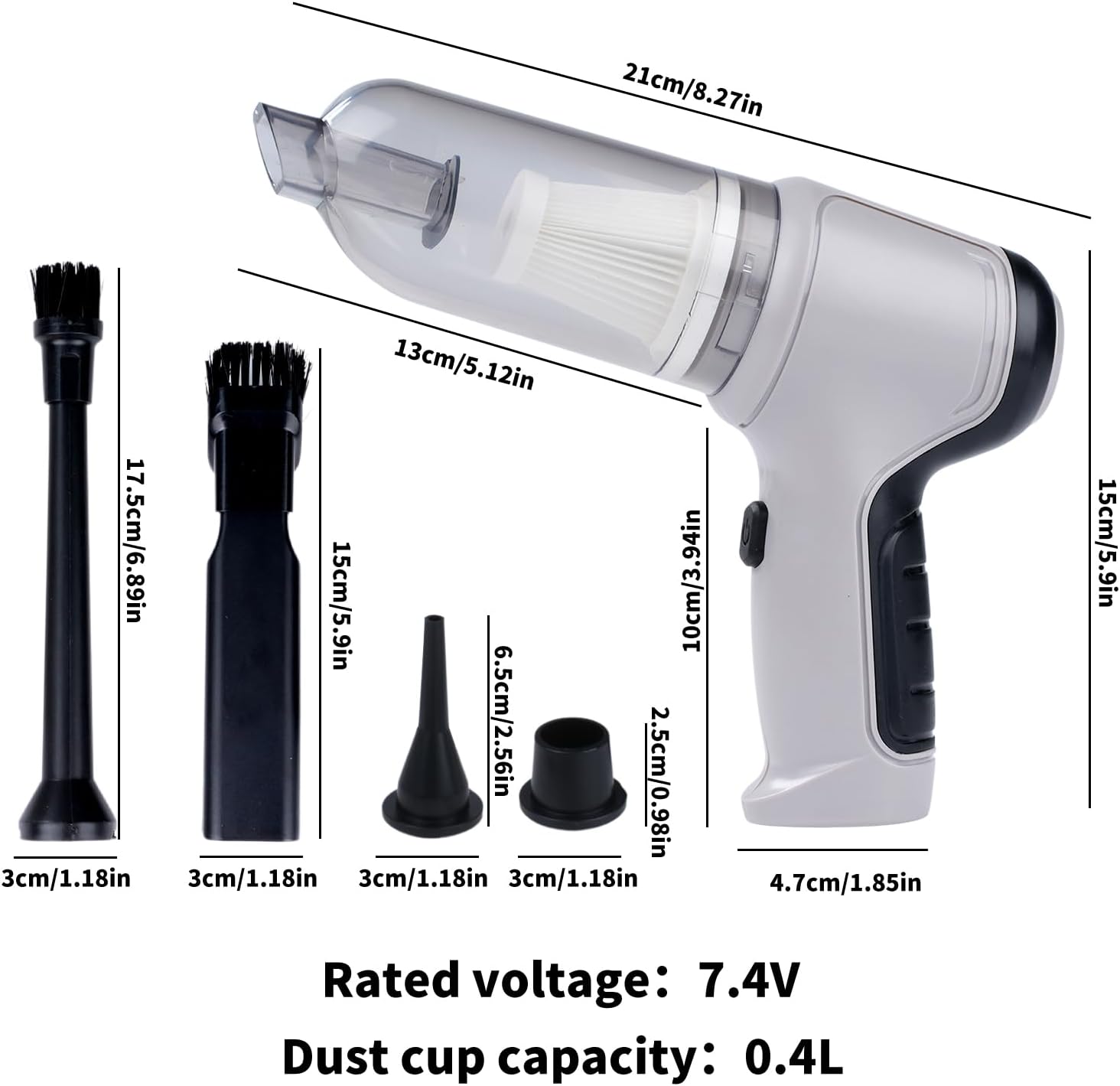
Figura 1: Main components of the ZPSHYD Handheld Vacuum.

Figura 2: Detaliat view of key features including air outlet, handle, switch, and removable dustbin.
Componente incluse:
- 1 x Aspirator portabil
- 1 x Dust Collector Cover
- 1 x filtru HEPA
- 2 x Inflation Nozzles (various sizes)
- 2 x Suction Nozzles (one with removable brush)
- 1 x cablu de încărcare USB
Înființat
1. Încărcarea dispozitivului
Before first use, fully charge the vacuum cleaner. Connect the provided USB charging cable to the charging port on the device and plug the other end into a compatible USB power adapter (not included) or a USB port. The indicator light will show charging status (refer to device for specific light behavior, typically red for charging, green for full).
2. Atașarea accesoriilor
Depending on the desired function, select the appropriate nozzle and firmly attach it to the device's inlet (for vacuuming) or outlet (for blowing/inflating).
Instrucțiuni de operare
1. Funcția de aspirare
- Ensure the dust collection bin and HEPA filter are securely in place.
- Attach the desired suction nozzle to the vacuum inlet. For car interiors or tight spaces, use the narrow nozzle. For surfaces requiring agitation, use the brush nozzle.
- Press the power button (one-button switch) to turn on the vacuum.
- Îndreptați duza spre zona de curățat.
- After cleaning, press the power button again to turn off the device.

Figura 3: Using the vacuum for car interior cleaning.
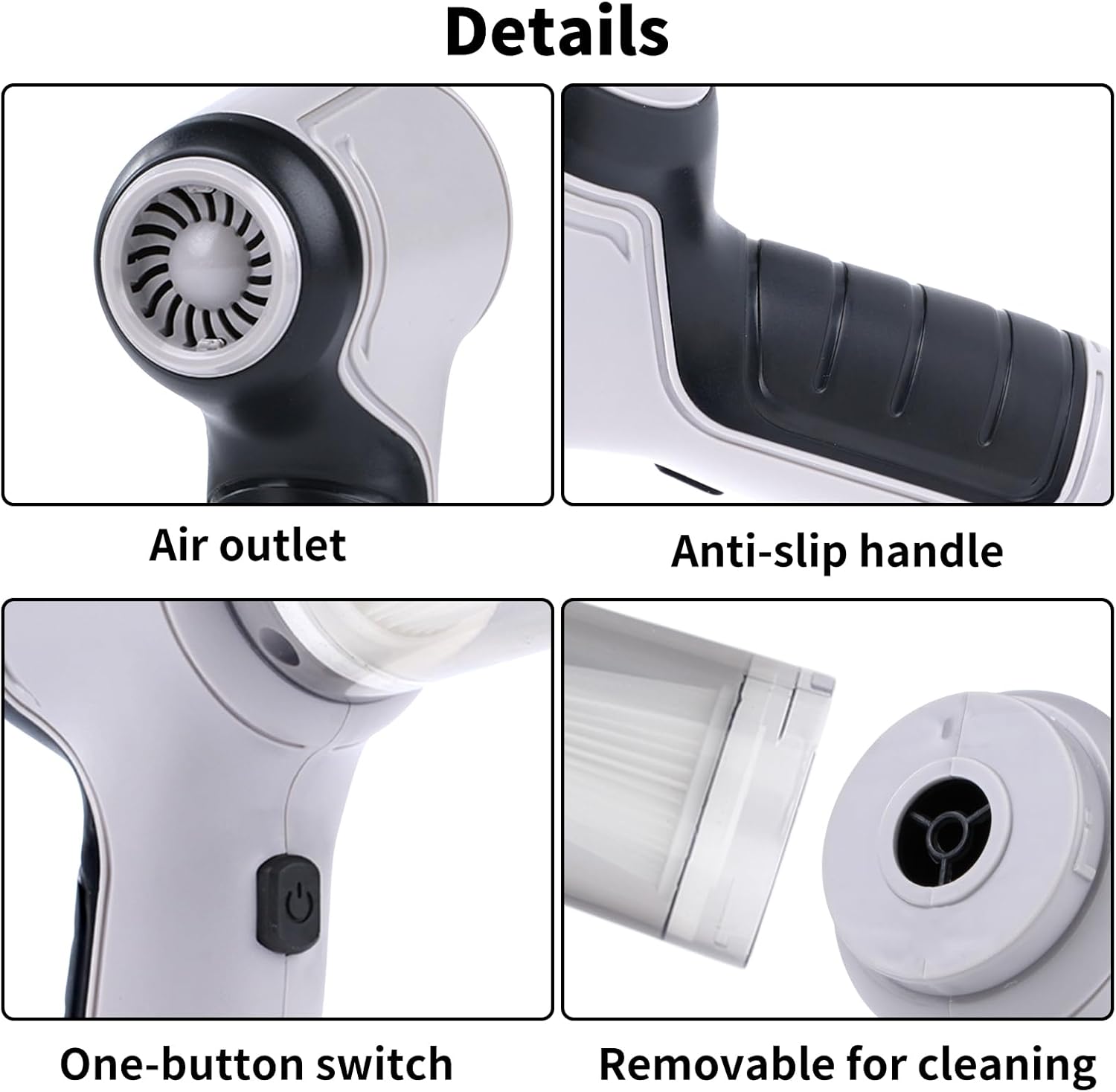
Figura 4: Demonstrating strong suction power for various debris.
2. Air Duster Function
- Attach a suitable nozzle to the air outlet of the device.
- Press the power button to activate the blowing function.
- Use the directed airflow to remove dust from keyboards, electronics, or other delicate surfaces.
- Apăsați butonul de pornire pentru a opri.

Figura 5: Using the air duster for keyboard cleaning.
3. Inflator Function
- Select the appropriate inflation nozzle and attach it firmly to the air outlet.
- Insert the nozzle into the inflation valve of the item (e.g., swimming ring, small inflatable).
- Press the power button to begin inflation.
- Monitor the inflation and turn off the device once the item is adequately inflated.

Figura 6: Inflating a swimming ring with the device.
4. Vacuum Sealer Function
- Attach the vacuum sealing nozzle to the air outlet.
- Place the nozzle over the air valve of a compatible vacuum storage bag.
- Press the power button to start extracting air from the bag.
- Turn off the device once the desired vacuum level is achieved.

Figura 7: Using the device for vacuum sealing.
Întreţinere
1. Golirea recipientului de colectare a prafului
The transparent dust collection bin allows for easy monitoring of its fill level. When full, detach the bin from the main unit and empty its contents into a waste receptacle. Reattach the bin securely.
2. Curățarea filtrului HEPA
The HEPA filter should be cleaned regularly to maintain optimal suction power. Remove the filter from the dust collection bin. Tap it gently to dislodge dust or rinse it under running water. Ensure the filter is completely dry before reinserting it into the device. Do not use the vacuum without a dry filter.
3. Curățenie generală
Ștergeți exteriorul aspiratorului cu o lavetă moale șiamp cloth. Do not use harsh chemicals or abrasive cleaners. Ensure the device is turned off and unplugged before cleaning.
Depanare
| Problemă | Cauza posibila | Soluţie |
|---|---|---|
| Dispozitivul nu pornește | Bateria este descărcată | Încărcați complet dispozitivul. |
| Butonul de pornire nu a fost apăsat corect | Asigurați-vă că apăsați ferm butonul de pornire. | |
| Putere de aspirare slabă | Dust collection bin is full | Goliți recipientul de colectare a prafului. |
| HEPA filter is clogged | Curățați sau înlocuiți filtrul HEPA. | |
| Nozzle attachment is loose or blocked | Check and secure the nozzle; clear any blockages. | |
| Dispozitivul nu se încarcă | USB cable or power adapter faulty | Încercați un alt cablu USB sau adaptor de alimentare. |
| Portul de încărcare este murdar sau deteriorat | Clean the charging port carefully or contact support. |
Specificații
Figura 8: Dimensiunile produsului și specificațiile cheie.
- Marca: ZPSHYD
- Număr de model: JJ-107
- Sursa de alimentare: Alimentat cu baterie (litiu-ion)
- Voltage: 5 Volts (Rated voltage: 7.4V from image)
- Wattage: 50 wați
- Putere de aspirare: 6000 Pa
- Tip filtru: Filtrul HEPA
- Capacitate cupa de praf: 0.4 litri
- Greutatea articolului: 1.1 lire sterline
- Dimensiuni articol (L x l x H): 8.6" x 6.3" x 2.6" (21cm x 16cm x 6.6cm)
- Tehnologie de conectivitate: USB
- Caracteristici speciale: Cordless, 3-in-1 (Vacuum, Blower, Inflator/Vacuum Sealer)
- Utilizări recomandate: Mașină, Acasă
Garanție și suport
For warranty information, product registration, or customer support, please refer to the documentation included with your purchase or contact ZPSHYD customer service directly through their official website or the retailer where the product was purchased. Please have your model number (JJ-107) and purchase date available when contacting support.