
Cleer Arc 3
Cleer ARC 3 Open Ear Headphones User Manual
Model: Arc 3 | Brand: Cleer
1. Introducere
The Cleer ARC 3 Open Ear Headphones offer a unique audio experience with their comfortable, ergonomic design and advanced features. These true wireless earbuds provide crystal-clear sound with Dolby Atmos and Snapdragon Sound, ensuring an immersive listening experience while maintaining situational awareness. Designed for active lifestyles, they are IPX7 waterproof and come with a smart charging case featuring UV sterilization.

Image: Cleer ARC 3 Open Ear Headphones and their smart charging case.

Image: A person wearing the Cleer ARC 3 headphones, highlighting their ultra-light open-ear design for all-day comfort with zero-degree elastic silicone ear hooks.
2. Ce se află în cutie
- Cleer ARC 3 Open Ear Headphones
- Charging Case with Built-in Sterilization using UV-C
- Cablu de încărcare USB-C la USB-A
- Manual de utilizare
3. Configurare
3.1 Initial Power On & Charging
Before first use, ensure your Cleer ARC 3 headphones and charging case are fully charged. Connect the USB-C to USB-A charging cable to the case and a power source. The case features an FHD display to show battery levels.

Image: The Cleer ARC 3 headphones in their charging case, illustrating the total 50 hours of battery life (10 hours from headphones + 40 hours from case).
3.2 Asociere Bluetooth
The Cleer ARC 3 headphones support Bluetooth 5.4 and multi-point connection, allowing simultaneous pairing with two devices.
Option 1: First-time Pairing (via MFB on case)
- Remove the protective film from the earbuds and long-press the Multi-Function Button (MFB) on the case for 2 seconds to power on the ARC 3.
- The ARC 3 will automatically enter pairing mode.
- Turn on Bluetooth on your device and ensure it is in pairing mode. Select "Cleer ARC 3" from the list of available Bluetooth devices.
Option 2: Using Touchpad Controls for Pairing
- Tap the touchpad on either headphone 5 times and wait for the LED indicators to blink red and white, signaling that the ARC 3 is in pairing mode.
- Turn on Bluetooth on your device and ensure it is in pairing mode. Select "Cleer ARC 3" from the list of available Bluetooth devices.
Option 3: Using the Charging Case for Pairing
- Place both headphones into the charging case and close the lid.
- On the "Auxiliary" page of your charging case's touch screen, select the "Pairing Mode."
- Open the charging case, and the headphones will enter pairing mode.
- Turn on Bluetooth on your device and ensure it is in pairing mode. Select "Cleer ARC 3" from the list of available Bluetooth devices.

Image: Visual guide for three different pairing methods: First pairing via MFB, Touchpad pairing, and Charging case pairing.
Video: Official Cleer ARC 3 pairing instructions, demonstrating how to connect your headphones to a device.
4. Utilizarea căștilor
4.1 Controale de bază
The ARC 3 headphones feature intuitive touch controls for managing playback, calls, and volume. You can also control these functions directly from the smart charging case's FHD display or via the Cleer+ App.

Image: Various methods to control volume: via phone, charging case touch screen, touchpad on headphones, or voice control.
4.2 Smart Features & Audio Quality
Experience enhanced audio with Dolby Atmos and Snapdragon Sound. The 16.2mm drivers deliver spatial sound, optimized for Dolby Atmos head tracking for an immersive experience.

Image: A woman wearing the Cleer ARC 3 headphones, illustrating the powerful sound optimized for Dolby Atmos and featuring Snapdragon Sound.
- Dolby Atmos & Head Tracking: Activate these features via the charging case display or Cleer+ App for a dynamic, spatial audio experience.
- Control adaptiv al volumului: Automatically adjusts audio based on your surroundings for consistent listening.
- Controlul miscarii: Enable head gesture commands for hands-free operation (e.g., nod twice to pick up calls).
- Control vocal: Folosește comenzi vocale pentru diverse funcții.
- Setări EQ: Personalizează-ți profesionistul de sunetfile (Rock, Flat, Jazz, Classical, Pop, Custom) directly from the charging case or Cleer+ App.
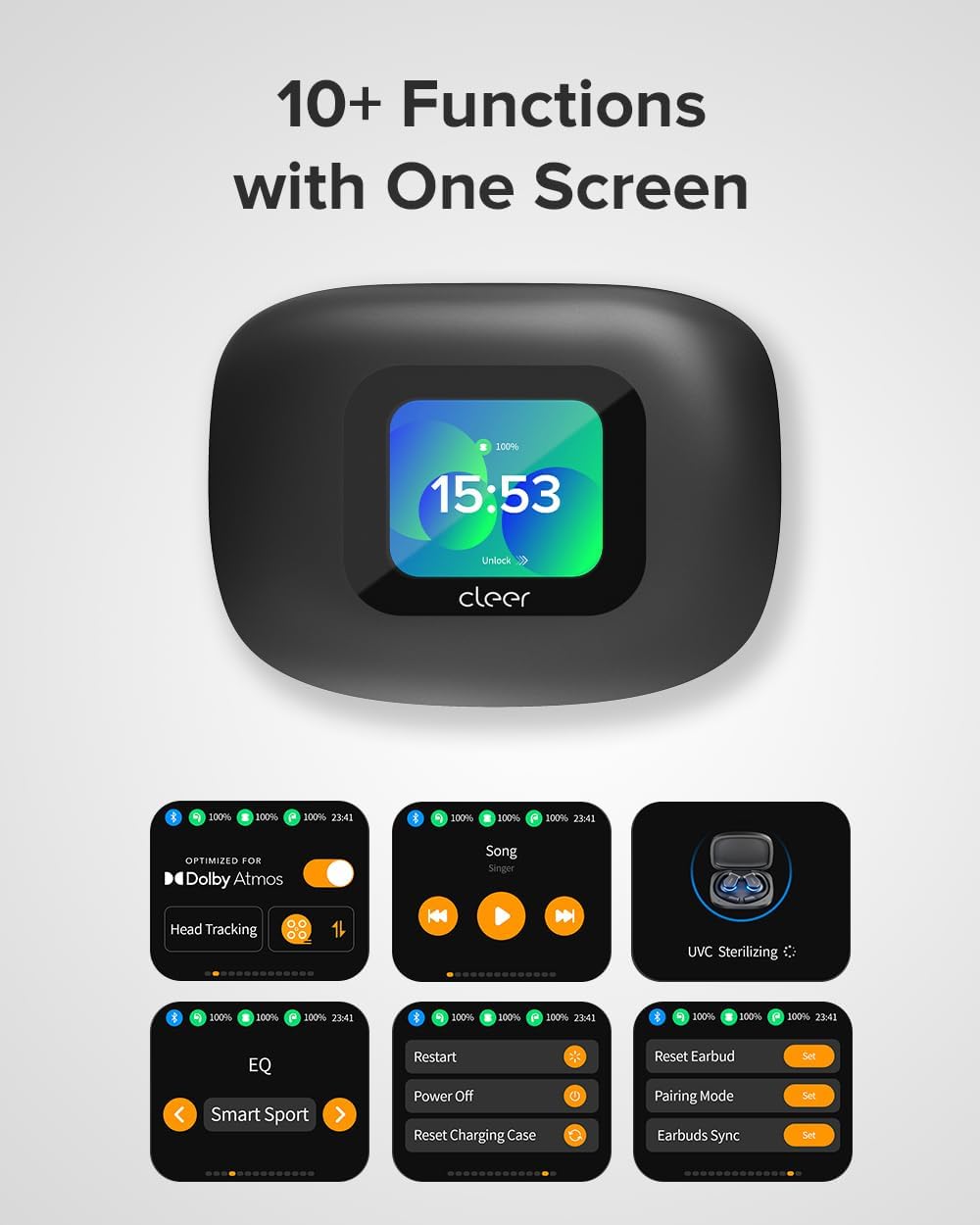
Image: The smart case display showcasing over 10 functions, including Dolby Atmos settings, EQ, UVC Sterilizing, and pairing options.
Video: Official Cleer video highlighting the ARC 3's features, including the smart case display and adaptive volume control.
Video: Official Cleer video demonstrating the ARC 3's optimization for Dolby Audio and its revolutionary open-ear design.
4.3 Cleer+ App
Download the Cleer+ App from the Apple App Store or Google Play Store to unlock full customization options, including EQ settings, motion control activation, and firmware updates.

Image: The Cleer+ App interface showing options for music mode, movie mode, head tracking, Smart Sport EQ, motion control, and intelligent voice control.
5. Întreținere
5.1 Durata de viață a bateriei și încărcarea
The headphones offer up to 10 hours of playtime on a single charge, with an additional 40 hours provided by the wireless charging case, totaling 50 hours of continuous performance. A quick 10-minute charge can provide 2.5 hours of listening time.
The charging case itself takes 2.5 hours to fully charge.
5.2 Sterilizare UV
The smart charging case features built-in UV-C light sterilization. When the earbuds are placed inside and the lid is closed, the UV-C light activates to sanitize your headphones, ensuring they are clean for your next use.

Image: The multifunctional charging case sterilizes the headphones with UV-C light when the case lid is closed.
5.3 Rezistența la apă
The Cleer ARC 3 headphones are IPX7 waterproof, making them resistant to sweat, rain, and accidental splashes. They are built to endure intense workouts and outdoor adventures.

Image: Cleer ARC 3 headphones with water droplets, indicating their IPX7 sweat-resistant and waterproof capabilities.
6. Depanare
- Nu se poate realiza asocierea: Ensure both earbuds are charged. Try resetting the earbuds via the charging case display or the Cleer+ App. Make sure Bluetooth is enabled on your device and "Cleer ARC 3" is selected.
- Fără sunet/Volum redus: Check the volume levels on both your connected device and the headphones. Ensure the earbuds are properly seated on your ears.
- Earbud Finder: If you misplace an earbud, use the "Find My Earbuds" feature on the charging case's display to emit a sound from the lost earbud.
- Probleme de actualizare a firmware-ului: Ensure the headphones and case are sufficiently charged and maintain a stable connection during firmware updates via the Cleer+ App.
7. Specificații
| Caracteristică | Detaliu |
|---|---|
| Numele modelului | Cleer Audio ARC 3 |
| Factor de formă | True Wireless |
| Plasarea urechii | Deschide Urechea |
| Tehnologia de conectivitate | Wireless, Bluetooth (5.4) |
| Tip de driver audio | Difuzor dinamic (16.2 mm) |
| Durata de viață a bateriei (căști) | 10 de ore |
| Durata de viață a bateriei (cu carcasă) | 50 de ore |
| Timp de încărcare (căști) | 0.5 de ore |
| Timp de încărcare (carcasă) | 2.5 de ore |
| Nivel de rezistență la apă | IPX7 (rezistent la apă) |
| Greutatea articolului | 12 grams (each earbud) / 130.02 Grams (total) |
| Tip control | Control tactil, Control volum, Control prin aplicație, Control vocal |
| Caracteristici speciale | Dolby Atmos, Snapdragon Sound, FHD Display, UV-C Sterilization, Multi-Point Connection, Head Gesture Commands, Adaptive Volume Control |
8. Garanție și asistență
For detailed warranty information and customer support, please refer to the official Cleer website-ul sau manualul de utilizare complet în format PDF, furnizat împreună cu produsul.
You can access the full User Manual PDF Aici.
Protection plans are also available for extended coverage.