
1. Introducere
This manual provides detailed instructions for the proper use, setup, operation, and maintenance of your EBTOOLS Bluetooth Headset. Please read this manual thoroughly before using the product to ensure optimal performance and longevity.
2. Produs terminatview
2.1 Caracteristici cheie
- Microfon rotativ: Easily adjust the microphone to the optimal angle for clear voice capture.
- Tehnologie Bluetooth 5.0: Ensures faster, more efficient, and stable wireless connectivity with compatible devices.
- Design confortabil: Single-ear design with padded ear cushion and flexible headband for extended wear without discomfort.
- Durată lungă de viață a bateriei: Up to 17 hours of talk time and 200 hours of standby time on a 2-hour charge.
- Universal Compatibilitate: Works with laptops, cell phones, PCs, tablets, and other Bluetooth-enabled devices. Ideal for office, home, remote work, call centers, VoIP, and Skype.
2.2 Conținutul pachetului
Verificați dacă toate articolele sunt prezente în colet:
- EBTOOLS Bluetooth Headset
- Baza de incarcare
- Cablu de încărcare micro USB
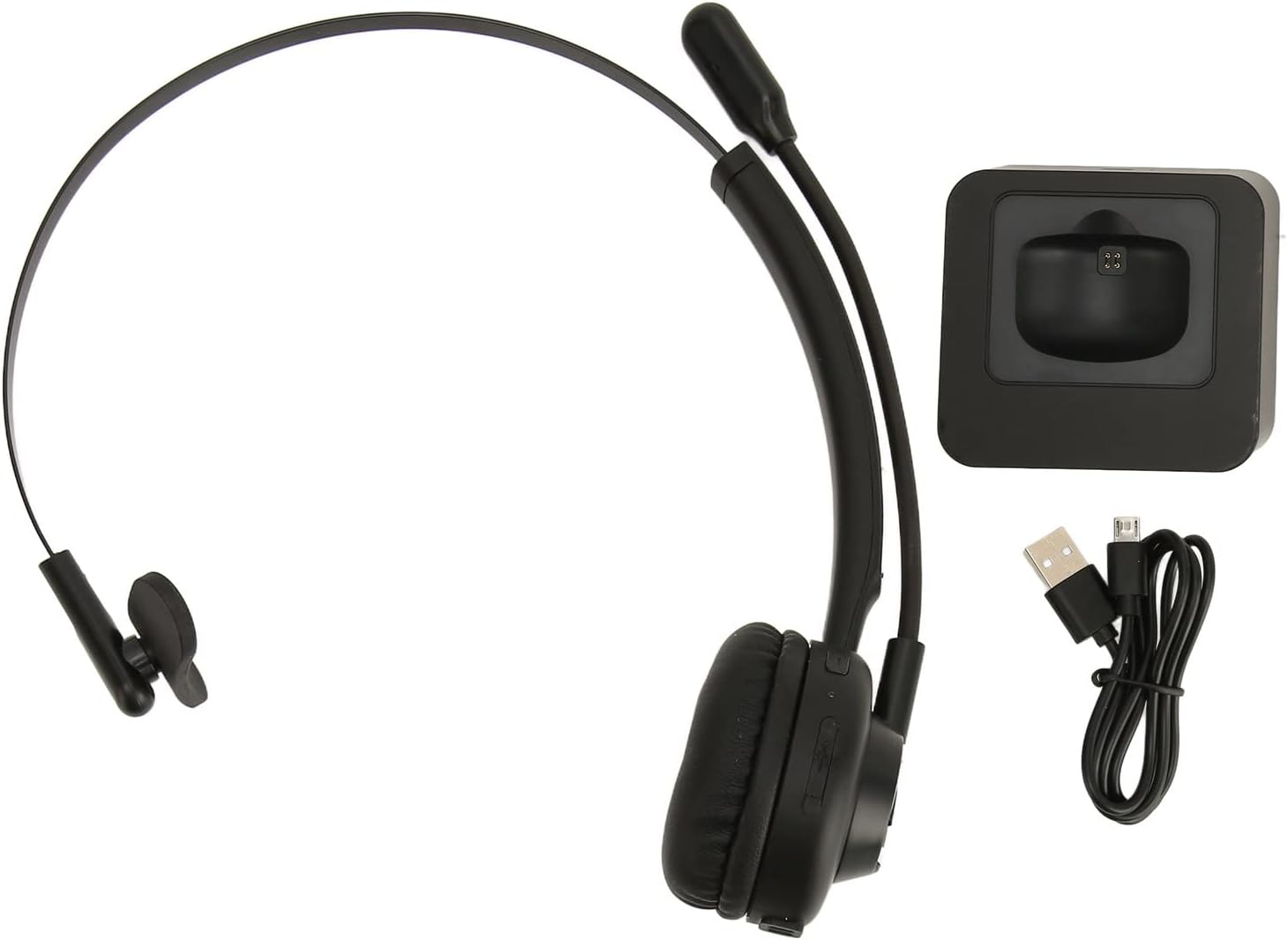
Image: The EBTOOLS Bluetooth Headset, its dedicated charging base, and a Micro USB charging cable, illustrating the complete package contents.
2.3 Headset Controls and Indicators

Image: A detailed diagram highlighting the Micro USB port, LED indicator, Volume Down button, Multifunctional button, and Volume Up button on the EBTOOLS Bluetooth Headset.
- Port micro USB: For direct charging of the headset.
- Indicator LED: Afișează starea de alimentare, încărcare și asociere.
- Buton Volum: Reduce volumul audio.
- Buton multifuncțional: Controls power, pairing, call answer/end, and music playback.
- Volum + Buton: Mărește volumul audio.
3. Configurare
3.1 Încărcarea căștilor
Before first use, fully charge the headset. You can charge it using the included charging base or directly via the Micro USB port.
- Connect the Micro USB cable to the charging base and a power source (e.g., computer USB port, USB wall adapter).
- Place the headset onto the charging base, ensuring the charging contacts align. The LED indicator on the headset will show charging status.
- Alternatively, connect the Micro USB cable directly to the headset's Micro USB port and a power source.
- A full charge typically takes approximately 2 hours. The LED indicator will change color or turn off once fully charged.

Imagine: Un prim-plan view of the headset's earcup, showing the charging contacts designed to connect with the charging base.
3.2 Împerecherea cu un dispozitiv Bluetooth
Pentru a conecta căștile la un dispozitiv:
- Asigurați-vă că setul cu cască este oprit.
- Țineți apăsat butonul Buton multifuncțional for approximately 5-7 seconds until the LED indicator flashes red and blue alternately, indicating pairing mode.
- On your device (phone, PC, tablet), enable Bluetooth and search for new devices.
- Select "EBTOOLS Headset" (or similar name) from the list of available devices.
- Once connected, the LED indicator on the headset will typically flash blue slowly or turn solid blue.
- Dacă vi se solicită o parolă, introduceți „0000”.
3.3 Purtarea căștilor
The headset is designed for comfort and flexibility.
- Adjust the flexible headband to fit comfortably over your head.
- The single ear design allows you to remain aware of your surroundings.
- Rotate the microphone boom to position it close to your mouth for optimal voice clarity. The microphone can be rotated 180 degrees to be worn on either the left or right ear.

Image: A person wearing the EBTOOLS Bluetooth Headset, demonstrating the comfortable fit and the adjustable, rotatable microphone positioned for clear communication.
4. Instrucțiuni de utilizare
4.1 Pornire/Oprire
- Pornire: Țineți apăsat butonul Buton multifuncțional for approximately 3 seconds until the LED indicator flashes blue.
- Oprire: Țineți apăsat butonul Buton multifuncțional for approximately 3-5 seconds until the LED indicator flashes red and then turns off.
4.2 Reglarea volumului
- Apăsați tasta Volum + Buton to increase the listening volume.
- Apăsați tasta Volum - Buton pentru a reduce volumul de ascultare.
4.3 Gestionarea apelurilor
- Răspunde la apel: Apăsați scurt pe Buton multifuncțional când sună un apel primit.
- Terminare apel: Apăsați scurt pe Buton multifuncțional în timpul unui apel.
- Respinge apelul: Țineți apăsat butonul Buton multifuncțional for approximately 2 seconds when an incoming call rings.
- Reapelează ultimul număr: Apăsați de două ori pe Buton multifuncțional când nu sunteți într-un apel.
4.4 Music Playback (if supported by device)
- Redare/Pauză: Apăsați scurt pe Buton multifuncțional.
- Următoarea piesă: Țineți apăsat butonul Volum + Buton.
- Pista anterioară: Țineți apăsat butonul Volum - Buton.
4.5 Utilizarea microfonului
The rotatable microphone ensures your voice is captured clearly.
- Adjust the microphone boom to be approximately 1-2 inches from your mouth.
- The microphone can be rotated 180 degrees to allow wearing the headset on either the left or right ear.

Imagine: Un prim-plan view of the EBTOOLS headset's flexible microphone boom, highlighting its design for optimal voice pickup.
5. Întreținere
5.1 Curățare
- Ștergeți căștile cu o lavetă moale, uscată sau ușor tamponată.amp pânză.
- Nu utilizați substanțe chimice dure, solvenți de curățare sau detergenți puternici.
- Evitați pătrunderea umezelii în orice deschidere.
5.2 Îngrijirea bateriei
- Încărcați setul cu cască în mod regulat, chiar dacă nu îl utilizați frecvent, pentru a menține bateria sănătoasă.
- Evitați descărcarea completă frecventă a bateriei.
- Depozitați setul cu cască într-un loc răcoros și uscat, ferit de temperaturi extreme.
6. Depanare
Dacă întâmpinați probleme cu setul cu cască, consultați următoarele soluții comune:
| Problemă | Soluție posibilă |
|---|---|
| Căștile nu pornesc. | Ensure the headset is charged. Connect it to the charging base or directly via USB. |
| Nu se poate realiza asocierea cu dispozitivul. | Ensure the headset is in pairing mode (LED flashing red/blue). Turn off and on your device's Bluetooth. Delete previous pairings on your device and try again. Ensure the headset is within range (typically 10 meters). |
| Niciun sunet sau volum redus. | Increase volume on both the headset and your connected device. Ensure the headset is selected as the audio output device on your computer or phone. Re-pair the headset. |
| Microfonul nu funcționează. | Ensure the microphone is positioned correctly. Check microphone settings on your connected device to ensure the headset is selected as the input device. |
| Conexiune intermitentă. | Move closer to your connected device. Avoid obstacles between the headset and device. Reduce interference from other wireless devices. |
7. Specificații
| Caracteristică | Detaliu |
|---|---|
| Nume de marcă | EBTOOLS |
| Numărul de model | EBTOOLSrsgvuyg5fc |
| Tehnologia de conectivitate | Bluetooth 5.0 |
| Greutatea articolului | 11.6 uncii |
| Dimensiuni pachet | 7.09 x 6.69 x 2.36 inci |
| Timp de vorbire | Până la 17 ore |
| Timp de așteptare | Până la 200 ore |
| Timp de încărcare | Aproximativ 2 ore |
8. Garanție și asistență
For warranty information or technical support, please refer to the documentation included with your purchase or contact EBTOOLS customer service through the retailer where the product was purchased. Keep your proof of purchase for warranty claims.