
Introducere
This manual provides instructions for the safe and efficient use of the TRU Components TC-12358892 TC-KW-190 USB to RS485/RS422 Serial Converter. This device facilitates communication between a computer's USB port and RS485 or RS422 serial devices. It features an integrated FTDI FT232RL chip for reliable data transfer and 4 kV ESD protection.
Informații de siguranță
- Always handle the converter with care to prevent physical damage.
- Ensure proper grounding when connecting to other devices to avoid electrical hazards.
- The device includes 4 kV ESD (Electrostatic Discharge) protection. However, it is recommended to take standard ESD precautions when handling the device, especially in dry environments.
- Do not expose the device to moisture, extreme temperatures, or corrosive substances.
- Nu încercați să deschideți sau să modificați dispozitivul. Apelați la personal calificat pentru orice operațiune de service.
Conținutul pachetului
Pachetul trebuie să conțină următorul articol:
- 1 x TRU Components TC-12358892 TC-KW-190 USB to RS485/RS422 Serial Converter
If any items are missing or damaged, please contact your supplier.
Înființat
Follow these steps to set up your USB to RS485/RS422 serial converter:
- Instalare driver: Before connecting the converter, ensure that the necessary drivers for the FTDI FT232RL chip are installed on your computer's operating system. These drivers are typically available from the FTDI website or your operating system's update service.
- Conectare la computer: Plug the USB Type-A connector of the converter into an available USB port on your computer. The operating system should detect the new hardware.
- Conectare la dispozitivul serial: Connect the RS485/RS422 side of the converter to your serial device using appropriate wiring. Refer to your serial device's manual for specific wiring diagrams for RS485 (2-wire or 4-wire) or RS422 connections.
- Verificați conexiunea: After connecting, check your computer's Device Manager (Windows) or equivalent system information (Linux/macOS) to confirm that the converter is recognized and assigned a COM port (Windows) or a serial device identifier.
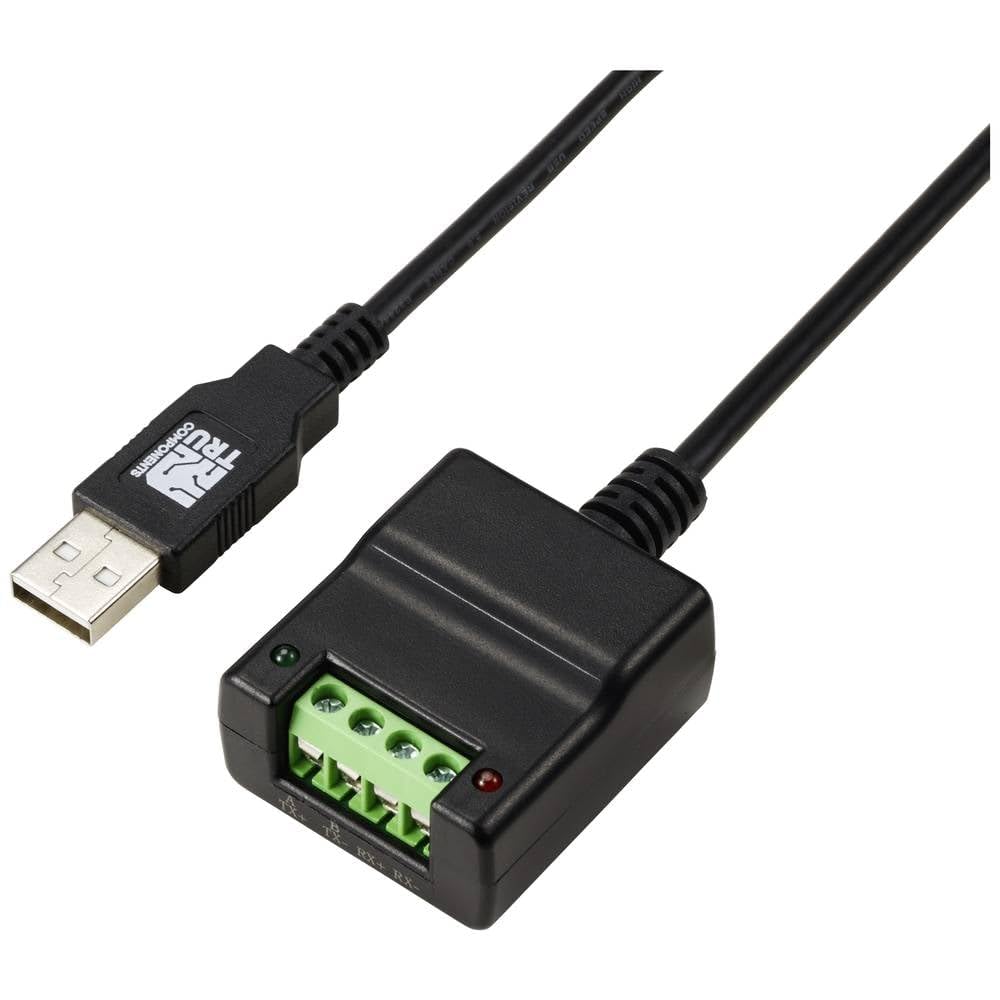
Image: TRU Components TC-12358892 TC-KW-190 USB to RS485/RS422 Serial Converter. This image shows the compact design of the converter with its USB connector on one end and the terminal block for RS485/RS422 connections on the other.
Instrucțiuni de operare
Once the converter is successfully installed and recognized by your system, you can use it with serial communication software.
- Selectați portul COM: Open your preferred serial communication software (e.g., PuTTY, Tera Term, or custom application) and select the COM port assigned to the converter.
- Configure Serial Parameters: Set the serial communication parameters (baud rate, data bits, parity, stop bits, flow control) to match those of your RS485/RS422 device. Incorrect settings will prevent communication.
- Inițiați comunicarea: Begin sending and receiving data as required by your application. The converter will transparently handle the USB to RS485/RS422 conversion.
- RS485/RS422 Mode Selection: Some converters may have jumpers or software settings to select between RS485 (2-wire/4-wire) and RS422 modes. Consult the specific documentation for the converter if such options are present.
Întreţinere
The TRU Components TC-12358892 TC-KW-190 converter requires minimal maintenance.
- Păstrați dispozitivul curat și fără praf. Folosiți o cârpă moale și uscată pentru curățare.
- Depozitați convertorul într-un loc răcoros și uscat atunci când nu îl utilizați.
- Verificați periodic conexiunile cablurilor pentru a depista orice semne de uzură sau deteriorare.
Depanare
Dacă întâmpinați probleme cu convertorul, luați în considerare următoarele:
- Dispozitiv nerecunoscut:
- Ensure drivers are correctly installed. Reinstall them if necessary.
- Încercați un alt port USB pe computer.
- Verificați dacă cablul USB este deteriorat.
- Nici o comunicare:
- Verify that the correct COM port is selected in your software.
- Double-check all serial communication parameters (baud rate, data bits, parity, stop bits, flow control) to ensure they match the connected device.
- Inspect the RS485/RS422 wiring for correct polarity and connections.
- Confirm the RS485/RS422 device is powered on and functioning correctly.
- Comunicare intermitentă:
- Check for electromagnetic interference (EMI) from other devices.
- Ensure cable lengths are within specifications for RS485/RS422.
- Verify proper termination resistors are used on the RS485/RS422 bus if required by your setup.
Specificații
| Caracteristică | Detaliu |
|---|---|
| Model | TC-12358892 (TC-KW-190) |
| Interfață | USB to RS485/RS422 |
| Chipset | FTDI FT232RL |
| Protecție ESD | 4 kV |
| Numărul de intrări | 1 x (USB) |
| Numărul de ieșiri | 1 x (RS485/RS422) |
| Greutate | 60 grame |
| Producător | COMPONENTE ADEVAATE |
Garanție și suport
For warranty information and technical support, please refer to the documentation provided with your purchase or contact TRU Components directly through their official webPăstrați dovada achiziției pentru reclamații în garanție.