
Introducere
Thank you for choosing the INIU P51L 20000mAh 45W Portable Charger. This device is designed to provide reliable and fast charging for your electronic devices on the go. Please read this manual carefully before use to ensure proper operation and to maximize the lifespan of your product.
Caracteristicile produsului
- Capacitate mare: 20000mAh battery provides multiple charges for smartphones and tablets.
- Încărcare rapidă PD de 45 W: Supports Power Delivery (PD) and Quick Charge (QC) protocols for rapid charging of compatible devices, including the latest iPhone and Samsung Galaxy models.
- Cablu USB-C încorporat: Features an integrated, durable USB-C cable for convenient charging without needing to carry extra cables.
- Ecran digital: An LED screen accurately shows the remaining battery percentage în timp real.
- Încărcare simultană: Equipped with multiple ports (USB-A, USB-C, and built-in USB-C cable) to charge up to three devices concurrently.
- Compact și ușor: Utilizes high-density TinyCell battery technology for a smaller and lighter design, making it easy to carry.
- Protecție avansată de siguranță: Incorporates an 18-layer smart protect system to safeguard against overcharge, over-discharge, over-current, short-circuit, and extreme temperatures.
Conținutul pachetului
- INIU P51L 20000mAh 45W Portable Charger
- Manual de utilizare
Produs terminatview
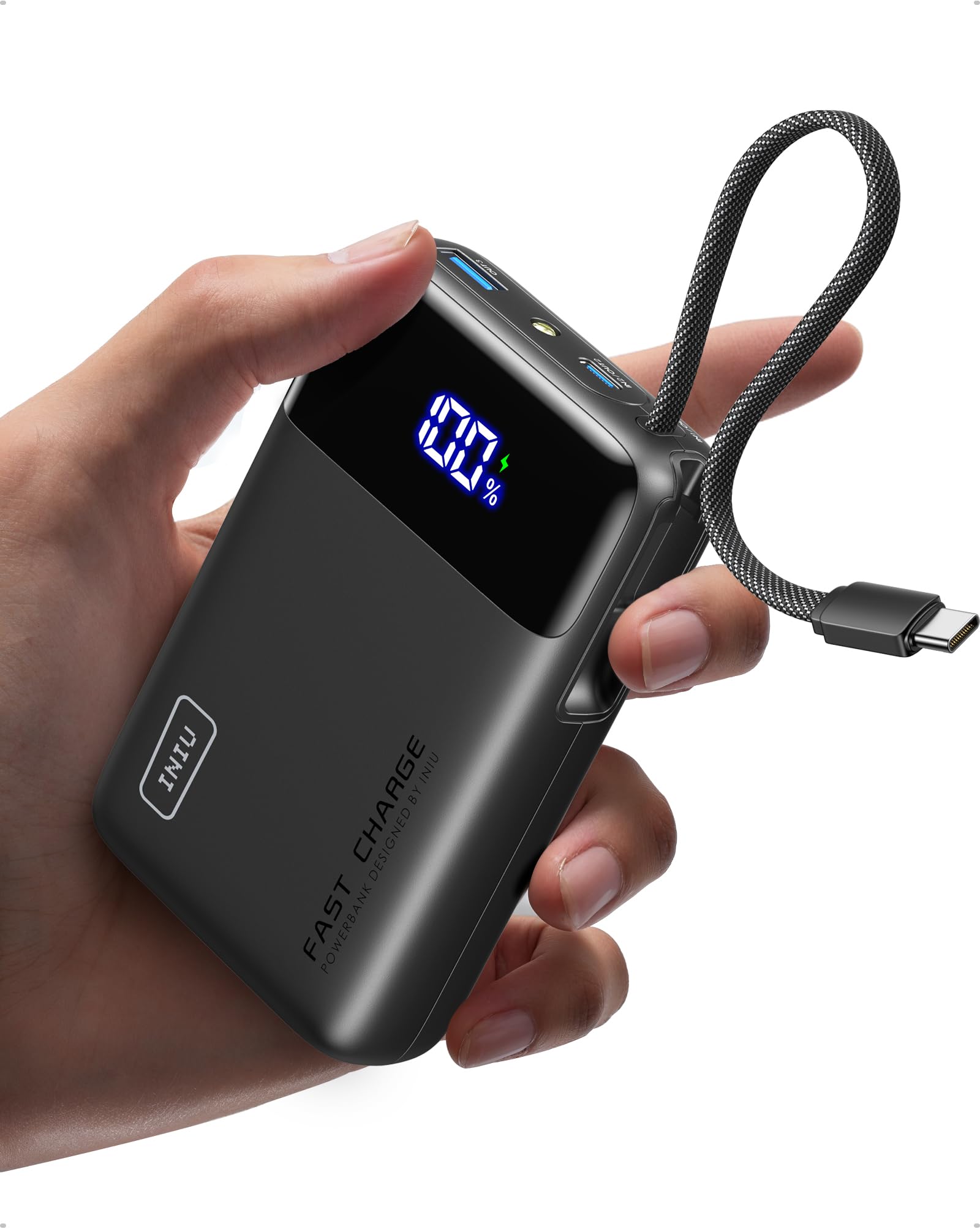


Porturi și indicatoare:
- Afișaj LED digital: Afișează procentul baterieitage (0-100%).
- Cablu USB-C încorporat: For charging USB-C devices and recharging the power bank.
- Port USB-C (intrare/ieșire): Supports 45W Power Delivery for fast charging compatible devices or recharging the power bank.
- USB-A Port (Output): Pentru încărcarea diverselor dispozitive compatibile USB-A.
- Buton de alimentare: Press once to check battery level or initiate charging. Double-press to activate/deactivate the small flashlight.
- Lanternă: A small LED light for emergency use.
Înființat
Încărcarea inițială a bateriei externe:
- For optimal performance, fully charge your INIU P51L Portable Charger before first use.
- Connect the built-in USB-C cable or a separate USB-C cable to the USB-C port of the power bank.
- Connect the other end of the cable to a compatible wall charger (not included). A 45W PD charger is recommended for fastest recharging.
- Afișajul digital va afișa progresul încărcării. Acumulatorul extern este complet încărcat când afișajul arată 100%.
Instrucțiuni de operare
Încărcarea dispozitivelor dvs.:


- Utilizarea cablului USB-C încorporat: Pull out the integrated USB-C cable and connect it directly to your USB-C compatible device. The power bank will automatically begin charging.
- Utilizarea portului USB-C: Connect a USB-C to USB-C cable (not included) from the power bank's USB-C port to your device.
- Utilizarea portului USB-A: Connect a USB-A to your device's charging cable (not included) from the power bank's USB-A port to your device.
- The digital display will illuminate, showing the remaining battery percentage.
- Pentru a opri încărcarea, pur și simplu deconectați dispozitivul.
Reîncărcarea Power Bank:


- Connect the built-in USB-C cable or a separate USB-C cable to the power bank's USB-C input/output port.
- Plug the other end into a USB wall charger.
- Afișajul digital va afișa starea de încărcare.
Încărcare directă:
The INIU P51L supports pass-through charging, allowing you to charge your devices while the power bank itself is being recharged. Simply connect the power bank to a wall charger and then connect your devices to the power bank.
Folosind lanterna:
- Double-press the power button to turn the small LED flashlight ON.
- Double-press the power button again to turn the flashlight OFF.
Măsuri de siguranță
- Do not expose the power bank to extreme temperatures (above 60°C/140°F or below 0°C/32°F), direct sunlight, or water.
- Evitați să scăpați, să dezasamblați sau să încercați să reparați singur dispozitivul.
- A nu se lăsa la îndemâna copiilor.
- Folosiți doar cabluri și adaptoare de încărcare certificate.
- This product is PSE technical standard compliant, ensuring safety for use.
- Călătorii cu avionul: The 20000mAh capacity is generally allowed for carry-on luggage on airplanes. Always check current airline regulations before travel (rules as of June 2025).


Depanare
- Dispozitivul nu se încarcă: Ensure the power bank has sufficient charge. Press the power button to activate output. Check if the cable is securely connected to both the power bank and your device. Try a different cable or port.
- Încărcare lentă: Ensure your device supports fast charging protocols (PD/QC) and that you are using a compatible cable. Some devices may require specific charging sequences (e.g., plugging in the phone while the charger is off for superfast charging).
- Bateria externă nu se reîncarcă: Ensure the wall charger is functioning correctly and the cable is properly connected. Try a different wall adapter or cable.
- If issues persist, please contact INIU customer support for assistance.
Specificații
| Model | P51L |
| Capacitatea bateriei | 20000 mAh |
| Putere de ieșire | Max 45W |
| Vol. De intraretage | 5 volți |
| Tipuri de conector | USB tip A, USB tip C |
| Numărul de porturi | 3 (1x USB-A, 1x USB-C, 1x Built-in USB-C cable) |
| Tipul celulei bateriei | Polimer de litiu |
| Greutatea produsului | 326.1 de grame |
| Dimensiuni (L x l x A) | 11.5 cm x 7.3 cm x 2.9 cm |
| Culoare | Negru |
| Caracteristici | Digital Display, Integrated USB-C Cable, Fast Charging |
| Dispozitive compatibile | iPhone (17/16/15/14/13/12/11/SE/X/8 series), Samsung Galaxy (S25/S24/S23/S22/S21/S20/S10/S9/S8/S7/S6 series), Google Pixel (10/9/8/7/6/5/4/3/2 series), iPad Pro, iPad Air, Apple Watch Series (9/8), AirPods Max, AirPods Pro, AirPods. |

Garanție și suport
INIU provides a 3 ani garanție de calitate for this product. If you encounter any quality issues within this period, please contact our customer support for a replacement.

For further assistance or inquiries, please visit the official INIU website or contact our customer service team through the contact information provided in your product packaging.