
WOOPKER AK45
WOOPKER AK45 Stereo AmpManual de utilizare mai viu
Model: AK45
1. Introducere
The WOOPKER AK45 is a versatile 2-channel stereo amplifier designed for home audio systems. It features multiple input options including Bluetooth 5.0, AUX, USB, SD card, and FM radio, making it suitable for various audio sources and environments. This manual provides detailed instructions for setting up and operating your AK45 ampliificator pentru a asigura o performanță optimă.

Image 1.1: The WOOPKER AK45 Stereo Amplifier with its included remote control. This image displays the front panel controls and the compact design of the ampmai în viață.
2. Ce se află în cutie
Vă rugăm să verificați dacă toate articolele sunt prezente în colet:
- WOOPKER AK45 Stereo Ampliificator x 1
- Telecomandă x 1
- Cablu de alimentare x 1
- FM Antenna x 1
- Manual de utilizare x 1

Image 2.1: Visual representation of the items included in the WOOPKER AK45 amplifier package. This includes the amplifier unit, remote control, power cable, FM antenna, and user manual.
3. Produs terminatview
3.1 Panoul frontal

Imaginea 3.1: Detaliată view of the AK45 amplifier's front panel, highlighting the various controls and input ports such as USB, SD Card slot, display, microphone inputs, and adjustment knobs.
- Întrerupător: Întoarce ampmai viață pornită sau oprită.
- Port USB: For connecting USB flash drives for audio playback.
- Slot pentru card SD/MMC: For inserting SD or MMC cards for audio playback.
- Afişa: Afișează modul curent, informații despre piesă sau frecvența FM.
- Buton Treble: Ajustează ieșirea audio de înaltă frecvență.
- Buton de bas: Ajustează ieșirea audio de joasă frecvență.
- Mic/Vol Knob: Reglează volumul microfonului.
- Intrări MIC1/MIC2: Mufe de 6.35 mm pentru conectarea microfoanelor.
- Butonul de mod: Cycles through input sources (Bluetooth, AUX, USB, SD, FM).
- Butoane de navigare: For track control (previous/next), play/pause, and FM station tuning.
- Buton de volum: Main volume control for overall audio output.
3.2 Panoul din spate
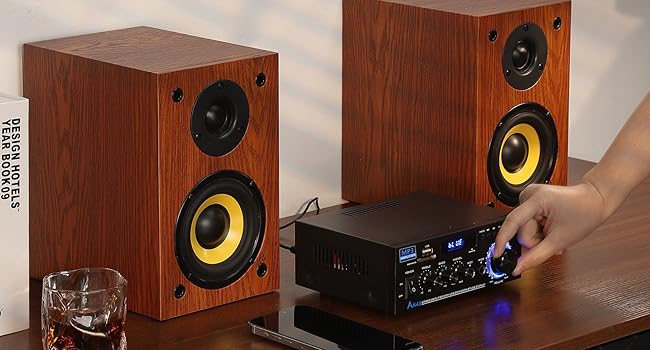
Imaginea 3.2: Spate view of the AK45 amplifier, illustrating the speaker output terminals, RCA audio input, FM antenna connection, DC 12V input, and AC power input.
- FM ANT: Conexiune pentru antena FM.
- INTRARE AUDIO (RCA): Red and white RCA jacks for connecting external audio devices (e.g., CD player, DVD player, TV).
- IEȘIRE DIBUZOARE: Terminals for connecting passive speakers (4-16 Ohms impedance).
- Intrare alimentare CC 12V/5A: For connecting a 12V DC power adapter (if applicable).
- Intrare alimentare CA: For connecting the main AC power cable (AC90-240V, 50-60Hz).
4. Configurare
4.1 Conexiune difuzor
The AK45 amplifier is designed for passive speakers with an impedance of 4-16 Ohms. Follow these steps to connect your speakers:
- Identificați terminalele pozitive (+) și negative (-) de pe difuzoare și de pe amplifier. Positive terminals are typically red, and negative terminals are black.
- Press the clasp on the ampterminalele de ieșire a difuzorului ale unui lifter.
- Insert the bare speaker wires into the corresponding terminals. Ensure a secure connection and that no stray wire strands are touching other terminals.
- Connect the right speaker to the 'RIGHT' output and the left speaker to the 'LEFT' output.

Image 4.1: Visual guide for connecting passive speakers to the rear panel of the AK45 amplifier, illustrating the correct polarity for left and right channels.
4.2 Conexiune la alimentare
Connect the provided AC power cable to the AC Power Input on the rear panel of the amplifier, then plug it into a standard wall outlet. If using a DC 12V power source, connect it to the DC 12V/5A input.
Conectarea antenei FM 4.3
Connect the included FM antenna to the 'FM ANT' port on the rear panel for improved FM radio reception.
5. Instrucțiuni de utilizare
5.1 Pornire/Oprire
Flip the 'POWER' switch on the front panel to the 'ON' position to power on the amplifier. Flip it to 'OFF' to power down.
5.2 Selectarea intrării
Press the 'MODE' button on the front panel or the remote control to cycle through available input sources: Bluetooth (BT), AUX, USB, SD Card, and FM Radio. The selected mode will be displayed on the front panel screen.
5.3 Asociere Bluetooth
- Comutați amplifier to 'BT' mode using the 'MODE' button. The display will show 'BLUE' and flash, indicating it's ready for pairing.
- Pe dispozitivul mobil (smartphone, tabletă etc.), activați Bluetooth și căutați dispozitivele disponibile.
- Select 'BT' from the list of devices to pair. Once connected, the 'BLUE' indicator on the amplifier will stop flashing.
- Începeți să redați audio de pe dispozitiv.
Nota: Maintain a distance of less than 30 feet (10 meters) between the amplifier and your Bluetooth device for optimal connection. For TV or PC devices, keep the distance within 15 feet (5 meters).
Video 5.1: A demonstration of connecting speakers, powering on the AK45 amplifier, and pairing a mobile device via Bluetooth. This video also shows the amplifier playing music through connected speakers.
5.4 Redare de pe USB/card SD
Introduceți o unitate flash USB sau un card SD/MMC care conține fișiere audio files into the respective port/slot on the front panel. The amplifier will automatically switch to USB or SD mode and begin playback. Use the navigation buttons on the front panel or remote control to manage playback.
5.5 Funcționarea radioului FM
In FM mode, use the navigation buttons to scan for radio stations. Press and hold the 'Play/Pause' button to auto-scan and save available stations. Use the 'Previous/Next' buttons to cycle through saved stations.
5.6 Utilizarea microfonului
Connect up to two microphones to the 'MIC1' and 'MIC2' input jacks on the front panel. Adjust the microphone volume using the 'MIC/VOL' knob. The amplifier supports karaoke functions.

Image 5.2: The AK45 amplifier connected to two microphones, demonstrating its capability for karaoke or dual microphone use.
5.7 Ajustări audio
Use the 'TREBLE', 'BASS', and 'MIC/VOL' knobs on the front panel to fine-tune the audio output to your preference. The main 'VOLUME' knob controls the overall sound level.
5.8 Utilizarea telecomenzii
The included remote control allows for convenient operation from a distance. Ensure the plastic isolation sheet is removed from the battery compartment before first use. The remote can control power, mode selection, volume, track navigation, and EQ settings.
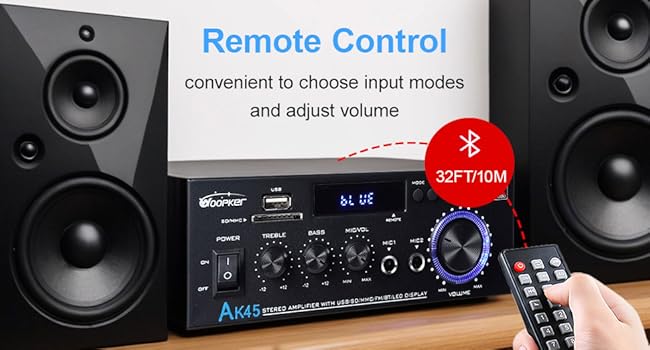
Image 5.3: The AK45 amplifier with its remote control, illustrating the convenience of remote operation for input mode selection and volume adjustments.
6. Specificații
| Caracteristică | Caietul de sarcini |
|---|---|
| Numărul de model | AK45 |
| Marca | WOOPKER |
| Putere de ieșire | 40W + 40W (Rated), 300W + 300W (Max) |
| Versiune Bluetooth | 5.0 |
| Tehnologia de conectivitate | AUX, USB, SD Card, Bluetooth |
| Dispozitive compatibile | Smartphone, Tablet, PC, TV, MP3 Player, CD Player, DVD Player, Projector |
| Mod ieșire audio | Stereo (2.0 canale) |
| Impedanta difuzorului | 4-16 ohmi |
| Greutatea articolului | 9.6 uncii |
| Dimensiuni pachet | 8.58 x 8.11 x 3.82 inci |
| Intrare de putere | AC90-240V, 50-60Hz / DC 12V/5A |
7. Depanare
If you encounter issues with your AK45 amplifier, consultați următoarele probleme și soluții comune:
- Fără putere:
- Asigurați-vă că cablul de alimentare este conectat corect la ambele ampalimentator și o priză de curent funcțională.
- Check if the power switch on the front panel is in the 'ON' position.
- Fără sunet:
- Verify that speakers are correctly connected to the 'SPEAKERS OUTPUT' terminals with correct polarity.
- Verificați nivelul volumului pe ambele amplifier and your audio source device.
- Ensure the correct input mode (Bluetooth, AUX, USB, SD, FM) is selected.
- If using AUX, ensure the audio cable is securely connected to both the amplifier's 'AUDIO INPUT' and your source device.
- Probleme de asociere Bluetooth:
- Asigurați-vă că amplifier is in 'BT' mode and the 'BLUE' indicator is flashing.
- Ensure your device's Bluetooth is enabled and it's within the recommended range (30 feet/10 meters).
- Încercați să anulați asocierea și să reasociați dispozitivul.
- USB/SD Card Not Playing:
- Ensure the USB drive or SD card is inserted correctly.
- Verificați dacă sunetul filesunt într-un format acceptat.
- Încearcă o altă unitate USB sau un alt card SD.
- Recepție radio FM slabă:
- Asigurați-vă că antena FM este conectată corect.
- Adjust the position of the FM antenna for better signal reception.
8. Întreținere
To ensure the longevity and optimal performance of your AK45 amplifter, urmați aceste instrucțiuni de întreținere:
- curatenie: Utilizați o cârpă moale și uscată pentru a curăța exteriorul ampNu utilizați agenți de curățare lichizi sau materiale abrazive.
- Ventilare: Asigurați amplifier is placed in a well-ventilated area to prevent overheating. Do not block the ventilation openings.
- Depozitare: Când nu este utilizat pentru perioade lungi de timp, depozitați ampA se păstra într-un loc răcoros și uscat, ferit de lumina directă a soarelui și de temperaturi extreme.
- Manipulare: Evitați să scăpați sau să supuneți amprezistent la impacturi puternice.
- Oprire: Opriți întotdeauna amplifier before connecting or disconnecting any cables or accessories.
9. Garanție și asistență
WOOPKER is committed to providing quality products and customer satisfaction. For any inquiries or support needs, please refer to the following:
- Customer Response: We aim to provide quick responses to customer inquiries within 24 hours.
- POLITICA DE RETURNARE: Products can be returned for an exchange or refund within 30 days of purchase.
- Suport tehnic: Lifetime technical customer support is available for your product.

Imaginea 9.1: O suprapunereview of WOOPKER's customer support commitments, including response times, return policy, and technical support availability.
Ask a question about this manual
Ask about setup, troubleshooting, compatibility, parts, safety, or missing instructions. Manuals+ will review the question and use this page’s manual context to help answer it.