
Xtorm FS405
Manual de utilizare pentru acumulatorul solar extern Xtorm FS405 20W – 10.000 mAh
Model: FS405
Introducere
The Xtorm FS405 Fuel Series Solar Powerbank 20W – 10.000 mAh is designed to provide portable power for your electronic devices, offering the flexibility to charge via USB-C or its integrated solar panel. This power bank is built for outdoor adventures, featuring a durable, splash-resistant design and a powerful LED flashlight.
Informații de siguranță
- Nu expuneți bateria externă la temperaturi extreme (peste 45°C sau sub -10°C).
- Evitați să scăpați, să dezasamblați sau să încercați să reparați singur dispozitivul.
- Keep away from water, except for the specified splash resistance (IPX4). Do not submerge.
- Folosiți doar cabluri și adaptoare de încărcare certificate.
- A nu se lăsa la îndemâna copiilor.
- Aruncați produsul în mod responsabil, conform reglementărilor locale.
Conținutul pachetului
Vă rugăm să verificați pachetul pentru următoarele articole:
- Xtorm FS405 Solar Powerbank
- Cablu de încărcare USB-C (0.30 m)
- Manual de utilizare
Produs terminatview

Faţă View: Shows the main solar charging panel and the Xtorm logo. The robust casing is visible around the edges.

Spate View (LED Off): Displays the textured back casing and the integrated LED light panel in its off state.
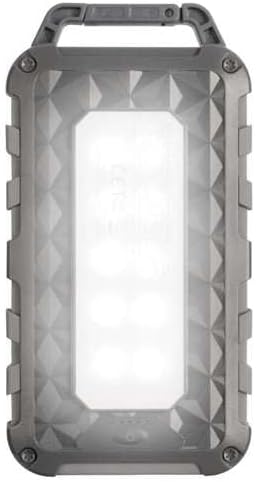
Spate View (LED On): Shows the powerful LED light panel fully illuminated, indicating the flashlight function is active.

Top View: Highlights the sturdy integrated carabiner handle, designed for easy attachment to bags or gear.
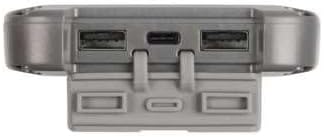
Fund View: Displays the USB-C PD input/output port and two USB-A Quick Charge 3.0 output ports, protected by a cover.
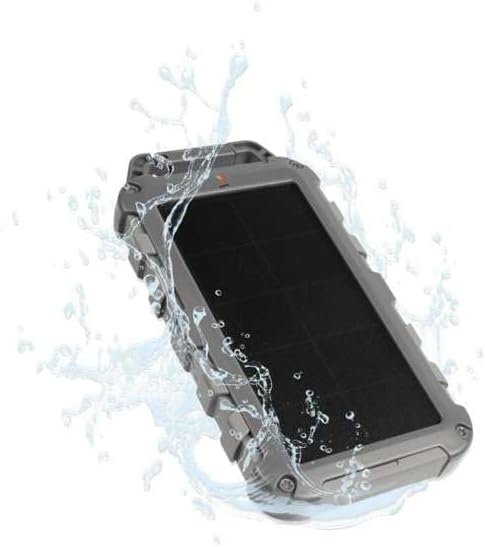
Durability Feature: Illustrates the power bank's splash-resistant design, suitable for outdoor conditions (IPX4 rated).
Înființat
Încărcare inițială
Before first use, it is recommended to fully charge the Xtorm FS405 Solar Powerbank via the USB-C port for optimal performance.
- Conectați cablul USB-C furnizat la portul USB-C de pe bateria externă.
- Conectați celălalt capăt al cablului USB-C la un adaptor de perete USB compatibil (nu este inclus) sau la portul USB al unui computer.
- The LED indicators on the power bank will show the charging status. A full charge via USB-C typically takes approximately 2 hours.
Instrucțiuni de operare
Încărcarea Power Bank-ului
The Xtorm FS405 can be charged using two methods:
1. Via USB-C (Recommended for Fast Charging)
- Connect the power bank to a USB-C power source using the included cable.
- The power bank will begin charging. This method provides the fastest charging speed for the power bank itself.
2. Via Solar Panel
The integrated solar panel allows for convenient charging when outdoors. For best results, place the power bank directly under strong sunlight.
- Place the solar panel facing direct sunlight.
- A small indicator light (usually green) will illuminate when solar charging is active.
- Note on Solar Charging Speed: Solar charging is a supplementary method and is significantly slower than USB-C charging. Factors like season, location, time of day, and cloud cover heavily influence charging speed.
Approximate solar charging times for a full charge:
- Spring/Summer (mostly sunny day): Aproximativ 10 de zile
- Autumn/Winter (mostly sunny day): Aproximativ 20 de zile
Solar charging is not effective on mostly cloudy days.
Încărcarea dispozitivelor externe
The power bank features one USB-C PD (Power Delivery) output and two USB-A Quick Charge 3.0 outputs.

Capacitate de încărcare rapidă: The power bank can charge compatible smartphones, such as an iPhone 14 or 12/13, up to 50% in approximately 30 minutes using the 20W USB-C PD output.
- Conectați cablul de încărcare al dispozitivului la unul dintre porturile de ieșire disponibile (USB-C sau USB-A) de pe bateria externă.
- Conectați celălalt capăt al cablului la dispozitiv.
- Acumulatorul extern va începe automat încărcarea dispozitivului.
- Indicatorii LED de pe bateria externă vor afișa nivelul rămas al bateriei.
The 10,000mAh capacity is sufficient to charge most smartphones at least 2 times.
Folosind lanterna LED
The Xtorm FS405 includes a powerful integrated LED flashlight on its back.
- Locate the power button (usually on the side or near the ports).
- Press and hold the power button for a few seconds to turn the flashlight ON.
- Press and hold the power button again to turn the flashlight OFF.
Întreţinere
- Curățați bateria externă cu o cârpă moale și uscată. Nu utilizați substanțe chimice dure sau materiale abrazive.
- Păstrați powerbank-ul într-un loc răcoros și uscat atunci când nu este utilizat.
- For long-term storage, charge the power bank to about 50-70% every 3-6 months to preserve battery health.
- Ensure the port covers are properly sealed when exposed to water splashes.
Depanare
Power Bank nu se încarcă
- Verificați cablul: Ensure the USB-C cable is securely connected to both the power bank and the power source. Try a different cable.
- Verificați sursa de alimentare: Verify that the wall adapter or USB port is functioning correctly.
- Încărcare solară: For solar charging, ensure the panel is in direct, strong sunlight. Remember solar charging is slow and not effective in low light or cloudy conditions.
Dispozitivul nu se încarcă de la bateria externă
- Verificați încărcarea bateriei externe: Asigurați-vă că bateria externă are suficientă încărcare.
- Verificați cablurile: Use the original charging cable for your device and ensure it's properly connected to both the power bank and your device. Try a different cable.
- Compatibilitate: Verify that your device is compatible with USB charging.
- Repornire: Disconnect and reconnect the device.
Lanterna nu funcționează
- Verificați încărcarea bateriei externe: Ensure the power bank has some charge remaining.
- Funcționare corectă: Ensure you are pressing and holding the power button correctly to activate the flashlight.
Specificații
| Caracteristică | Detaliu |
|---|---|
| Model | FS405 |
| Marca | Xtorm |
| Serie | Fuel Series 4 |
| Capacitatea bateriei | 10,000 mAh (litiu polimer) |
| Putere maximă de ieșire | 20 W |
| Output 1 (USB-C PD) | 20 W |
| Output 2 (USB-A QC 3.0) | 18 W |
| Output 3 (USB-A QC 3.0) | 18 W |
| Numărul de ieșiri | 3 |
| Tip de intrare | USB-C PD |
| Puterea panoului solar | 1 W (SunPower cells) |
| Dimensiuni (L x l x H) | 17 cm x 9 cm x 2 cm |
| Greutate | 289 g |
| Material | PC, ABS |
| Rezistenta la apa | IPX4 (rezistent la stropire) |
| Lanternă integrată | Da |
| Battery Charge Time (USB-C) | Aproximativ. 2 ore |
Garanție și suport
Pentru informații despre garanție și asistență pentru clienți, vă rugăm să contactați reprezentanța oficială Xtorm. website-ul web sau contactați distribuitorul local. Păstrați dovada achiziției pentru orice reclamații în garanție.
Suport online: www.xtorm.eu
Ask a question about this manual
Ask about setup, troubleshooting, compatibility, parts, safety, or missing instructions. Manuals+ will review the question and use this page’s manual context to help answer it.