
1. Introducere
This manual provides essential instructions for the safe and efficient use of your Meizu Note 21 Pro smartphone. Please read this manual thoroughly before operating the device and retain it for future reference.
2. Ce se află în cutie
- Meizu Note 21 Pro Smartphone
- Adaptor de alimentare
- (Other accessories such as USB cable, SIM ejector tool, and documentation may vary by region.)
3. Dispozitiv Dispozitiv
Familiarize yourself with the physical components of your Meizu Note 21 Pro.
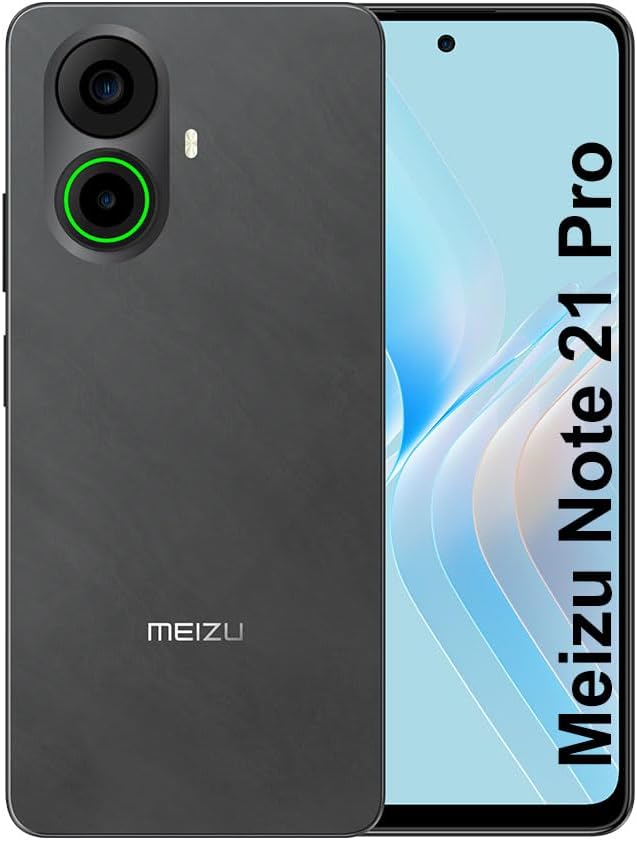
Imaginea 3.1: Fata si spate view of the Meizu Note 21 Pro. The front displays the screen with a punch-hole camera. The rear shows the dual camera module with a green accent ring on one lens, a flash, and the "MEIZU" logo at the bottom.
- Afișaj frontal: 6.78-inch FHD+ screen with a 120Hz refresh rate.
- Camera frontală: Situat în partea centrală sus a afișajului.
- Camerele din spate: Dual camera system, including a 64MP main camera.
- Senzor de amprentă lateral: Integrated for secure access.
- Port USB: Pentru încărcare și transfer de date.
- Mufă audio de 3.5 mm: Pentru căști.
- Compartiment pentru cartela SIM/MicroSD: Supports Dual Nano SIM and MicroSD cards.
4. Configurare
4.1. Introducerea cardurilor SIM și MicroSD
- Localizați tava cartelei SIM pe lateralul dispozitivului.
- Introduceți instrumentul de ejectare a cartelei SIM în orificiul mic de lângă tavă și împingeți ușor până când tava iese afară.
- Place your Nano SIM card(s) and/or MicroSD card into the designated slots on the tray. Ensure the gold contacts face downwards.
- Reintroduceți cu grijă tava în dispozitiv până când se fixează în poziție cu un clic.
4.2. Pornirea inițială și configurarea
- Press and hold the Power button until the Meizu logo appears.
- Urmați instrucțiunile de pe ecran pentru a selecta limba, a vă conecta la o rețea Wi-Fi și a configura contul Google.
- During setup, you will be guided to configure security features such as a PIN, pattern, or password.
4.3. Fingerprint Recognition Setup
- Navigați la Setări > Securitate și confidențialitate > Deblocare cu amprentă.
- Follow the on-screen instructions to register your fingerprint by repeatedly touching the side-mounted sensor.
- Pentru o performanță optimă, asigurați-vă că degetul acoperă întreaga zonă a senzorului în timpul înregistrării.
5. Operarea dispozitivului
5.1. Afișaj și navigare
- The 6.78-inch FHD+ display operates at a 120Hz refresh rate for smooth visuals.
- Navigate the Android 14 operating system using touch gestures: tap, swipe, pinch-to-zoom.
- Accesați setările rapide glisând în jos din partea de sus a ecranului.
5.2. Funcțiile camerei
- Deschideți aplicația Cameră din ecranul principal sau din sertarul de aplicații.
- The rear camera system features a 64MP main sensor for high-resolution photos and a 2MP depth-of-field camera for portrait effects.
- The 13MP front-facing camera is suitable for selfies and video calls.
- Tap on the screen to focus, and use the on-screen shutter button to capture images. Explore various modes like Portrait, Night, and Pro within the camera app.
5.3. Performanță și stocare
- The MediaTek G99 Octa Core processor ensures efficient performance for applications and multitasking.
- The device comes with 256GB of internal storage and 8GB of RAM.
- Storage can be expanded using a MicroSD card (sold separately).
5.4. Baterie și încărcare
- The Meizu Note 21 Pro is equipped with a 5000mAh battery.
- Use the provided Power Adapter for 30W fast charging.
- To charge, connect the USB cable to the phone's USB port and the power adapter, then plug the adapter into a wall outlet.
5.5. Conectivitate
- 4G LTE: Supports various LTE FDD and TDD bands for cellular data. Note: This international version works on T-Mobile in the USA and globally with other carriers.
- Wi-Fi 5: Conectați-vă la rețele wireless pentru acces la internet.
- Bluetooth: Asociați cu accesorii wireless precum căști și difuzoare.
- NFC: Pentru plăți contactless și asociere rapidă cu dispozitive compatibile.
- GPS: Pentru servicii de localizare și navigare.
6. Întreținere
- curatenie: Folosiți o lavetă moale, fără scame, pentru a curăța ecranul și carcasa dispozitivului. Evitați substanțele chimice dure sau materialele abrazive.
- Îngrijirea bateriei: Avoid extreme temperatures. Do not fully discharge the battery frequently. For optimal battery longevity, keep the charge between 20% and 80%.
- Actualizări de software: Verificați și instalați periodic actualizări de sistem pentru a asigura performanță și securitate optime. Accesați Setări > Sistem > Actualizare de sistem.
7. Depanare
| Emisiune | Soluție posibilă |
|---|---|
| Dispozitivul nu pornește | Ensure the battery is charged. Connect the device to the power adapter and try again. If unresponsive, press and hold the Power button for 10-15 seconds to force a restart. |
| Semnal slab de rețea | Check if the SIM card is correctly inserted. Move to an area with better network coverage. Restart the device. Verify with your carrier that your plan is active. |
| Aplicațiile sunt lente sau se blochează | Închideți aplicațiile din fundal. Ștergeți memoria cache a aplicației (Setări > Aplicații > selectați aplicația > Stocare și memorie cache > Goliți memoria cache). Restart the device. Ensure sufficient storage space. |
| Senzorul de amprentă nu funcționează | Ensure your finger and the sensor are clean and dry. Re-register your fingerprint in settings. |
8. Specificații
- Model: Meizu Note 21 Pro
- Sistem de operare: Android 14
- Procesor: MediaTek G99 Octa Core (2.2GHz)
- Afişa: 6.78 inches FHD+ (1080 x 2160 resolution), 120Hz Refresh Rate
- RAM: 8 GB
- Stocare internă: 256 GB
- Camera spate: 64MP principal + 2MP adâncime
- Camera frontală: 13MP
- Baterie: 5000mAh, încărcare rapidă de 30W
- Conectivitate: 4G LTE (FDD:1,2,3,4,5,7,8,12,17,18,19,20,26,28,66; TDD:38,40,41), 3G WCDMA, 2G Quad Band, Wi-Fi 5, Bluetooth, NFC, GPS
- Mufa audio: 3.5 mm
- Dimensiuni: 6.64 x 2.96 x 0.33 inci
- Greutate: 1.1 lire sterline
9. Garanție și asistență
For warranty information and technical support, please refer to the warranty card included with your product or visit the official Meizu webPăstrați dovada achiziției pentru reclamații în garanție.
For further assistance, you may contact Meizu customer service through their official channels.


