
1. Introducere
The Triplett WS230 Wall Scanner is a versatile and compact tool designed for accurately detecting hidden objects behind walls. It features advanced capabilities to locate wood studs, metal objects (ferrous and non-ferrous), and live AC wiring, providing essential information for construction, home improvement, and maintenance tasks. This manual provides detailed instructions for safe and effective use of your WS230 Wall Scanner.
2. Informații de siguranță
Please read all safety warnings and instructions carefully before using the device. Failure to follow these instructions may result in electric shock, fire, or serious injury.
- Always assume that live electrical wires are present behind walls. Exercise extreme caution.
- Do not rely solely on the detection results. Always verify findings through other means if possible.
- Păstrați dispozitivul uscat și curat. Nu îl expuneți la umezeală sau temperaturi extreme.
- Nu încercați să deschideți sau să modificați dispozitivul. Apelați la personal calificat pentru orice operațiune de service.
3. Conținutul pachetului
Verificați dacă toate articolele sunt prezente în colet:
- Triplett WS230 Wall Scanner
- 3.7V/300mAh Lithium Ion Battery (pre-installed)
- Soft Protective Pouch Case
- Manual de utilizare (acest document)
- Cablu de încărcare USB tip C.

Figure 3.1: WS230 Wall Scanner with Pouch and USB-C Cable
4. Produs terminatview
Familiarize yourself with the components of your Triplett WS230 Wall Scanner.

Figura 4.1: Față View of WS230 Wall Scanner

Figura 4.2: Spate View of WS230 Wall Scanner (QR Code: C242594011)
4.1 componente cheie
- Ecran LCD color: Displays detection mode, depth, battery status, and object location.
- Buton de alimentare: Pornește/oprește dispozitivul.
- Mode Selection Buttons: Allows switching between Stud, Metal, and AC Voltage detection modes.
- Zona senzorului: Located on the back of the device, this area must be in contact with the wall for accurate scanning.
- Port de încărcare USB-C: For recharging the internal Lithium-ion battery.
5. Configurare și încărcare
5.1 Încărcarea bateriei
The WS230 is equipped with a rechargeable 3.7V/300mAh Lithium-ion battery. Before first use, ensure the device is fully charged.
- Connect the provided USB Type C charging cable to the charging port on the device.
- Conectați celălalt capăt al cablului USB la un adaptor de alimentare USB standard (nu este inclus) sau la un port USB al computerului.
- The battery indicator on the LCD screen will show charging status. A full charge typically takes a few hours.
5.2 Pornire/Oprire
- Pentru a porni, apăsați și mențineți apăsat butonul Buton de alimentare (red button) until the screen illuminates.
- Pentru a opri, țineți apăsat butonul Buton de alimentare din nou până când ecranul se stinge.
6. Funcționare
6.1 Instrucțiuni generale de utilizare
- Asigurați-vă că suprafața peretelui este curată și uscată.
- Avoid scanning over freshly painted or wallpapered surfaces until they are completely dry, as moisture can affect accuracy.
- Hold the scanner flat against the wall, ensuring the sensor area is in full contact.
- Move the scanner slowly and steadily across the surface.
6.2 Calibrare automată
The WS230 features automatic calibration for accurate results. Calibration occurs automatically upon power-on or when switching detection modes.
- Place the scanner flat against the wall in an area where you are certain there are no studs, metal, or live wires.
- Apăsați tasta Buton de alimentare or select your desired mode. The screen will display "Calibrating, please wait."
- Keep the device still against the wall until calibration is complete.

Figure 6.1: Calibration in Progress
6.3 Detection Modes
The WS230 offers three primary detection modes:

Figure 6.2: Multiple Detection Mode Displays
6.3.1 Stud Detection
This mode locates the center and edges of wood or metal studs behind walls.
- Select the Stud Detection mode using the appropriate button.
- Place the scanner flat against the wall and slowly move it horizontally.
- The display will indicate the presence of a stud, its center, and depth (up to 1.5 inches / 38mm). Audio alerts will also sound.

Figure 6.3: Wood Stud Detection
6.3.2 Metal Detection
This mode identifies ferrous and non-ferrous metals, such as pipes and electrical wiring (even if not live).
- Select the Metal Detection mode.
- Scan the wall slowly. The display will show "Detect metal" and indicate the object's location and type (magnetic/non-magnetic).
- Maximum detection depth is 4.0 inches (100mm).

Figure 6.4: Metal Detection

Figure 6.5: Non-Magnetic Metal Detection
6.3.3 AC Voltage Detectare
This mode specifically detects live AC wires behind walls, providing an essential safety feature.
- Select the AC Voltage Detection mode.
- Scan the wall slowly. The display will show a lightning bolt icon and indicate the presence of live AC wiring.
- Maximum detection depth is 2 inches (50mm).
7. Întreținere
- Curățați dispozitivul cu o lavetă moale și uscată. Nu utilizați substanțe de curățare abrazive sau solvenți.
- Store the device in its protective pouch in a cool, dry place when not in use.
- Regularly charge the battery to maintain its health, even if the device is not used frequently.
8. Depanare
If you encounter issues with your WS230 Wall Scanner, try the following:
- Citiri inexacte: Ensure the device is properly calibrated on a clear section of the wall. Check for moisture on the wall surface.
- Fără putere: Verify the battery is charged. Connect the USB-C cable and allow it to charge for at least 30 minutes before attempting to power on again.
- Intermittent Detection: Ensure the sensor area is in full contact with the wall and you are moving the device slowly and steadily.
If problems persist, contact Triplett customer support.
9. Specificații
| Caracteristică | Caietul de sarcini |
|---|---|
| Dimensiunile produsului | 4.8 x 1 x 2.4 inci |
| Greutatea articolului | 4 uncii |
| Numărul de model | WS230 |
| baterii | 1 baterie litiu-ion (inclusă) |
| Sursa de alimentare | Alimentat cu baterie |
| Stud Detection Depth | Până la 1.5 inci (38 mm) |
| Metal Detection Depth | Până la 4.0 inci (100 mm) |
| AC Voltage Detection Depth | Până la 2 inci (50 mm) |
| Temperatura optimă de funcționare | 0 până la 40°C |
| Temperatura de depozitare | -20 până la 60°C |
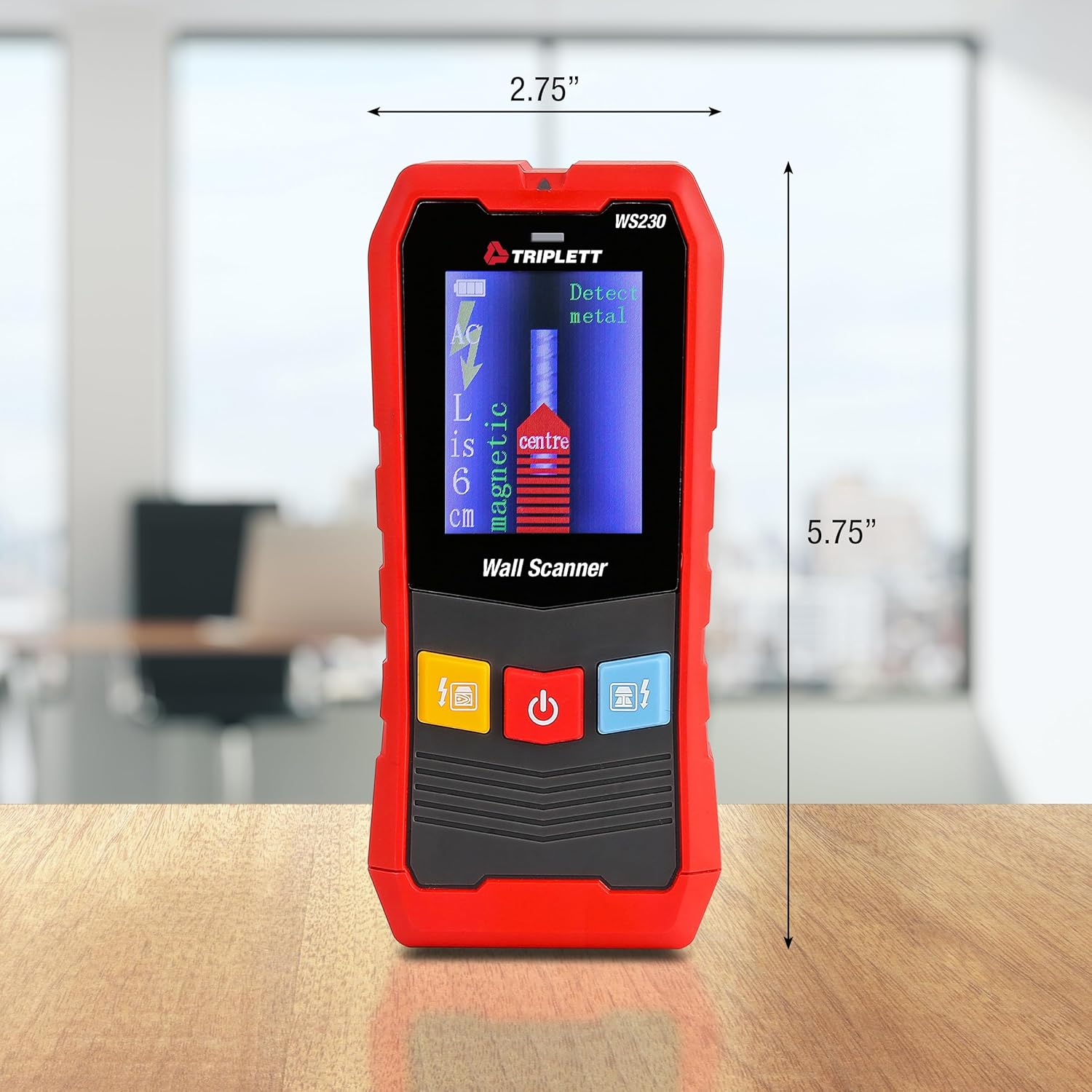
Figure 9.1: WS230 Dimensions
10. Garanție și asistență
For warranty information or technical support, please refer to the official Triplett website-ul lor sau contactați departamentul lor de asistență pentru clienți. Păstrați bonul fiscal ca dovadă a achiziției.
Visit the official Triplett Store: Triplett Store on Amazon