
1. Informații importante privind siguranța
- Citiți toate instrucțiunile înainte de a utiliza dispozitivul.
- Țineți aparatul departe de apă și umiditate.
- Nu expuneți la temperaturi extreme sau la lumina directă a soarelui.
- Use only the provided power adapter and charging cables.
- Nu încercați să dezasamblați sau să reparați dispozitivul singur. Contactați personalul de service calificat.
- Asigurați o ventilație adecvată pentru a preveni supraîncălzirea.
2. Conținutul pachetului
Verificați dacă toate articolele sunt prezente în colet:
- Ikarao Break X2 Karaoke Machine
- 2 microfoane wireless
- Cablu de încărcare
- Curea
- Manual de utilizare
3. Produs terminatview
The Ikarao Break X2 is an all-in-one portable karaoke system designed for an immersive entertainment experience. It features a 10.1-inch touch screen, a powerful 600W Bluetooth speaker, and two self-charging wireless microphones.
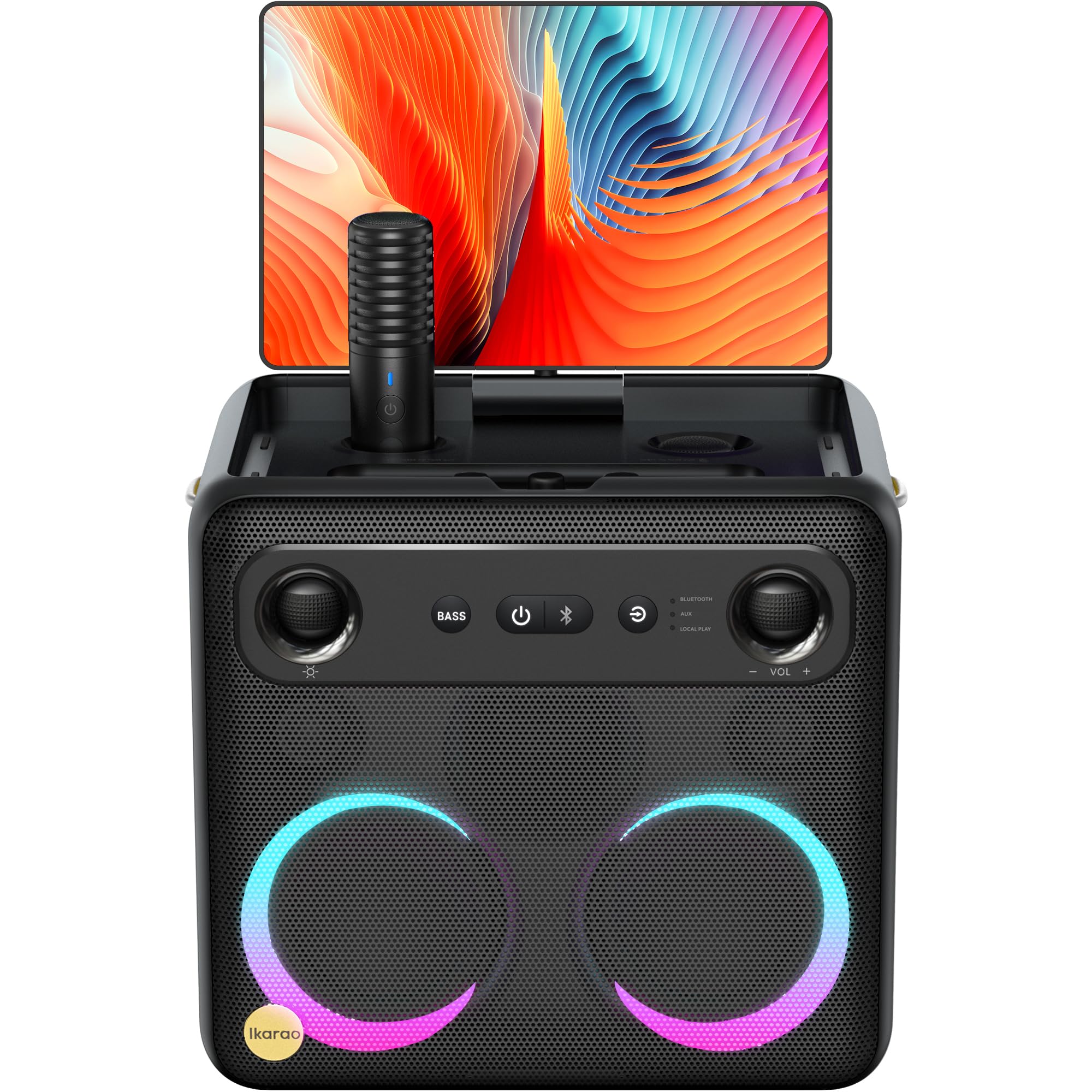
Image: Ikarao Break X2 Karaoke Machine. This image shows the main unit with its integrated 10.1-inch touch screen, the speaker grille, and the two wireless microphones stored in their charging slots.
Caracteristici cheie:
- Integrated 10.1-inch Touch Screen: 2K HD resolution for clear lyric display. The screen can rotate 180 degrees for optimal viewunghiuri de ing.
- 600W Bluetooth Speaker: Delivers powerful and clear audio for an engaging karaoke experience.
- Two Self-Charging Wireless Microphones: Conveniently store and charge microphones within the unit. No manual pairing required.
- Conectivitate încorporată: Access YouTube and Spotify via Wi-Fi for an unlimited song library.
- Mai multe moduri de redare: Supports HDMI, USB, AUX IN, AUX OUT, TF, SD, and wired microphone connections.
- Design portabil: Compact and equipped with a strap for easy transport, offering up to 8 hours of battery life.
4. Configurare
4.1 Încărcare inițială
- Connect the provided charging cable to the charging port on the Ikarao Break X2.
- Conectați celălalt capăt la o priză de alimentare adecvată.
- Allow the device to charge fully before first use. The charging indicator will show the battery status.
4.2 Pornire/Oprire
- To power on, press and hold the Power button located on the control panel until the screen illuminates.
- To power off, press and hold the Power button until the shutdown options appear on the screen, then select 'Power Off'.
4.3 Conexiune Wi-Fi
- Once powered on, navigate to the 'Settings' menu on the touch screen.
- Selectați „Wi-Fi” și activați-l.
- Alegeți rețeaua Wi-Fi dorită din listă și introduceți parola dacă vi se solicită.
- Once connected, you can access online features like YouTube and Spotify.
4.4 Utilizarea microfonului
- The two wireless microphones are pre-paired with the unit. Simply remove them from their charging slots to activate.
- To charge, place the microphones back into their designated slots on the main unit.
5. Instrucțiuni de utilizare
5.1 Utilizarea ecranului tactil
- The 10.1-inch touch screen functions like a tablet. Tap to select, swipe to scroll.
- The screen can be rotated 180 degrees to adjust the viewing angle. Gently pivot the screen to the desired position.
5.2 Karaoke Mode (YouTube/Spotify)
- Asigurați-vă că dispozitivul este conectat la Wi-Fi.
- From the home screen, tap on the YouTube or Spotify application icon.
- Caută your desired karaoke songs or playlists.
- Adjust the main volume using the controls on the unit or the on-screen interface.
- Adjust microphone volume and echo effects using the dedicated controls.
5.3 Mod difuzor Bluetooth
- Activați Bluetooth pe dispozitivul extern (de exemplu, smartphone, tabletă).
- On the Ikarao Break X2, navigate to the Bluetooth settings or select the Bluetooth input mode.
- Caută 'Ikarao Break X2' on your external device and pair.
- Once connected, you can play audio from your external device through the Ikarao Break X2 speaker.
5.4 Conectivitate dispozitive externe
- HDMI: Connect to a TV or external display for a larger viewexperiență.
- USB/TF/SD: Insert USB drives or memory cards to play local audio or video files.
- AUX IN: Conectați surse audio externe folosind un cablu audio de 3.5 mm.
- IESIREA AUX: Connect to external speakers or sound systems.
- Microfon cu fir: An additional port is available for a wired microphone if desired.
6. Întreținere
6.1 Curățare
- Wipe the screen and exterior surfaces with a soft, dry, lint-free cloth.
- Nu utilizați agenți de curățare abrazivi, solvenți sau spray-uri cu aerosoli.
- Pentru pete persistente, frecați ușorampClătiți laveta cu apă, apoi ștergeți-o imediat.
6.2 Depozitare
- Depozitați dispozitivul într-un loc răcoros și uscat, ferit de lumina directă a soarelui și de temperaturi extreme.
- Ensure microphones are securely placed in their charging slots when not in use.
6.3 Îngrijirea bateriei
- Pentru a prelungi durata de viață a bateriei, evitați descărcarea completă frecventă a acesteia.
- Dacă depozitați bateria pentru o perioadă lungă de timp, încărcați-o la aproximativ 50% la fiecare câteva luni.
7. Depanare
7.1 Nu se aude sunet din difuzor
- Check the main volume level on the unit and any connected external devices.
- Ensure the correct input source is selected (e.g., Bluetooth, AUX, YouTube).
- Verify that cables are securely connected if using wired inputs.
7.2 Microphones Not Working
- Ensure microphones are fully charged. Place them in their slots for a few minutes.
- Check microphone volume levels on the unit.
- Confirm that the microphones are removed from their charging slots to activate.
7.3 Probleme de conexiune Wi-Fi
- Restart the Ikarao Break X2 and your Wi-Fi router.
- Asigurați-vă că vă aflați în raza de acoperire a rețelei Wi-Fi.
- Verificați de două ori parola Wi-Fi.
7.4 Ecranul nu răspunde
- Try restarting the device by holding the Power button.
- If the screen is frozen, a hard reset might be necessary (refer to specific instructions if available, or hold power button for 10-15 seconds).
8. Specificații
| Caracteristică | Caietul de sarcini |
|---|---|
| Marca | Ikarao |
| Numele modelului | Pauză X2 |
| Dimensiunile produsului | 21 x 27 x 29 cm |
| Greutate | 6 kilograme |
| Tip baterie | Litiu-ion (1 necesară, inclusă) |
| Sursa de alimentare | Alimentat cu baterie |
| Periferice compatibile | HDMI, Guitar, USB, AUX IN, AUX OUT, TF, SD, Wired Microphone |
| Caracteristici speciale | Integrated YouTube and Spotify connection |
| Tehnologia de conectivitate | Aux, Bluetooth, HDMI, USB, Wi-Fi |
| Tip media | USB, Bluetooth |
| Utilizări recomandate | TV connection, Indoor, Outdoor, Parties, Commercial, Home use |
9. Garanție și asistență
The Ikarao Break X2 Karaoke Machine comes with a standard manufacturer's warranty. Please refer to the warranty card included in your package for specific terms and conditions.
For technical support, troubleshooting assistance, or warranty claims, please contact Ikarao customer service through their official website-ul sau informațiile de contact furnizate în documentația de achiziție.
Vă rugăm să păstrați dovada achiziției în scopul garanției.