
BSIDE 2 channel handheld oscilloscope
BSIDE 2-Channel Handheld Oscilloscope Multimeter Signal Generator User Manual
Model: 2 channel handheld oscilloscope
1. Introducere
This manual provides detailed instructions for the BSIDE 2-Channel Handheld Oscilloscope Multimeter Signal Generator. This versatile 4-in-1 device integrates a dual-channel oscilloscope, a 6000-count multimeter, a signal generator, and supports a flexible current clamp for comprehensive electrical testing and analysis. It is designed for both professional and educational applications, offering portability and a wide range of measurement capabilities.
2. Informații de siguranță
Respectați întotdeauna următoarele măsuri de siguranță pentru a preveni vătămările corporale și deteriorarea instrumentului:
- Nu utilizați dispozitivul dacă pare deteriorat sau funcționează anormal.
- Ensure all probes and test leads are properly connected and in good condition before use.
- Nu depășiți volumul maxim de intraretage ratings specified in the technical specifications.
- Avoid contact with live circuits when connecting or disconnecting probes.
- Use caution when working with high voltages sau curenti.
- Do not operate the device in wet or explosive environments.
- Refer to the manual for proper fuse replacement if necessary.
3. Conținutul pachetului
Verificați dacă toate articolele enumerate mai jos sunt prezente în colet:
- BSIDE 2-Channel 25MHz Oscilloscope Multimeter
- Oscilloscope Probe (Quantity: 2)
- Red and Black Crocodile Clip Probe
- Multimeter Test Leads (Pen type)
- Protective Cap (Quantity: 2)
- Color Ring (Quantity: 8)
- Regulating Rod (Quantity: 1)
- High-end EVA Storage Bag
- Manual de instructiuni
- Cablu de încărcare USB

Image 3.1: The BSIDE 4-in-1 handheld device shown with its complete set of accessories, including oscilloscope probes, multimeter leads, crocodile clips, charging cable, and the protective EVA storage bag.
4. Produs terminatview
4.1 Caracteristicile dispozitivului
The BSIDE handheld device combines four essential functions into one compact unit:
- Osciloscop: Dual-channel, 25MHz bandwidth for waveform analysis.
- Multimetru: 6000-count for various electrical measurements.
- Generator de semnal: Produces 7 types of waveforms for testing.
- Curent flexibil Clamp Sprijin: Allows measurement of high AC currents up to 6000A.

Image 4.1: A visual representation highlighting the integrated functions of the device: signal generation, multimeter measurements, and oscilloscope waveform display.
4.2 Comenzi și afișaj
The device features a 3.98-inch TFT full-view color screen (480*320 IPS) for clear data visualization. Navigation and function selection are performed using the front panel buttons.
- Ecran de afișare: Shows waveforms, measurement readings, and menu options.
- CH1/CH2 Inputs: Connect oscilloscope probes for dual-channel input.
- OSC Port (OUT/PUT): Signal generator output.
- Input/COM Terminals: Connect multimeter test leads.
- Buton de alimentare: Pornește/oprește dispozitivul.
- Butonul MENU: Accesează setările și opțiunile sistemului.
- Butonul MOD: Switches between Oscilloscope, Multimeter, and Signal Generator modes.
- F1-F4 Function Buttons: Context-sensitive buttons for specific operations within each mode.
- Butoane de navigare: Up, Down, Left, Right for menu navigation and parameter adjustment.
- AUTO PEAK Button: Automatic waveform acquisition and scaling in oscilloscope mode.
- Butonul SALVARE: Saves current data or waveform.
- x1/x10 Button: Adjusts probe attenuation setting.
- Buton AC/DC: Selects AC or DC coupling.
5. Configurare
5.1 Încărcarea bateriei
The device is equipped with a 5000mA rechargeable lithium battery. Before first use, fully charge the device using the provided USB charging cable and a compatible USB power adapter (not included).
- Connect the small end of the USB charging cable to the charging port on the side of the device.
- Connect the standard USB end to a USB power source.
- Indicatorul de încărcare de pe ecran va afișa starea de încărcare.

Image 5.1: The device being charged via its USB port, illustrating the battery icon on the display indicating charging status. A full charge provides approximately 10 hours in oscilloscope mode or 20 hours in multimeter mode.
5.2 Pornirea inițială
Press and hold the Power button until the screen illuminates. The device will boot into its last used mode or a default mode.
5.3 Connecting Probes and Leads
Always ensure the device is off or in a safe mode before connecting or disconnecting probes and leads.
- Oscilloscope Probes: Connect to the CH1 and CH2 BNC inputs. Ensure the probe attenuation setting (x1 or x10) on the probe matches the setting on the device.
- Multimeter Test Leads: Insert the red lead into the 'Input' terminal and the black lead into the 'COM' terminal for voltage, resistance, capacitance, and diode measurements. For current measurements, refer to the specific current input terminals.
- Curent flexibil Clamp: Connect the flexible current clamp to the appropriate input terminals as indicated for high current measurements.
6. Moduri de operare
Utilizați MOD button to switch between the primary operating modes: Oscilloscope, Multimeter, and Signal Generator.
6.1 Modul Osciloscop
This mode allows for real-time visualization and analysis of electrical waveforms.
- Presa MOD pentru a selecta modul Osciloscop.
- Connect oscilloscope probes to CH1 and/or CH2 inputs.
- Adjust the probe attenuation (x1/x10) on both the probe and the device to match.
- Use the navigation buttons to adjust vertical sensitivity (V/div) and horizontal time base (s/div).
- Presa AUTO PEAK pentru scalarea și declanșarea automată a formei de undă.
- The display shows waveform parameters such as Vpp, Vmax, Vmin, duty cycle, and frequency.
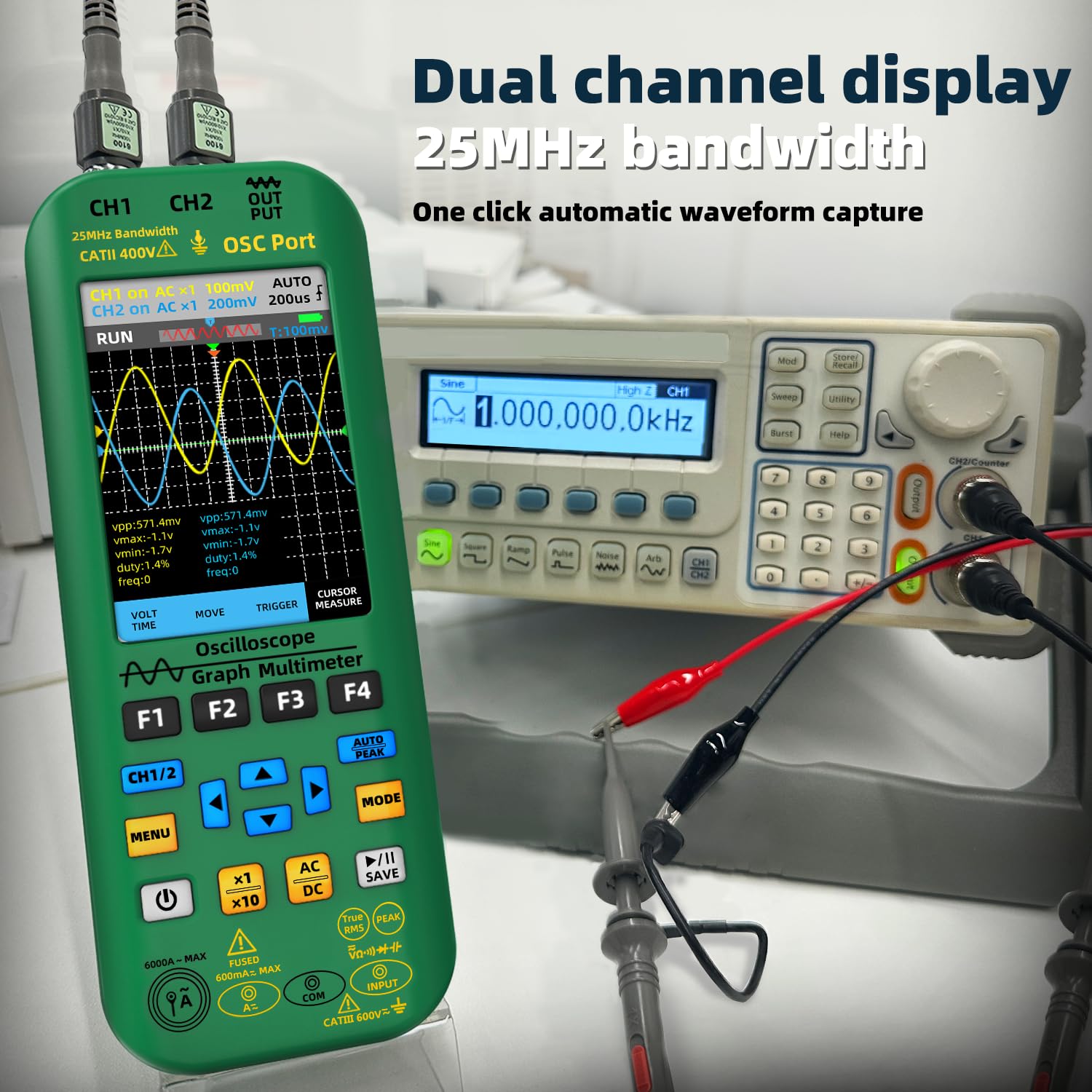
Image 6.1: The oscilloscope displaying dual-channel waveforms (CH1 and CH2) with various measurement parameters such as peak-to-peak voltage, vol. maximtage, vol minimtage, duty cycle, and frequency.
6.2 Modul multimetru
The multimeter function provides precise measurements of various electrical quantities.
- Presa MOD pentru a selecta modul Multimetru.
- Connect the multimeter test leads to the appropriate input terminals.
- Use the F1-F4 buttons or navigation to select the desired measurement function (e.g., DC Voltage, AC Voltage, Resistance, Capacitance, Current, Diode, Continuity, Temperature).
- For AC current measurements up to 6000A, connect the flexible current clamp.

Image 6.2: A user performing an AC voltage measurement within an electrical panel using the multimeter function of the BSIDE device. The display shows a reading of 235.6V AC.
6.3 Modul generator de semnal
The signal generator can output various waveforms for testing electronic circuits.
- Presa MOD to select Signal Generator mode.
- Connect a test lead from the OSC Port (OUT/PUT) to the circuit under test.
- Use the F1-F4 buttons or navigation to select the desired waveform type (sine, square, triangle, half, full, sawtooth, DC).
- Ajustați ieșirea amplitude (0.1V-3.0V) and frequency (0Hz-2MHz) using the navigation buttons.
- For square waves, the duty cycle can be adjusted from 1% to 99%.
6.4 Managementul datelor
The device supports data storage, preview, and export functions.
- Apăsați tasta SALVA button to store current waveform data or measurement readings.
- Navigate through saved data for preview.
- Connect the device to a computer via the USB port for high-speed data transmission and export of stored data.

Image 6.3: The BSIDE device connected to a laptop, demonstrating its high-speed data transmission capability. Waveform data saved on the device can be exported and viewed on a computer for further analysis.
7. Întreținere
7.1 Curățare
Pentru a curăța dispozitivul, utilizați un moale, damp lavetă. Nu utilizați substanțe de curățare abrazive sau solvenți. Asigurați-vă că dispozitivul este oprit și deconectat de la orice sursă de alimentare înainte de curățare.
7.2 Îngrijirea bateriei
The integrated 5000mA Li-ion battery provides extended operation. To maximize battery life:
- Reîncărcați bateria când apare indicatorul de baterie descărcată.
- Evitați descărcarea completă frecventă a bateriei.
- If storing the device for an extended period, charge it to approximately 50% and store in a cool, dry place.
7.3 Depozitare
When not in use, store the device in its provided high-end EVA storage bag to protect it from dust, moisture, and physical impact. Store in a dry environment away from direct sunlight and extreme temperatures.
8. Depanare
If you encounter issues with your BSIDE device, refer to the following common problems and solutions:
- Dispozitivul nu pornește: Asigurați-vă că bateria este încărcată. Conectați cablul de încărcare și încercați din nou.
- Niciun afișaj sau afișaj slab iluminat: Check battery level. Adjust backlight settings in the menu.
- Citiri incorecte în modul Multimetru: Verify test lead connections. Ensure the correct measurement function is selected. Check for damaged leads.
- No waveform in Oscilloscope mode: Check probe connections to both the device and the circuit. Ensure probe attenuation matches the device setting. Use AUTO PEAK to automatically adjust settings. Verify the circuit under test is active.
- Signal Generator output not working: Ensure the device is in Signal Generator mode and the output is enabled. Check connections from the OSC Port.
- Probleme legate de transferul de date: Ensure the USB cable is securely connected to both the device and the computer. Check computer's device manager for proper driver installation.
Dacă problema persistă, contactați asistența pentru clienți pentru asistență suplimentară.
9. Specificații
| Caracteristică | Caietul de sarcini |
|---|---|
| Afişa | 3.98-inch TFT Color Screen, 480*320 IPS, 6000 words |
| SampLing Rate | 3 times / second (Multimeter) |
| Lățimea de bandă | 25MHz (Dual-channel) |
| S în timp realampLing Rate | 208MSa / s |
| Numărul de canale | 2 de canale |
| Impedanta de intrare | 1MΩ, @16pF |
| Atenuarea sondei | ×1, ×10 |
| Vol. Maxim de intraretage | ×1 range <150V, ×10 range <300V (DC + AC peak) |
| Horizontal Sampling Rate Range | 1.5Sa/s - 208MSa/s |
| Sensibilitate verticală | 20mV/div - 10V/div |
| Modul de afișare | XT, XY, Scroll |
| Timp de strălucire | Min, 500ms, 1s, 10s, Unlimited |
| DC Voltage (V) | 0.001V - 1000V (0.8%+3) |
| AC Voltage (V) | 0.001V - 750V (1.0%+3) |
| Curent continuu (mA) | 0.01mA - 600.0mA (1.0%+3) |
| Curent alternativ (mA) | 0.01mA - 600.0mA (1.2%+5) |
| Curent flexibil Clamp Curent alternativ | 0.1A - 6000A (1.0%+5) |
| Rezistenţă | 0.1Ω - 60.00MΩ (1.0%+3) |
| Capacitate | 0.1nF - 99.99mF (4.5%+5) |
| Temperatură | (-20 - 1000)°C / (-4 - 1832)°F (2.5%+5) |
| Signal Generator Waveform Types | Sine, Square, Triangle, Half, Full, Sawtooth, DC |
| Signal Generator Frequency Range | 0Hz - 2MHz |
| Ieșire generator de semnal Amplititudine | 0.1V - 3.0V |
| Signal Generator Square Wave Duty Cycle | 1% - 99% |
| Baterie | 5000mA Li-ion (2 Lithium Ion batteries included) |
| Dimensiuni | 216.6 x 84.5 x 36.0 mm (8.5 x 3.31 x 1.42 inchi) |
| Greutate | 384 g (13.55 uncii) |
10. Garanție și asistență
For warranty information and technical support, please refer to the documentation included with your purchase or contact BSIDE customer service through their official website or the retailer where the product was purchased. Please have your model number (2 channel handheld oscilloscope) and purchase details ready when contacting support.
11. Informații despre videoclipuri
Nu au fost disponibile videoclipuri oficiale cu produsul de la vânzător pentru a fi încorporate în acest manual.
Documente aferente2 channel handheld oscilloscope


Ask a question about this manual
Ask about setup, troubleshooting, compatibility, parts, safety, or missing instructions. Manuals+ will review the question and use this page’s manual context to help answer it.