
Stemedu ESP32-3248S035C
Stemedu 3.5 inch ESP32 Capacitive Touch Screen User Manual
Model: ESP32-3248S035C
1. Introducere
This user manual provides detailed instructions for the setup, operation, maintenance, and troubleshooting of the Stemedu 3.5 inch ESP32 Capacitive Touch Screen. This development board integrates an ESP32 chip with BLE and WiFi dual-core processor, a 3.5-inch capacitive touch display, and 32MB flash memory. It features an ST7796 driver chip and a 480x320 TFT LCD touchscreen display, making it suitable for various applications including 3D printers, smart home devices, and IoT projects.
2. Produs terminatview
The Stemedu ESP32-3248S035C is a versatile development board designed for embedded systems and IoT applications. Its key components include:
- ESP32 Chip: Integrated with BLE + WiFi dual-core processor.
- Afişa: 3.5-inch capacitive touch TFT LCD with ST7796 driver, 480x320 resolution.
- Memorie: 32MB flash memory.
- Conectivitate: USB for powering and programming, UART, SPI, I2C, PWM interfaces.
- Depozitare: Support for TF card (maximum 4G).
2.1. Conținutul pachetului
Verificați dacă toate articolele sunt prezente în colet:
- 1 x 3.5 inch Capacitive Touch Screen Development Board
- 1 x cablu USB
- 1 x Set of Jumper Wires

Figure 2.1: Product and included accessories.

Figura 2.2: Detaliat view of the development board components.
3. Configurare
3.1. Pornirea inițială
Upon initial power-up via the USB port, the board performs a self-test and displays a demo application. This confirms basic functionality and showcases the display's graphical capabilities.
3.2. Conectarea la un computer
Connect the development board to your computer using the provided USB cable. This connection provides power and enables communication for programming.
3.3. Instalarea driverelor (dacă este necesar)
If your computer does not automatically recognize the device, you may need to install a USB-SERIAL CH340 (COM) driver. This driver is commonly required for ESP32 boards. A common source for this driver can be found via a web search for "CH340 driver".
4. Operating the Development Board
4.1. Programming Environment Setup
The ESP32-3248S035C board can be programmed using various Integrated Development Environments (IDEs) such as Arduino IDE, ESP IDE, or MicroPython. Ensure you select the correct board and port in your IDE settings.
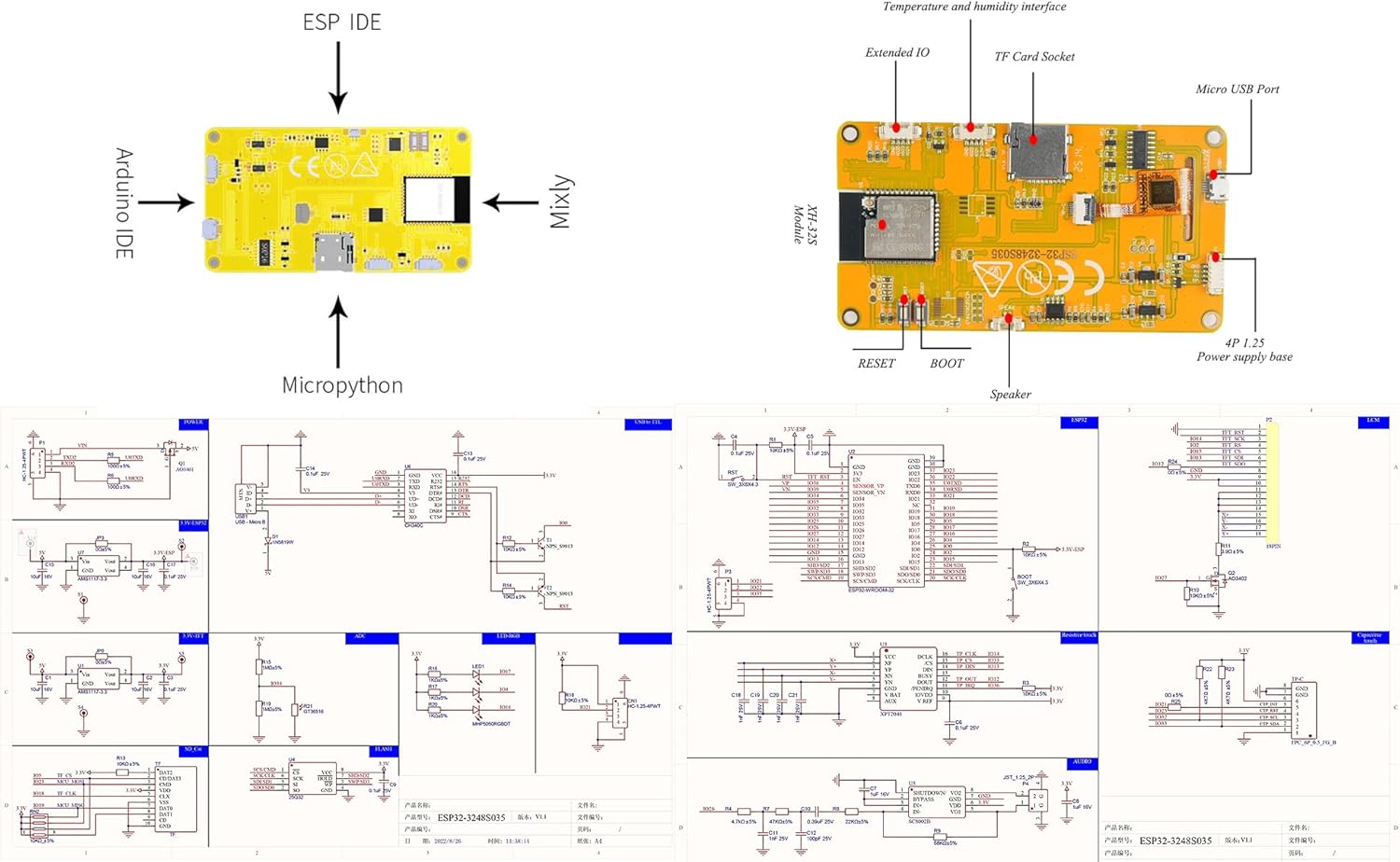
Figure 4.1: Programming environment options for the development board.
4.2. Library Selection
When developing applications, it is crucial to use the correct display and touch libraries. For this 3.5-inch capacitive touch display, ensure your chosen library supports capacitive touch and the ST7796 driver with 480x320 resolution. Some users have found success with the ESP32-3248S035 GitHub repository iar cel OpenHASP documentation for Sunton ESP32-3248S035 boards.
4.3. Uploading Code
Code can be uploaded to the board via your chosen IDE (e.g., Arduino IDE) or using the Espressif Download Tool. Ensure the correct COM port is selected and the baud rate is set appropriately for faster flashing.

Figure 4.3: Code upload methods.
5. Întreținere
To ensure the longevity and optimal performance of your Stemedu ESP32 Capacitive Touch Screen, follow these maintenance guidelines:
- curatenie: Use a soft, dry, anti-static cloth to clean the display and board. Avoid abrasive cleaners or solvents.
- Depozitare: Store the board in a cool, dry environment, away from direct sunlight and extreme temperatures.
- Manipulare: Handle the board by its edges to avoid touching sensitive components or the display surface.
- Alimentare electrică: Always use a stable and appropriate power supply (via USB or VIN/GND pins as specified).
6. Depanare
| Problemă | Cauza posibila | Soluţie |
|---|---|---|
| Afișajul nu se aprinde. | No power, faulty USB cable, or incorrect power source. | Check USB connection, try a different cable or USB port. Ensure power supply meets specifications. |
| Computer not recognizing the board. | Missing or incorrect USB driver. | Install the USB-SERIAL CH340 (COM) driver. |
| Display shows garbled or incorrect graphics. | Incorrect display library or configuration in code. | Verify that the correct capacitive touch and ST7796 driver libraries are used. Ensure display resolution (480x320) is correctly set in your code. |
| Ecranul tactil nu răspunde. | Incorrect touch library or calibration issues. | Confirm the capacitive touch library is correctly implemented. Check for any specific touch calibration routines required by your chosen library. |
| Code upload fails. | Incorrect COM port, baud rate, or board selection in IDE. | Ensure the correct COM port is selected. Try different baud rates. Verify the board type is correctly selected in your IDE. |
7. Specificații
| Caracteristică | Detaliu |
|---|---|
| Model | ESP32-3248S035C |
| Dimensiunea afișajului | 3.5 inci |
| Tip de afișare | Capacitive Touch TFT LCD |
| Rezoluţie | 480x320 pixeli |
| Cip de șofer | ST7796 |
| Procesor | ESP32 (BLE + WiFi dual-core) |
| Memorie flash | 32 MB |
| Interfețe | UART, SPI, I2C, PWM, USB |
| Suport card TF | Da, până la 4 GB |
| Alimentare electrică | USB (5V) or VIN/GND (4.7-5.2VDC) |
| Dimensiuni (Lxlxh) | 3.94 x 2.17 x 0.2 inci |
| Greutatea articolului | 4.2 uncii |
8. Garanție și asistență
For warranty information and technical support, please refer to the official Stemedu website or contact their customer service directly. Additional resources and community support can often be found on forums and repositories related to ESP32 development, such as the OpenHASP community and various GitHub projects.