
1. Introducere
This manual provides comprehensive instructions for the installation, operation, maintenance, and troubleshooting of the Axiom GMFIBER-SFP-500-AX 1000BASE-SX SFP Transceiver. Please read this manual thoroughly before using the product to ensure proper functionality and safety.
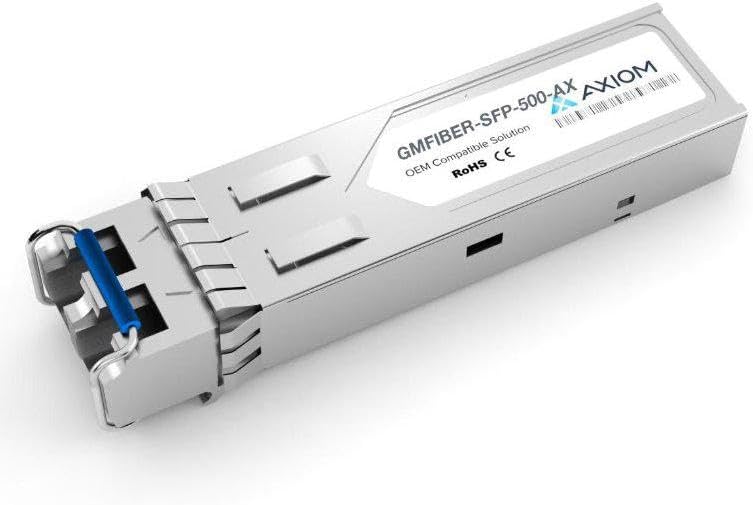
An image showing the Axiom GMFIBER-SFP-500-AX 1000BASE-SX SFP Transceiver. It is a compact, metallic module with a blue pull tab on one end, designed for network connectivity.
2. Produs terminatview
The Axiom GMFIBER-SFP-500-AX is a high-performance Small Form-Factor Pluggable (SFP) transceiver module designed for 1000BASE-SX Gigabit Ethernet applications. It provides a reliable fiber optic link for data communication, compatible with SIXNET systems. This module is hot-pluggable, allowing for easy installation and replacement without interrupting network operations.
Caracteristici cheie:
- 1000BASE-SX compliant
- SFP (Small Form-Factor Pluggable) standard
- Designed for multi-mode fiber applications
- Hot-pluggable interface
- OEM Compatible Solution for SIXNET
- RoHS and CE compliant
3. Configurare
3.1 Conținutul pachetului
Before proceeding with installation, please verify that all items are present and in good condition:
- Axiom GMFIBER-SFP-500-AX 1000BASE-SX SFP Transceiver
- Acest Manual de utilizare (digital sau tipărit)
3.2 Etapele de instalare
Follow these steps to properly install the SFP transceiver:
- Siguranța pe primul loc: Ensure that the host device (e.g., network switch, router) is powered off or that the SFP port is disabled, if possible, to prevent accidental damage during installation.
- Orient the Transceiver: Hold the SFP transceiver with the blue pull tab facing upwards.
- Insert into Port: Gently slide the SFP transceiver into the designated SFP port on your compatible network device (e.g., SIXNET equipment) until it clicks into place. Do not force the module.
- Conectați cablul de fibră optică: Remove the dust cap from the SFP transceiver's optical port and from your fiber optic cable. Carefully insert the appropriate fiber optic cable (LC connector for 1000BASE-SX) into the transceiver's port. Ensure a secure connection.
- Power On/Enable Port: If you powered off the device, power it back on. If you disabled the port, re-enable it.
- Verificați conexiunea: Check the link/activity LEDs on the host device's SFP port. A solid green or blinking green light typically indicates a successful link and data activity. Refer to your host device's manual for specific LED indicators.
4. Instrucțiuni de utilizare
Once installed, the Axiom GMFIBER-SFP-500-AX transceiver operates automatically as part of your network infrastructure. It facilitates the conversion of electrical signals to optical signals for transmission over fiber optic cables and vice-versa.
Verificarea funcționării:
- Stare link: Observe the link status indicator on your network device's SFP port. A steady light usually signifies a successful physical link.
- Activity Indicator: A blinking light typically indicates data transmission and reception.
- Conectivitate la rețea: Confirm network connectivity and data flow between devices connected via the transceiver.
For detailed information on monitoring SFP module status, consult the documentation for your specific network switch or router.
5. Întreținere
The Axiom GMFIBER-SFP-500-AX SFP Transceiver is designed for reliable, long-term operation with minimal maintenance. However, proper care can extend its lifespan and ensure optimal performance.
Îngrijire generală:
- Păstra curat: Always keep the optical ports of the transceiver and fiber optic cables clean and covered with dust caps when not in use. Dust and contaminants can significantly degrade optical performance.
- Manipulați cu atenție: Avoid touching the optical interfaces directly. Handle the transceiver by its metal casing.
- Depozitare: Store the transceiver in a cool, dry, and dust-free environment when not installed. Use anti-static bags if available.
- Avoid Bending Fiber: Ensure that connected fiber optic cables are not bent beyond their minimum bend radius, as this can cause signal loss.
6. Depanare
If you encounter issues with your Axiom GMFIBER-SFP-500-AX SFP Transceiver, refer to the following table for common problems and their solutions.
| Problemă | Soluție posibilă |
|---|---|
| No Link Light on Host Device |
|
| Conectivitate intermitentă |
|
| Slow Data Transfer / High Error Rate |
|
7. Specificații
The following table outlines the key technical specifications for the Axiom GMFIBER-SFP-500-AX SFP Transceiver:
| Caracteristică | Detaliu |
|---|---|
| Model | GMFIBER-SFP-500-AX |
| Tip de produs | SFP (Small Form-Factor Pluggable) Transceiver |
| Rata de date | 1.25 Gbps (Gigabit Ethernet) |
| Standard | 1000BASE-SX |
| Tipul fibrei | Fibră multimodală (MMF) |
| Tip conector | LC Duplex |
| Compatibilitate | SIXNET (OEM Compatible Solution) |
| Producător | Axiomă |
| ASIN | B0D83HG83R |
| Data primului disponibil | 30 decembrie 2022 |
8. Informații despre garanție
Axiom products are manufactured to high-quality standards. This product is covered by the manufacturer's standard warranty. For specific warranty terms, conditions, and duration, please refer to the warranty documentation provided with your purchase or visit the official Axiom webPăstrați dovada achiziției pentru reclamații în garanție.
9. Suport
If you require technical assistance or have questions regarding the Axiom GMFIBER-SFP-500-AX SFP Transceiver that are not addressed in this manual, please contact Axiom customer support or your authorized reseller. When contacting support, please have your product model number (GMFIBER-SFP-500-AX) and purchase information ready.
For the most up-to-date support resources, including FAQs and contact details, please visit the official Axiom website-ul.


