
1. Introducere
This manual provides essential information for the installation, operation, maintenance, and troubleshooting of your Balboa Water Group VL401 Topside Control Panel. The VL401 is a genuine Balboa Water Group 4-button electronic control panel designed for use with VS/GS series spa control systems. Please read these instructions carefully before proceeding with installation or operation to ensure proper function and longevity of your unit.
2. Configurare și instalare
The Balboa Water Group VL401 topside control panel is designed for straightforward replacement or new installation in compatible spa systems. Ensure the spa's power is disconnected before beginning any installation work.
- Deconectare de la curent: Turn off all power to the spa at the main breaker before attempting any installation or service.
- Eliminați panoul vechi (dacă este cazul): Carefully detach the existing topside control panel from its mounting location. Disconnect the RJ45 (8-wire) cord from the spa pack.
- Conectați panoul nou: Connect the RJ45 (8-wire) cord of the new VL401 panel to the corresponding port on your spa's VS/GS control system. Ensure the connection is secure. The cord length is 7 feet.
- Montați panoul nou: Position the new VL401 panel in the desired location. The panel is rectangular, with dimensions of 6-3/8" x 2-1/4". Secure it using appropriate mounting hardware or adhesive, ensuring a watertight seal if necessary.
- Restaurarea energiei: Once the panel is securely installed and connected, restore power to the spa at the main breaker.
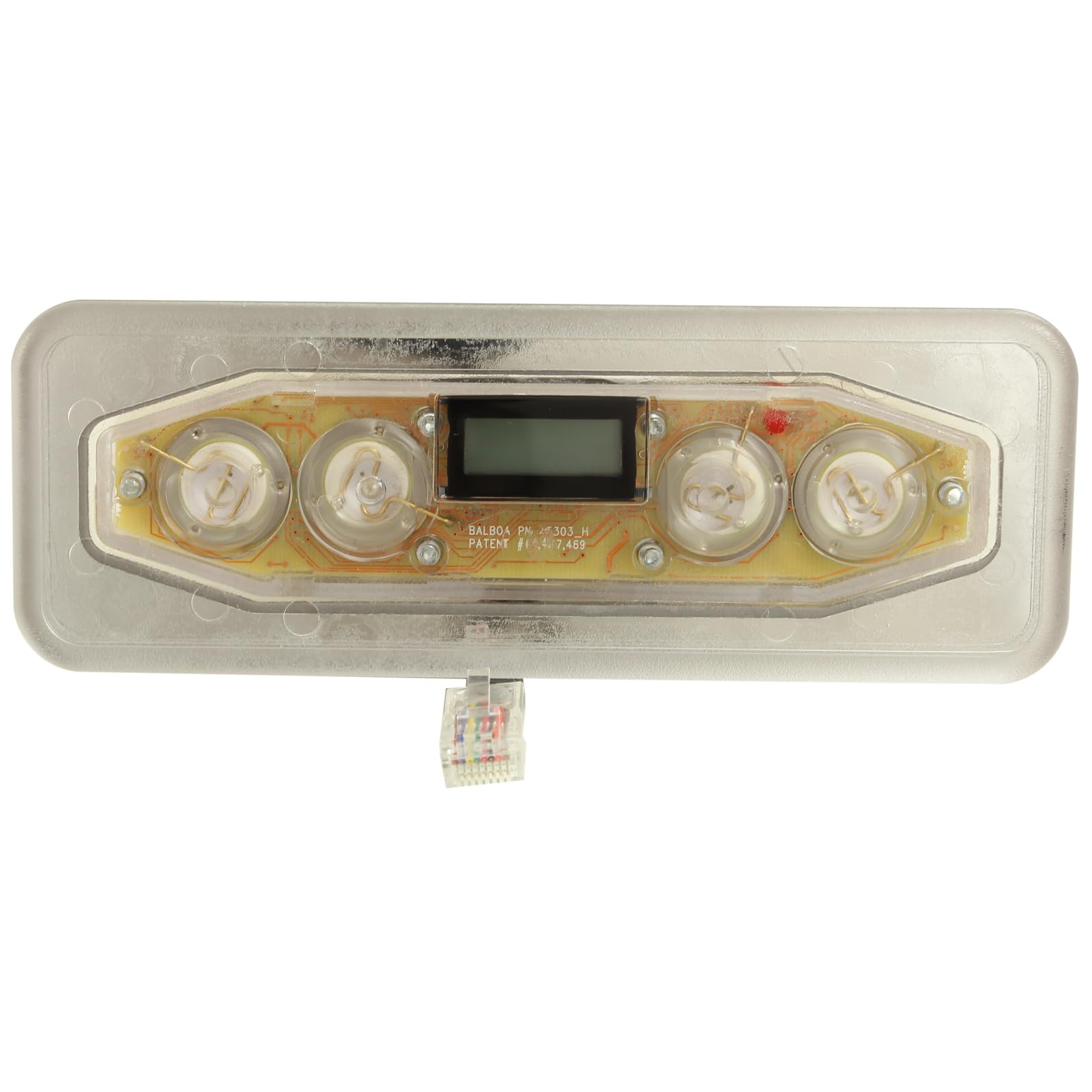
Figura 2.1: Față view of the Balboa Water Group VL401 Topside Control Panel, showing the display, 4 buttons, and the RJ45 connection cable.
3. Instrucțiuni de utilizare
The VL401 topside control panel features a simple 4-button interface for managing your spa's functions. Specific button functions may vary slightly depending on your spa's configuration and the VS/GS control system it is paired with. Refer to your spa's main owner's manual for detailed function descriptions.
- Reglarea temperaturii: Typically, two buttons are dedicated to increasing (Up arrow) and decreasing (Down arrow) the desired water temperature. Pressing these buttons will adjust the set temperature displayed on the screen.
- Jets Control: One button usually controls the spa's jet pump(s). Pressing it cycles through different jet speeds or turns the jets on/off.
- Controlul luminii: Another button is commonly used to control the spa's lighting system, cycling through colors or turning the light on/off.
- Afişa: The integrated display shows the current water temperature, set temperature, and various status indicators.
4. Întreținere
Întreținerea corespunzătoare asigură longevitatea și performanța optimă a panoului de control superior.
- curatenie: Curățați suprafața panoului în mod regulat cu o lavetă moale,amp cloth. Avoid abrasive cleaners, solvents, or harsh chemicals, as these can damage the display and buttons.
- Expunerea la apă: While designed for spa environments, avoid prolonged direct exposure to strong sunlight or extreme weather conditions if possible, as this can degrade the plastic over time.
- Inspecția cablului: Periodically inspect the RJ45 cord for any signs of wear, damage, or fraying. If damage is observed, disconnect power and replace the panel.
5. Depanare
If you encounter issues with your VL401 topside control panel, consider the following common troubleshooting steps:
- Panoul nu răspunde:
- Ensure the spa has power and the main breaker is on.
- Check the RJ45 cord connection at both the panel and the spa pack for a secure fit.
- If the issue persists, a power cycle (turning off and on the spa's main breaker) may resolve minor glitches.
- Display Issues (Blank, Flickering, Incorrect Readings):
- Verify the cord connection is secure.
- A power cycle may help.
- If the display remains problematic, the panel or the spa pack may require professional service or replacement.
- Butoanele nu funcționează:
- Ensure the buttons are not stuck or obstructed.
- A power cycle can sometimes reset button functionality.
- Dacă doar anumite butoane nu răspund, panoul ar putea fi defect.
For persistent issues, consult a qualified spa technician or contact Balboa Water Group customer support.
6. Specificații
Detailed specifications for the Balboa Water Group VL401 Topside Control Panel (G8241):
| Producător | Grupul de apă Balboa |
| Model | VL401 (G8241) |
| Tipul de suprafață | Electronic |
| Numărul de butoane | 4 |
| Forma părții superioare | Dreptunghiular |
| Dimensiunea panoului | 6-3/8" x 2-1/4" |
| Tipul conectorului pentru cablu | RJ45, 8 fire |
| Lungimea cablului | 7 ft |
| Dimensiunile produsului | 6.45 x 3.3 x 2 inci |

Figura 6.1: Spate view of the Balboa Water Group VL401 Topside Control Panel, showing mounting points and adhesive backing.
7. Informații despre garanție
For specific warranty details regarding your Balboa Water Group VL401 Topside Control Panel, please refer to the documentation provided with your spa system or contact Balboa Water Group directly. Warranty coverage typically applies to manufacturing defects and is subject to terms and conditions.
8. Suport
If you require further assistance, technical support, or have questions not covered in this manual, please contact Balboa Water Group customer service or your authorized spa dealer. When contacting support, please have your product model number (VL401) and any relevant spa system information readily available.