
1. Introducere
The MARSTEK SP-001 Adjustable Voltage Protector is designed to safeguard your valuable electrical equipment and appliances. This smart device provides comprehensive protection against over-current, over-voltage, și subvoltage conditions. It features real-time monitoring of voltage, current, and power levels, ensuring your electrical systems operate within safe parameters. With its automatic reset function, power is restored once conditions return to normal, minimizing downtime and protecting against potential hazards.
2. Informații de siguranță
- Instalare profesională recomandată: Installation should be performed by a qualified electrician to ensure proper wiring and safety.
- Deconectare de la curent: Always disconnect power before installation, maintenance, or any wiring adjustments.
- Mediu de operare: Nu expuneți dispozitivul la umiditate, temperaturi extreme sau medii corozive.
- Capacitate de încărcare: Ensure the connected load does not exceed the device's maximum current rating of 63 Amps.
- Fire Resistant Material: The housing is made of fire-resistant PC material, but proper ventilation is still important.
3. Product Features and Panel Introduction
The SP-001 features a high-definition digital display for real-time monitoring and intuitive controls for setup.

Imagine: Front panel of the MARSTEK SP-001 showing the digital display, indicators, and control buttons. The display shows real-time voltage, current, and energy consumption. Indicators include 'Fault', 'R/T' (Delay), and 'OUT' (Output). Buttons are 'SET' for menu, 'Up Arrow' for digit increase, 'Down Arrow' for digit decrease, and 'Power On/Off'.
- Ecran digital: Afișează volumul în timp realtage (V), current (A), and energy consumption (kWh).
- Indicator de eroare: Illuminates to indicate a malfunction or protection trip.
- R/T (Delay) Indicator: Shows when a delay is active, such as during automatic reset.
- OUT (Output) Indicator: Indicates the output is active and power is being supplied.
- Buton SET: Used to enter the setup menu and confirm settings.
- Butoane săgeată sus/jos: Used to navigate menu options and adjust numerical values.
- Buton de pornire / oprire: Controls the power supply to the connected load.
4. Configurare și instalare
The SP-001 is designed for DIN rail mounting, allowing for flexible and straightforward installation in electrical panels.
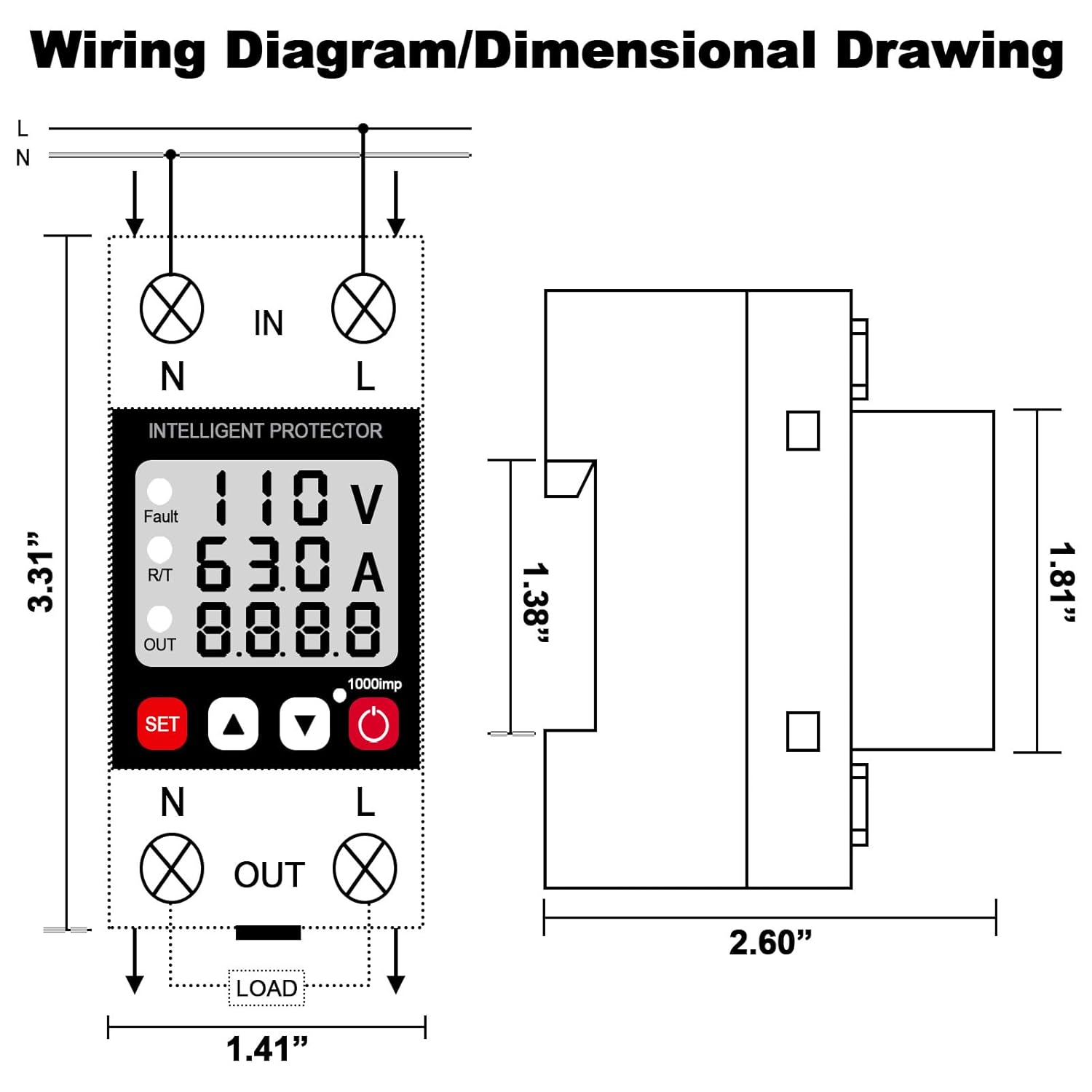
Imagine: A detailed wiring diagram for the MARSTEK SP-001, showing input (IN) and output (OUT) terminals for Neutral (N) and Live (L) wires. The diagram illustrates how to connect the device in series with the load. Also included is a dimensional drawing showing the device's physical measurements (e.g., 3.31 inches height, 2.60 inches width, 1.81 inches depth).
- Montare: Securely attach the SP-001 to a standard DIN rail within your electrical panel.
- Cablaj: Refer to the wiring diagram provided. Connect the incoming neutral (N) and live (L) wires to the 'IN' terminals. Connect the outgoing neutral (N) and live (L) wires to the 'OUT' terminals, leading to your protected load. Ensure all connections are tight and secure.
- Pornire: Once wiring is complete and verified, restore power to the circuit. The device will power on and display real-time readings.
5. Funcționare
5.1 Monitorizare în timp real
The device continuously displays voltage, current, and energy consumption, allowing you to monitor your electrical system's performance.

Imagine: The MARSTEK SP-001 Intelligent Protector displaying real-time values for voltage (V), current (A), and energy consumption (kWh) on its digital screen. The image also illustrates the device's application in various household settings, protecting appliances.
5.2 Funcții de protecție
The SP-001 provides robust protection:
- Peste-Voltage Protecție: Automatically disconnects power if voltage exceeds the preset upper limit.
- Sub-Voltage Protecție: Automatically disconnects power if voltage drops below the preset lower limit.
- Protecție la supracurent: Automatically disconnects power if current exceeds the preset maximum.
5.3 Automatic Reset Function
When a protection event occurs (e.g., over-voltage), the device will cut off power. After a default delay time (typically 30 seconds), it will automatically reset and restore power once the voltage and current return to normal levels.

Imagine: A flowchart illustrating the automatic reset process of the MARSTEK SP-001. Steps include: 1. Circuit abnormality cuts off power. 2. Default delay wait of 30 seconds. 3. Circuit resets automatically after 30 seconds. 4. If abnormality persists after 30 seconds, the device continues to wait for normal conditions before resetting.
5.4 Setarea parametrilor
Use the 'SET' button to enter the configuration menu. The Up/Down arrow buttons allow you to adjust parameters such as over-voltage limit, under-voltage limit, over-current limit, and recovery delay time. Refer to the detailed parameter settings in the specifications section for default and adjustable ranges.
6. Întreținere
- curatenie: Păstrați dispozitivul curat și fără praf. Folosiți o lavetă uscată și moale pentru curățare. Nu utilizați agenți de curățare lichizi.
- Inspecţie: Verificați periodic conexiunile cablurilor pentru a vă asigura că acestea rămân fixe.
- Conditii de mediu: Asigurați-vă că mediul de operare se încadrează în intervalele de temperatură și umiditate specificate.
7. Depanare
- Dispozitivul nu pornește: Check the main power supply and ensure all wiring connections are correct and secure.
- Power Cut Off Unexpectedly: Check the display for fault indicators. This usually means an over-voltage, sub-voltage, or over-current event has occurred. Verify the input voltage and current are within normal operating parameters.
- Device Not Resetting: If the device does not reset after the delay, ensure the abnormal conditions (e.g., high voltage) have truly resolved. If the issue persists, manually power cycle the device.
- Citiri incorecte: Ensure the device is correctly wired and the load is within its specified range.
8. Specificații
Detailed technical parameters for the MARSTEK SP-001.

Imagine: A table detailing the product parameters of the MARSTEK SP-001. Key specifications include: Supply Terminals (N, L), Rated Supply Voltage (AC 110V; DC 85-300V), Rated Frequency (40/50/60/70Hz), Over-Voltage Setting Range (>U Setting Range: AC130-300V; DC130-300V), Under-Voltage Setting Range (<U Setting Range: AC80-210V; DC85-210V), Voltage Hysteresis (5V), Overvoltage Trip Delay (0.5s), Voltage Accuracy (<1%), Max. Operating Phase Voltage (350V), Max. Operating Current (40A/63A), Altitude (≤2000m), Function (Lightning Protection), Permissible Relative Humidity (≤50% at 40°C without condensation), Ambient Temperature (-25°C ~ +55°C), Net Weight (159g), and Size (81*36*66mm).
| Parametru | Valoare |
|---|---|
| Terminale de alimentare | N, L |
| Vol. aprovizionare evaluatătage | AC 110V; DC 85-300V |
| Frecvența nominală | 40/50/60 / 70Hz |
| Peste-Voltage Interval de setare | AC130-300V; DC130-300V |
| Sub-Voltage Interval de setare | AC80-210V; DC85-210V |
| Voltage histerezis | 5V |
| Overvoltage Întârzierea călătoriei | anii 0.5 |
| Voltage Precizia | <1% |
| Max. Operating Phase Voltage | 350V |
| Max. Curent de funcționare | 40A/63A |
| Altitudine | ≤2000m |
| Funcţie | Protecție împotriva trăsnetului |
| Umiditatea relativă admisă | ≤50% at 40°C (Without Condensation) |
| Temperatura ambiantă | -25°C ~ +55°C |
| Greutate netă | 159 g |
| Dimensiune | 81*36*66mm |
9. Comparison with Standard Circuit Breaker
The MARSTEK SP-001 offers advanced protection features beyond a standard circuit breaker.

Imagine: A comparison table highlighting the differences between an 'Intelligent Protector' (MARSTEK SP-001) and a 'Circuit Breaker'. The Intelligent Protector offers Voltage Current and kWh Display, Overvoltage Protection (less than 1 second), Undervoltage Protection (less than 1 second), Automatic Recovery, Automatic/Manual Off Mode, and Intelligent Regulation (Current/Voltage/Recovery Time). A standard Circuit Breaker offers 'No' for all these features except for a 'Manual' Off Mode.
10. Garanție și asistență
For warranty information and technical support, please refer to the product packaging or contact MARSTEK customer service directly. Keep your purchase receipt as proof of purchase.