
1. Introducere
The GODIAG GD203 is a professional handheld diagnostic tool designed for comprehensive vehicle system analysis. It supports over 80 automotive brands and offers advanced diagnostic functions for Anti-lock Braking System (ABS) and Supplemental Restraint System (SRS), alongside a wide range of OBDII/EOBD+CAN functions and 28 special reset services. This manual provides detailed instructions for setting up, operating, maintaining, and troubleshooting your GD203 scanner.
2. Conținutul pachetului
Verificați dacă toate articolele enumerate mai jos sunt incluse în pachetul dumneavoastră:
- 1pc x GD203 OBD2 Scanner
- 1pc x Cipher paper
- 1 buc x cablu USB
- 1pc x Test line (OBDII connection cable)
- 1pc x Instruction manual and Upgrade guide
- 1pc x Black storage box

Image: The GODIAG GD203 package contents, including the scanner, cables, manual, and storage box.
3. Dispozitiv terminatview
The GD203 scanner features a compact design with an LCD screen, function keys, and a non-slip cover for comfortable handling. Familiarize yourself with the device's layout:

Imagine: Detaliată view of the GODIAG GD203 scanner, highlighting the LCD screen, non-slip cover, function keys (F1, F2, F3), OK button, navigation arrows, back button, and USB charging port.
- Ecran LCD: Afișează informații de diagnosticare și opțiuni de meniu.
- Non-slip Cover: Provides a secure grip and protection.
- Taste funcționale (F1, F2, F3): Efectuați acțiuni specifice așa cum sunt indicate pe ecran.
- Navigation Keys (Up, Down, Left, Right): Folosit pentru a derula meniurile și a selecta opțiuni.
- Buton OK: Confirmă selecțiile.
- Butonul Înapoi: Revine la ecranul sau meniul anterior.
- Port de încărcare USB: For connecting to a computer for updates or power.
- Conector OBDII: Conectează scanerul la portul OBDII al vehiculului.
4. Configurare
- Localizați portul OBDII al vehiculului: The OBDII port is typically located under the dashboard on the driver's side, though its exact position may vary by vehicle model. Refer to your vehicle's owner's manual if you cannot find it.
- Conectați scanerul: Plug the OBDII connector cable from the GD203 scanner firmly into the vehicle's OBDII port.
- Pornire: The GD203 scanner does not require a separate battery. It will power on automatically once connected to the vehicle's OBDII port, drawing power directly from the vehicle.
- Pornirea vehiculului (opțional): For some diagnostic functions, it may be necessary to turn the vehicle's ignition to the "ON" position or start the engine. Follow the on-screen prompts or specific function requirements.
5. Instrucțiuni de utilizare
5.1 Navigație generală
Use the navigation keys (Up, Down, Left, Right) to move through menu options. Press the OK button to select an item or confirm an action. Press the Spate butonul pentru a reveni la ecranul anterior.
5.2 OBDII/EOBD+CAN Functions
These functions provide standard diagnostic capabilities for engine and emission-related issues.

Image: The GODIAG GD203 displaying the OBDII/EOBD+CAN functions menu, including options like Read Codes, Erase Codes, Live Data, Freeze Frame, and I/M Readiness.
- Citiți codurile: Preia codurile de diagnosticare a erorilor (DTC) de la computerul vehiculului.
- Ștergeți codurile: Șterge codurile de eroare și stinge indicatorul de defecțiune Lamp (MIL) după reparații.
- Date live: Displays real-time Parameter Identification Data (PID) from the vehicle's sensors in text and graphic formats.
- Blocare cadru: Shows a snapshot of vehicle operating conditions at the moment a DTC was set.
- Disponibilitate I / M: Checks the status of emission-related monitors to determine if the vehicle is ready for an inspection/maintenance test.
- Test monitor O2: Preia rezultatele testelor de monitorizare a senzorului de O2.
- Test monitor de bord: Accesează rezultatele testelor de monitorizare a diagnosticării la bord pentru componente/sisteme specifice.
- Testul componentelor: Permite inițierea unui test de scurgeri pentru sistemul EVAP al vehiculului.
- Informații despre vehicul: Preia numărul de identificare al vehiculului (VIN), ID-ul de calibrare (CALID) și numărul de verificare a calibrării (CVN).
- Module prezente: Displays communication protocols and modules detected.
5.3 Diagnosticare ABS/SRS
The GD203 provides in-depth diagnostic capabilities for the Anti-lock Braking System (ABS) and Supplemental Restraint System (SRS/Airbag).

Image: The GODIAG GD203 performing ABS and SRS dual system diagnosis, showing a visual representation of ABS operation and airbag deployment.
- Diagnosticarea sistemului ABS: Citește și șterge codurile de eroare, views live data, and performs active tests for the ABS system. This helps identify issues with wheel speed sensors, ABS pump, and other related components.
- SRS/Airbag System Diagnosis: Citește și șterge codurile de eroare, views live data, and performs active tests for the SRS system. This assists in diagnosing issues with airbags, seatbelt pretensioners, crash sensors, and the SRS control module.
5.4 28 Special Functions
The GD203 offers a comprehensive suite of 28 special reset and service functions to assist with various vehicle maintenance tasks. Note: Availability of specific functions may vary by vehicle make, model, and year.
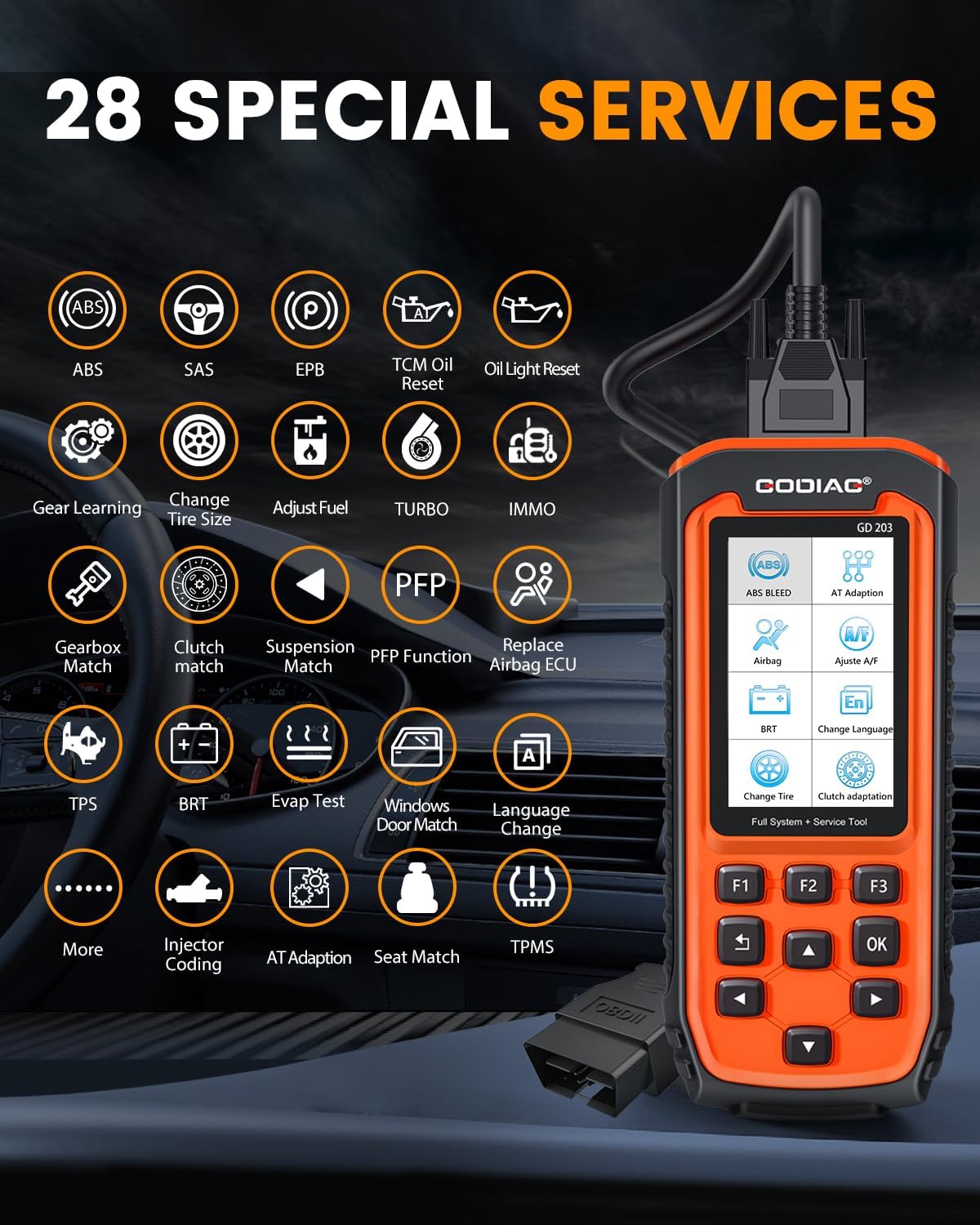
Image: The GODIAG GD203 displaying icons for its 28 special services, including ABS, SAS, EPB, Oil Reset, IMMO, BRT, TPMS, and more.
- 1. ABS Bleed
- 2. Airbag (SRS) Reset
- 3. Resetarea frânei de parcare electronice (EPB)
- 4. Injector Coding
- 5. Oil Light Reset (TCM Oil Reset)
- 6. Steering Angle Sensor (SAS) Calibration
- 7. Battery Reset (BRT)
- 8. Language Change (for instrument cluster)
- 9. Gear Learning
- 10. Tire Size Change
- 11. Fuel Adjustment
- 12. Turbo Calibration
- 13. Funcțiile imobilizatorului (IMMO)
- 14. Gearbox Match
- 15. Clutch Match
- 16. Suspension Match
- 17. PFP Function
- 18. Airbag ECU Replacement
- 19. Throttle Position Sensor (TPS) Reset
- 20. EVAP Test
- 21. Windows/Door Match
- 22. Automatic Transmission (AT) Adaptation
- 23. Seat Match
- 24. Tire Pressure Monitoring System (TPMS) Reset
- 25. AFS (Adaptive Front-lighting System)
- 26. And More...
5.5 Setări de limbă
The GD203 supports multiple languages for its interface. To change the language:
- Navigate to the "Settings" or "Setup" menu on the device.
- Select "Language" from the options.
- Choose your desired language from the list. The device supports 17 languages, including English, German, Italian, and Chinese.

Image: The GODIAG GD203 displaying various language options and indicating support for over 65 vehicle brands.
6. Întreținere
6.1 Actualizări de software
The GODIAG GD203 offers lifetime free online updates to ensure compatibility with new vehicle models and diagnostic protocols. To update your device:
- Download the update software from the official GODIAG website onto a computer.
- Connect the GD203 scanner to your computer using the provided USB cable.
- Follow the instructions in the update guide (included in the package) and on the computer software to perform the update.

Image: A visual representation of connecting the GODIAG GD203 scanner to a laptop for a lifetime free online software update.
6.2 Curățarea și depozitarea
- Curăţaţi dispozitivul cu un material moale, damp pânză. Nu utilizați agenți de curățare abrazivi sau solvenți.
- Store the scanner in its black storage box when not in use to protect it from dust, moisture, and physical damage.
- Evitați expunerea dispozitivului la temperaturi extreme sau la lumina directă a soarelui pentru perioade prelungite.
7. Depanare
- Dispozitivul nu pornește:
- Asigurați-vă că cablul OBDII este conectat corect la portul OBDII al vehiculului.
- Verify the vehicle's ignition is in the "ON" position or the engine is running (if required).
- Verificați siguranța vehiculului pentru portul OBDII.
- Eroare de comunicare cu vehiculul:
- Confirm the vehicle supports the OBDII protocol.
- Asigurați-vă că contactul este pus.
- Check for any damage to the OBDII cable or connector.
- Try connecting to a different OBDII-compliant vehicle to rule out scanner issues.
- Ecranul se blochează sau dispozitivul nu răspunde:
- Deconectați dispozitivul de la vehicul și reconectați-l.
- If the issue persists, perform a software update as described in Section 6.1.
- O anumită funcție nu funcționează:
- Verify that your vehicle model supports the specific function. Some classic models without an electronic control system may not support certain reset services.
- Asigurați-vă că software-ul dispozitivului este actualizat.
8. Specificații
| Caracteristică | Caietul de sarcini |
|---|---|
| Model | GD203 OBD2 Scanner |
| Producător | GODIAG |
| Greutatea articolului | 2 lire sterline |
| Dimensiunile produsului | 8.66 x 3.34 x 1.18 inchi (22 x 8.5 x 3 cm) |
| Sursa de alimentare | Sistem electric cu fir (prin portul OBDII) |
| Sistem de operare | Android 4.0 (internal system) |
| Dimensiunea ecranului | 4 inchi |
| Protocoale acceptate | OBDII/EOBD+CAN |
| Funcții speciale | 28+ Reset and Service Functions |
| Actualizare | Actualizare online gratuită pe viață |
9. Suport
If you encounter any problems while using the GODIAG GD203 OBD2 Scanner or require technical assistance, please contact GODIAG customer support. You can typically reach support through the Amazon platform by contacting the seller directly. Please provide your product model and a detailed description of the issue for efficient assistance.
GODIAG is committed to providing satisfactory solutions within 24 hours.