
1. Produs terminatview
The WOOPKER AK35 is a compact 2.0 channel stereo audio amplifier designed for home use. It features Bluetooth 5.0 connectivity, USB and SD card inputs, AUX input, and controls for bass, treble, and master volume. This amplifier delivers clear and powerful sound for various audio setups.
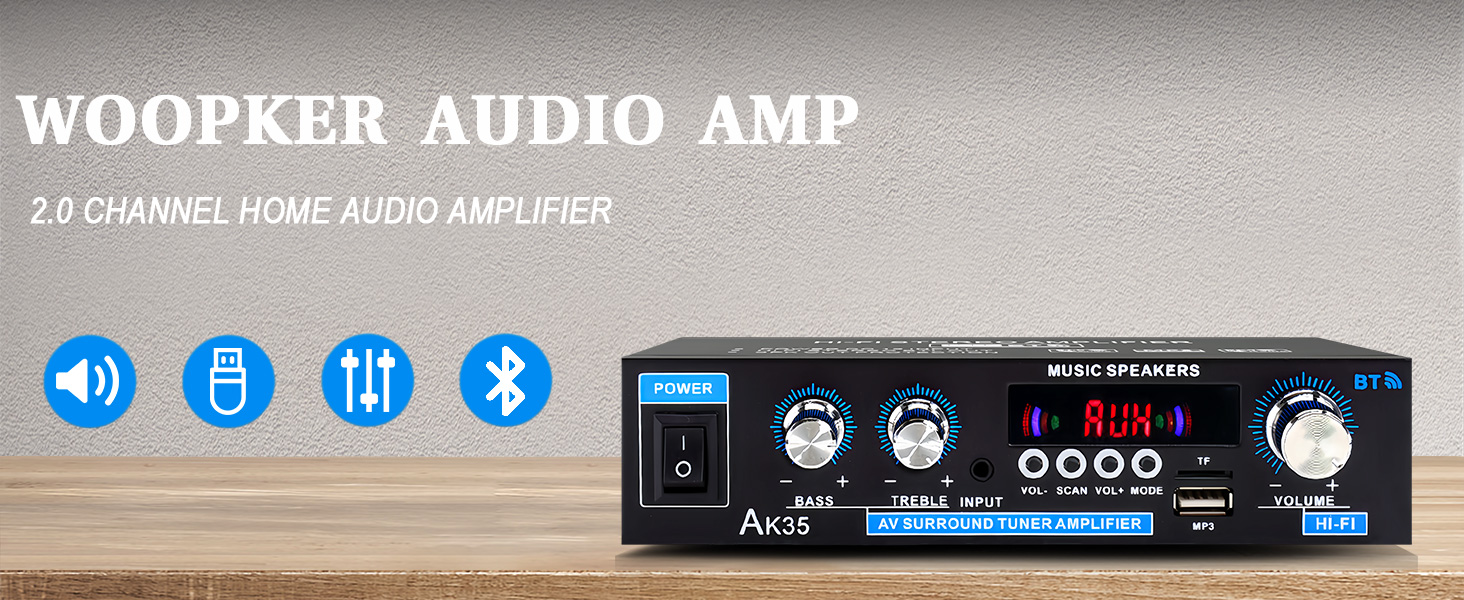
Imaginea 1.1: Față view of the AK35 Stereo Audio Ampmai în viață.
2. Conținutul pachetului
Verificați dacă toate articolele sunt prezente în colet:
- 1x AK35 Audio Ampmai în viață
- 1x cablu de alimentare
- 1x Manual de utilizare (acest document)
- 1x telecomandă
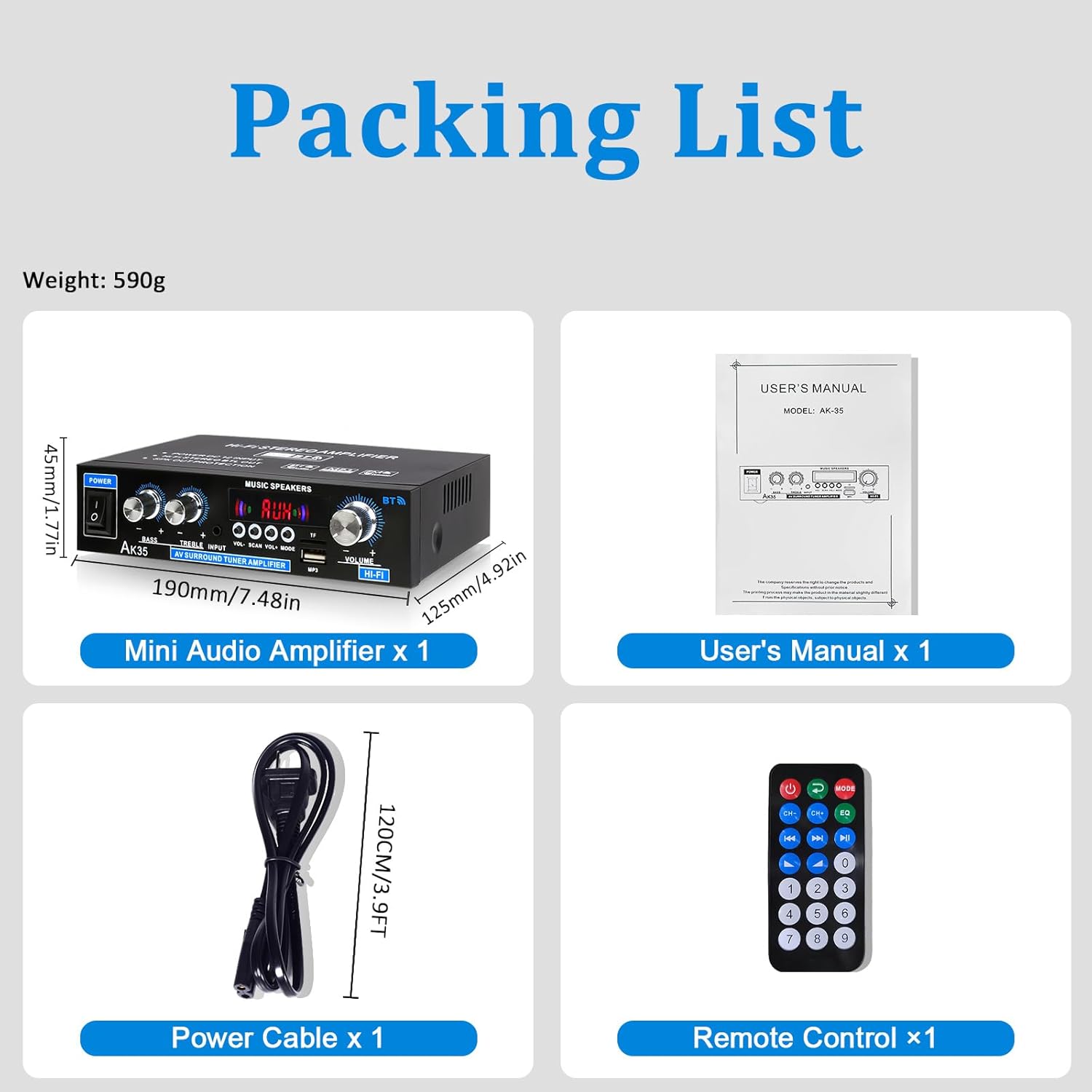
Image 2.1: Contents of the AK35 amppachet lifier.
3. Instrucțiuni de configurare
3.1 Controale panoului frontal
Familiarize yourself with the front panel controls and indicators:

Image 3.1: Front Panel Layout of the AK35 Ampmai în viață.
- Întrerupător: Întoarce amplifier ON/OFF.
- Buton de bas: Ajustează ieșirea audio de joasă frecvență.
- Buton Treble: Ajustează ieșirea audio de înaltă frecvență.
- Intrare audio: Selects the audio source (AUX, USB, SD, Bluetooth, FM).
- Display LED: Shows current mode, track information, or frequency.
- Volumul principal: Controlează volumul general de ieșire.
- Butoane funcționale: Includes VOL-, SCAN, VOL+, MODE for navigation and control.
- TF/USB Port: For connecting USB flash drives or SD cards (via adapter).
3.2 Conexiuni la panoul din spate
Understand the rear panel for proper connectivity:

Image 3.2: Rear Panel Layout of the AK35 Ampmai în viață.
- Audio Input Jack (RCA): Connect external audio sources via RCA cables.
- Speaker Output Jack (L/R): Conectați difuzoare pasive.
- Intrare alimentare CC 12V/5A: Pentru alimentare de curent continuu.
- AC 110-240V Power Input: For AC power supply.
- Antena radio FM: Conectați antena FM inclusă pentru recepția radio.
3.3 Conexiune difuzor
Follow these steps to connect your speakers:

Image 3.3: Speaker Connection Diagram.
- Before connecting speakers, distinguish the positive (+) and negative (-) terminals. The positive terminal is usually red, and the negative terminal is black.
- Press the clasp on the back of the AK35 amplifier and insert bare speaker wires into the speaker clasp corresponding to the positive and negative terminals.
- Ensure proper polarity (+ to + and - to -) for both left and right channels.
- Avoid plugging and unplugging USB drives, SD cards, RCA audio cables, or speaker cables while the ampLifierul este pornit.
3.4 Conexiune la alimentare
Connect the power cable to the AC power input on the rear panel and then to a suitable power outlet.
Video 3.4: Demonstrates connecting speaker wires and powering on the AK35 ampmai în viață.
4. Instrucțiuni de utilizare
4.1 Pornire/Oprire
Flip the Power Switch on the front panel to turn the amplifier PORNIT sau OPRIT.
4.2 Selecție mod de intrare
Press the 'MODE' button on the front panel or remote control to cycle through available input sources: Bluetooth (BT), AUX, USB, SD, and FM Radio.
4.3 Asociere Bluetooth
Pentru a conecta un dispozitiv Bluetooth:
- Comutați amplifier to Bluetooth mode (the LED display will show "BLUE").
- Activați Bluetooth pe dispozitivul mobil sau pe computer.
- Caută "AK35" in the list of available devices and select it to pair.
- Odată asociat, amplifier will confirm the connection, and you can stream audio wirelessly.

Image 4.3: Bluetooth 5.0 connectivity for wireless music streaming.
Video 4.3: Demonstrates Bluetooth pairing and music playback with the AK35 ampmai în viață.
4.4 Redare de pe USB/card SD
Insert a USB flash drive or an SD card (with an adapter) into the TF/USB port. The ampLiferul va comuta automat în modul USB/SD și va începe să redea sunetul files. Use the Function Buttons (VOL-, SCAN, VOL+) to control playback.
4.5 Utilizarea intrării AUX
Connect an external audio source (e.g., CD player, DVD player, computer) to the RCA Audio Input Jacks on the rear panel using an RCA cable. Switch the amplifier to AUX mode to play audio from the connected device.
4.6 Radio FM
Ensure the FM antenna is connected to the rear panel. Switch the amplifier to FM mode. Use the 'SCAN' button to auto-scan and save available radio stations. Use VOL- and VOL+ to navigate through saved stations.
4.7 Reglarea volumului, basului și înaltelor
Adjust the Master Volume knob for overall sound level. Use the Bass and Treble knobs to fine-tune the low and high frequencies according to your preference.

Image 4.7: Remote control for easy adjustment of ampsetările lifitorului.
5. Întreținere
5.1 Curățare
Ștergeți amplifier's exterior with a soft, dry cloth. Do not use liquid cleaners or solvents, as they may damage the finish or internal components.
5.2 Depozitare
Când nu este utilizat pentru perioade lungi de timp, depozitați ampA se păstra într-un loc răcoros și uscat, ferit de lumina directă a soarelui și de temperaturi extreme.
6. Depanare
| Problemă | Cauza posibila | Soluţie |
|---|---|---|
| Fără putere | Cablul de alimentare nu este conectat; Întrerupătorul este oprit; Priza de alimentare este defectă. | Ensure power cable is securely connected. Turn the power switch ON. Test the power outlet with another device. |
| Fără ieșire de sunet | Incorrect input mode; Speaker wires loose; Volume too low; Audio source issue. | Select the correct input mode. Check speaker wire connections. Increase master volume. Verify audio source is playing and connected correctly. |
| Bluetooth nu se conectează | Amplifier not in BT mode; Device not in pairing mode; Interference. | Comutator amplifier to BT mode. Ensure your device's Bluetooth is on and searching. Move closer to the ampmai în viață. |
| Nu se redă cardul USB/SD | Incorect file formatare; Cardul/unitatea nu au fost introduse corect; Corupte files. | Asigurați-vă audio files are in supported formats (e.g., MP3). Reinsert the USB drive/SD card. Try a different USB drive/SD card. |
7. Specificații
- Model: AK35
- Ieșire de vârf: 100W + 100W
- Putere nominală (RMS): 30W x 2
- Canale: 2.0
- Versiune Bluetooth: 5.0
- Intrări: AUX (RCA), USB, SD Card, Bluetooth, FM Radio
- comenzi: Bass, Treble, Master Volume
- Putere de intrare: DC 12V/5A, AC 110-240V
- Greutatea articolului: 1.28 livre (aprox. 580 g)
- Dimensiuni pachet: 8.03 x 6.93 x 2.13 inci (aprox. 20.4 x 17.6 x 5.4 cm)
8. Garanție și asistență
WOOPKER products are designed for reliability and performance. For warranty information or technical support, please refer to the contact details provided with your purchase or visit the official WOOPKER website-ul. Păstrați chitanța de achiziție pentru cererile de garanție.