
1. Introducere
This manual provides detailed instructions for the installation, operation, and maintenance of your Alarm.com ADC-VC728PF Pro Series 4MP Bullet PoE Camera. This camera is designed for both indoor and outdoor surveillance, offering advanced features such as a motorized varifocal lens, 4MP video resolution, and intelligent analytics for enhanced security monitoring.
Vă rugăm să citiți cu atenție acest manual înainte de a încerca să instalați sau să utilizați dispozitivul pentru a asigura funcționalitatea și siguranța corespunzătoare.
2. Conținutul pachetului
Verificați dacă toate articolele sunt prezente în colet:
- Alarm.com ADC-VC728PF Camera
- Hardware de montare
- Weather Resistant RJ45 Cap
- Ghid de instalare
- Cheie Torx
3. Produs terminatview
The Alarm.com ADC-VC728PF is a robust Power over Ethernet (PoE) bullet camera featuring a 4MP sensor and a motorized varifocal lens. This design allows for flexible installation and remote adjustment of the camera's field of view without compromising image quality. It supports 24/7 recording to an optional onboard microSD card or a Commercial-Grade Stream Video Recorder (CSVR126), and integrates advanced analytics for object detection and business activity tracking.
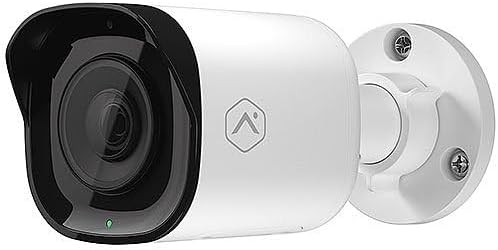
Faţă view of the Alarm.com ADC-VC728PF Pro Series 4MP Bullet PoE Camera, showing the lens, LED indicator, and the adjustable mounting base.
Caracteristici cheie:
- 4MP WDR and HDR Video: Delivers high-resolution video with Wide Dynamic Range and High Dynamic Range capabilities (4MP recording supported on Commercial SVR).
- Motorized Varifocal Lens: Allows remote adjustment of the camera's field of view (3.2-9.8 mm).
- Alimentare prin Ethernet (PoE): Simplifică instalarea prin furnizarea de energie și date printr-un singur cablu Ethernet.
- SD Card Local Storage: Supports optional onboard microSD card for 24/7 continuous recording.
- Viziune de noapte IR: Provides clear video surveillance in low-light or no-light conditions.
- Perimeter Guard: Supports LED and Audio Alert features (requires firmware version 0.6.3.601+).
- Business Activity Analytics: Enables intelligent object detection and tracking for commercial applications.
- Utilizare în interior/exterior: Designed for versatile deployment in various environments.
4. Configurare și instalare
Urmați acești pași pentru instalarea corectă a camerei.
4.1 Montarea camerei
- Selectați o locație: Choose a suitable indoor or outdoor location for wall mounting. Ensure the area provides a clear field of view and is within reach of your network infrastructure.
- Pregătiți suprafața: Use the included mounting hardware to secure the camera base to the chosen surface. Drill pilot holes if necessary.
- Atașați camera: Securely attach the camera to the mounting base. The adjustable ball joint allows for flexible positioning.
4.2 Cablare și conectivitate
- Conectați cablul Ethernet: Connect a standard Ethernet cable from your PoE-enabled network switch or injector to the camera's RJ45 port.
- Apply Weather Resistant Cap: For outdoor installations, use the included weather-resistant RJ45 cap to protect the Ethernet connection from environmental elements.
- Pornire: Once connected to a PoE source, the camera will power on automatically. The status LED on the camera will indicate its operational status.
- Configurarea Rețelei: Access the Alarm.com platform or your network management interface to discover and configure the camera. Refer to the Alarm.com documentation for specific network setup procedures.
5. Funcționare
After successful installation and network configuration, you can begin operating your ADC-VC728PF camera.
5.1 Varifocal Lens Adjustment
- The motorized varifocal lens can be adjusted remotely through the Alarm.com app or web interfata.
- Navigate to the camera settings to widen or narrow the field of view to optimize surveillance coverage.
5.2 SD Card Recording
- If an optional microSD card is installed, the camera supports 24/7 continuous recording.
- Acces înregistrat footage via the Alarm.com platform. Ensure the microSD card is properly formatted as per Alarm.com guidelines.
5.3 Analiză inteligentă
- Configure object detection and business activity tracking settings within the Alarm.com platform.
- Utilize the Perimeter Guard feature for LED and audio alerts, if supported by your camera's firmware version.
6. Întreținere
Întreținerea regulată asigură performanța optimă și durata de viață a camerei dumneavoastră.
- curatenie: Curățați periodic obiectivul și carcasa camerei cu o lavetă moale șiamp pânză. Evitați curățarea abrazivă.
- Actualizări firmware: Ensure your camera's firmware is up to date. Firmware updates are typically managed through the Alarm.com platform and provide performance enhancements and new features.
- Verificarea cablului: Regularly inspect all cables and connections for wear or damage, especially in outdoor environments.
7. Depanare
Consultați tabelul de mai jos pentru problemele comune și soluțiile acestora.
| Emisiune | Cauza posibila | Soluţie |
|---|---|---|
| Nu există alimentare / Camera nu pornește | No PoE connection; Faulty Ethernet cable; PoE switch issue. | Verify Ethernet cable connection; Ensure PoE source is active; Try a different cable or PoE port. |
| Fără feed video | Network connectivity issue; Incorrect camera configuration; Firewall blocking. | Check network connection; Verify camera settings in Alarm.com; Ensure network allows camera traffic. |
| Calitate slabă a imaginii | Dirty lens; Incorrect focus (varifocal); Low light conditions; Network bandwidth. | Clean the lens; Adjust varifocal lens remotely; Ensure adequate lighting or check IR functionality; Verify network bandwidth. |
| SD Card Recording Not Working | SD card not installed; SD card full or corrupted; Incorrect recording settings. | Install a compatible microSD card; Format or replace SD card; Check recording settings in Alarm.com. |
8. Specificații
Detailed technical specifications for the Alarm.com ADC-VC728PF camera.
| Caracteristică | Caietul de sarcini |
|---|---|
| Numele modelului | Alarm.com VC728PF |
| Rezoluție statică efectivă | 4 MP |
| Rezoluție captură video | 1080p, 1920p |
| Tip de lentile | Motorized Varifocal (3.2-9.8mm) |
| Tehnologia de conectivitate | Cablat (Ethernet) |
| Sursa de alimentare | PoE (Power over Ethernet) |
| Utilizare în interior/exterior | În interior, în aer liber |
| Tip de montare | Montare pe perete |
| Factor de formă | Glonţ |
| Dimensiuni (L x l x H) | 6.8 x 3 x 3 inci |
| Greutatea articolului | 1.86 lire sterline |
| UPC | 850010773322 |
| Caracteristici speciale | PoE, 4MP, WDR, HDR, IR Night Vision, Business Activity Analytics, Perimeter Guard |
9. Garanție și asistență
For warranty information, technical support, or service inquiries, please contact Alarm.com directly or refer to their official webPăstrați bonul fiscal pentru validarea garanției.
- Suport online: Visit the official Alarm.com support portal for FAQs, troubleshooting guides, and software downloads.
- Contactați Serviciul Clienți: Refer to your Alarm.com service provider for direct customer support.