
1. Introducere și informații despre siguranță
This manual provides essential instructions for the installation, operation, and maintenance of your GAMEMAX GX-850 80 Plus Gold Fully Modular Power Supply. Please read this manual thoroughly before installation and retain it for future reference.
1.1 Avertismente importante de siguranță
- Pericol de electrocutare: Power supplies contain high voltage components. Do not open the power supply unit. There are no user-serviceable parts inside. Opening the unit will void the warranty.
- Împământare adecvată: Ensure your computer system is properly grounded to prevent electrical hazards.
- Deconectați alimentarea: Always disconnect the AC power cord from the wall outlet before installing, removing, or servicing the power supply or any other computer components.
- Ventilare: Asigurați o ventilație adecvată în jurul sursei de alimentare. Nu blocați nicio deschidere de ventilație.
- Umiditate și temperatură: Do not operate the power supply in high humidity or high-temperature environments. Keep it away from water and heat sources.
- Instalare profesionala: If you are unsure about any installation steps, seek assistance from a qualified technician.
2. Conținutul pachetului
Verify that all items are present in your GAMEMAX GX-850 package:
- GAMEMAX GX-850 80 Plus Gold Fully Modular Power Supply
- Modular Cable Set (including ATX 24-pin, CPU 8-pin, PCIe 6+2-pin, SATA, Peripheral 4-pin cables)
- Cablu de alimentare AC
- Șuruburi de montare
- Manual de utilizare (acest document)
3. Produs terminatview
The GAMEMAX GX-850 is an 850-watt 80 Plus Gold certified fully modular power supply designed for desktop computers. It features an LLC and DC-DC circuit design for high efficiency and stable power delivery, along with an ultra-quiet FDB (Fluid Dynamic Bearing) fan for optimal cooling and low noise.
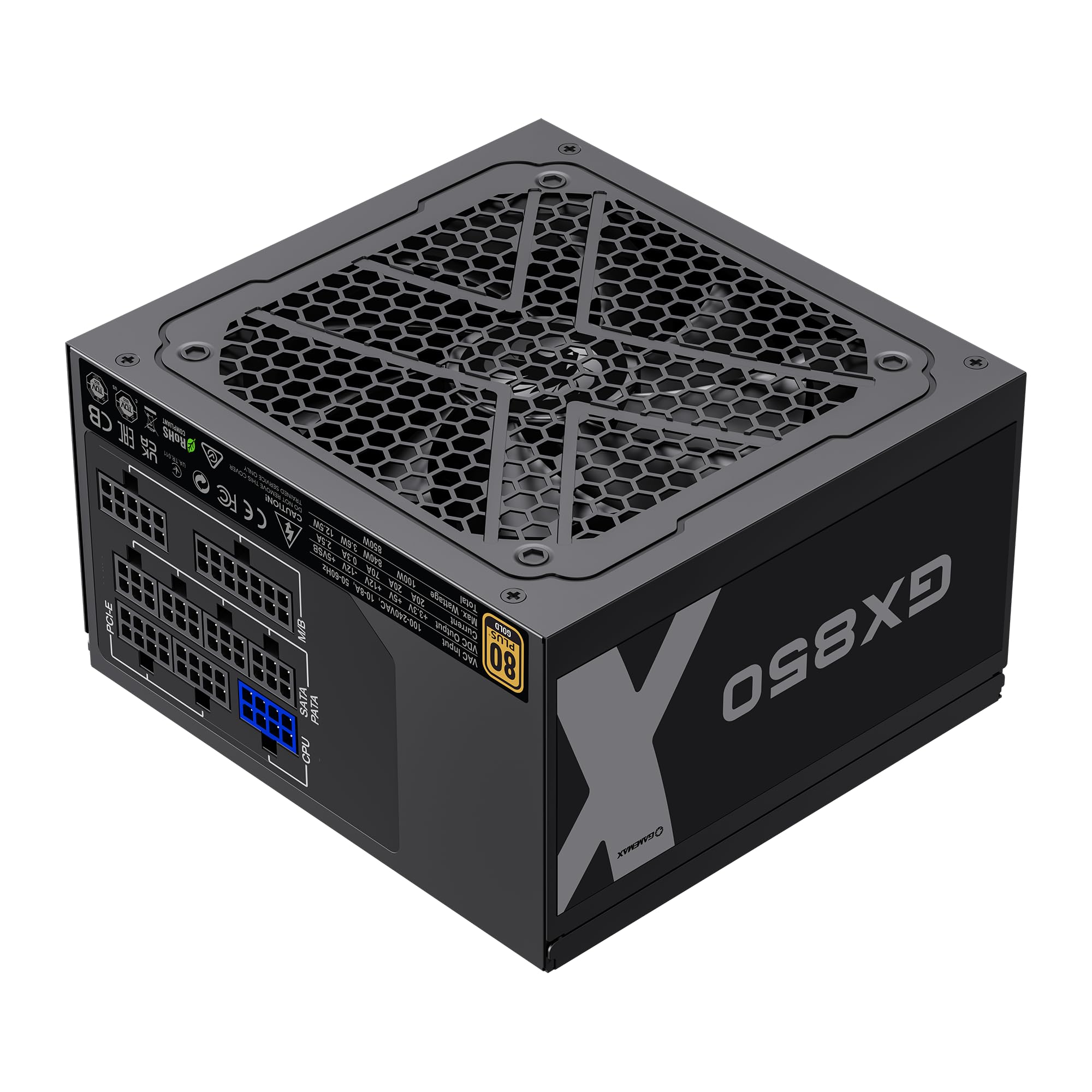
Image: The GAMEMAX GX-850 80 Plus Gold Fully Modular Power Supply, showcasing its black finish and modular design.
3.1 Caracteristici cheie
- Certificare 80 Plus Gold: Ensures high power efficiency, reducing heat and operating costs.
- LLC+DC-DC Circuit: Advanced circuit design for stable voltage output and improved efficiency.
- Design complet modular: Allows for custom cable management, reducing clutter and improving airflow.
- FDB Fan: Ultra-quiet temperature-controlled Fluid Dynamic Bearing fan for silent operation and extended lifespan.
- 105℃ Mainstream Capacitor: High-quality capacitors ensure long life and smooth power output.
- Protecție cuprinzătoare: Features SIX levels of protection: Over Temperature Protection (OTP), Over Current Protection (OCP), Short Circuit Protection (SCP), Over Voltage Protection (OVP), sub voltage Protection (UVP), and Over Power Protection (OPP).
4. Configurare și instalare
Follow these steps to properly install your GAMEMAX GX-850 power supply into your computer system.
4.1 Etapele de instalare
- Pregătiți-vă sistemul: Asigurați-vă că ați oprit complet computerul și deconectat de la priza de perete. Deschideți carcasa computerului.
- Scoateți sursa veche (dacă este cazul): Disconnect all cables from your old power supply and remove it from the case.
- Montați noua sursă de alimentare: Carefully place the GAMEMAX GX-850 into the power supply bay of your computer case. Secure it with the provided mounting screws. Ensure the fan is facing the correct direction for optimal airflow (typically facing down if your case has a bottom vent, or up if it's a top-mounted PSU).
- Conectați cablurile modulare: Identify the necessary cables for your components. Connect the modular cables to the corresponding ports on the power supply first, then route them to your components.
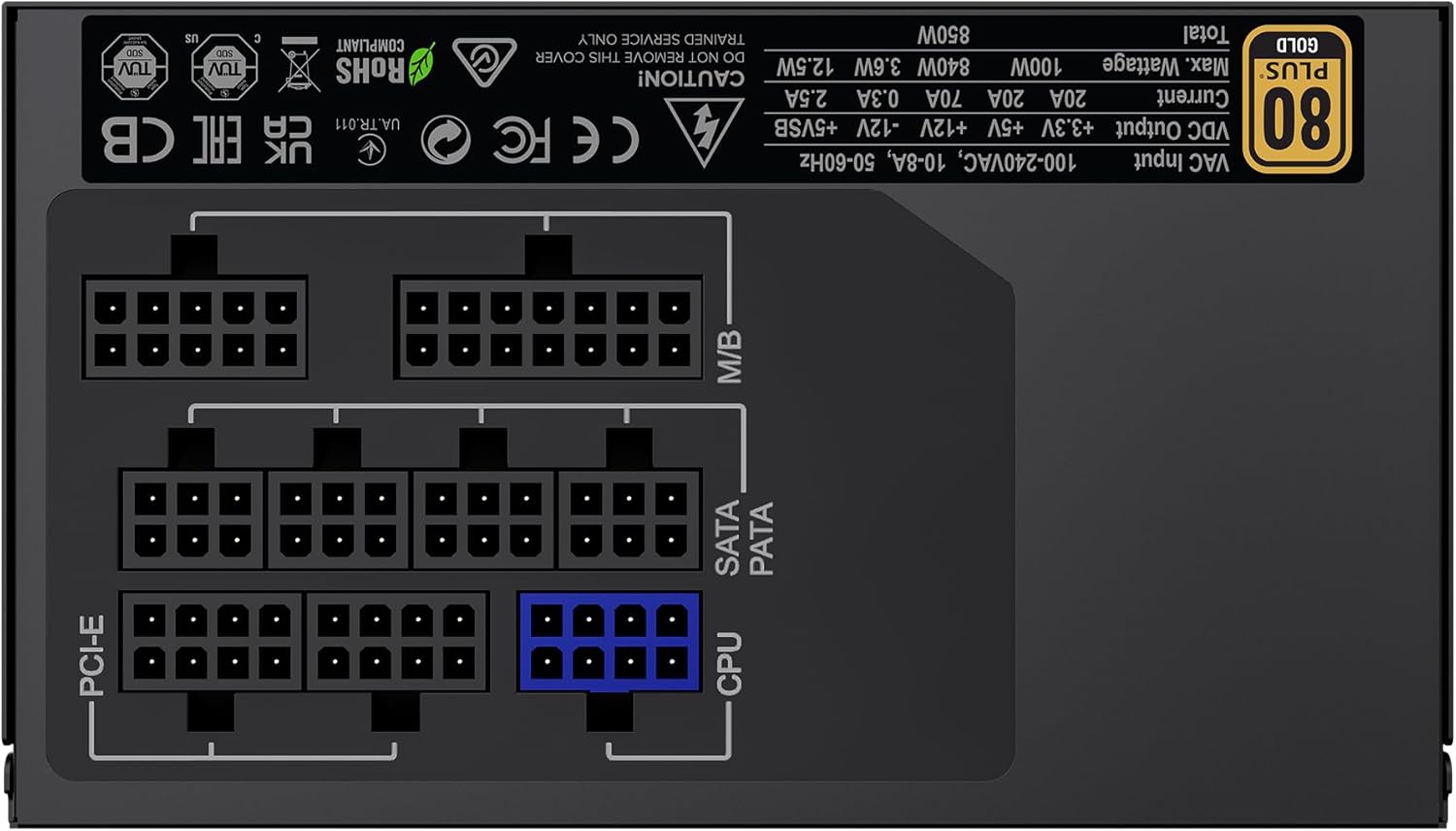
Imagine: Spate view of the GAMEMAX GX-850 showing the fully modular cable connection ports for PCI-e, M/B (Motherboard), SATA/PATA, and CPU cables.
- Motherboard (M/B): Conectați cablul ATX cu 24 de pini la placa de bază.
- CPU: Connect the 8-pin (or 4+4-pin) CPU power cable to the CPU power connector on your motherboard.
- Graphics Cards (PCI-e): Connect the 6+2-pin PCIe power cables to your graphics card(s). Use separate cables for each connector if your GPU requires multiple.
- Storage Devices (SATA): Conectați cablurile de alimentare SATA la SSD-uri, HDD-uri și unități optice.
- Peripherals (PATA/Molex): Connect peripheral power cables to any other devices requiring them (e.g., fan controllers, older drives).
- Organizare de cabluri: Traseați cablurile cu grijă pentru a îmbunătăți circulația aerului și estetica.
- Închideți carcasa și conectați alimentarea cu curent alternativ: Close your computer case. Connect the AC power cord to the power supply and then to a grounded wall outlet.
5. Instrucțiuni de utilizare
After successful installation, follow these steps to operate your system.
- Întrerupător: Asigurați-vă că întrerupătorul de alimentare de pe spatele sursei de alimentare este în poziția „ON” (I).
- Pornirea sistemului: Press the power button on your computer case to turn on the system.
- System Power Off: To turn off your system, use the operating system's shutdown procedure. For a hard shutdown, hold the case power button for several seconds. For complete power disconnection, switch the PSU's power switch to 'OFF' (O) and unplug the AC cord.
6. Întreținere
Întreținerea regulată ajută la asigurarea longevității și a performanței optime a sursei de alimentare.
- Curățare de praf: Periodically clean the power supply's fan and ventilation grilles using compressed air to prevent dust buildup, which can impede cooling. Ensure the system is powered off and unplugged before cleaning.
- Verificare cablu: Occasionally check all modular cable connections to ensure they are securely seated.
- Conditii de mediu: Maintain a clean, dry, and well-ventilated environment for your computer.
7. Depanare
Dacă întâmpinați probleme cu sursa de alimentare, consultați următorii pași comuni de depanare:
- Fără putere:
- Ensure the AC power cord is securely plugged into both the wall outlet and the power supply.
- Check that the power switch on the back of the PSU is in the 'ON' (I) position.
- Verify that the 24-pin ATX and 8-pin CPU power cables are correctly and firmly connected to the motherboard.
- Testați priza de perete cu un alt dispozitiv pentru a confirma că are alimentare.
- Instabilitate a sistemului/Opriri aleatorii:
- Ensure all modular cables are fully seated at both the PSU and component ends.
- Check for proper ventilation and ensure the PSU fan is spinning. Overheating can cause shutdowns.
- If you have recently added new components, ensure your 850W power supply is sufficient for the total system wattage.
- Ventilatorul nu se învârte:
- The GX-850 features a temperature-controlled fan. It may not spin at low loads or temperatures. This is normal operation.
- If the fan does not spin under load and the PSU feels hot, ensure there are no obstructions and consider contacting support.
If problems persist after performing these steps, contact GAMEMAX customer support or your retailer for further assistance.
8. Specificații
Detailed technical specifications for the GAMEMAX GX-850 80 Plus Gold Power Supply:
| Caracteristică | Caietul de sarcini |
|---|---|
| Numele modelului | GX-850 Modular |
| Marca | GAMEMAX |
| Putere de ieșiretage | 850 wați |
| Factor de formă | ATX |
| Certificare de eficiență | 80 Plus Aur |
| Proiectarea sursei de alimentare | Complet modular |
| Metoda de răcire | Aer (ventilator FDB) |
| Număr de fani | 1 |
| Vol. minim de intraretage | 115 volți |
| Vol. Maxim de intraretage | 240 volți (AC) |
| Evaluarea temperaturii superioare | 105 Degrees Celsius (Capacitors) |
| Dispozitive compatibile | Computer desktop |
| Tipuri de conector | ATX, PCI-e, SATA |
9. Garanție și asistență
GAMEMAX products are manufactured to high-quality standards. For warranty information, please refer to the warranty card included with your product or visit the official GAMEMAX website. Termenii garanției pot varia în funcție de regiune și de comerciant.
For technical support or further inquiries, please contact GAMEMAX customer service through their official website-ul sau informațiile de contact furnizate de distribuitorul dvs.