
Elektron Digitakt II
Elektron Digitakt II User Manual
Model: Digitakt II
Produs terminatview
The Elektron Digitakt II is a powerful 16-track drum computer and sampler designed for music production and live performance. It offers extensive sound manipulation capabilities, a robust sequencer, and a compact, durable design, making it suitable for both studio and on-the-go creative work.

Figura 1: Față view of the Elektron Digitakt II, showing the display, knobs, and performance pads.
Conținutul pachetului
Asigurați-vă că toate articolele sunt prezente în cutie:
- Elektron Digitakt II Unit
- Adaptor de alimentare
- Cablu USB
Configurare inițială
Follow these steps to set up your Digitakt II for the first time:
- Conectare alimentare: Plug the included power adapter into the 12V DC IN port on the rear of the unit and then into a wall outlet.
- Conectați sunetul: Connect your audio output cables from the L/R OUT ports to your mixer, audio interface, or headphones. If using external audio sources, connect them to the L/R IN ports.
- Conectați USB (opțional): For computer integration and use with Elektron's Overbridge software, connect a USB cable from the Digitakt II's USB port to your computer.
- Pornire: Press the Power button on the rear of the unit to turn on the Digitakt II.
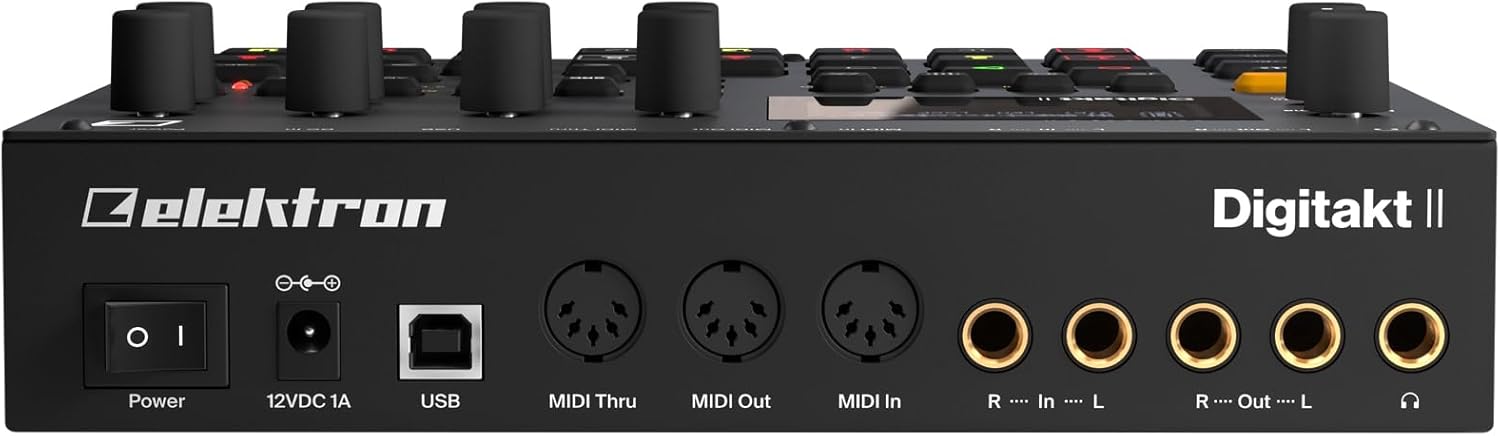
Figura 2: Spate view of the Elektron Digitakt II, showing power, USB, MIDI, and audio connections.
Operating Your Digitakt II
The Digitakt II features an intuitive interface with dedicated buttons and encoders for efficient workflow. Familiarize yourself with the main display and control layout.
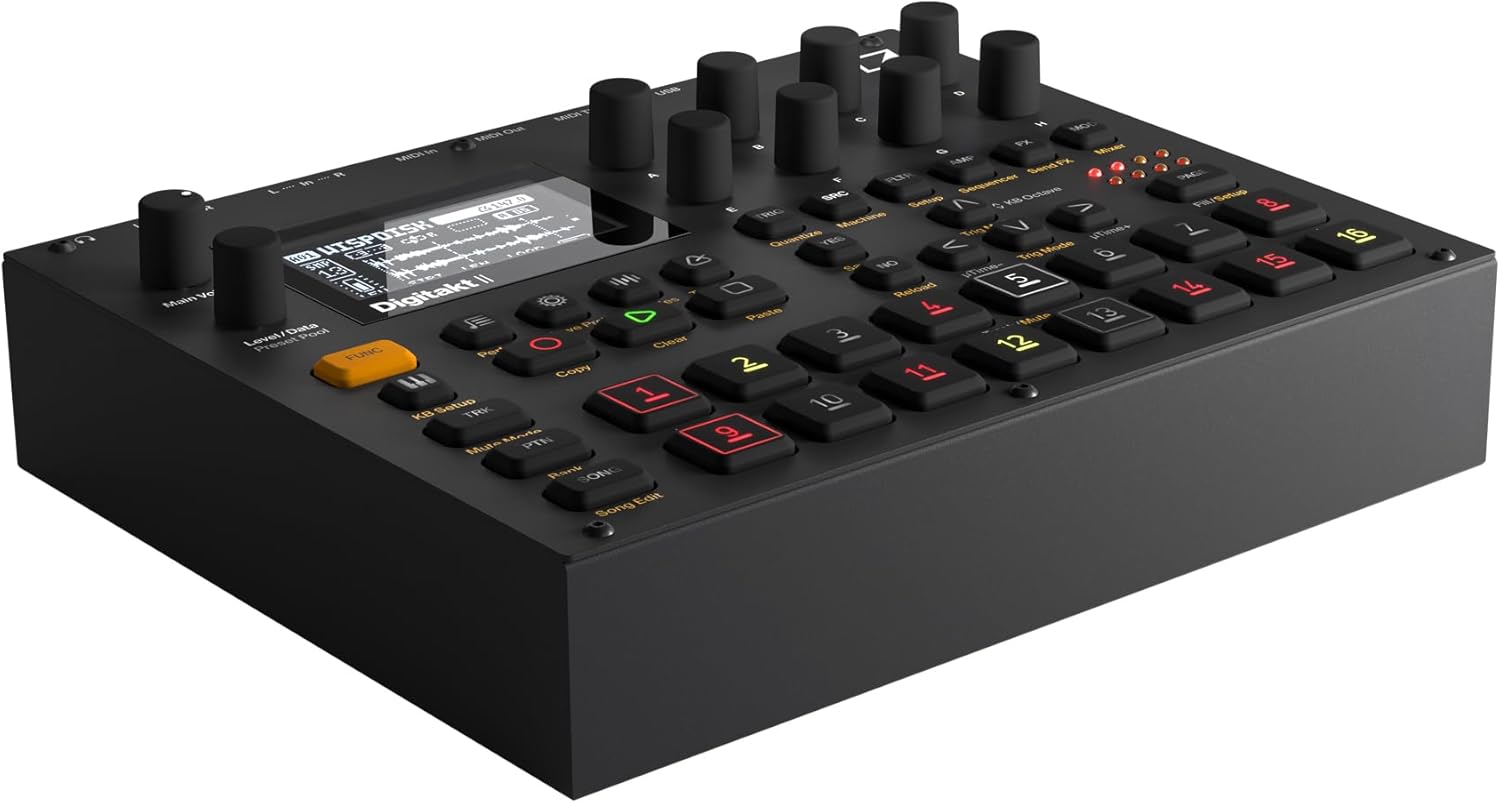
Figura 3: Înclinat view of the Elektron Digitakt II, highlighting the control surface and display.
Caracteristici cheie
- 16 Audio Tracks: Each track supports stereo or mono samples, or MIDI data.
- 128-Step Elektron Sequencer: Program intricate patterns with precise control.
- 3 Assignable LFOs per Track: Modulate various parameters for dynamic sound design.
- Per-Track Effects: Apply Delay, Reverb, Chorus, Bit Reduction, Sample Reduction, and Overdrive to individual tracks.
- Euclidean Sequence Generator: Explore complex rhythmic possibilities.
- Swappable Filters: Utilize a Base-width filter and choose from Multi-mode, Low Pass 4, Comb, EQ, or Legacy LP/HP filters.
- 4 Trig Modes: Enhance sequencing with various trigger behaviors.
- Modul cântec: Create, edit, and play full compositions with ease.
Operare de bază
Se încarcă Samples: Use the 'Samples' button and the data encoders to browse and load samples into your project. Samples can be imported via USB using Elektron's software.
Secvențiere: Select a track using the numbered pads. Enter notes and parameter locks by holding a trig button and adjusting parameters. The 128-step sequencer allows for detailed pattern creation.
Efecte: Access the FX section to apply and adjust the built-in effects for each track. Experiment with different effect types and parameters to shape your sound.
Saving Projects: Regularly save your work by pressing the 'Save Proj' button to prevent data loss.
Îngrijire și întreținere
To ensure the longevity and optimal performance of your Digitakt II, follow these guidelines:
- curatenie: Folosiți o cârpă moale și uscată pentru curățarea unității. Evitați substanțele de curățare abrazive sau solvenții.
- Depozitare: Depozitați unitatea într-un loc răcoros și uscat, ferit de lumina directă a soarelui și de temperaturi extreme.
- Manipulare: Avoid dropping the unit or exposing it to excessive force.
- Ventilare: Asigurați o ventilație adecvată în jurul unității pentru a preveni supraîncălzirea.
Depanare
If you encounter issues with your Digitakt II, refer to the table below for common problems and solutions:
| Problemă | Cauza posibila | Soluţie |
|---|---|---|
| Fără ieșire de sunet | Incorrect audio connections, volume too low, muted tracks. | Check audio cables, increase Main Volume, ensure tracks are not muted in Mute Mode. |
| Unitatea nu pornește | Power adapter not connected or faulty, power outlet issue. | Verify power adapter connection, try a different power outlet, ensure power button is pressed. |
| Probleme de conectivitate USB | Incorrect USB cable, driver not installed, Overbridge not running. | Use the provided USB cable, install the latest Elektron drivers and Overbridge software from the official website-ul. |
| Pads unresponsive | Unit frozen, calibration issue. | Restart the unit. If the problem persists, consult the full manual for calibration procedures. |
Specificatii tehnice
| Caracteristică | Detaliu |
|---|---|
| Numele modelului | Digitakt II |
| Greutatea articolului | 3.3 de lire sterline (1.5 kg) |
| Dimensiuni produs (L x l x H) | 8.4 x 6.9 x 2.5 inchi (21.3 x 17.5 x 6.4 cm) |
| Materialul corpului | Aluminiu turnat |
| Culoare | Negru |
| Tip conector | USB, Proprietary Power, MIDI In/Out/Thru, Audio In L/R, Audio Out L/R, Headphones |
| Componente incluse | Adaptor de alimentare |
Garanție și suport
Elektron products are manufactured to high standards and come with a limited warranty. For detailed warranty information, product registration, and technical support, please visit the official Elektron website-ul lor web sau contactați serviciul lor de asistență pentru clienți. Păstrați dovada achiziției pentru solicitările de garanție.
Resurse online: For the most up-to-date information, firmware updates, and additional resources, please refer to the official Elektron support page.
Ask a question about this manual
Ask about setup, troubleshooting, compatibility, parts, safety, or missing instructions. Manuals+ will review the question and use this page’s manual context to help answer it.