
1. Introducere
This manual provides instructions for the Varmilo Koi 73 JIS Keyboard with Sakura Switches (Model: VMMA73A039SAKURA). This keyboard features a unique design inspired by traditional Chinese Koi fish and water elements, combined with a modern aesthetic. It is a compact 65% size keyboard with a Japanese Industrial Standard (JIS) layout, designed for both functionality and portability. The keyboard is equipped with Cherry-style stabilizers for a stable typing experience.
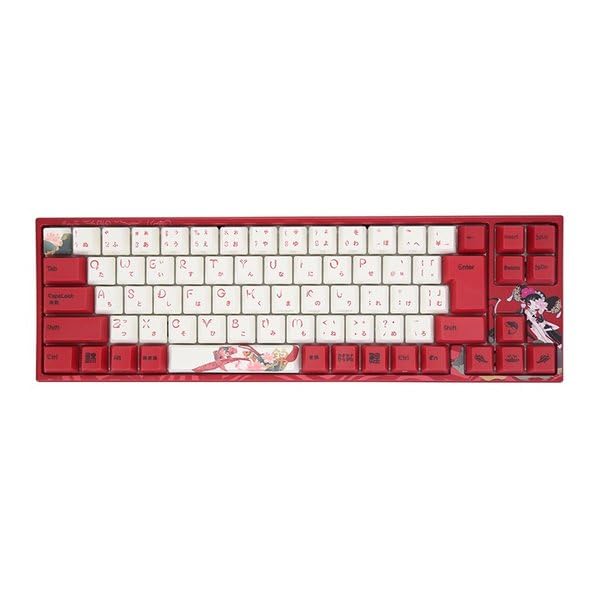
Image: Varmilo Koi 73 JIS Keyboard overview.
2. Caracteristici cheie
- Unique Koi Design: Features vibrant koi fish illustrations and a red aesthetic, developed in collaboration with illustrator Li Huan.
- JIS Layout: 73-key Japanese Industrial Standard layout for specific regional input needs.
- Compact 65% Size: Optimizes desk space while retaining essential function and arrow keys.
- Customizable Switches: Offers a choice of Varmilo mechanical electrostatic capacity switches to suit individual typing preferences.
- Cherry-Style Stabilizers: Ensures consistent and stable key presses, especially for larger keys.
- Conectivitate USB: Reliable wired connection for stable performance.
3. Ghid de instalare
3.1 Conținutul pachetului
Înainte de a începe, vă rugăm să vă asigurați că toate articolele sunt prezente în colet:
- Varmilo Koi 73 JIS Keyboard
- Cablu USB
- Manual de utilizare (acest document)
3.2 Conectarea tastaturii
To connect your Varmilo Koi 73 keyboard to your computer, follow these steps:
- Localizați portul USB-C pe spatele tastaturii.
- Conectați un capăt al cablului USB furnizat la portul USB-C al tastaturii.
- Conectați celălalt capăt al cablului USB la un port USB disponibil de pe computer.
- Tastatura ar trebui să fie recunoscută automat de sistemul de operare.
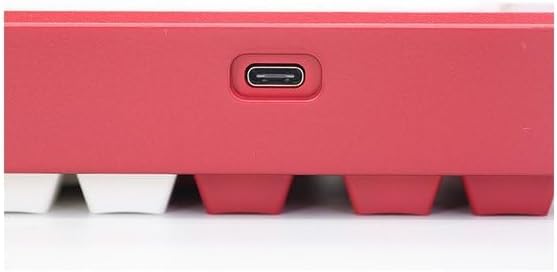
Image: USB-C port for keyboard connection.
3.3 Driver Installation (Optional)
For advanced customization and optimal performance, it is recommended to install the Varmilo driver software. This software allows you to remap keys, adjust performance settings, and customize lighting effects.
Video: This video demonstrates the driver installation process and software usage for Varmilo keyboards. While it features the Muse65 model, the steps for driver installation and basic software navigation are generally applicable to other Varmilo keyboards like the Koi 73.
Please visit the official Varmilo website for the latest driver downloads specific to your keyboard model. Follow the on-screen instructions during installation.
4. Instrucțiuni de utilizare
4.1 Funcții de bază ale tastelor
The Varmilo Koi 73 keyboard features a standard JIS layout. Most keys function as labeled. For special functions, refer to the combination keys below.
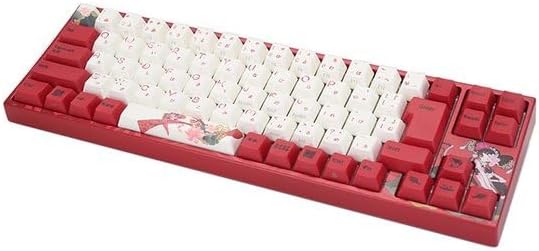
Imagine: Pesteview of the Varmilo Koi 73 JIS Keyboard layout.
4.2 Combinații de taste funcționale (Fn)
Since this is a 73-key layout, some functions are accessed via the Fn key. Hold down the Fn key and press the corresponding key to activate its secondary function. Common Fn combinations include:
- Fn + F1-F12: Multimedia controls (e.g., volume, play/pause).
- Fn + Taste săgeată: Page Up/Down, Home/End (specific to model, refer to keycap legends).
- Tasta Fn + Win: Blochează/deblochează tasta Windows.

Image: Left side keys, often used with Fn for additional functions.
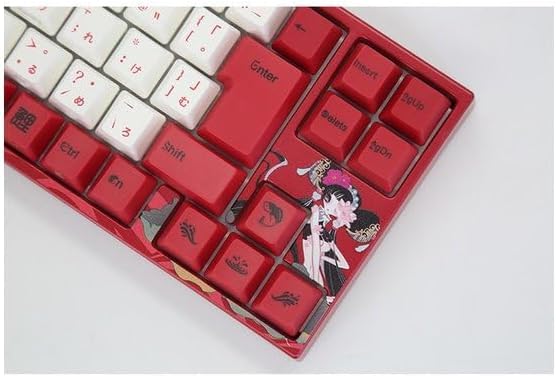
Image: Right side keys, including navigation and utility keys.
4.3 efecte de iluminare
The Varmilo Koi 73 keyboard supports various RGB lighting effects. You can cycle through different modes and adjust brightness using specific key combinations. Refer to your keyboard's specific keycap legends or the driver software for detailed lighting controls.
Video: This video showcases various RGB lighting effects on a Varmilo keyboard. While the model shown is Muse65, it provides a general idea of the dynamic lighting capabilities available on Varmilo keyboards, including the Koi 73.
5. Întreținere și îngrijire
Proper maintenance ensures the longevity and optimal performance of your Varmilo Koi 73 keyboard.
- Curățarea tastelor: Gently remove keycaps using a keycap puller. Clean the keycaps with a soft cloth dampclătite cu apă și săpun delicat. Asigurați-vă că sunt complet uscate înainte de a le fixa la loc.
- Curățarea corpului tastaturii: Folosiți o lavetă moale și uscată pentru a șterge corpul tastaturii. Pentru murdăria persistentă, ștergeți ușoramp cloth with a small amount of isopropyl alcohol can be used. Avoid excessive moisture.
- Îndepărtarea prafului: Folosește aer comprimat pentru a îndepărta praful și resturile dintre taste.
- Evitați lichidele: Nu lăsați lichidele să ajungă la tastatură pentru a preveni deteriorarea.
- Îngrijirea cablului: Do not bend or crimp the USB cable excessively.
6. Depanare
If you encounter issues with your Varmilo Koi 73 keyboard, try the following solutions:
- Tastatura nu răspunde:
- Asigurați-vă că ați conectat cablul USB în siguranță atât la tastatură, cât și la computer.
- Încercați să conectați tastatura la un alt port USB al computerului.
- Reporniți computerul.
- Dacă utilizați un hub USB, încercați să îl conectați direct la computer.
- Cheile nu se înregistrează:
- Check for any debris or foreign objects under the keycaps.
- If specific keys are not working, consider reinstalling the keyboard driver.
- Probleme de iluminare:
- Ensure the keyboard driver is installed and up to date.
- Use the Fn key combinations or driver software to adjust lighting modes and brightness.
- Tasta Windows blocată:
- Presa Fn + Win Key pentru a comuta blocarea tastelor Windows.
If the problem persists, please contact Varmilo customer support for further assistance.
7. Specificații
| Marca | Varmilo |
| Numărul de model | VMMA73A039SAKURA |
| Aspectul tastaturii | 73-key JIS (Japanese Industrial Standard) |
| Conectivitate | USB cu fir |
| Tip comutator | Mechanical (Linear) |
| Dispozitive compatibile | Laptop |
| Dimensiunile produsului | 34.2 cm (L) x 34.2 cm (L) x 5.1 cm (Î) |
| Componente incluse | Cablu USB |
8. Garanție și asistență
Varmilo products typically come with a manufacturer's warranty. Please refer to the warranty card included with your product or visit the official Varmilo website-ul pentru termenii și condițiile detaliate ale garanției.
For technical support, driver downloads, or further inquiries, please visit the official Varmilo support page or contact their customer service.
Official Varmilo Website: www.varmilo.com