
BSP D9
BSP D9 Game Controller User Manual
Model: D9
1. Introducere
The BSP D9 Game Controller is a versatile gaming accessory designed to enhance your mobile and PC gaming experience. It supports a wide range of devices including iPhones, iPads, Android phones and tablets, PCs, Nintendo Switch, and PlayStation consoles. Featuring advanced Hall Effect joysticks and triggers, programmable back buttons, and a stretchable design, the D9 controller provides precise control and comfortable gameplay across various platforms.
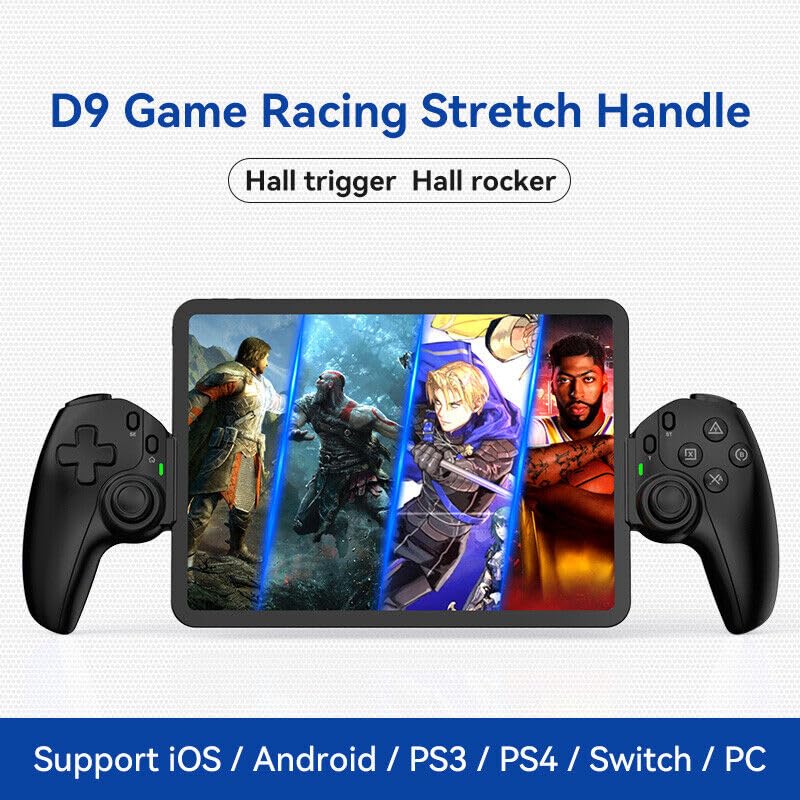
Figure 1.1: The BSP D9 Game Controller attached to a tablet, showcasing its design and compatibility with mobile gaming.
2. Produs terminatview: Key Details
Familiarize yourself with the various buttons and components of your D9 Game Controller.

Figure 2.1: Detailed diagram of the D9 controller's button layout, including the Cross Key, SELECT, HOME, START, A/B/X/Y buttons, L1/R1, L2/R2 triggers, M1/M2 back buttons, Left/Right Sticks (L3/R3), Status Indicator, and Charging Indicator.
- Cross Key (D-Pad): Intrare direcțională.
- Left Stick/L3: Left analog joystick, press down for L3.
- Buton SELECT: Function button, typically for menu selection.
- Butonul HOME: Power on/off, mode switching, return to home screen.
- Indicator de stare: Shows connection status and mode.
- Indicator de încărcare: Displays battery charging status.
- Right Stick/R3: Right analog joystick, press down for R3.
- Butoane A/B/X/Y: Butoane de acțiune standard.
- Butonul de start: Function button, typically for pausing or starting games.
- Butonul TURBO: Activates/deactivates turbo function for assigned buttons.
- Butoane L1/R1: Nasturi de umăr.
- Declanșatoare L2/R2: Declanșatoare analogice.
- Butoane M1/M2: Butoane programabile pentru întoarcere.
3. Caracteristici
3.1 Declanșatoare și joystick-uri cu efect Hall
The D9 controller is equipped with advanced Hall Effect technology for both its triggers and joysticks. This provides superior precision and durability compared to traditional potentiometers.

Figure 3.1: Explanation of Hall Effect Triggers and Joysticks, highlighting 0.1mm accuracy for triggers and benefits like no drift issues, no dead zone, long lifespan, and precise control for joysticks.
- Declanșatori ai efectului Hall: Provide 0.1mm accuracy for precise micro-operations in games.
- Joystick-uri cu efect Hall: Eliminate drift issues, maintain stable trajectory, offer precise positioning, and provide a smooth feel without stuttering.
3.2 Funcția Turbo
The Turbo function allows you to set automatic rapid firing for specific buttons, giving you an advantage în jocuri cu ritm rapid.

Figure 3.2: The Turbo function allows setting A/B/X/Y, L1/R1, L2/R2 buttons for rapid fire. Three adjustable turbo speeds are available: 8 shots/s, 15 shots/s, and 25 shots/s.
3.3 Macro Programming Function
The M1 and M2 back buttons can be programmed to execute complex key combinations with a single press, reducing repetitive actions and extending controller lifespan.

Figure 3.3: Instructions for setting and canceling macro programming on the M1 and M2 back buttons. Macros can be assigned to A/B/X/Y/L1/R1/L2/R2/Cross Key combinations.
3.4 Stretchable Design
The controller features a stretchable design to accommodate a wide range of smartphones and tablets, ensuring a secure fit and comfortable grip.

Figure 3.4: The controller supports device lengths from 130mm to 280mm (5-11 inches) and a maximum thickness of 13mm. It is perfectly compatible with iPhone 15 series and supports silicone & clear phone cases.
4. Compatibilitate
The BSP D9 Game Controller offers broad compatibility with various operating systems and gaming platforms, transforming your mobile device into a portable gaming console.

Figure 4.1: The controller supports streaming & cloud gaming (PS Remote Play, Xbox Game Pass, Steam Link, Rainway, NVIDIA GeForce NOW, Moonlight Game Streaming, Apple Arcade), direct play on iOS devices (Genshin Impact, Call of Duty Mobile, Diablo Immortal, Minecraft, Roblox), and direct play on Android devices (Call of Duty Mobile, Diablo Immortal, Minecraft, NBA 2K, Asphalt).
- Sisteme de operare: iOS, Android, Windows (PC).
- Console: Nintendo Switch, PlayStation (PS3, PS4, PS5 via remote play).
- Jocuri în cloud: Supports services like Xbox Game Pass, PS Remote Play, Steam Link, NVIDIA GeForce NOW, and more.
- Redare directă: Compatible with popular mobile games on both iOS and Android.
5. Configurare
5.1 Încărcarea controlerului
- Connect the provided USB-C charging cable to the charging port on the controller.
- Conectați celălalt capăt al cablului la o sursă de alimentare USB (de exemplu, portul USB al computerului, adaptorul de perete).
- The Charging Indicator light will illuminate during charging and turn off when fully charged.
5.2 Inserting Your Device
- Gently pull the two sides of the controller apart to extend the stretchable mechanism.
- Carefully place your smartphone or tablet into the central slot, ensuring it is securely seated. The controller supports devices with lengths between 130mm and 280mm and a maximum thickness of 13mm.
- The controller is designed to accommodate devices with slim cases.
5.3 Conectarea la dispozitiv (împerechere Bluetooth)
The connection method varies slightly depending on your device's operating system.
Pentru dispozitivele Android:
- Țineți apăsat butonul ACASĂ button until the Status Indicator light begins to flash rapidly, indicating pairing mode.
- Pe dispozitivul tău Android, accesează Setări > Bluetooth și activați Bluetooth-ul.
- Caută available devices and select "BSP-D9" or similar from the list.
- Once connected, the Status Indicator light on the controller will become solid.
Pentru dispozitivele iOS:
- Țineți apăsat butonul ACASĂ button until the Status Indicator light begins to flash rapidly.
- On your iOS device, go to Setări > Bluetooth și activați Bluetooth-ul.
- Caută available devices and select "Xbox Wireless Controller" or "DUALSHOCK 4 Wireless Controller" (depending on the mode the D9 emulates for iOS compatibility) from the list.
- Once connected, the Status Indicator light on the controller will become solid.
For PC/Switch/PS (Wired/Wireless):
Refer to the specific connection instructions provided with your controller for PC, Switch, or PS modes, as these may involve different button combinations or wired connections.
6. Instrucțiuni de utilizare
6.1 Funcții de bază ale butoanelor
Refer to Section 2, "Product Overview: Key Details," for the layout and basic functions of all buttons (Cross Key, A/B/X/Y, L1/R1, L2/R2, Joysticks, SELECT, START, HOME).
6.2 Using the Turbo Function
- Țineți apăsat butonul TURBO buton.
- În timp ce ține TURBO, press the button you wish to assign the turbo function to (e.g., A, B, X, Y, L1, R1, L2, R2). The button will now have turbo enabled.
- To adjust the turbo speed, press and hold TURBO and then press the Right Stick (R3) up or down to cycle through the 3 available speeds (8, 15, 25 shots/s).
- To cancel the turbo function for a specific button, press and hold TURBO și apăsați din nou butonul atribuit.
- To clear all turbo settings, press and hold TURBO and then press the SELECT button.
6.3 Programming Macro Buttons (M1/M2)
The M1 and M2 back buttons can be programmed to store a sequence of button presses.
How to Set a Macro:
- Țineți apăsat butonul SELECTA butonul și M1 (or M2) key for 2 seconds. The LED indicator light will flash quickly.
- Press the key(s) you want to set for the macro programming function (e.g., A+B+X+Y).
- After setting the sequence, press the M1 (or M2) key again. The LED light will become solid, indicating that the setting is complete.
- Once set, pressing M1 (or M2) will automatically execute the programmed key combination.
How to Cancel a Macro:
- Țineți apăsat butonul SELECTA butonul și M1 (or M2) key for 2 seconds. The LED indicator light will flash quickly.
- Apăsați tasta M1 (or M2) key again to clear the macro programming. (Note: Do not press other buttons at this time). The LED light will remain solid to confirm the setting is cleared.
7. Întreținere
- curatenie: Folosiți o lavetă moale și uscată pentru a curăța controlerul. Nu utilizați substanțe de curățare abrazive sau solvenți.
- Depozitare: Depozitați controlerul într-un loc răcoros și uscat, ferit de lumina directă a soarelui și de temperaturi extreme.
- Îngrijirea bateriei: Pentru a prelungi durata de viață a bateriei, evitați descărcarea completă frecventă a controlerului. Încărcați-l regulat, chiar dacă nu îl utilizați pentru perioade lungi de timp.
- Evitați picăturile: Protejați controlerul de căderi și impacturi, care pot deteriora componentele interne.
8. Depanare
| Problemă | Cauza posibila | Soluţie |
|---|---|---|
| Controlerul nu pornește. | Baterie descărcată. | Încărcați controlerul timp de cel puțin 30 de minute. |
| Nu se poate realiza asocierea prin Bluetooth. | Controller not in pairing mode; Bluetooth interference; device Bluetooth off. | Ensure controller is in pairing mode (flashing LED). Turn off and on Bluetooth on your device. Move closer to the device. |
| Butoanele sau joystick-urile nu răspund. | Problemă de conexiune; eroare de software; daune fizice. | Reconnect the controller. Restart your device. If problem persists, contact customer support. |
| Device does not fit in the controller. | Device dimensions exceed supported limits. | Ensure your device length is between 130-280mm and thickness is max 13mm. Remove bulky cases. |
9. Specificații
- Model: D9
- Marca: BSP
- Conectivitate: Bluetooth, Wired (for PC/Switch/PS, specific modes may vary)
- Supported Device Length: 130 mm - 280 mm (5 - 11 inci)
- Supported Device Thickness: Până la 13 mm
- Joystick/Trigger Technology: Efect Hall
- Butoane programabile: M1, M2 (back buttons)
- Funcția Turbo: Yes, with 3 adjustable speeds
- Producător: Compania Tehnologică ShenZhen ShanWan, Ltd.
- Prima dată disponibilă: 30 martie 2024
10. Garanție și asistență
For warranty information and technical support, please refer to the documentation included with your purchase or visit the official BSP product support webPăstrați dovada achiziției pentru reclamații în garanție.
Notă: Termenii specifici ai garanției și datele de contact pentru asistență pot varia în funcție de regiune.
Ask a question about this manual
Ask about setup, troubleshooting, compatibility, parts, safety, or missing instructions. Manuals+ will review the question and use this page’s manual context to help answer it.