
Introducere
This manual provides essential information for the setup, operation, and maintenance of your Arducam USB 3.0 Camera Module B0497C. This high-speed 4K camera features an 8.3MP IMX678 sensor, designed for superior low-light performance and wide-angle capture on Windows and Linux systems.
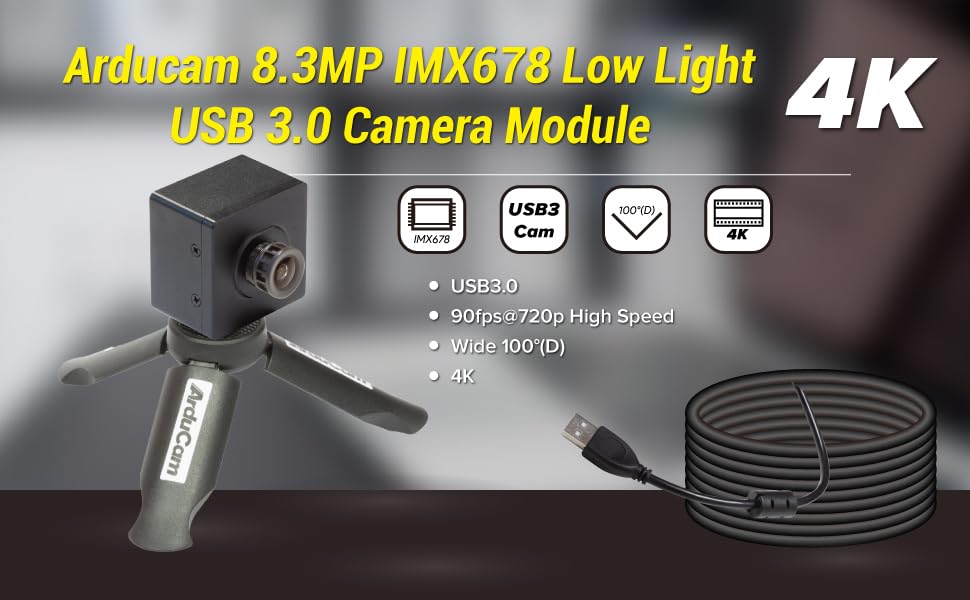
Image: Arducam 8.3MP IMX678 Low Light USB 3.0 Camera Module B0497C highlighting its 4K resolution, USB 3.0 connectivity, 90fps@720p high speed, and 100°(D) wide-angle lens.
Ce este în cutie
Verificați dacă toate componentele sunt prezente la despachetare:
- 1 x IMX678 USB3.0 Camera Module with Back Cover and Tripod Adapter
- 1 x Cablu USB A la USB Type-C de 1 m

Image: Contents of the Arducam USB 3.0 Camera Module package, showing the camera module and the USB Type-C cable.
Instrucțiuni de configurare
- Conectați cablul USB: Insert the USB Type-C end of the provided 1m cable into the camera module's Type-C port.
- Conectare la computer: Plug the USB-A end of the cable into an available USB 3.0 port on your Windows or Linux computer. For optimal performance, use a USB 3.0 port.
- Driver Installation (Plug and Play): The camera is designed for plug-and-play operation. No additional drivers are typically required for Windows and Linux operating systems. The system should automatically detect and install the necessary components.
- Montare (Opțional): The camera module includes a tripod adapter. You can attach it to a standard tripod or mounting bracket for stable positioning.

Image: Detail of the USB Type-C port on the Arducam camera module, indicating USB 3.0 connectivity.

Image: The Arducam camera module attached to a tripod, demonstrating a typical setup configuration. Note: Tripod is not included.
Instrucțiuni de operare
Compatibilitate software
The Arducam B0497C is compatible with standard webcam software on both Windows and Linux operating systems. It functions as a UVC (USB Video Class) device.
- Windows: Use built-in camera applications, OBS Studio, VLC Media Player, or other third-party software that supports UVC cameras.
- Linux: Utilize applications like Cheese, OBS Studio, VLC Media Player, or custom applications that interface with V4L2 (Video for Linux Two) devices.

Image: Visual representation of the camera module's compatibility with Windows and Linux operating systems.
Operare de bază
- Lansați software: Open your preferred camera application on your computer.
- Selectați camera: If you have multiple cameras, select "Arducam USB Camera" or a similar identifier from the device list within your software.
- Ajustați setările: Most applications allow you to adjust resolution, frame rate, brightness, contrast, and other image parameters. The camera supports resolutions up to 3840x2160 (4K) and frame rates up to 90fps at 720p.
- Performanță la lumină scăzută: The IMX678 sensor provides enhanced low-light capabilities. For optimal results in dim environments, ensure your software settings are configured to utilize these features.

Image: A visual comparison demonstrating the superior low-light performance of the Arducam 4K IMX678 camera compared to a standard camera.

Imagine: Examples illustrating the camera's effective performance in low-light conditions, such as indoor and outdoor night scenes.
Întreţinere
- Curățarea lentilei: Folosiți o lavetă moale, fără scame, special concepută pentru lentile optice, pentru a șterge ușor obiectivul camerei. Evitați materialele abrazive sau substanțele chimice dure.
- Curățarea modulului: For the camera body, use a dry, soft cloth to remove dust. Do not use liquid cleaners directly on the module.
- Depozitare: When not in use, store the camera module in a clean, dry environment, away from extreme temperatures and direct sunlight.
- Manipulare: Handle the camera module by its edges to avoid touching the lens or the circuit board components.
Depanare
- Camera not detected by computer:
- Asigurați-vă că ați conectat cablul USB în siguranță atât la cameră, cât și la computer.
- Try a different USB port on your computer, preferably a USB 3.0 port.
- Testați cu un alt cablu USB, dacă este disponibil.
- Reporniți computerul.
- Check your operating system's device manager (Windows) or
lsusbcommand (Linux) to see if the device is listed.
- Poor image quality or excessive noise:
- Ensure adequate lighting in the environment. While the camera has low-light capabilities, extreme darkness will still affect image quality.
- Adjust camera settings within your software (e.g., exposure, gain, white balance).
- Verificați dacă obiectivul este curat și fără pete sau praf.
- Check for available firmware updates from Arducam's official website, as updates can improve image processing.
- Low frame rate:
- Ensure the camera is connected to a USB 3.0 port. USB 2.0 ports will limit bandwidth and frame rate.
- Reduce the resolution or disable certain image enhancements in your software to decrease bandwidth requirements.
- Close other applications that might be consuming significant system resources.
Specificații
| Caracteristică | Detaliu |
|---|---|
| Numele modelului | B0497C |
| Senzor | IMX678 CMOS |
| Rezoluţie | 8.3 MP (3840x2160) |
| Frame Rate | 90fps@720p |
| Tip de lentile | M12 Lens, F1.65 Aperture |
| Câmpul de View (FoV) | 100°(D) |
| Conectivitate | USB 3.0 (conector tip C pe cameră) |
| Caracteristici speciale | Low Light Performance, Onboard ISP (de-Bayer, gamma, BLC, AE, AWB, CCM, RGB2YUV) |
| Sisteme de operare | Windows, Linux (Plug and Play) |
| Greutatea articolului | 3.53 uncii |
| Dimensiuni pachet | 1.34 x 1.34 x 1.34 inci |
Garanție și suport
Pentru informații despre garanție și asistență tehnică, vă rugăm să consultați listă oficială Arducam. website-ul lor web sau contactați direct serviciul lor de asistență pentru clienți. Păstrați bonul fiscal pentru reclamații în garanție.
Arducam Oficial Website: www.arducam.com