
Introducere
Thank you for choosing the MARVO Monka Contra PS4 Wireless Game Controller. This manual provides detailed instructions for setting up, operating, and maintaining your new controller. Please read this manual carefully before use to ensure optimal performance and longevity of your device. Keep this manual for future reference.
Conținutul pachetului
- MARVO Monka Contra PS4 Wireless Game Controller
- Cablu de încărcare USB
- Manual de utilizare (acest document)
Produs terminatview
The MARVO Monka Contra controller is designed for an immersive gaming experience on your PlayStation 4. It features a wireless connection, ergonomic design for comfortable extended play, and responsive controls for precise input.

Figura 1: Față view of the MARVO Monka Contra PS4 Wireless Game Controller. This image displays the layout of the dual analog sticks, directional pad, action buttons (Triangle, Circle, Cross, Square), Share, Options, Home, and Turbo buttons, as well as the central touch pad and light bar.
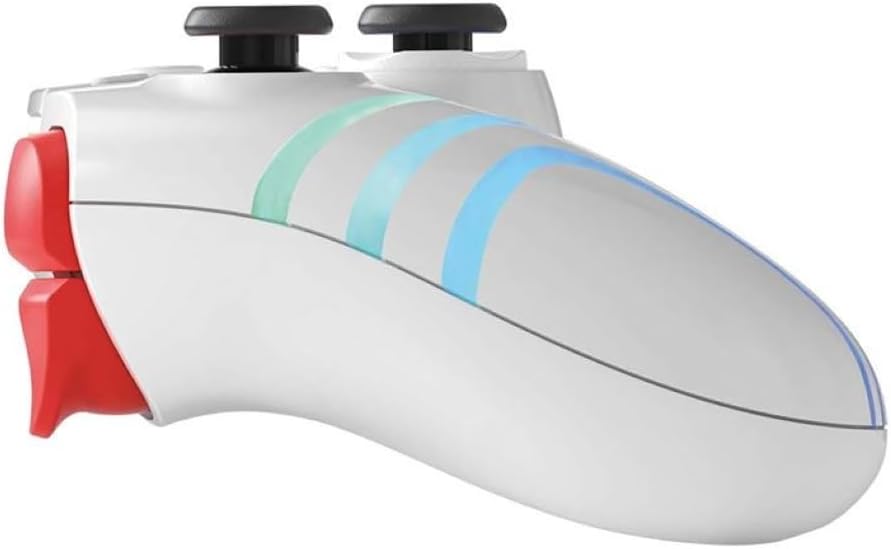
Figura 2: lateral view of the MARVO Monka Contra PS4 Wireless Game Controller. This image illustrates the ergonomic curvature of the controller's handles and the placement of the L1, L2, R1, and R2 shoulder/trigger buttons.
Aspectul controlerului:
- Stick analogic stâng: Mișcarea și controlul camerei.
- Stick analogic drept: Controlul camerei și țintirea.
- Pad direcțional (D-Pad): Menu navigation and specific game actions.
- Butoane de acțiune (Triunghi, Cerc, Cruce, Pătrat): Acțiuni în joc.
- Butonul SHARE: Share gameplay moments.
- Buton OPȚIUNI: Access in-game menus or pause.
- PS Button (HOME): Access the PS4 system menu.
- Butonul TURBO: Activează funcția turbo pentru butoanele atribuite.
- Touch Pad: Interactive input for compatible games.
- Butoane L1/R1: Nasturi pe umăr pentru diverse acțiuni.
- Declanșatoare L2/R2: Analog triggers for precise input.
- Vorbitor: In-game audio output.
- Mufă pentru căști: Conectați o cască compatibilă.
- Port USB: Charging and wired connection.
Înființat
Încărcare inițială:
Before first use, fully charge the controller. Connect the supplied USB charging cable to the controller's USB port and the other end to a powered USB port on your PS4 console or a USB wall adapter (not included). The light bar on the controller will slowly flash orange while charging and turn off when fully charged.
Asociere cu PS4:
- Asigurați-vă că consola PS4 este pornită.
- Conectați controlerul la consola PS4 folosind cablul de încărcare USB inclus.
- Apăsați tasta PS Button (HOME) on the controller. The controller will power on and automatically pair with the console.
- Once paired, you can disconnect the USB cable to use the controller wirelessly. The light bar will glow a solid color (e.g., blue for Player 1) indicating a successful connection.
- To pair additional controllers, repeat steps 2-4 for each controller.
Note: If the controller does not pair, ensure the PS4 system software is up to date.
Instrucțiuni de operare
Pornire/Oprire:
- Pentru a porni: Apăsați tasta PS Button (HOME).
- Pentru a opri: Țineți PS Button (HOME) for approximately 10 seconds until the light bar turns off, or select "Power Off Controller" from the PS4 Quick Menu.
Funcția Turbo:
The Turbo function allows a button to be repeatedly pressed automatically as long as it is held down, which can be useful in certain games.
- Țineți apăsat butonul Buton TURBO.
- În timp ce ține TURBO, press the action button (e.g., Cross, Circle, Square, Triangle, L1, R1, L2, R2) you wish to assign the turbo function to.
- Release both buttons. The assigned button will now activate the turbo function when pressed.
- To disable turbo for a specific button, repeat steps 1-2.
- To clear all turbo settings, hold the Buton TURBO și apăsați tasta Buton SHARE simultan.
Conexiune căști:
Connect a compatible 3.5mm headset to the headset jack on the bottom of the controller for in-game audio and voice chat.
Încărcare
The controller contains a built-in rechargeable battery. When the battery level is low, the light bar may flash or change color to indicate low power.
- Connect the controller to your PS4 console or a USB wall adapter using the provided USB cable.
- The light bar will slowly flash orange during charging.
- The light bar will turn off when the controller is fully charged.
- Timpul de încărcare poate varia în funcție de sursa de alimentare și de nivelul rămas al bateriei.
Întreţinere
- curatenie: Folosiți o cârpă moale și uscată pentru a curăța controlerul. Nu utilizați substanțe chimice dure sau materiale abrazive.
- Depozitare: Depozitați controlerul într-un loc răcoros și uscat, ferit de lumina directă a soarelui și de temperaturi extreme.
- Îngrijirea bateriei: Pentru a prelungi durata de viață a bateriei, evitați descărcarea completă frecventă a controlerului. Încărcați-l regulat, chiar dacă nu îl utilizați pentru perioade lungi de timp.
- Evitați picăturile: Protejați controlerul de căderi și impacturi, care pot deteriora componentele interne.
Depanare
| Problemă | Soluţie |
|---|---|
| Controlerul nu pornește. | Ensure the controller is charged. Connect it to the PS4 with the USB cable and press the PS Button. |
| Controller does not connect to PS4 wirelessly. |
|
| Buttons or analog sticks are unresponsive. |
|
| Controlerul se deconectează frecvent. |
|
Specificații
- Model: Monka Contra
- Conectivitate: Fără fir (Bluetooth), Cu fir (USB)
- Compatibilitate: PlayStation 4
- Baterie: Litiu-ion reîncărcabil încorporat
- Dimensiuni: Aproximativ 17.4 x 17.2 x 7.6 cm
- Greutate: Aproximativ 460 g
Garanție și suport
MARVO products are designed for reliability and performance. For warranty information or technical support, please refer to the warranty card included with your product or visit the official MARVO website. Vă rugăm să păstrați dovada achiziției pentru reclamații în garanție.
For further assistance, contact MARVO customer support through their official channels.