
Introducere
Thank you for choosing the Thunderobot K87 Wired Mechanical Keyboard. This manual provides essential information for the proper setup, operation, maintenance, and troubleshooting of your new keyboard. Please read this manual thoroughly before using the product to ensure optimal performance and longevity.

Figura 1: Înclinat view of the Thunderobot K87 Mechanical Keyboard.
Înființat
Conținutul pachetului
Before proceeding, please verify that your package contains the following items:
- Thunderobot K87 Wired Mechanical Keyboard
- Cablu USB
- Manual de utilizare (acest document)
Conectarea tastaturii
- Unpack the Thunderobot K87 keyboard and the included USB cable.
- Connect the USB-C end of the cable to the port located on the keyboard.
- Conectați capătul USB-A al cablului la un port USB disponibil al computerului.
- Tastatura va fi recunoscută automat de sistemul dvs. de operare. De obicei, nu sunt necesare drivere suplimentare pentru funcționalitatea de bază.

Figura 2: De jos view of the keyboard, illustrating adjustable feet and cable management options.
Instrucțiuni de operare
Funcții de bază
The Thunderobot K87 is a standard 87-key (TKL) layout mechanical keyboard. Simply plug it into your computer, and it is ready for typing. The keyboard features Red mechanical switches, known for their linear feel and quiet operation, making them suitable for both typing and gaming.
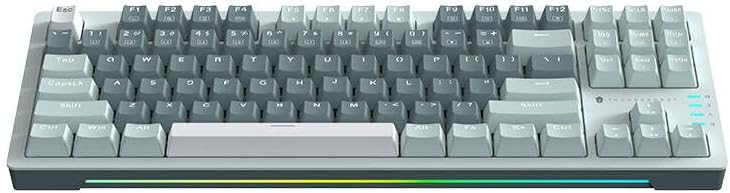
Figura 3: De sus în jos view of the Thunderobot K87 keyboard layout.
Taste multimedia și funcționale
The keyboard includes a Function (Fn) key, typically located near the right Alt key. This key, when pressed in combination with the F1-F12 keys, activates various multimedia and system functions. Refer to the keycap legends for specific functions.
- Fn + F1-F12: Typically control media playback, volume, and other system shortcuts.
- Fn + Tasta Windows: Blochează/deblochează tasta Windows pentru a preveni apăsările accidentale în timpul jocului.
Controlul iluminării de fundal
The Thunderobot K87 keyboard features customizable RGB backlighting. Specific key combinations allow you to change lighting modes, brightness, and speed. Consult the keyboard's keycap legends or the manufacturer's website for detailed instructions on lighting customization.

Figura 4: Față view showing the RGB lighting strip.

Figura 5: Pro lateralfile view demonstrating keycap height and keyboard angle.
Întreţinere
Curățarea tastaturii
Curățarea regulată ajută la menținerea aspectului și funcționalității tastaturii.
- Deconecta: Deconectați întotdeauna tastatura de la computer înainte de curățare.
- Îndepărtarea prafului: Folosește o recipient cu aer comprimat pentru a îndepărta praful și resturile dintre capacele tastelor.
- Curățarea suprafețelor: Ștergeți ușor tastele și suprafața tastaturii cu o lavetă moale, fără scame.ampCurățați cu apă sau cu o soluție de curățare blândă, neabrazivă. Evitați umiditatea excesivă.
- Evita: Do not use harsh chemicals, solvents, or abrasive materials, as these can damage the keyboard's finish or keycap legends.
Depozitare
When not in use for extended periods, store the keyboard in a dry, cool place away from direct sunlight and extreme temperatures. Consider covering it to prevent dust accumulation.
Depanare
If you encounter issues with your Thunderobot K87 keyboard, please refer to the following common solutions:
| Problemă | Cauza posibila | Soluţie |
|---|---|---|
| Tastatura nu răspunde | Conexiune USB slăbită, port USB defect, problemă cu driverul. | Ensure USB cable is securely connected. Try a different USB port on your computer. Restart your computer. |
| Anumite taste nu funcționează | Resturi sub capacul tastei, defecțiune a comutatorului. | Use compressed air to clear debris. If the issue persists, contact customer support. |
| Iluminarea de fundal nu funcționează sau este incorectă | Lighting mode disabled, software conflict. | Check keyboard's lighting control key combinations (Fn + specific keys). Ensure no conflicting software is running. |
| Keyboard input lag | USB port issues, system performance. | Try a different USB port. Close unnecessary background applications. |
If the problem persists after trying these solutions, please contact Thunderobot customer support for further assistance.
Specificații
| Caracteristică | Detaliu |
|---|---|
| Numărul de model | JM03NQ002 |
| Marca | Thunderbot |
| Conectivitate | Cu fir (USB) |
| Tip comutator | Întrerupătoare mecanice roșii |
| Aspect | 87 de taste (fără zece taste) |
| Iluminare din spate | RGB |
| Producător | Thunderbot |
| ASIN | B0CWS77B83 |
| garanție | 2 years manufacturer |
Informații despre garanție
The Thunderobot K87 Wired Mechanical Keyboard (Model JM03NQ002) comes with a Garanție de 2 an de la producător from the date of purchase. This warranty covers defects in materials and workmanship under normal use. It does not cover damage caused by accident, misuse, abuse, neglect, unauthorized modification, or improper installation.
To claim warranty service, please retain your proof of purchase. For detailed warranty terms and conditions, or to initiate a warranty claim, please contact Thunderobot customer support.
Sprijin
For technical assistance, product inquiries, or warranty claims, please visit the official Thunderobot website or contact their customer support team. Please have your product model number (JM03NQ002) and proof of purchase ready when seeking support.
Official Thunderobot Website: www.thunderobot.com (Vă rugăm să rețineți: Acesta este un substituent) URL deoarece nu există un sprijin specific URL was provided in the product data. Refer to your product packaging or official Thunderobot documentation for the correct support contact information.)