
1. Introducere
This manual provides detailed instructions for the installation, operation, and maintenance of your Dynatron C2 Intel 7529 2U Active CPU Cooler. Designed for Intel CPUs with an LGA 7529 socket, this cooler ensures optimal thermal management for your system. Please read this manual thoroughly before installation and use.
Key features of the Dynatron C2 include its compact dimensions suitable for 2U rack-mounted servers, enhanced cooling performance with a PWM function fan, premium aluminum stacked-fin and heat pipe construction, convenient mounting system, and pre-applied thermal grease for efficient heat transfer.
2. Informații de siguranță
- Always disconnect power from your computer before installing or removing components.
- Manevrați cu grijă coolerul procesorului și alte componente pentru a evita deteriorarea.
- Asigurați o împământare corespunzătoare pentru a preveni descărcarea electrostatică (ESD).
- A nu se lăsa la îndemâna copiilor.
- Do not operate the cooler if the fan is damaged or obstructed.
3. Conținutul pachetului
Verificați dacă toate articolele sunt prezente în colet:
- Dynatron C2 Intel 7529 2U Active CPU Cooler (1)
- Mounting hardware (integrated or included as a separate frame)
4. Produs terminatview
The Dynatron C2 CPU cooler consists of a heatsink assembly with aluminum stacked-fins, copper heat pipes, a base plate, and an integrated fan. The base plate comes with pre-applied thermal grease for direct contact with the CPU.
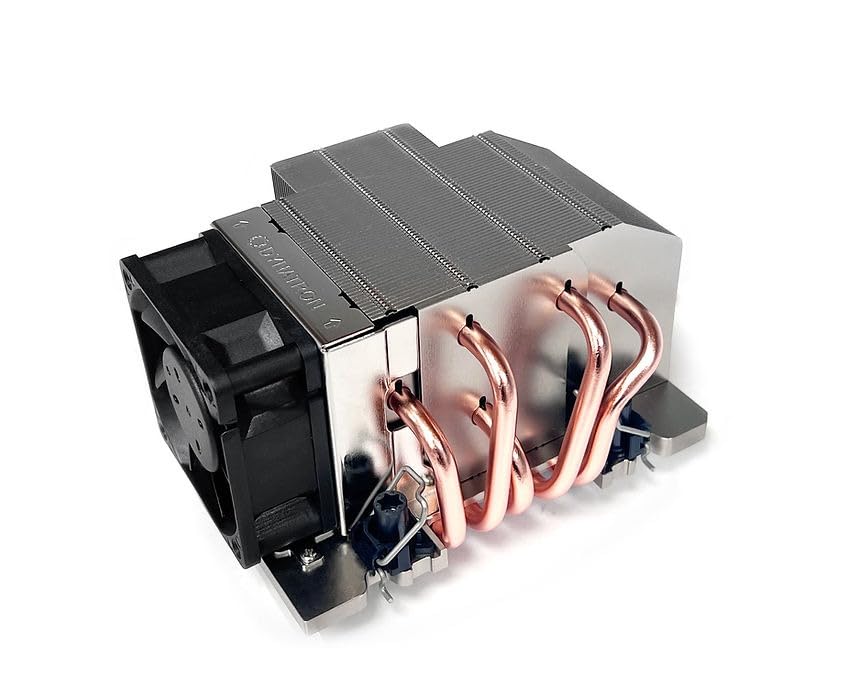
Figura 1: De sus în jos view of the Dynatron C2 CPU Cooler, showing the heatsink fins and integrated fan.
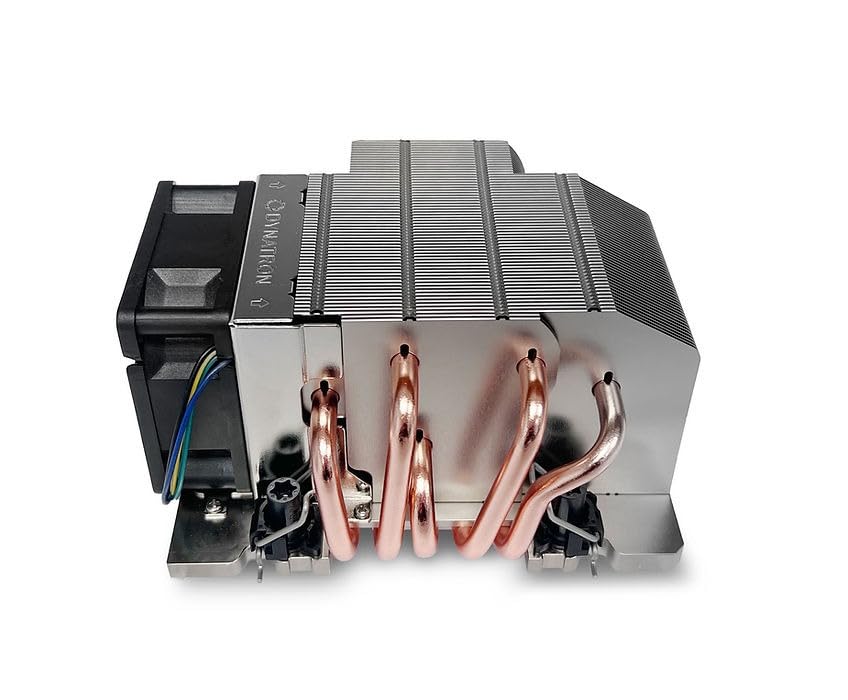
Figura 2: lateral view of the Dynatron C2 CPU Cooler, highlighting the copper heat pipes extending from the base.
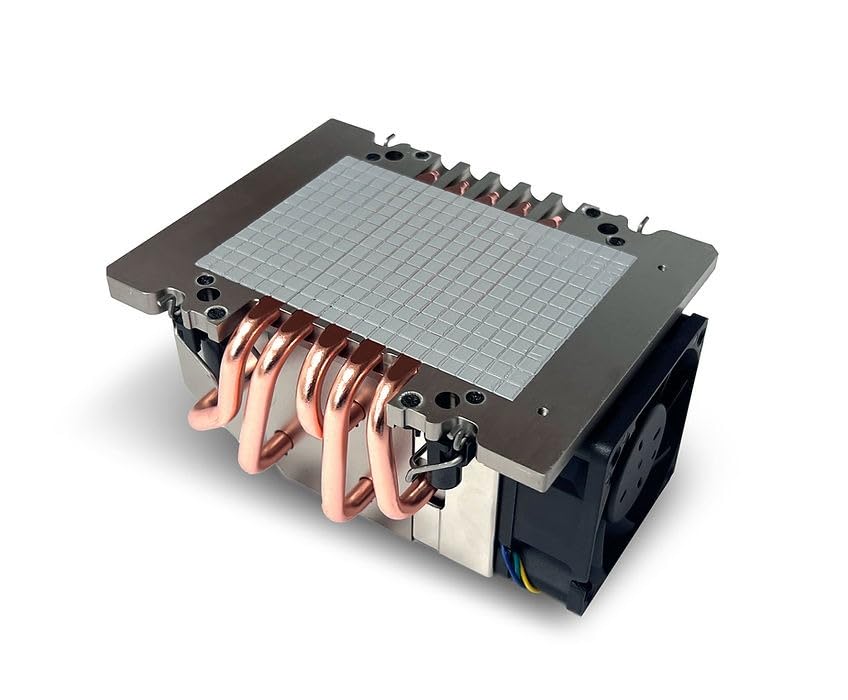
Figura 3: De jos view of the Dynatron C2 CPU Cooler, showing the contact plate with pre-applied thermal grease.
5. Specificații
| Caracteristică | Caietul de sarcini |
|---|---|
| Suport CPU | Intel |
| Soclu CPU | LGA 7529 |
| Soluţie | 2U and Up |
| Dimensiuni (L x l x H) | 132.5 x 97.8 x 67 mm (5.22" L x 3.85" l x 2.64" Î) |
| Greutate | 630 g (1.39 livre) |
| Material | Aluminum Stacked-fin with Heat Pipes (Copper) |
| Dimensiunea ventilatorului | 60 x 60 x 25 mm |
| Fan Speed (PWM) | 20% Duty Cycle: 2300 ± 200 RPM 50% Duty Cycle: 5400 ± 10% RPM 100% Duty Cycle: 11000 ± 10% RPM |
| Vol. Evaluattage | 12V DC |
| Tip rulment | 2 Rulment cu bile |
| Consumul de energie | 20% Duty Cycle: 0.84 W 50% Duty Cycle: 2.76 W 100% Duty Cycle: 18 W |
| Flux de aer | 20% Duty Cycle: 11.91 CFM 50% Duty Cycle: 28.38 CFM 100% Duty Cycle: 58.31 CFM |
| Nivel de zgomot | 20% Duty Cycle: 25.8 dBA 50% Duty Cycle: 44.4 dBA 100% Duty Cycle: 59.8 dBA |
| Presiunea aerului | 20% Duty Cycle: 1.48 mm-H2O 50% Duty Cycle: 7.54 mm-H2O 100% Duty Cycle: 28.8 mm-H2O |
| Lead Wire Pin Out | Pin#1- Black(-), Pin#2- Yellow(+), Pin#3- Green(Tachometer/ Signal Output), Pin#4- Blue (PWM) |
| Grease termica | Shin-Etsu 7762 (Pre-applied) |
6. Configurare și instalare
The Dynatron C2 cooler is designed for easy installation on Intel LGA 7529 sockets, featuring a convenient heat sink screw captive mounting system and pre-applied thermal grease.
Pașii de instalare:
- Pregătiți soclul procesorului: Ensure the Intel LGA 7529 socket on your motherboard is clean and free of debris.
- Poziționarea răcitorului: Carefully align the Dynatron C2 cooler over the CPU, ensuring the mounting holes on the cooler's base align with the screw posts around the CPU socket. The cooler's base has pre-applied thermal grease (Shin-Etsu 7762), so no additional application is needed.
- Fixați răcitorul: Using a screwdriver, tighten the captive screws on the cooler's mounting brackets in a diagonal pattern (e.g., top-left, bottom-right, top-right, bottom-left). Tighten gradually and evenly until the cooler is firmly seated and stable. Do not overtighten.
- Conectați ventilatorul: Locate the 4-pin fan connector on the Dynatron C2 cooler. Connect this cable to the designated CPU_FAN header on your motherboard. Ensure the connector is fully seated.

Figura 4: Example of a mounting frame for LGA 7529 socket (actual frame may vary or be integrated).
7. Funcționare
Once installed and connected, the Dynatron C2 CPU cooler operates automatically. The 60x60x25mm fan features a PWM (Pulse Width Modulation) function, allowing the motherboard to dynamically adjust fan speed based on CPU temperature. This ensures efficient cooling while minimizing noise during lighter workloads.
The fan operates at speeds ranging from approximately 2300 RPM (at 20% duty cycle) to 11000 RPM (at 100% duty cycle), providing robust airflow as needed to dissipate heat from the CPU.
8. Întreținere
To ensure optimal performance and longevity of your Dynatron C2 CPU cooler, periodic maintenance is recommended.
- Îndepărtarea prafului: Regularly inspect the cooler for dust accumulation on the fan blades and heatsink fins. Dust can impede airflow and reduce cooling efficiency. Use compressed air or a soft brush to gently remove dust. Ensure the system is powered off and unplugged before cleaning.
- Inspecție ventilator: Periodically check that the fan spins freely and quietly. If unusual noises occur, inspect for obstructions or signs of wear.
- Fără dezasamblare: Do not attempt to disassemble the fan or heatsink assembly beyond routine cleaning. Unauthorized disassembly may void your warranty.
9. Depanare
If you encounter issues with your Dynatron C2 CPU cooler, refer to the following common problems and solutions:
- Issue: High CPU Temperatures
Soluţie: Verify that the cooler is securely mounted to the CPU and that all captive screws are tightened evenly. Check the fan connection to the motherboard's CPU_FAN header. Ensure adequate airflow within the computer chassis and that no cables or components are obstructing the cooler's fan. - Issue: Fan Not Spinning or Making Unusual Noise
Soluţie: Check the 4-pin fan cable connection to the motherboard. Power off the system and inspect the fan for any physical obstructions (e.g., loose wires). If the fan is faulty or damaged, contact Dynatron support or your reseller for assistance.
10. Garanție și asistență
For warranty information, technical support, and service inquiries regarding your Dynatron C2 Intel 7529 2U Active CPU Cooler, please refer to the official Dynatron website or contact your authorized reseller. It is recommended to retain your purchase receipt as proof of purchase for any warranty claims.