
1. Produs terminatview
The Rossmax X9 BT PARR PRO is an advanced automatic blood pressure monitor designed for professional use. It measures blood pressure from the upper arm and incorporates several detection technologies to provide comprehensive health insights. This device features Bluetooth low energy technology for connectivity and offers both automatic and auscultatory measurement methods.
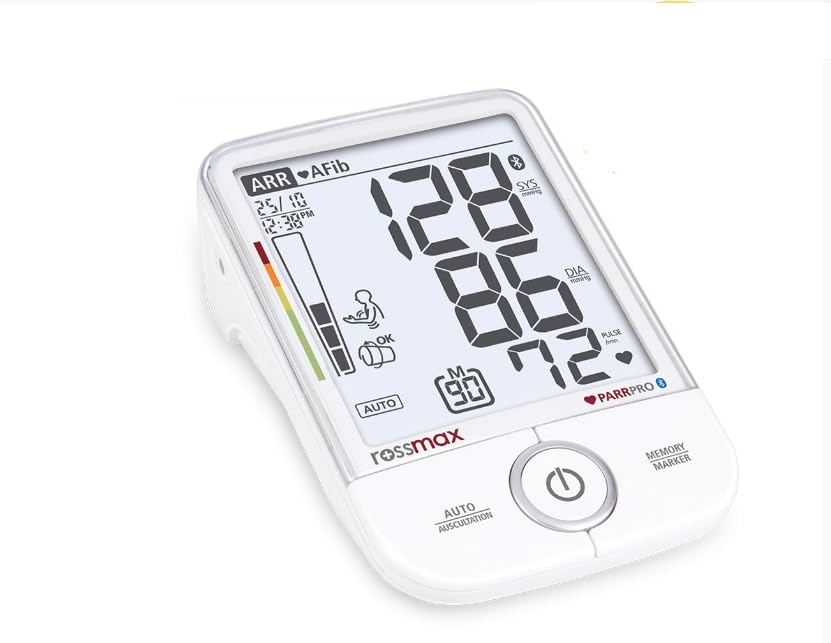
Image: Rossmax X9 BT PARR PRO Blood Pressure Monitor, displaying a blood pressure reading of 128/86 mmHg and a pulse rate of 72 bpm, along with the Bluetooth logo and PARR PRO indicators.
Caracteristici cheie:
- Tehnologie Bluetooth cu consum redus de energie: Enables wireless data transfer to compatible devices.
- PARR Technology: Includes detection for Arrhythmia (ARR), Atrial Fibrillation (AFib), Premature Contraction (PC), Tachycardia (TACH), and Bradycardia (BRAD).
- Metode de măsurare: Supports both automatic and auscultatory blood pressure measurement.
- Detectarea mișcării: Alerts users to body movement during measurement for improved accuracy.
- Cuff Detection: Ensures proper cuff placement for reliable readings.
- Hypertension Risk Indication: Provides a visual indicator for potential hypertension.
- Funcția de memorie: Stores 90 readings with date and time stamps.
- Afişa: Jumbo size "XL" digit with backlight LCD for easy readability.
- Putere: Includes a 6V adapter for continuous power.
- Lifetime Calibration: Ensures long-term accuracy of the device.
2. Ce se află în cutie
Upon unpacking your Rossmax X9 BT PARR PRO Blood Pressure Monitor, please ensure all the following components are present:
- Rossmax X9 BT PARR PRO Blood Pressure Monitor Unit
- Manșeta de sus
- Adaptor de alimentare 6V
- Manual de instrucțiuni (acest document)

Image: The Rossmax X9 BT PARR PRO monitor unit positioned next to its accompanying upper arm cuff, ready for use.
3. Ghid de instalare
3.1 Alimentarea dispozitivului
- Locate the 6V DC power input port on the side of the monitor.
- Connect the provided 6V power adapter to this port.
- Conectați adaptorul la o priză electrică standard.
- Alternatively, the device can be powered by batteries (not included). Open the battery compartment on the bottom of the unit and insert four AA batteries, ensuring correct polarity.

Imagine: Un prim-plan view of the side of the Rossmax X9 BT PARR PRO monitor, showing the 6V DC power input and DATA ports.
3.2 Atașarea manșetei
- Ensure the cuff tube is securely connected to the air jack on the side of the monitor unit.
- Wrap the cuff around your bare upper arm, approximately 1-2 cm above the elbow joint.
- The artery mark on the cuff should align with your brachial artery (inner side of the arm).
- The bottom edge of the cuff should be positioned above the elbow.
- Secure the cuff snugly with the Velcro fastener. It should be tight enough so that two fingers can barely fit underneath.

Image: The Rossmax X9 BT PARR PRO monitor alongside its cuff, which displays a size guide (S, M, L) and instructions for proper placement on the left arm, indicating the main artery and cuff range.
3.3 Asociere Bluetooth
The Rossmax X9 BT PARR PRO uses Bluetooth low energy technology to connect with compatible smart devices for data management. Refer to the specific instructions provided with the Rossmax health app for detailed pairing procedures.
4. Instrucțiuni de utilizare
4.1 Înainte de a efectua o măsurare
- Evitați să mâncați, să beți alcool, să fumați, să faceți exerciții fizice și să faceți baie timp de 30 de minute înainte de măsurare.
- Odihnește-te cel puțin 5 minute înainte de a face o măsurătoare.
- Stați într-o poziție confortabilă, cu spatele sprijinit și picioarele așezate pe podea.
- Așezați brațul pe o suprafață plană astfel încât manșeta să fie la nivelul inimii.
- Rămâneți nemișcat și tăcut în timpul măsurătorii.
4.2 Taking an Automatic Measurement
- Ensure the cuff is correctly applied to your upper arm.
- Apăsați tasta START/STOP button (power button) to turn on the device. The cuff will automatically inflate.
- The display will show your systolic pressure, diastolic pressure, and pulse rate once the measurement is complete.
- If any irregular heartbeat (ARR, AFib, PC, TACH, BRAD) or movement is detected, the corresponding icon will appear on the display.
- Măsurătoarea va fi stocată automat în memoria dispozitivului.
- Apăsați tasta START/STOP Apăsați din nou butonul pentru a opri dispozitivul, altfel acesta se va opri automat după o perioadă de inactivitate.
4.3 Auscultatory Measurement
The X9 BT PARR PRO also supports auscultatory measurement, which involves using a stethoscope to listen for Korotkoff sounds. This method is typically performed by healthcare professionals. Consult your healthcare provider for guidance on this measurement technique.
4.4 Înțelegerea indicatorilor de afișare
- SYS / DIA: Systolic and Diastolic blood pressure readings in mmHg.
- PULS: Heart rate in beats per minute (bpm).
- ARR (Arrhythmia): Indicates an irregular heartbeat.
- AFib (Atrial Fibrillation): Indicates potential atrial fibrillation.
- PC (Premature Contraction): Indicates premature heartbeats.
- TACH (Tachycardia): Indicates a faster than normal heart rate.
- BRAD (Bradycardia): Indicates a slower than normal heart rate.
- Movement Detection Icon: Appears if excessive movement occurred during measurement.
- Cuff Detection Icon: Confirms proper cuff placement.
- Hypertension Risk Indication: A color-coded bar on the left side of the display indicates the risk level based on WHO guidelines.
- Memory Icon (M): Indicates the current reading is stored in memory.
- Pictogramă Bluetooth: Indică o conexiune Bluetooth activă.
4.5 Recalling Memory Readings
Apăsați tasta MEMORY/MARKER buton pentru a review previous measurements. Each press will cycle through the 90 stored readings, displaying the date and time for each.
5. Întreținere
5.1 Curăţarea dispozitivului
- Ștergeți unitatea monitorului și manșeta cu o lavetă moale și uscată.
- Dacă este necesar, folosiți o cârpă ușor tamponată.ampCurățați cu apă sau un detergent blând. Nu utilizați produse de curățare abrazive și nu scufundați dispozitivul în apă.
- Ensure no liquid enters the monitor casing.
5.2 Depozitare
- Depozitați dispozitivul într-un loc curat și uscat, ferit de lumina directă a soarelui, temperaturi extreme și umiditate.
- Evitați să scăpați dispozitivul sau să îl supuneți la impacturi puternice.
- Dacă nu utilizați dispozitivul pentru o perioadă lungă de timp, scoateți bateriile pentru a preveni scurgerile.
5.3 Lifetime Calibration
The Rossmax X9 BT PARR PRO is designed with lifetime calibration to maintain accuracy. However, it is recommended to have the device checked by an authorized service center periodically, especially if you suspect any inaccuracies or after significant impact.
6. Depanare
| Problemă | Cauza posibila | Soluţie |
|---|---|---|
| Dispozitivul nu pornește. | Batteries are depleted or incorrectly inserted. Power adapter is not connected or faulty. | Înlocuiți bateriile, asigurându-vă polaritatea corectă. Verificați conexiunea adaptorului de alimentare și încercați o altă priză. |
| Cuff does not inflate or inflates improperly. | Cuff tube is not securely connected. Cuff is damaged. | Ensure the cuff tube is firmly inserted into the air jack. Inspect the cuff for leaks or damage; replace if necessary. |
| Citiri inexacte sau inconsistente. | Improper cuff placement. Movement during measurement. Not resting before measurement. Incorrect arm position. | Re-apply cuff correctly. Remain still and silent. Rest for 5 minutes before measuring. Ensure arm is at heart level. |
| Probleme de conexiune Bluetooth. | Device not in pairing mode. Bluetooth on smart device is off. App issues. | Refer to the Rossmax health app instructions for pairing. Ensure Bluetooth is enabled on your smart device. Restart both devices. |
| Mesaj de eroare pe afișaj. | Various internal errors or measurement issues. | Consult the full user manual for specific error codes. If the problem persists, contact customer support. |
7. Specificațiile produsului
| Caracteristică | Detaliu |
|---|---|
| Numărul de model | X9-BP BT |
| Metoda de măsurare | Oscillometric (Automatic) & Auscultatory |
| Utilizare țintă parte a corpului | Braţ |
| Capacitate de memorie | 90 readings with date & time indication |
| Afişa | Jumbo size "XL" digit, Backlight LCD |
| Conectivitate | Tehnologie Bluetooth Low Energy |
| Special Detections | Arrhythmia (ARR), Atrial Fibrillation (AFib), Premature Contraction (PC), Tachycardia (TACH), Bradycardia (BRAD), Movement Detection, Cuff Detection, Hypertension Risk Indication |
| Sursa de alimentare | 6V Adapter (included), Batteries (not included) |
| Componente incluse | Adapter, Cuff |
| Greutatea articolului | 500 g |
| Dimensiunile produsului | 20L x 10W x 20Th Centimeters |
| Producător | Rossmax International Ltd. |
| Țara de origine | Taiwan |
8. Garanție și asistență
8.1 Informații despre garanție
The Rossmax X9 BT PARR PRO Blood Pressure Monitor comes with a standard manufacturer's warranty. For specific details regarding the warranty period and coverage, please refer to the warranty card included with your product or visit the official Rossmax website. Extended warranty options may also be available from third-party providers, such as the "1 Year Extended Warranty by Onsitego" mentioned during purchase.
8.2 Asistență pentru clienți
For technical assistance, troubleshooting, or service inquiries, please contact Rossmax International Ltd. directly:
- Producător: Rossmax International Ltd.
- Adresa: 12F - 189 Kang Chien Road, Taipei 114, TAIWAN ROC.
- E-mail: info@rossmax.com
When contacting support, please have your product model number (X9-BP BT) and purchase information ready.