
1. Introducere
The Pronomic DX-50 USB MKII is a professional 4-channel DJ mixer designed for a wide range of applications, including discos, parties, restaurants, and presentations. Its user-friendly design ensures that both experienced and less experienced users can fully utilize its features. This manual provides detailed instructions for setting up, operating, and maintaining your mixer.
Key features include a recording function, integrated Bluetooth interface, USB player with transport controls, and multiple input channels.
2. Instrucțiuni importante de siguranță
- Citiți instrucțiunile: Read all safety and operating instructions before using the product.
- Păstrați instrucțiuni: Păstrați instrucțiunile de siguranță și operare pentru referințe ulterioare.
- Acordați atenție avertismentelor: Respectați toate avertismentele de pe produs și din instrucțiunile de utilizare.
- Urmați instrucțiunile: Urmați toate instrucțiunile de utilizare și utilizare.
- Apă și umiditate: Do not use this apparatus near water (e.g., bathtub, washbowl, kitchen sink, laundry tub, wet basement, or swimming pool).
- Ventilare: Nu blocați niciun orificiu de ventilație. Instalați conform instrucțiunilor producătorului.
- Căldură: Nu instalați lângă nicio sursă de căldură, cum ar fi calorifere, registre de căldură, sobe sau alte aparate (inclusiv ampliificatori) care produc căldură.
- Surse de alimentare: Use only power sources specified by the manufacturer.
- Protecție cablu de alimentare: Protejați cablul de alimentare să nu fie călcat sau ciupit, în special la prize, prize convenabile și la punctul de ieșire din aparat.
- curatenie: Curățați numai cu o cârpă uscată.
- Service: Nu încercați să reparați singur acest produs, deoarece deschiderea sau îndepărtarea capacelor vă poate expune la un volum periculostage sau alte pericole. Pentru toate lucrările de întreținere, adresați personalului de service calificat.
3. Conținutul pachetului
Please check that all items listed below are included in your package. If any items are missing or damaged, contact your dealer immediately.
- Pronomic DX-50 USB MKII DJ Mixer
- Adaptor de alimentare (12 V CA)
- USB Stick (32 GB, if included in your specific bundle)
- Manual de utilizare (acest document)
4. Produs terminatview
Familiarize yourself with the various controls and connections on your DX-50 USB MKII mixer.
4.1 Controale panoului frontal
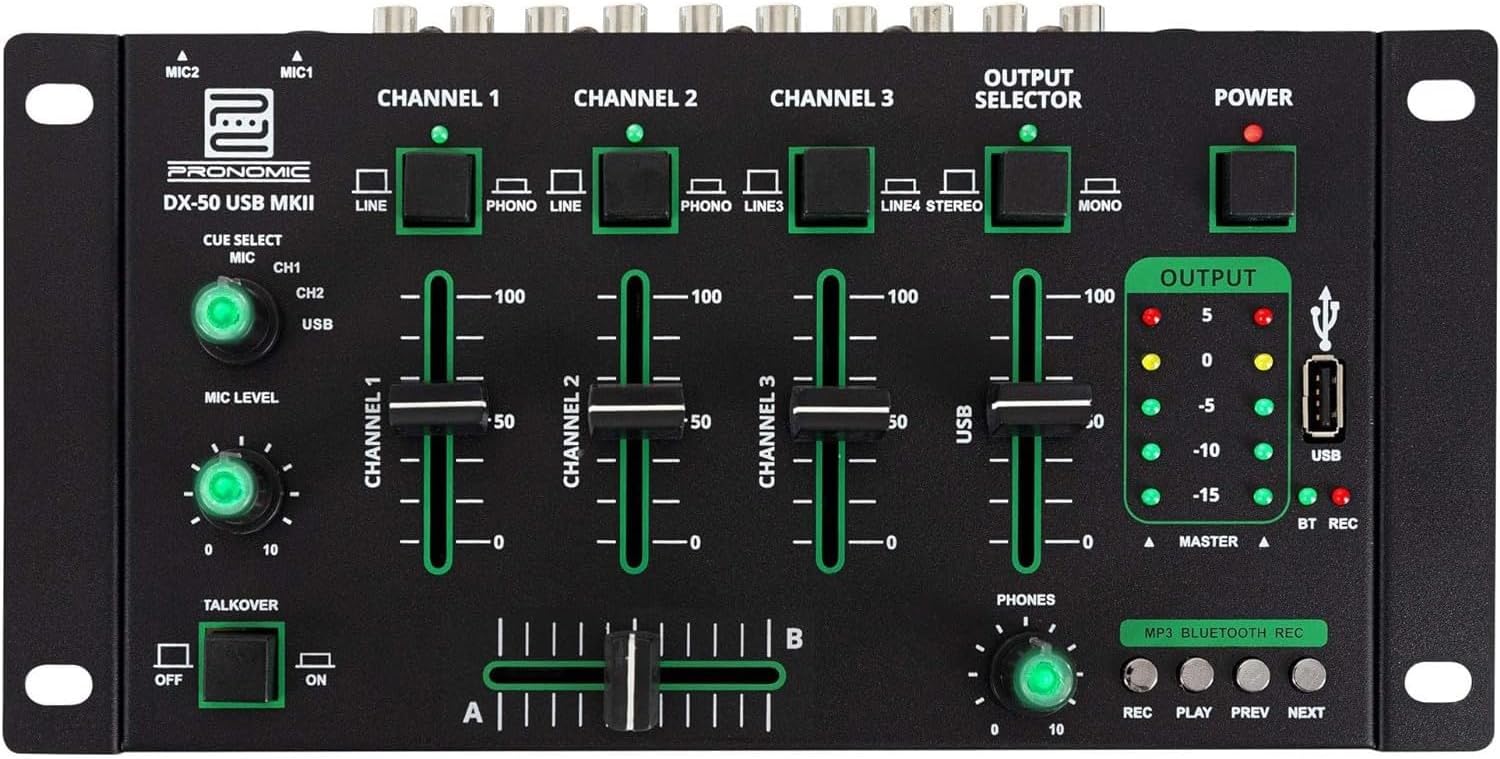
- Intrări MIC 1/2: Connect microphones.
- Channel 1-4 Input Selectors: Switch between LINE, PHONO, or USB/Bluetooth inputs for each channel.
- Faders de canal: Adjust the volume level for each channel.
- CUE Select Buttons: Route specific channels to the headphone output for monitoring.
- MIC Level Knob: Adjust the volume of the microphone inputs.
- Talkover Switch: Activates the talkover function, which automatically lowers music volume when speaking into the microphone.
- Selector de ieșire: Choose between Stereo or Mono master output.
- Întrerupător: Pornește/oprește mixerul.
- Contoare de nivel de ieșire: LED indicators showing the master output level.
- Port USB: Connect a USB drive for MP3 playback and recording.
- MP3/Bluetooth/REC Player Controls: Buttons for Play/Pause, Previous, Next, and Record functions for the integrated player.
- Phones Level Knob: Reglează volumul ieșirii pentru căști.
- Crossfader (A/B): Blends between channels assigned to A and B.
4.2 Conexiuni la panoul din spate

- AC 12V Power Input: Conectați adaptorul de alimentare furnizat aici.
- Ieșire PHONES: Mufă de 6.3 mm pentru conectarea căștilor.
- MASTER OUT L/R (RCA): Connect to your main ampamplificator sau difuzoare amplificate.
- Channel 1 & 2 Inputs (RCA Line/Phono): Connect turntables (Phono) or other line-level devices (CD players, media players). Use the front panel selector to switch.
- Channel 3 & 4 Inputs (RCA Line): Connect line-level devices.
- MIC 1 & 2 Inputs (6.3mm Jack): Connect microphones.
5. Configurare
Follow these steps to set up your Pronomic DX-50 USB MKII mixer:
- Conexiune de alimentare: Ensure the mixer's power switch is in the OFF position. Connect the supplied AC 12V power adapter to the "AC 12V" input on the rear panel of the mixer. Plug the adapter into a suitable power outlet.
- Master Output Connection: Connect the "MASTER OUT L/R" RCA outputs on the rear panel to the inputs of your ampamplificator sau difuzoare amplificate.
- Conexiune dispozitiv de intrare:
- Platane: Connect turntables to the "CHANNEL 1" or "CHANNEL 2" RCA inputs. Set the corresponding input selector on the front panel to "PHONO".
- CD Players/Line Devices: Connect CD players, media players, or other line-level devices to "CHANNEL 1", "CHANNEL 2", "CHANNEL 3", or "CHANNEL 4" RCA inputs. Set the corresponding input selector on the front panel to "LINE".
- Microfoane: Connect microphones to the "MIC 1" or "MIC 2" 6.3mm jack inputs on the rear panel.
- Conexiune căști: Connect your headphones to the "PHONES" 6.3mm jack on the rear panel.
- USB Drive (Optional): If using a USB drive for playback or recording, insert it into the "USB" port on the front panel.
- Pornire: Once all connections are made, switch the mixer's power switch to the ON position. The power indicator LED will illuminate.
6. Instrucțiuni de utilizare
6.1 Mixaj de bază
- Selectați intrare: For each channel, use the input selector switch (LINE/PHONO/USB/BT) to choose the desired audio source.
- Adjust Channel Volume: Use the vertical faders for each channel to adjust its individual volume level.
- Ieșire principală: Monitor the "OUTPUT" LED meters and adjust the master volume knob (if present, otherwise rely on channel faders and amplifier volume) to achieve a suitable overall output level without clipping.
- Crossfader: Use the crossfader to smoothly transition between channels assigned to A and B. Channels 1 and 2 are typically assigned to the crossfader.
6.2 Utilizarea microfonului
- Connect your microphone to one of the MIC inputs on the rear panel.
- Adjust the "MIC LEVEL" knob on the front panel to control the microphone's volume.
- Talkover Function: Activate the "TALKOVER" switch to automatically reduce the volume of the music when you speak into the microphone. This is useful for announcements.
6.3 Redare și înregistrare USB
- Redare USB: Introduceți o unitate USB care conține MP3 files into the "USB" port. Select "USB" as the input source for the dedicated USB channel. Use the "PLAY/PAUSE", "PREV", and "NEXT" buttons to control playback.
- Înregistrare USB: Press the "REC" button to start recording the master output to the connected USB drive. Press "REC" again to stop recording. Ensure your USB drive has sufficient free space and is formatted correctly (FAT32 is commonly supported).
6.4 Conectivitate Bluetooth
- Activați Bluetooth: Select "BT" as the input source for the dedicated Bluetooth channel. The mixer will enter pairing mode.
- Asociați dispozitivul: On your Bluetooth-enabled device (smartphone, tablet, etc.), search for available Bluetooth devices. Select "Pronomic DX-50 USB MKII" (or similar name) from the list to pair.
- Redare audio: Once paired, you can play audio from your device through the mixer. Control playback from your device or using the mixer's transport controls (if supported by your device).
6.5 Monitoring with Headphones
- Connect headphones to the "PHONES" output.
- Use the "CUE SELECT" buttons to choose which channels you want to monitor in your headphones without affecting the main output.
- Adjust the "PHONES" level knob to set your desired headphone volume.
7. Întreținere
- curatenie: Disconnect the power before cleaning. Use a soft, dry cloth to wipe the surface of the mixer. Do not use liquid cleaners, aerosols, or solvents.
- Depozitare: Depozitați mixerul într-un loc răcoros și uscat, ferit de lumina directă a soarelui și de temperaturi extreme.
- Îngrijirea faderului și a butonului rotativ: Avoid excessive force when operating faders and knobs. Periodically check for dust or debris accumulation around moving parts.
- Organizare de cabluri: Ensure cables are not kinked or strained, which can lead to damage.
8. Depanare
| Problemă | Cauza posibila | Soluţie |
|---|---|---|
| Fără putere | Power adapter not connected; Power switch off; Faulty power outlet. | Check power adapter connection; Ensure power switch is ON; Try a different power outlet. |
| Niciun sunet de la ieșirea principală | Master volume too low; Amplifier/speakers off or disconnected; Incorrect input selection; Channel faders down. | Increase master volume; Check amplifier/speaker connections and power; Verify correct input selected for channels; Raise channel faders. |
| Fără sunet de la căști | Headphone volume too low; Headphones not connected; No CUE selected. | Increase PHONES level; Connect headphones properly; Press CUE button for desired channel. |
| Bluetooth nu se asociază | Mixer not in pairing mode; Device too far; Interference. | Ensure BT input is selected; Bring device closer; Restart mixer and device. |
| Redarea USB nu funcționează | USB drive not inserted correctly; Incorrect file formatare; unitatea USB nu este formatată corect. | Re-insert USB drive; Ensure files are MP3; Format USB drive to FAT32. |
9. Specificații
| Model | Pronomic DX-50 USB MKII |
| Numărul de canale | 4 |
| Tehnologia de conectivitate | Bluetooth, USB |
| Intrare audio | RCA (line/phono), 6.3mm microphone, Bluetooth, USB |
| Tip conector de ieșire | RCA (Master Out), 6.3mm (Phones) |
| Sursa de alimentare | Electric Cable (AC 12V adapter) |
| Dimensions (without corner brackets and controls) | 222 x 129 x 28 mm (lățime x adâncime x înălțime) |
| Total Dimensions (with corner brackets and controls) | 267 x 136 x 51 mm (lățime x adâncime x înălțime) |
| Greutate | 790 g |
10. Garanție și asistență
Pentru informații despre garanție și asistență tehnică, vă rugăm să consultați documentația furnizată odată cu achiziția sau să contactați distribuitorul. Păstrați dovada achiziției pentru orice reclamații în garanție.
For further assistance, you may also visit the official Pronomic website-ul sau contactați departamentul de servicii pentru clienți.