
1. Introducere
This manual provides essential information for the safe and efficient operation of your DALTON KS10Pro Portable Karaoke Machine. Please read this manual thoroughly before using the product and retain it for future reference.
The DALTON KS10Pro is an all-in-one portable karaoke system designed for versatile audio entertainment. It features Bluetooth connectivity, dual wireless microphones, and various input options for music playback and vocal performance.
2. Ce se află în cutie
La despachetare, vă rugăm să vă asigurați că toate articolele enumerate mai jos sunt prezente și în stare bună:
- 2 microfoane wireless UHF
- 4 AA Batteries (for microphones)
- 1 Cablu de alimentare
- 1 Storage Box (for microphones)
- 1 Manual de instrucțiuni (acest document)
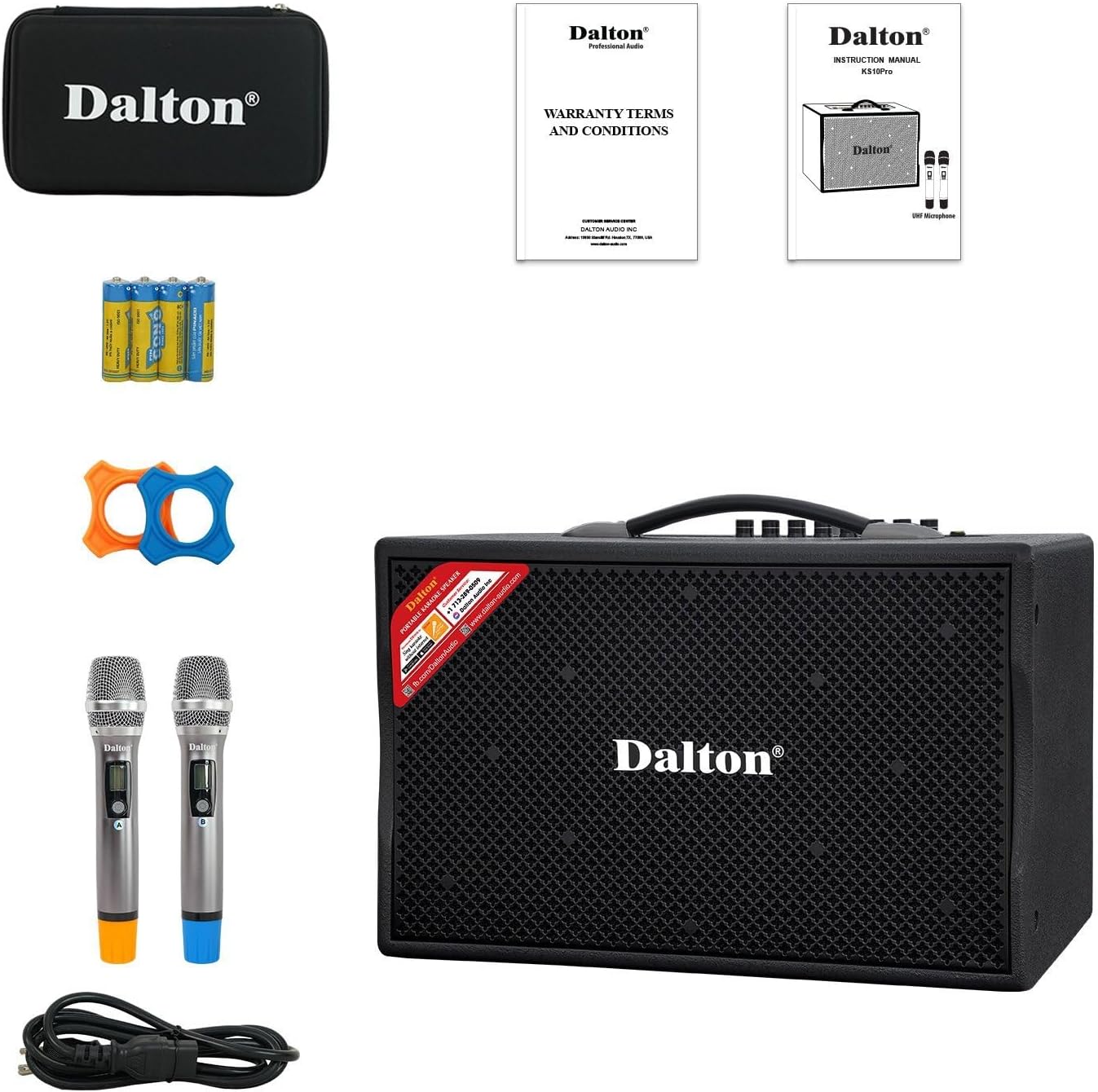
Image: The complete package contents of the DALTON KS10Pro Portable Karaoke Machine, showing the main speaker unit, two wireless microphones, power cable, AA batteries, and a storage case.
3. Ghid de instalare
3.1 Încărcare inițială
Before first use, fully charge the karaoke machine. Connect the provided power cable to the AC120V/60Hz input on the rear panel of the speaker and plug it into a power outlet. The 'CHARGE' indicator light will illuminate. Charging is complete when the 'CHARGE' light turns off or changes color (refer to specific model indicators if different).
Video: A demonstration of the DALTON KS10Pro Portable Bluetooth Speaker, highlighting its features and portability. This video shows the speaker being moved and its control panel.
3.2 Configurarea microfonului
- Insert the 4 AA batteries into the wireless microphones.
- Turn on each microphone using its power switch. The microphones should automatically pair with the speaker.
- Place the non-roll rings on the microphones for added protection and stability.
3.3 Connecting to a Music Source
The KS10Pro offers multiple connectivity options:
- Bluetooth:
- Turn on the karaoke machine.
- Activați Bluetooth pe smartphone, tabletă sau alt dispozitiv.
- Caută "Dalton BT03" (or similar, refer to your device's Bluetooth list) and pair.
- Once connected, you can play music wirelessly from your device.
- USB: Introduceți o unitate USB care conține MP3 files into the USB port on the control panel. The speaker will automatically detect and play the music.
- AUX IN: Connect an external audio device (e.g., TV, MP3 player) using an AUX cable to the AUX IN ports on the rear panel.

Image: The DALTON KS10Pro Portable Karaoke Machine highlighting its connectivity options: Bluetooth, AUX, and USB, indicating versatile music playback.
Video: A demonstration of a karaoke machine playing songs from YouTube, showing the screen interface and song selection. This video illustrates how to select and play music for karaoke.
4. Instrucțiuni de utilizare
4.1 Pornire/Oprire
Locate the 'POWER' switch on the control panel. Flip it to 'ON' to power on the device. Flip it to 'OFF' to power off.
4.2 Reglarea volumului și a efectelor
The control panel features various knobs for fine-tuning your audio experience:
- MUZICA VOL: Reglează volumul general al muzicii.
- MUSIC TREBLE/BASS: Controls the treble and bass levels of the music.
- VOL MIC: Reglează volumul microfonului.
- MIC TREBLE/BASS: Controls the treble and bass levels of the microphones.
- ECOU: Adaugă un efect de ecou vocilor de la microfon.
- ÎNTÂRZIERE: Adjusts the delay of the echo effect.

Imagine: O imagine detaliată view of the DALTON KS10Pro control panel, showing all knobs and inputs for adjusting music and microphone settings, including volume, treble, bass, echo, and delay.
4.3 Utilizare portabilă
The KS10Pro is designed for portability with 360-degree wheels and a sturdy handle, allowing you to easily move it to any location for indoor or outdoor events.

Image: A woman demonstrating the portability of the DALTON KS10Pro karaoke speaker, easily moving it across a floor using its built-in wheels and handle.
5. Întreținere
- curatenie: Use a soft, dry cloth to clean the exterior of the speaker and microphones. Avoid using harsh chemicals or abrasive materials.
- Depozitare: Depozitați unitatea într-un loc răcoros și uscat, ferit de lumina directă a soarelui și de temperaturi extreme.
- Îngrijirea bateriei: For optimal battery life, fully charge the unit before long periods of storage and recharge it every 3 months.
6. Depanare
| Problemă | Cauza posibila | Soluţie |
|---|---|---|
| Fără putere | Battery is depleted; Power cable not connected. | Încărcați unitatea; Asigurați-vă că cablul de alimentare este conectat corect. |
| Niciun sunet de la difuzor | Volum prea mic; Mod de intrare selectat incorect; Dispozitiv neîmperecheat (Bluetooth). | Increase MUSIC VOL; Select correct input mode (Bluetooth/USB/AUX); Re-pair Bluetooth device. |
| Niciun sunet de la microfon | Microphone off; Batteries depleted; MIC VOL too low. | Porniți microfonul; Înlocuiți bateriile; Măriți VOLUMUL MIC. |
| Calitate slabă a sunetului | Interference; Incorrect TREBLE/BASS settings. | Move away from other electronic devices; Adjust MUSIC/MIC TREBLE/BASS knobs. |
Video: Instructions on how to connect a karaoke machine to a TV using an optical cable. This video demonstrates the process of setting up audio output from a TV to an external speaker.
7. Specificații
| Caracteristică | Detaliu |
|---|---|
| Marca | DALTON |
| Numărul de model | KS10Pro |
| Putere de ieșiretage | 300 wați |
| Dimensiune woofer | 10 inchi |
| Dimensiunea tweeterului | 1 inchi |
| Tehnologia de conectivitate | AUX, Bluetooth, USB |
| Sursa de alimentare | Alimentat cu baterie |
| Greutatea articolului | 33.9 lire sterline |
| Dimensiunile produsului | 21.3 x 12.6 x 17.6 inci |
| Material | Steel, Wooden Cabinet |
| Numărul de canale | 2 |
| Dispozitive compatibile | TV, Guitar, USB, AUX IN, Wireless Microphone |

Image: An exploded diagram of the DALTON KS10Pro speaker, illustrating its internal components including the 300W power output, 10-inch woofer, and 1-inch tweeter for harmonizing sounds.
8. Garanție și asistență
For warranty information and customer support, please refer to the documentation included in your product packaging or visit the official DALTON webPăstrați bonul fiscal ca dovadă a achiziției pentru reclamații în garanție.
Planurile de protecție sunt disponibile pentru achiziționare separat:
- Plan de protecție pe 2 ani
- Plan de protecție pe 3 ani
- Protecție completă: Un singur plan acoperă toate achizițiile eligibile trecute și viitoare