
DELTACO GAMING PCH90
DELTACO GAMING RGB Gaming Chair PCH90 User Manual
Model: PCH90 | Brand: DELTACO GAMING
1. Introducere
Thank you for choosing the DELTACO GAMING RGB Gaming Chair PCH90. This manual provides detailed instructions for assembly, operation, maintenance, and troubleshooting to ensure you get the most out of your new gaming chair. Please read this manual thoroughly before use and keep it for future reference.
2. Produs terminatview
The DELTACO GAMING RGB Gaming Chair PCH90 combines ergonomic design with vibrant RGB lighting for an immersive gaming experience. Key features include:
- 332 customizable RGB lighting modes.
- Ergonomic design with high backrest, neck, and lumbar support cushions.
- Adjustable height via hydraulic gas lift.
- Recline function from 90 to 180 degrees.
- 2D adjustable armrests.
- Durable vegan leather upholstery and strong steel frame.
- Stable 5-point star base with smooth-rolling nylon casters.

Figura 1: Față View of the Gaming Chair
Această imagine prezintă partea din față view of the pink DELTACO GAMING RGB Gaming Chair PCH90, highlighting its ergonomic design and the vibrant RGB lighting strips along the edges of the backrest and seat.

Figure 2: Chair Construction Details
This image provides a closer look at the chair's construction, highlighting the robust steel frame, comfortable soft foam padding, and the durable vegan leather upholstery.
3. Informații de siguranță
Please observe the following safety precautions to prevent injury or damage to the chair:
- Asamblare necesară: Ensure all parts are securely fastened before using the chair.
- Capacitate de greutate: Nu depășiți capacitatea maximă de greutate a 120 kg (265 lbs).
- Ajustari: Exercise caution when adjusting the chair's height, recline, and armrests to avoid pinching or injury.
- Stabilitate: Always ensure the chair is on a stable, level surface before sitting or making adjustments.
- Copii: Nu lăsați copiii să se apropie de scaun în timpul asamblării și ajustării.
- curatenie: Use only recommended cleaning methods and products to avoid damaging the material. Refer to the Maintenance section.
4. Conținutul pachetului
Înainte de a începe asamblarea, verificați dacă toate componentele sunt prezente și nedeteriorate. Dacă lipsesc sau sunt deteriorate piese, vă rugăm să contactați serviciul de asistență pentru clienți.
- spatar
- Baza scaunului
- Cotiere (2)
- Baza stelară
- Rotile (5)
- Cilindru de ridicare cu gaz
- Capac de ridicare pe gaz
- Placă de mecanism
- Pernă lombară
- Pernă pentru gât
- Set de accesorii (șuruburi, șaibe, cheie Allen)
- Telecomanda RGB
- Cablu de alimentare USB
5. Configurare și asamblare
Urmați cu atenție acești pași pentru o asamblare corectă. Se recomandă ca asamblarea să fie realizată de două persoane.
5.1 Attach Casters to Star Base
Insert each of the five casters firmly into the holes at the end of the star base until they click into place.
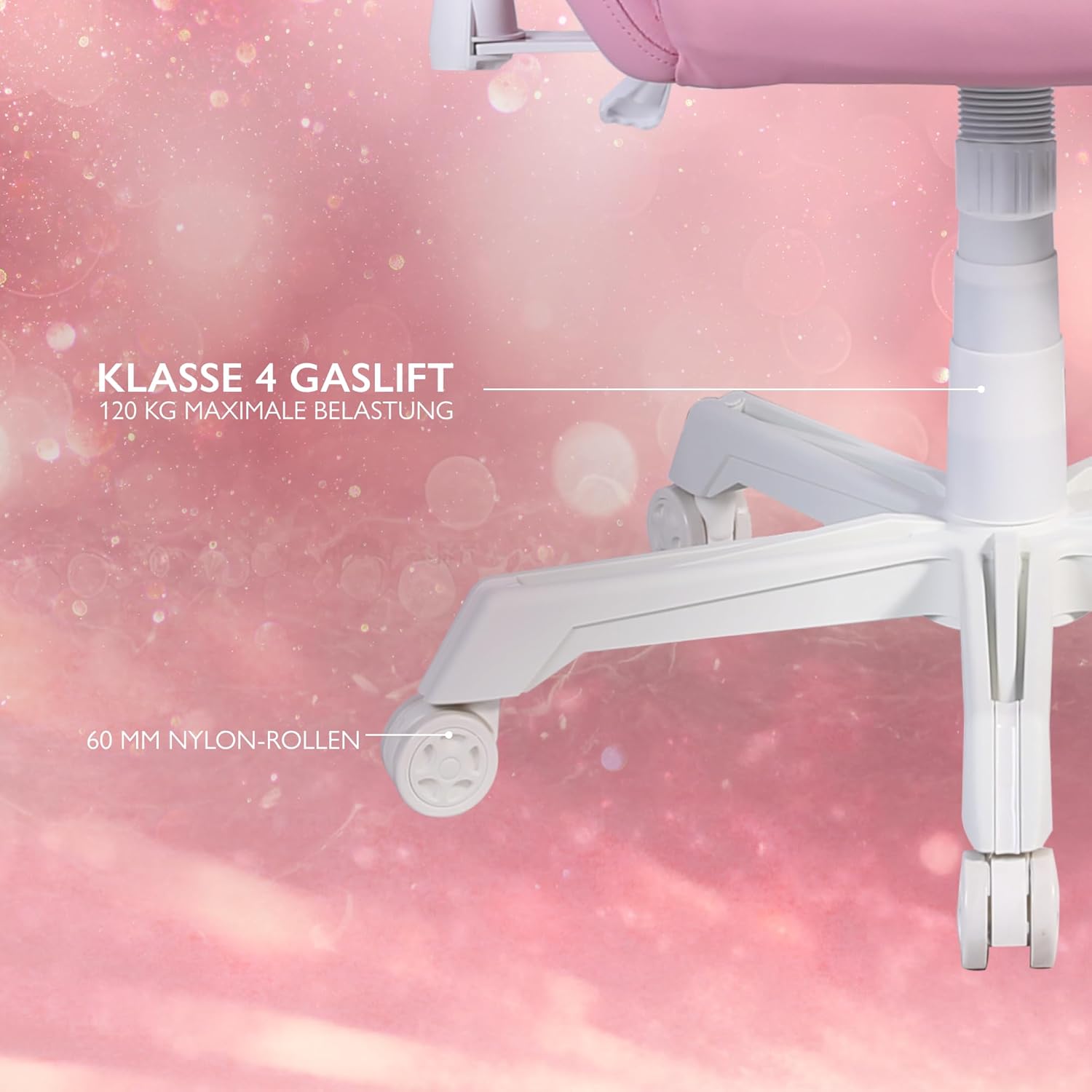
Figure 3: Star Base and Casters
This image highlights the robust 5-point star base with 60mm nylon casters, designed for smooth movement, and indicates the Class 4 gas lift for height adjustment.
5.2 Install Gas Lift
Place the gas lift cylinder into the center hole of the assembled star base. Cover the gas lift with the telescopic plastic cover.
5.3 Attach Mechanism Plate to Seat Base
Align the mechanism plate with the pre-drilled holes on the underside of the seat base. Ensure the front of the mechanism plate faces the front of the seat. Secure with screws and washers from the hardware kit, tightening them with the Allen key.
5.4 Attach Armrests to Seat Base
Attach the armrests to the sides of the seat base using the provided screws. Do not fully tighten yet.

Figure 4: 2D Adjustable Armrests
This image illustrates the 2D adjustable armrests, capable of height and side adjustments for personalized comfort.
5.5 Attach Backrest to Seat Base
Align the backrest with the mounting brackets on the seat base. Secure with screws, then fully tighten the armrest screws and backrest screws.
5.6 Connect Seat to Gas Lift
Așezați cu grijă scaunul și spătarul asamblate pe cilindrul de ridicare cu gaz, asigurându-vă că sunt centrate și stabile.
5.7 Attach Cushions
Attach the neck cushion to the top of the backrest using its straps. Position the lumbar cushion on the lower backrest as desired.

Figure 5: Neck and Lumbar Support Cushions
This image displays the additional neck and lumbar support cushions, designed to enhance ergonomic comfort during long gaming sessions.
6. Instrucțiuni de utilizare
Familiarizați-vă cu caracteristicile reglabile ale scaunului pentru un confort optim.
6.1 Reglarea înălțimii
Pull the lever located on the right side of the seat upwards to adjust the chair height. Release the lever at your desired height. The hydraulic gas lift allows for smooth and precise adjustments.
6.2 Reglarea înclinării scaunului
Pull the recline lever on the left side of the seat upwards to adjust the backrest angle. Lean back or forward to the desired position (90 to 180 degrees) and release the lever to lock it in place.

Figure 6: Full Recline Functionality
This image shows the gaming chair fully reclined, illustrating its ability to adjust from 90 to 180 degrees for various activities, from intense gaming to relaxation.
6.3 Reglarea cotierei
The 2D armrests can be adjusted for height and pivoted horizontally. Use the buttons or levers on the armrests to make adjustments.
6.4 Controlul iluminării RGB
The chair features 332 customizable RGB lighting modes. Connect a 5V 2A USB-A power source (e.g., a power bank, not included) to the USB cable located in the practical storage pocket on the side of the chair. Use the included remote control to select lighting modes, colors, and brightness.

Figure 7: RGB Lighting and Remote Control
This image displays the gaming chair alongside its remote control, emphasizing the 332 unique LED modes available for personalized lighting effects.

Figure 8: USB Power Pocket
This image shows the practical storage compartment on the side of the chair, ideal for a power bank to supply power to the RGB lighting via the integrated USB cable.
7. Întreținere și îngrijire
Proper maintenance will extend the life of your gaming chair.
- curatenie: Wipe the vegan leather surfaces with a soft, damp Pentru petele persistente, folosiți o soluție delicată de săpun și ștergeți imediat. Evitați substanțele chimice dure sau produsele de curățare abrazive.
- Cadru: Regularly check all screws and bolts to ensure they are tight. Re-tighten if necessary.
- Role Clean casters periodically to remove dust and debris that may hinder smooth movement.
- Depozitare: Depozitați scaunul într-un loc răcoros și uscat, ferit de lumina directă a soarelui și de temperaturi extreme.
8. Depanare
Dacă întâmpinați probleme, consultați următoarele probleme comune și soluții:
| Problemă | Cauza posibila | Soluţie |
|---|---|---|
| Scaunul nu se ajustează pe înălțime. | Defecțiune a cilindrului de ridicare a gazului sau maneta nu este acționată. | Ensure the height adjustment lever is fully pulled. If the issue persists, the gas lift may need replacement. Contact support. |
| Scaunul se clatină sau este instabil. | Șuruburi slăbite sau podea neuniformă. | Verificați și strângeți toate șuruburile de asamblare. Asigurați-vă că scaunul se află pe o suprafață plană și dreaptă. |
| Roțile nu se rostogolesc lin. | Resturi în roți sau roți deteriorate. | Curățați orice păr sau resturi de pe roțile pivotante. Dacă sunt deteriorate, este posibil să fie nevoie să fie înlocuite. |
| Iluminarea RGB nu funcționează. | No power source, low power, or remote control issue. | Ensure a 5V 2A USB-A power source is connected and charged. Check remote control battery. Verify USB cable connection. |
If the problem persists after attempting these solutions, please contact DELTACO GAMING customer support.
9. Specificații
| Caracteristică | Detaliu |
|---|---|
| Marca | DELTACO GAMING |
| Numărul de model | PCH90 |
| Culoare | Roz |
| Material | Vegan Leather, Metal Frame |
| Dimensiuni produs (L x l x H) | 57 x 68 x 55 cm (22.4 x 26.8 x 21.7 țoli) |
| Greutatea articolului | 21 kg (46.3 lbs) |
| Capacitate maximă de greutate | 120 kg (265 lbs) |
| Gas Lift Class | Clasa 4 |
| Dimensiunea rotorului | 60 mm Nylon Casters |
| Tip cotieră | 2D Adjustable (Height & Pivot) |
| Unghi de înclinare | 90 - 180 grade |
| Iluminat | RGB with 332 customizable modes |
| Power for RGB | 5V 2A USB-A (external power source not included) |
10. Garanție și asistență
For warranty information and customer support, please refer to the product packaging or visit the official DELTACO GAMING webPăstrați dovada achiziției pentru reclamații în garanție.
Informații de contact:
- Marca: DELTACO GAMING
- Website: www.deltacogaming.com (Examplinkul, linkul real poate varia)
- E-mail: support@deltacogaming.com (Example email, actual email may vary)
Documente conexe - PCH90
 |
DELTACO GAMING PK95R/PK95B Wireless Mechanical Gaming Keyboard User Manual User manual for the DELTACO GAMING PK95R/PK95B Wireless Mechanical Gaming Keyboard, covering key combinations, connectivity, battery, LED modes, software, and hardware compatibility. |
 |
DELTACO GAMING PK95R/PK95B Wireless Mechanical Gaming Keyboard User Manual Comprehensive user manual for the DELTACO GAMING PK95R/PK95B Wireless Mechanical Gaming Keyboard, covering key combinations, connectivity options (Bluetooth, wired, 2.4GHz), battery status, LED modes, charging, and software compatibility. |
 |
Manual de utilizare pentru mouse-ul de gaming wireless DELTACO GAMING PM80 Manual de utilizare pentru mouse-ul de gaming wireless DELTACO GAMING PM80, care acoperă configurarea, caracteristicile, conectivitatea, setările DPI, personalizarea LED-urilor și informații despre siguranță. |
 |
Manual de utilizare pentru scaunul de gaming DELTACO GAMING seria GAM-087 Manual de utilizare pentru scaunele de gaming din seriile DELTACO GAMING GAM-087, GAM-087-B și GAM-087A-B, inclusiv instrucțiuni de siguranță, ghid de asamblare și informații de utilizare. |
 |
Instrucțiuni de asamblare pentru scaunul de gaming DELTACO GAMING seria GAM-121 Instrucțiuni detaliate de asamblare și dimensiuni pentru scaunele de gaming din seria DELTACO GAMING GAM-121, inclusiv lista pieselor și informații de asistență. |
 |
Scaun de gaming DELTACO GAMING seria GAM-087 - Manual de asamblare și utilizare Manual oficial de utilizare și asamblare pentru scaunele de gaming DELTACO GAMING GAM-087, GAM-087-B și GAM-087A-B. Include instrucțiuni de siguranță, pași de asamblare, instrucțiuni de utilizare și informații de asistență. |
Ask a question about this manual
Ask about setup, troubleshooting, compatibility, parts, safety, or missing instructions. Manuals+ will review the question and use this page’s manual context to help answer it.