
myPhone IN-FL-TLMYFLIPNB
myPhone Flip LTE Instruction Manual

Image: The myPhone Flip LTE, a blue flip phone, shown open with its display and large keypad visible. The back of the phone is also visible, showing the camera and SOS button.
1. Introducere
Bun venit
Thank you for choosing the myPhone Flip LTE. This manual provides essential information on how to set up, operate, and maintain your new device. Please read it carefully to ensure optimal performance and longevity of your phone.
Produs terminatview
The myPhone Flip LTE is a practical flip phone designed for clear communication and ease of use. Key features include:
- VoLTE Technology: Ensures high-quality audio for clear conversations.
- Display de 2.8 de inchi: Large and bright for easy readability of messages and information.
- Butonul SOS: Provides quick access to emergency functions, including alarm, text message, and calling predefined contacts.
- Suport dual SIM: Allows the use of two SIM cards simultaneously.
- Baterie de 1000 mAh: Offers extended standby time, up to 6 days on a single charge.
- Încărcare USB-C: Convenient and universal charging port.
- Interfață ușor de utilizat: Features large, comfortable buttons and practical shortcuts for simple operation.

Image: A person, likely a senior, is shown smiling while holding the myPhone Flip LTE to their ear, demonstrating the phone's ease of use for its target demographic.
2. Configurare
Conținutul pachetului
Înainte de a începe, vă rugăm să vă asigurați că toate articolele sunt prezente în colet:
- myPhone Flip LTE Handset
- Baterie (1000 mAh)
- Cablu de încărcare USB-C
- Manual de utilizare (acest document)
Inserting SIM Card(s) and Battery
- Scoateți cu grijă capacul din spate al telefonului.
- Locate the SIM card slots. The myPhone Flip LTE supports Dual SIM.
- Gently slide your Micro-SIM card(s) into the designated slot(s) until they click into place. Ensure the metal contacts face downwards. Exercise caution when handling the SIM card holders to avoid damage.
- Insert the battery into its compartment, aligning the gold contacts on the battery with those in the phone.
- Puneți la loc capacul din spate, apăsând ferm până când se fixează în poziție.

Image: The back of the myPhone Flip LTE, a blue phone, featuring the camera lens and the prominent SOS button.
Încărcare inițială
Before first use, it is recommended to fully charge your phone. Connect the USB-C cable to the phone's charging port and the other end to a compatible USB power adapter or computer. The charging port is located at the bottom of the phone.

Imagine: Un prim-plan view of the bottom edge of the myPhone Flip LTE, clearly showing the USB-C charging port and two small gold charging contacts.
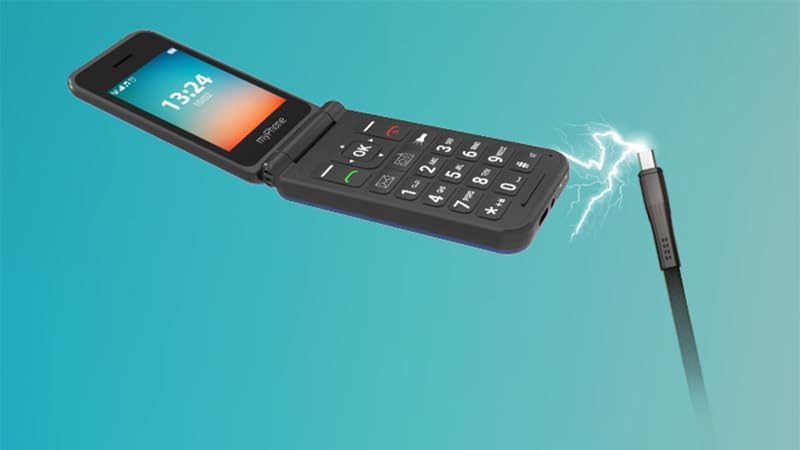
Image: An illustration depicting the myPhone Flip LTE being charged, with a USB-C cable connected to its port and a lightning bolt symbol indicating power transfer.
3. Operating Your myPhone Flip LTE
Funcții de bază
- Pornire/Oprire: Press and hold the red call end button to power the phone on or off.
- Efectuand apeluri: Introduceți numărul de telefon folosind tastatura și apăsați butonul verde de apelare.
- Primirea apelurilor: Press the green call button to answer an incoming call. You can also configure the phone to answer by opening the flip.
- Trimiterea mesajelor: Navigate to the 'Messages' menu, select 'New Message', enter your text, and choose a recipient.
- Keypad and Navigation: The large, well-spaced buttons are designed for easy dialing and text input. Use the directional pad (up, down, left, right) and the 'OK' button for menu navigation.

Imagine: O față directă view of the myPhone Flip LTE, open, clearly displaying its large screen with time and date, and the well-arranged, large-button keypad below.

Imagine: Un unghi view of the myPhone Flip LTE, open, with a focus on the large, clear keypad, highlighting its user-friendly design.
Caracteristici speciale
- Butonul SOS: Located on the back of the phone. Press and hold this button to activate the emergency function. The phone will trigger an alarm, send a text message, and call predefined emergency contacts. Ensure you set up your emergency contacts in the phone settings.
- Lanternă: The phone includes a built-in flashlight for convenience. Access it via a dedicated shortcut button on the keypad.
- Radio FM: Enjoy your favorite radio stations. Note that headphones (not included) may be required to act as an antenna for optimal reception.
- VoLTE (Voice over LTE): This technology provides superior call quality, ensuring clear and crisp conversations. The myPhone Flip LTE supports 4G LTE for reliable communication.

Image: A close-up of the SOS button on the back of the myPhone Flip LTE, illuminated with a red glow, indicating its activation or readiness for emergency use.

Image: The myPhone Flip LTE is shown alongside the text '4G LTE VoLTE', emphasizing its advanced connectivity features for high-quality calls.
4. Întreținere
Curatenie
To keep your phone in good condition, wipe it regularly with a soft, dry cloth. Avoid using harsh chemicals or abrasive materials, as these can damage the phone's surface.
Îngrijirea bateriei
The 1000 mAh battery provides up to 6 days of standby time. To maximize battery life:
- Evitați temperaturile extreme.
- Charge the phone regularly, but avoid overcharging or letting the battery completely drain too often.
- Use only the provided USB-C cable or a certified compatible charger.

Image: The myPhone Flip LTE is displayed next to the text '1000 mAh', highlighting its battery capacity.
Depozitare
When not in use for extended periods, store the phone in a cool, dry place away from direct sunlight and extreme temperatures. Ensure the battery has some charge before storing.
5. Depanare
Probleme comune și soluții
| Emisiune | Cauza posibila | Soluţie |
|---|---|---|
| Telefonul nu pornește | Baterie descărcată; Butonul de pornire nu a fost apăsat suficient de mult timp | Charge the phone for at least 30 minutes; Press and hold the power button for several seconds. |
| Calitate slabă a apelurilor | Weak signal; Network congestion | Move to an area with better network coverage; Try making the call again later. |
| Bateria nu menține încărcarea | Battery degradation; Improper charging | Ensure you are using the correct charger; Consider replacing the battery if it's old. |
| Cartela SIM nu a fost detectată | SIM card improperly inserted; Damaged SIM card | Reinsert the SIM card carefully, ensuring it is correctly seated; Try a different SIM card to rule out a faulty SIM. |
6. Specificatii tehnice
| Caracteristică | Caietul de sarcini |
|---|---|
| Marca | MP myPhone |
| Numele modelului | Flip LTE |
| Numărul de model | IN-FL-TLMYFLIPNB |
| Dimensiunea afișajului | 2.8 inchi |
| Tip de afișare | LCD |
| Rezoluţie | 240 x 320 pixeli |
| RAM Installed Size | 48 MB |
| Dimensiunea memoriei flash | 128 MB |
| Capacitatea bateriei | 1000 mAh (litiu-ion) |
| Durata medie a bateriei | Până la 6 de zile |
| Tehnologia celulară | 4G |
| Conectivitate | Bluetooth |
| Caracteristici speciale | Dual SIM, SOS Button, Flashlight |
| Sistem de operare | Alt sistem |
| Dimensiuni | 11.9 x 8.7 x 5.3 cm; 107 g (Packaging) |
7. Garanție și asistență
Informații despre garanție
Your myPhone Flip LTE comes with a standard manufacturer's warranty. Please refer to the warranty card included in your package for specific terms and conditions, including coverage period and what is covered. Keep your proof of purchase for warranty claims.
Asistență pentru clienți
If you encounter any issues not covered in this manual or require further assistance, please contact myPhone customer support. Contact details can typically be found on the manufacturer's official website-ul sau pe ambalajul produsului.
Ask a question about this manual
Ask about setup, troubleshooting, compatibility, parts, safety, or missing instructions. Manuals+ will review the question and use this page’s manual context to help answer it.