
1. Produs terminatview
The Weuaste YS-Carplay-04 is a motorcycle DVR system designed to enhance your riding experience with integrated smart features and recording capabilities. It features a 5.5-inch IPS touchscreen display, dual 1080p HD cameras for front and rear recording, and supports wireless Apple CarPlay and Android Auto. The system is built to withstand various weather conditions, offering IP66 waterproofing and operation in a wide temperature range.

Image: The Weuaste Motorcycle DVR screen showing both Wireless CarPlay and Wireless Android Auto interfaces, demonstrating its smart connectivity features.
Caracteristici cheie:
- Apple CarPlay și Android Auto fără fir: Integrare perfectă cu smartphone-ul pentru navigare, muzică, apeluri și mesagerie.
- Dual 1080p HD Cameras: Front and rear cameras provide high-definition video recording with loop recording functionality and full-color night vision.
- Ecran tactil IPS de 5.5 inci: Responsive and easy-to-use display, visible even in bright sunlight.
- Siri & Google Voice Control: Access voice assistants for hands-free operation.
- IP66 Waterproof & Durable Design: Engineered to withstand various weather conditions and temperatures from -4°F to 158°F.
- WiFi & Bluetooth Connectivity: For data transfer, phone pairing, and accessory connection.
- Suport card TF: Includes a 128GB TF card for ample storage of video recordings.
2. Conținutul pachetului
Înainte de instalare, vă rugăm să verificați dacă toate componentele enumerate mai jos sunt prezente în pachet.
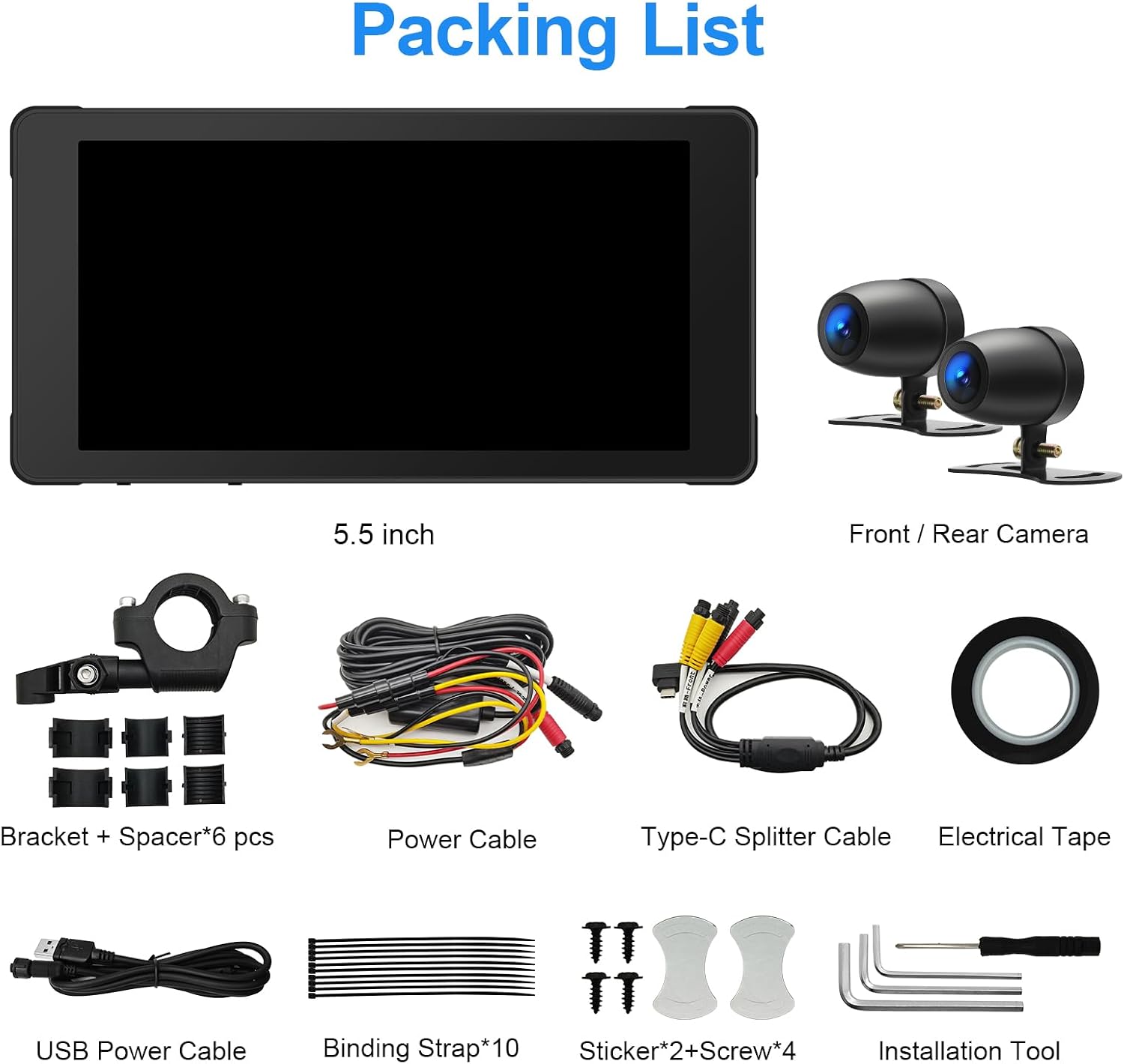
Image: A visual representation of the complete packing list, including the main unit, cameras, cables, and mounting hardware.
- 5.5-inch IPS Touchscreen Display Unit
- Front Camera (1080p)
- Rear Camera (1080p)
- Mounting Bracket + Spacers (6 pcs)
- Cablu de alimentare
- Type-C Splitter Cable
- Cablu de alimentare USB
- Binding Straps (10 pcs)
- Stickers + Screws (4 pcs)
- Installation Tools (Allen wrenches, etc.)
- Bandă electrică
- Card TF de 128 GB (preinstalat sau separat)
3. Configurare și instalare
Careful installation is crucial for optimal performance and safety. It is recommended to route wires neatly and securely.
3.1 Identificarea componentelor

Imagine: Detaliată view of the main display unit, highlighting the Microphone Receiving Hole, Type-C Power Plug, Light Sensor, and SD Card Slot Hole.
- Microphone Receiving Hole: Pentru intrare vocală.
- Type-C Power Plug: Main power input for the device.
- Senzor de lumină: Reglează automat luminozitatea ecranului.
- SD Card Slot Hole: Insert the TF card here for video storage.
3.2 Montarea unității de afișare
- Select a suitable location on your motorcycle handlebars for the display unit. Ensure it does not obstruct your view sau controale.
- Use the provided mounting bracket and spacers to securely attach the display unit. Adjust the angle for optimal visibility.
3.3 Installing the Cameras

Imagine: Prim-plan view of the two 1080P dual cameras, designed for front and rear installation on a motorcycle.
- Montați camera frontală într-o poziție care oferă o imagine clară și neobstrucționată view a drumului din fata.
- Mount the rear camera to capture the view behind your motorcycle. Consider locations that minimize vibration and offer protection from debris.
- Route the camera cables securely along the motorcycle frame, away from moving parts and heat sources. Use binding straps to keep cables tidy.
3.4 Conexiune la alimentare
- Connect the main power cable to your motorcycle's power source (e.g., battery or ignition-switched power). Ensure correct polarity.
- Connect the Type-C power plug from the display unit to the power cable.
- Use the USB power cable for initial setup or testing if a temporary power source is needed. This is not intended for permanent installation.
3.5 TF Card Insertion
- Locate the SD Card Slot Hole on the display unit.
- Insert the provided 128GB TF card into the slot until it clicks into place. Ensure it is inserted correctly to avoid damage.
4. Instrucțiuni de utilizare
4.1 Pornire/Oprire
- The device typically powers on automatically with the motorcycle's ignition.
- To manually power off, press and hold the power button (if available) or disconnect power.
4.2 Operarea ecranului tactil
The 5.5-inch IPS touchscreen is highly responsive and can be operated even with gloves. Navigate through menus and applications by tapping and swiping.
CarPlay wireless 4.3 și Android Auto
- Asigurați-vă că Bluetooth și Wi-Fi-ul smartphone-ului dvs. sunt activate.
- On the DVR, navigate to the CarPlay or Android Auto section.
- Follow the on-screen prompts to pair your phone via Bluetooth. Once paired, the system will establish a Wi-Fi connection for CarPlay/Android Auto functionality.
- Access navigation, music, calls, and other compatible apps directly from the DVR screen.
4.4 Comandă la volan

Image: The steering wheel control unit, showing buttons for Motorcycle Battery Voltage Display, Cycle Button / Answer the Phone, Camera Button / Hang up the Phone, and Main Interface Button.
The wired remote control provides convenient access to key functions without needing to touch the screen.
- Volumul bateriei pentru motocicletătage Afișaj: Shows current battery voltage.
- Cycle Button / Answer the Phone: Used to cycle through modes or answer incoming calls.
- Camera Button / Hang up the Phone: Activates camera functions or ends calls.
- Main Interface Button: Returns to the main menu or home screen.
4.5 Înregistrare video
The dual cameras continuously record footage. The system supports seamless loop recording, overwriting the oldest files when the TF card is full. Recorded videos are stored on the 128GB TF card.
4.6 Siri & Google Voice
When connected to Apple CarPlay or Android Auto, you can utilize Siri or Google Voice for hands-free commands. Activate the voice assistant through the touchscreen interface or your paired smartphone.
5. Întreținere
The Weuaste YS-Carplay-04 is designed for durability and minimal maintenance.
5.1 Rezistența la intemperii

Image: The DVR unit shown on a motorcycle in sunny, rainy, and cold conditions, illustrating its IP66 waterproof rating and ability to function between -4°F and 158°F.
- Dispozitivul are un Clasament de impermeabilitate IP66, protecting it from dust and powerful water jets.
- It is designed to operate reliably in temperatures ranging from -4°F până la 158°F (-20°C până la 70°C).
- Regularly wipe the screen and camera lenses with a soft, damp cloth to remove dirt and ensure clear visibility. Avoid abrasive cleaners.
5.2 TF Card Management
- Periodically check the TF card for important recordings.
- Format the TF card every few months to maintain optimal recording performance and prevent data corruption. Refer to the device settings for the formatting option.
6. Depanare
If you encounter issues with your Weuaste YS-Carplay-04 DVR, refer to the following common problems and solutions.
6.1 Dispozitivul nu pornește
- Verificați conexiunile de alimentare: Ensure all power cables are securely connected to the motorcycle's power source and the DVR unit. Verify correct polarity.
- Sursa de alimentare de testare: If possible, test the DVR with an alternative, known-good 12V power source (e.g., a different motorcycle or a bench power supply) to rule out issues with your motorcycle's wiring harness.
- Inspect Wiring Harness: Look for any visible damage, cuts, or loose connections in the supplied wiring harness.
6.2 Screen Freezes or Becomes Unresponsive
- Reporniți dispozitivul: Disconnect and reconnect the power to perform a hard reset.
- Verificați cardul TF: A faulty or full TF card can sometimes cause system instability. Try removing the TF card or replacing it with another one.
- Actualizare software: Verifică-l pe cel al producătorului website for any available firmware updates that might resolve software-related issues.
6.3 Cameras Not Recording or Poor Quality
- Verificați conexiunile camerei: Ensure both front and rear camera cables are securely plugged into the main unit.
- Curățați lentilele: Wipe camera lenses with a soft cloth to remove dirt, dust, or water spots.
- TF Card Issues: Ensure the TF card is properly inserted, not full, and formatted correctly. A slow or corrupted TF card can affect recording quality.
6.4 Probleme de conectare CarPlay/Android Auto
- Bluetooth și Wi-Fi: Confirm that Bluetooth and Wi-Fi are active on both your smartphone and the DVR.
- Uitați de dispozitiv: On your smartphone, forget the DVR from your Bluetooth settings and attempt to re-pair.
- Update Phone OS: Asigurați-vă că sistemul de operare al smartphone-ului dvs. este actualizat.
7. Specificații
| Numărul de model | YS-Carplay-04 |
| Marca | Weuaste |
| Dimensiunea afișajului | Ecran tactil IPS de 5.5 inci |
| Rezoluție de înregistrare video | 1080p (Dual Cameras) |
| Conectivitate | Bluetooth, USB, Wi-Fi |
| Caracteristici speciale | Apple CarPlay, Android Auto, Siri & Google Voice, Waterproof (IP66), Touchscreen |
| Tip de memorie | Card TF |
| Card de memorie inclus | 128 GB |
| Temperatura de operare | -4°F până la 158°F (-20°C până la 70°C) |
| Metoda de control | Touch, Wired Remote Control |
| Tip de vehicul compatibil | Motocicletă |
| UPC | 658362216227 |
8. Garanție și asistență
Warranty information for the Weuaste YS-Carplay-04 Motorcycle DVR is not provided within this manual. For details regarding warranty coverage, technical support, or service, please refer to the manufacturer's official website-ul web sau contactați direct serviciul lor de asistență pentru clienți. Păstrați bonul fiscal ca dovadă a achiziției.